https://github.com/lumakernel/frourio-sample-1
Hints for deploying frourio app to production.
https://github.com/lumakernel/frourio-sample-1
frourio github-page netlify sample typescript vercel
Last synced: about 2 months ago
JSON representation
Hints for deploying frourio app to production.
- Host: GitHub
- URL: https://github.com/lumakernel/frourio-sample-1
- Owner: LumaKernel
- Created: 2021-01-06T09:34:52.000Z (over 5 years ago)
- Default Branch: master
- Last Pushed: 2021-01-16T02:45:34.000Z (over 5 years ago)
- Last Synced: 2025-03-15T07:03:17.021Z (over 1 year ago)
- Topics: frourio, github-page, netlify, sample, typescript, vercel
- Language: TypeScript
- Homepage: https://frourio-sample-1.lumakernel.vercel.app
- Size: 650 KB
- Stars: 0
- Watchers: 1
- Forks: 1
- Open Issues: 1
-
Metadata Files:
- Readme: README.md
Awesome Lists containing this project
README
# Badges
- Test:
- Official: [](https://github.com/LumaKernel/frourio-sample-1/actions?query=workflow%3A%22Test%22)
- shields.io: [](https://github.com/LumaKernel/frourio-sample-1/actions?query=workflow%3A%22Test%22)
- Deploy Client to GitHub Pages:
- Official: [](https://github.com/LumaKernel/frourio-sample-1/actions?query=workflow%3A%22Deploy+client%22)
- shields.io: [](https://github.com/LumaKernel/frourio-sample-1/actions?query=workflow%3A%22Deploy+client%22)
- Deploy Client to GCP Storage:
- Official: [](https://github.com/LumaKernel/frourio-sample-1/actions?query=workflow%3A%22Deploy+client+to+GCP+Storage%22)
- shields.io: [](https://github.com/LumaKernel/frourio-sample-1/actions?query=workflow%3A%22Deploy+client+to+GCP+Storage%22)
- Deploy API server with pm2 deploy:
- Official: [](https://github.com/LumaKernel/frourio-sample-1/actions?query=workflow%3A%22Deploy+server%22)
- shields.io: [](https://github.com/LumaKernel/frourio-sample-1/actions?query=workflow%3A%22Deploy+server%22)
- Netlify:
- Official: [](https://app.netlify.com/sites/fervent-carson-ea5bcd/deploys)
- shields.io: [](https://app.netlify.com/sites/fervent-carson-ea5bcd/deploys)
- Vercel ( GitHub Deployments by shields.io )
- Production: [](https://github.com/LumaKernel/frourio-sample-1/deployments/activity_log?environment=Production)
- Preview: [](https://github.com/LumaKernel/frourio-sample-1/deployments/activity_log?environment=Preview)
- Production backing lambda: [](https://github.com/LumaKernel/frourio-sample-1/deployments/activity_log?environment=Production+%E2%80%93+frourio-sample-1-lambda)
# Deployments
## Client
- GitHub Pages: https://lumakernel.github.io/frourio-sample-1
- Vercel: https://frourio-sample-1.vercel.app/
- Netlify: https://fervent-carson-ea5bcd.netlify.app/
- GCP Cloud Storage + LB + Cloud CDN: https://www.frourio-sample-1.luma.place/
- Use Lambda version for backend
- Vercel: https://frourio-sample-1-lambda.vercel.app/
## Server
- GCP VM and load balancer: https://api.frourio-sample-1.luma.place/
- AWS Lambda (serverless): https://8d9g90gifk.execute-api.ap-northeast-1.amazonaws.com/
# My personal goals
- [x] Deploy server to GCE + GCP LB
- [x] Use pm2 graceful start
- [x] Deploy client to Cloud CDN + GCS
- [x] Use fluent-logger
- [ ] ~Deploy server to GAE~
- Some problems:
- Read-only. I can't use sqlite and write images.
- Fully controlled by App Engine. We should use single package.json or take workspace (by yarn workspace, lerna, or npm v7 or above workspace) strategy.
- We can use `preinstall` script for this purpose, but it does not look smart.
# Deploy to GCE as an exmpale using pm2 deploy
I'm using the setup script like this with Ubuntu20.04
```
#!/bin/bash
sudo apt update
curl -sL https://deb.nodesource.com/setup_14.x | sudo -E bash -
sudo apt update
sudo apt install -y git nodejs
sudo mkdir -p /opt/apiserver
sudo mkdir -p /srv/apiserver
USER="ci"
sudo chown "$USER:$USER" /opt/apiserver
sudo chown "$USER:$USER" /srv/apiserver
```
And setting GitHub Actions secrets like this.
```
API_DEPLOY_HOST= host ip got from GCP console
API_DEPLOY_KNOWN_HOSTS= run `ssh-keyscan -H $host` for above host
API_DEPLOY_SSH_KEY= ssh private key that can access to above host registered by GCE metadata
API_DEPLOY_USER=ci
API_DATABASE_URL=file:/srv/apiserver/prod.db
API_JWT_SECRET=supersecret
API_BASE_PATH=/api
API_ORIGIN=https://api.frourio-sample-1.luma.place
API_USER_ID=myuser
API_USER_PASS=mypass
API_SERVER_PORT=8080
API_USER_STATIC_DIR=/srv/apiserver/static
AWS_REGION=ap-northeast-1
AWS_LAMBDA_FUNCTION_NAME_SERVER=your lambda name 1
AWS_LAMBDA_FUNCTION_NAME_MIGRATION=your lambda name 2
AWS_ACCESS_KEY_ID= your akid
AWS_SECRET_ACCESS_KEY= your secret
GCP_BUCKET_BASE_PATH=
```
# Diff
- `goal-1`: https://github.com/LumaKernel/frourio-sample-1/compare/0ec04c4de73cf5a9e040e6eae87a513592a8301d..goal-1
# Information
This is a [Next.js](https://nextjs.org/) project bootstrapped with [`create-next-app`](https://github.com/vercel/next.js/tree/canary/packages/create-next-app).
## Getting Started
First, run the development server:
```bash
npm run dev
# or
yarn dev
```
Open [http://localhost:3001](http://localhost:3001) with your browser to see the result.
You can start editing the page by modifying `pages/index.js`. The page auto-updates as you edit the file.
## Learn More
To learn more about Next.js, take a look at the following resources:
- [Next.js Documentation](https://nextjs.org/docs) - learn about Next.js features and API.
- [Learn Next.js](https://nextjs.org/learn) - an interactive Next.js tutorial.
You can check out [the Next.js GitHub repository](https://github.com/vercel/next.js/) - your feedback and contributions are welcome!
## Deploy on Vercel
The easiest way to deploy your Next.js app is to use the [Vercel Platform](https://vercel.com/import?utm_medium=default-template&filter=next.js&utm_source=create-next-app&utm_campaign=create-next-app-readme) from the creators of Next.js.
Check out our [Next.js deployment documentation](https://nextjs.org/docs/deployment) for more details.
## Deploy server on Lambda
This is example for constructing infrastructures.
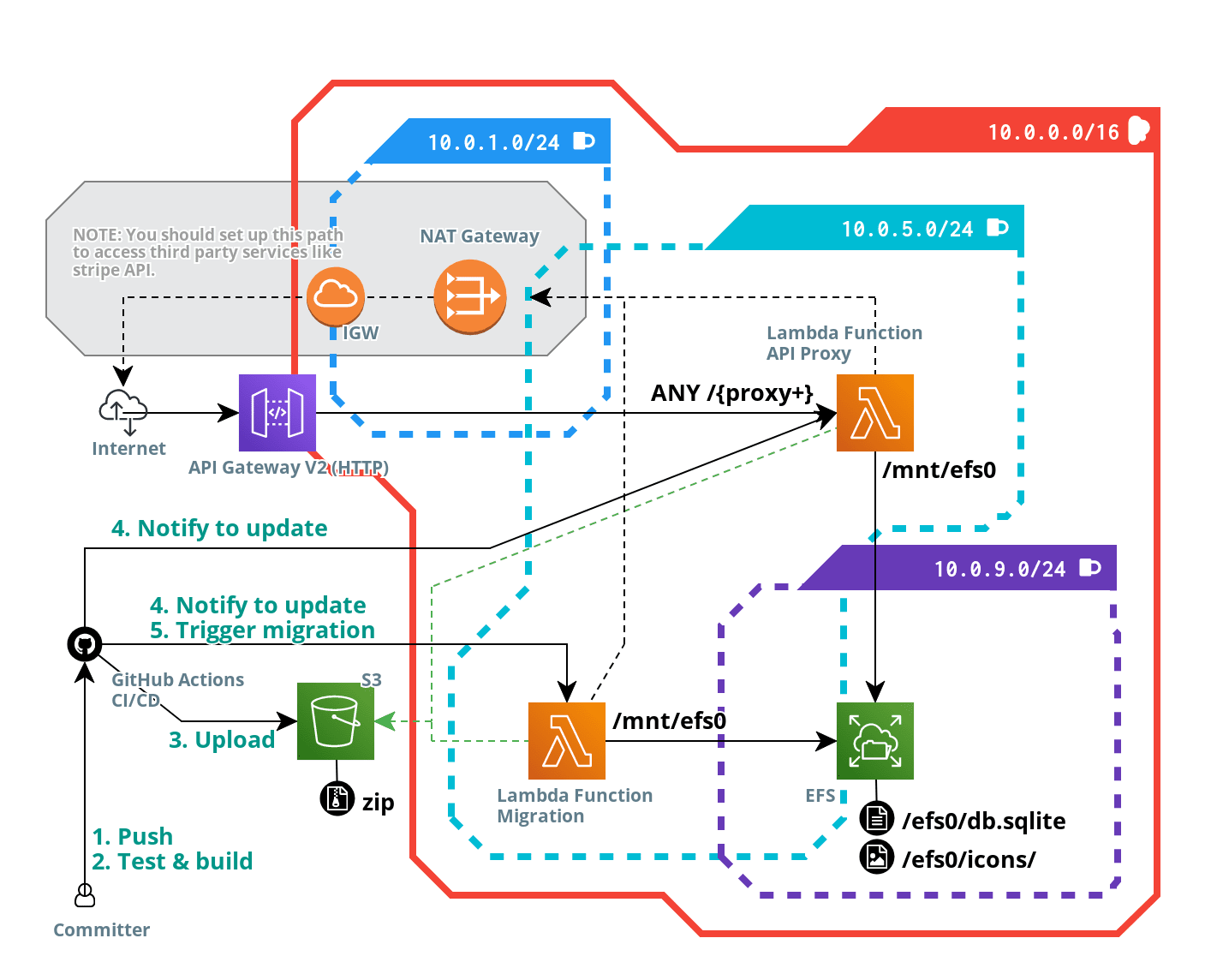
(Created by [Cloudcraft](https://www.cloudcraft.co/))
# My personal notes about this, motsly about GCP (Japanese)
I'm using this repo for my GCP playground.
- https://scrapbox.io/lookmark/B:_Installing_the_Cloud_Logging_agent_on_a_single_VM_%C2%A0%7C%C2%A0_Google_Cloud
- https://scrapbox.io/lookmark/B:_Google_Cloud_for_AWS_Professionals
- https://scrapbox.io/lookmark/B:_Using_Google-managed_SSL_certificates_%C2%A0%7C%C2%A0_Load_Balancing_%C2%A0%7C%C2%A0_Google_Cloud
- https://scrapbox.io/lookmark/B:_How_To_Host_a_Next.js_Static_Website_With_GCP_Cloud_Storage_%7C_by_Bhargav_Bachina_%7C_Bachina_Labs_%7C_Medium