https://github.com/luochang212/dive-into-langgraph
LangGraph 1.0 Tutorial
https://github.com/luochang212/dive-into-langgraph
agent e-book guide handbook langchain langgraph
Last synced: 3 months ago
JSON representation
LangGraph 1.0 Tutorial
- Host: GitHub
- URL: https://github.com/luochang212/dive-into-langgraph
- Owner: luochang212
- License: other
- Created: 2025-11-02T12:55:20.000Z (8 months ago)
- Default Branch: main
- Last Pushed: 2026-03-01T18:28:31.000Z (4 months ago)
- Last Synced: 2026-03-01T19:36:27.937Z (4 months ago)
- Topics: agent, e-book, guide, handbook, langchain, langgraph
- Language: Jupyter Notebook
- Homepage: http://www.luochang.ink/dive-into-langgraph/
- Size: 15.7 MB
- Stars: 322
- Watchers: 1
- Forks: 40
- Open Issues: 1
-
Metadata Files:
- Readme: README.md
- License: LICENSE
Awesome Lists containing this project
README

Dive into LangGraph





中文 | [English](./docs/README-en.md)
---
## 📢 News
### ✨ 2026-03-02 更新
本教程已转为 Agent Skill。现在无需使用人脑学习本教程,只需要为你的 [Claude Code](https://github.com/anthropics/claude-code) 安装本 Skill,即可写出高质量的 LangChain 和 LangGraph 代码。详见:[SKILL.md](skills/dive-into-langgraph/SKILL.md)
使用 npx 安装本 Skill ([dive-into-langgraph](https://skills.sh/luochang212/dive-into-langgraph/dive-into-langgraph)):
```
npx skills add luochang212/dive-into-langgraph
```
## 一、项目介绍
> 2025 年 10 月中旬,LangGraph 发布 1.0 版本。开发团队承诺这是一个稳定版本,预计未来接口不会大改,因此现在正是学习它的好时机。
这是一个开源电子书项目,旨在帮助 Agent 开发者快速掌握 LangGraph 框架。[LangGraph](https://github.com/langchain-ai/langgraph) 是由 LangChain 团队开发的开源智能体框架。它功能强大,你要的记忆、MCP、护栏、状态管理、多智能体它全都有。LangGraph 通常与 [LangChain](https://github.com/langchain-ai/langchain) 一起使用:LangChain 提供基础组件和工具,LangGraph 负责工作流和状态管理。因此,两个库都需要学习。为了让大家快速入门,本教程将两个库的主要功能提取出来,分成 14 个章节进行介绍。
## 二、安装依赖
```bash
pip install -r requirements.txt
```
依赖包列表
以下为 `requirements.txt` 中的依赖包清单:
```text
pydantic
python-dotenv
langchain[openai]
langchain-community
langchain-mcp-adapters
langchain-text-splitters
langgraph
langgraph-cli[inmem]
langgraph-supervisor
langgraph-checkpoint-sqlite
langgraph-checkpoint-redis
langmem
ipynbname
fastmcp
bs4
scikit-learn
supervisor
jieba
dashscope
tavily-python
ddgs
```
## 三、章节目录
本教程的内容速览:
| 序号 | 章节 | 主要内容 |
| -- | -- | -- |
| 1 | [快速入门](./1.quickstart.ipynb) | 创建你的第一个 ReAct Agent |
| 2 | [状态图](./2.stategraph.ipynb) | 使用 StateGraph 创建工作流 |
| 3 | [中间件](./3.middleware.ipynb) | 使用自定义中间件实现四个功能:预算控制、消息截断、敏感词过滤、PII 检测 |
| 4 | [人机交互](./4.human_in_the_loop.ipynb) | 使用内置的 HITL 中间件实现人机交互 |
| 5 | [记忆](./5.memory.ipynb) | 创建短期记忆、长期记忆 |
| 6 | [上下文工程](./6.context.ipynb) | 使用 State、Store、Runtime 管理上下文 |
| 7 | [MCP Server](./7.mcp_server.ipynb) | 创建 MCP Server 并接入 LangGraph |
| 8 | [监督者模式](./8.supervisor.ipynb) | 两种方法实现监督者模式:tool-calling、langgraph-supervisor |
| 9 | [并行](./9.parallelization.ipynb) | 如何实现并发:节点并发、`@task` 装饰器、Map-reduce、Sub-graphs |
| 10 | [RAG](./10.rag.ipynb) | 三种方式实现 RAG:向量检索、关键词检索、混合检索 |
| 11 | [网络搜索](./11.web_search.ipynb) | 实现联网搜索:DashScope、Tavily 和 DDGS |
| 12 | [Deep Agents](./12.deep_agents.ipynb) | 简单介绍 Deep Agents |
| 13 | [Gradio APP](./13.gradio_app.ipynb) | 基于 Gradio 开发流式对话智能体应用 |
| 14 | [附录:调试页面](./14.langgraph_cli.ipynb) | 介绍 langgraph-cli 提供的调试页面 |
> \[!NOTE\]
>
> **承诺**:本教程完全基于 LangGraph v1.0 编写,不含任何 v0.6 的历史残留。
## 四、调试页面
`langgraph-cli` 提供了一个可快速启动的调试页面。
```bash
langgraph dev
```
详见:[附录](https://luochang212.github.io/dive-into-langgraph/langgraph-cli/)
## 五、实战章节
[第 13 章](https://luochang212.github.io/dive-into-langgraph/gradio-app/) 开源了一个基于 Gradio + LangChain 实现的智能体应用,效果如下。你可以为这个应用添加更多功能,定制专属于你的智能体。

详见:[/app](./app/)
## 六、延伸阅读
**官方文档:**
- [LangChain](https://docs.langchain.com/oss/python/langchain/overview)
- [LangGraph](https://docs.langchain.com/oss/python/langgraph/overview)
- [Deep Agents](https://docs.langchain.com/oss/python/deepagents/overview)
- [LangMem](https://langchain-ai.github.io/langmem/)
**官方教程:**
- [langgraph-101](https://github.com/langchain-ai/langgraph-101)
- [langchain-academy](https://github.com/langchain-ai/langchain-academy)
## 七、如何贡献
我们欢迎任何形式的贡献!
- 🐛 报告 Bug - 发现问题请提交 Issue
- 💡 功能建议 - 有好想法就告诉我们
- 📝 内容完善 - 帮助改进教程内容
- 🔧 代码优化 - 提交 Pull Request
## 八、Star History
[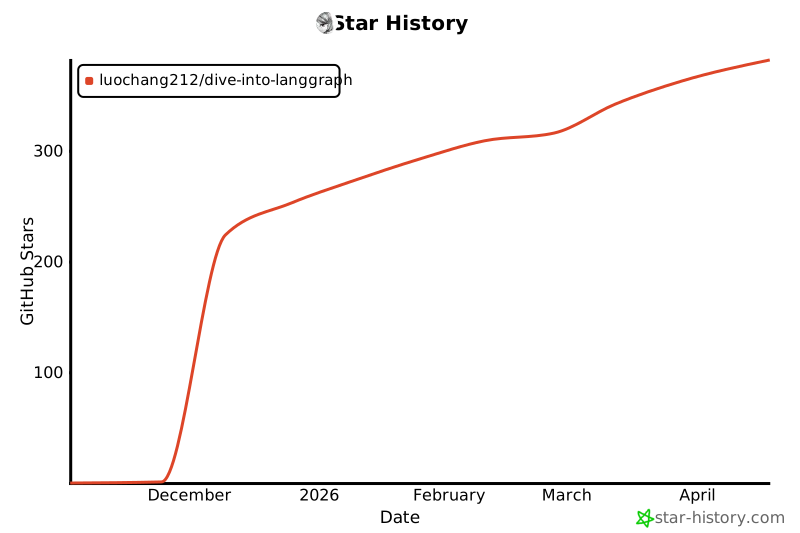](https://www.star-history.com/#luochang212/dive-into-langgraph&type=date&legend=top-left)
## 九、开源协议
本作品采用 [知识共享署名-非商业性使用-相同方式共享 4.0 国际许可协议](http://creativecommons.org/licenses/by-nc-sa/4.0/) 进行许可。