https://github.com/lupyuen/nuttx-star64
Apache NuttX RTOS for Pine64 Star64 64-bit RISC-V SBC (StarFive JH7110)
https://github.com/lupyuen/nuttx-star64
jh7110 nuttx riscv riscv64 star64
Last synced: 4 days ago
JSON representation
Apache NuttX RTOS for Pine64 Star64 64-bit RISC-V SBC (StarFive JH7110)
- Host: GitHub
- URL: https://github.com/lupyuen/nuttx-star64
- Owner: lupyuen
- License: apache-2.0
- Created: 2023-06-26T07:33:05.000Z (almost 3 years ago)
- Default Branch: main
- Last Pushed: 2026-04-05T00:26:57.000Z (about 2 months ago)
- Last Synced: 2026-04-05T02:26:58.974Z (about 2 months ago)
- Topics: jh7110, nuttx, riscv, riscv64, star64
- Language: C
- Homepage: https://lupyuen.org/articles/release
- Size: 2.38 MB
- Stars: 32
- Watchers: 1
- Forks: 2
- Open Issues: 1
-
Metadata Files:
- Readme: README.md
- Funding: .github/FUNDING.yml
- License: LICENSE
Awesome Lists containing this project
README
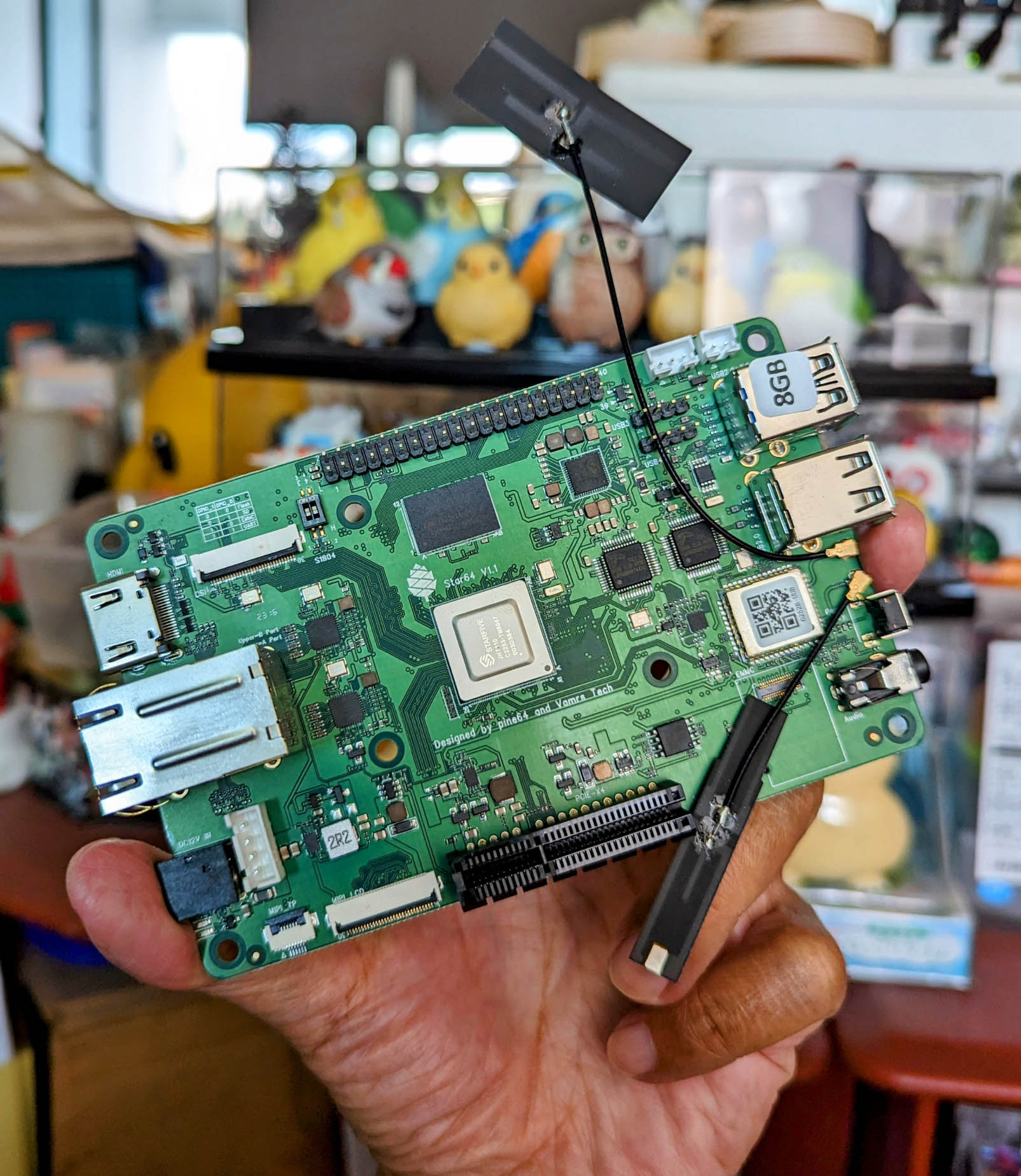
# Apache NuttX RTOS for Pine64 Star64 64-bit RISC-V SBC (StarFive JH7110)
[](https://github.com/lupyuen/nuttx-star64/actions/workflows/star64.yml)
Read the articles...
- ["Star64 JH7110 RISC-V SBC: Experiments with OpenSBI (Supervisor Binary Interface)"](https://lupyuen.github.io/articles/sbi)
- ["RISC-V Star64 JH7110: Power Up the Display Controller with U-Boot Bootloader"](https://lupyuen.github.io/articles/display3)
- ["RISC-V Star64 JH7110: Inside the Display Controller"](https://lupyuen.github.io/articles/display2)
- ["RTOS on a RISC-V SBC: Star64 JH7110 + Apache NuttX"](https://www.hackster.io/lupyuen/rtos-on-a-risc-v-sbc-star64-jh7110-apache-nuttx-2a7429)
- ["Star64 JH7110 + NuttX RTOS: Creating the First Release for the RISC-V SBC"](https://lupyuen.github.io/articles/release)
- ["Star64 JH7110 + NuttX RTOS: RISC-V PLIC Interrupts and Serial I/O"](https://lupyuen.github.io/articles/plic)
- ["Star64 JH7110 + NuttX RTOS: RISC-V Semihosting and Initial RAM Disk"](https://lupyuen.github.io/articles/semihost)
- ["Star64 JH7110 + NuttX RTOS: RISC-V Privilege Levels and UART Registers"](https://lupyuen.github.io/articles/privilege)
- ["Apache NuttX RTOS on RISC-V: Star64 JH7110 SBC"](https://lupyuen.github.io/articles/nuttx2)
- ["Star64 JH7110 RISC-V SBC: Boot from Network with U-Boot and TFTP"](https://lupyuen.github.io/articles/tftp)
- ["Strange Workaround for TFTP Timeout in U-Boot Bootloader (Star64 JH7110 RISC-V SBC)"](https://lupyuen.github.io/articles/tftp2)
Earlier articles...
- ["Booting RISC-V Linux on Star64 JH7110 SBC"](https://lupyuen.github.io/articles/linux)
- ["Inspecting the RISC-V Linux Images for Star64 JH7110 SBC"](https://lupyuen.github.io/articles/star64)
- ["64-bit RISC-V with Apache NuttX Real-Time Operating System"](https://lupyuen.github.io/articles/riscv)
- ["Rolling to RISC-V"](https://lupyuen.github.io/articles/pinephone2#rolling-to-risc-v)
Many thanks to CNXSoft for the coverage...
- ["Star64 RISC-V SBC can now boot Apache NuttX real-time operating system"](https://www.cnx-software.com/2023/08/17/star64-risc-v-sbc-apache-nuttx-real-time-operating-system/)
Let's port Apache NuttX RTOS to [Pine64 Star64](https://wiki.pine64.org/wiki/STAR64) 64-bit RISC-V SBC!
(Based on [StarFive JH7110 SoC](https://doc-en.rvspace.org/Doc_Center/jh7110.html))
[(NuttX now officially supports Star64 JH7110)](https://nuttx.apache.org/docs/latest/platforms/risc-v/jh7110/boards/star64/index.html)
[(NuttX works OK on StarFive VisionFive 2 SBC too)](https://lupyuen.github.io/articles/release#whats-next)
Hopefully NuttX will run on Pine64 PineTab-V, which is also based on StarFive JH7110 SoC.
# NuttX Automated Daily Build for Star64
NuttX for Star64 is now built automatically every day via GitHub Actions.
The Daily Releases are available here...
- [nuttx-star64/releases](https://github.com/lupyuen/nuttx-star64/releases)
[nuttx.hash](https://github.com/lupyuen/nuttx-star64/releases/download/nuttx-star64-2023-08-11/nuttx.hash) contains the Commit Hash of the NuttX Kernel and NuttX Apps repos...
```text
NuttX Source: https://github.com/apache/nuttx/tree/fa676f264fa16253213ff665052ba4691e56bf05
NuttX Apps: https://github.com/apache/nuttx-apps/tree/6196e03337a3c677aba0c74e815af16e7075bc71
```
The GitHub Actions Workflow is here...
- [star64.yml](https://github.com/lupyuen/nuttx-star64/blob/main/.github/workflows/star64.yml)
Maybe someday we'll do Daily Automated Testing...
1. Download the Daily Build to TFTP Server
1. Power on Star64 with an [IKEA Smart Power Plug via Home Assistant](https://lupyuen.github.io/articles/tftp#whats-next)
1. Star64 boots the Daily Build over TFTP
1. Capture the Automated Testing Log and write to the Release Notes
[(Similar to BL602)](https://lupyuen.github.io/articles/auto)
# Linux Images for Star64
Read the article...
- ["Inspecting the RISC-V Linux Images for Star64 JH7110 SBC"](https://lupyuen.github.io/articles/star64)
Let's examine the Linux Images for Star64 SBC, to see how U-Boot Bootloader is configured. (We'll boot NuttX later with U-Boot)
According to [Software Releases for Star64](https://wiki.pine64.org/wiki/STAR64#Software_releases), we have...
- [Yocto Images](https://github.com/Fishwaldo/meta-pine64) at [pine64.my-ho.st](https://pine64.my-ho.st:8443/)
Let's inspect [star64-image-minimal](https://pine64.my-ho.st:8443/star64-image-minimal-star64-1.2.wic.bz2)
- [Armbian Images](https://www.armbian.com/star64/)
Let's inspect [Armbian 23.8 Lunar (Minimal)](https://github.com/armbianro/os/releases/download/23.8.0-trunk.56/Armbian_23.8.0-trunk.56_Star64_lunar_edge_5.15.0_minimal.img.xz)
Current state of RISC-V Linux: [Linux on RISC-V (2022)](https://docs.google.com/presentation/d/1A0A6DnGyXR_MPpeg7QunQbv_yePPqid_uRswQe8Sj8M/edit#slide=id.p)
# Armbian Image for Star64
Read the article...
- ["Inspecting the RISC-V Linux Images for Star64 JH7110 SBC"](https://lupyuen.github.io/articles/star64)
Let's inspect the Armbian Image for Star64: [Armbian 23.8 Lunar (Minimal)](https://github.com/armbianro/os/releases/download/23.8.0-trunk.56/Armbian_23.8.0-trunk.56_Star64_lunar_edge_5.15.0_minimal.img.xz)
Uncompress the .xz, mount the .img file on Linux / macOS / Windows as an ISO Volume.
The image contains 1 used partition: `armbi_root` (612 MB) that contains the Linux Root Filesystem.
Plus one unused partition (4 MB) at the top. (Partition Table)
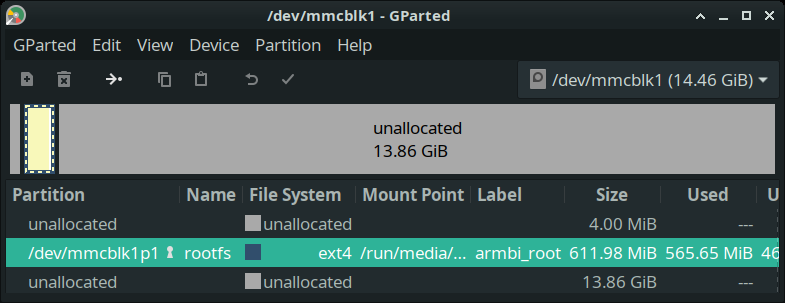
We see the U-Boot Bootloader Configuration at `armbi_root/boot/extlinux/extlinux.conf`...
```text
label Armbian
kernel /boot/Image
initrd /boot/uInitrd
fdt /boot/dtb/starfive/jh7110-star64-pine64.dtb
append root=UUID=99f62df4-be35-475c-99ef-2ba3f74fe6b5 console=ttyS0,115200n8 console=tty0 earlycon=sbi rootflags=data=writeback stmmaceth=chain_mode:1 rw rw no_console_suspend consoleblank=0 fsck.fix=yes fsck.repair=yes net.ifnames=0 splash plymouth.ignore-serial-consoles
```
This says that U-Boot will load the Linux Kernel from `armbi_root/boot/Image`
Which is sym-linked to `armbi_root/boot/vmlinuz-5.15.0-starfive2`
_Where in RAM will the Kernel Image be loaded?_
According to [__kernel_addr_r__](https://u-boot.readthedocs.io/en/latest/develop/bootstd.html#environment-variables) from the [__Default U-Boot Settings__](https://github.com/lupyuen/nuttx-star64#u-boot-settings-for-star64), the Linux Kernel will be loaded at RAM Address __`0x4020` `0000`__...
```text
kernel_addr_r=0x40200000
```
[(Source)](https://github.com/lupyuen/nuttx-star64#u-boot-settings-for-star64)
_Everything looks hunky dory?_
Nope the [__Flattened Device Tree (FDT)__](https://u-boot.readthedocs.io/en/latest/develop/devicetree/index.html) is missing!
But the Flattened Device Tree (FDT) is missing! `/boot/dtb/starfive/jh7110-star64-pine64.dtb`
```text
fdt /boot/dtb/starfive/jh7110-star64-pine64.dtb
```
Which means that Armbian will [__fail to boot__](https://github.com/lupyuen/nuttx-star64#boot-armbian-on-star64) on Star64!
```text
Retrieving file: /boot/uInitrd
10911538 bytes read in 466 ms (22.3 MiB/s)
Retrieving file: /boot/Image
22040576 bytes read in 936 ms (22.5 MiB/s)
Retrieving file: /boot/dtb/starfive/jh7110-star64-pine64.dtb
Failed to load '/boot/dtb/starfive/jh7110-star64-pine64.dtb'
```
[(Source)](https://github.com/lupyuen/nuttx-star64#boot-armbian-on-star64)
The missing Device Tree is noted in this [__Pine64 Forum Post__](https://forum.pine64.org/showthread.php?tid=18276&pid=117607#pid117607). So we might need to check back later for the Official Armbian Image, if it's fixed.
[(__balbes150__ suggests that we try this Armbian Image instead)](https://forum.pine64.org/showthread.php?tid=18420&pid=118331#pid118331)
For Reference: Here's the list of __Supported Device Trees__...
```text
→ ls /Volumes/armbi_root/boot/dtb-5.15.0-starfive2/starfive
evb-overlay jh7110-evb-usbdevice.dtb
jh7110-evb-can-pdm-pwmdac.dtb jh7110-evb.dtb
jh7110-evb-dvp-rgb2hdmi.dtb jh7110-fpga.dtb
jh7110-evb-i2s-ac108.dtb jh7110-visionfive-v2-A10.dtb
jh7110-evb-pcie-i2s-sd.dtb jh7110-visionfive-v2-A11.dtb
jh7110-evb-spi-uart2.dtb jh7110-visionfive-v2-ac108.dtb
jh7110-evb-uart1-rgb2hdmi.dtb jh7110-visionfive-v2-wm8960.dtb
jh7110-evb-uart4-emmc-spdif.dtb jh7110-visionfive-v2.dtb
jh7110-evb-uart5-pwm-i2c-tdm.dtb vf2-overlay
```
And here are the other files in __/boot__...
```text
→ ls -l /Volumes/armbi_root/boot
total 94416
lrwxrwxrwx 24 Image -> vmlinuz-5.15.0-starfive2
-rw-r--r-- 4276712 System.map-5.15.0-starfive2
-rw-r--r-- 1536 armbian_first_run.txt.template
-rw-r--r-- 38518 boot.bmp
-rw-r--r-- 144938 config-5.15.0-starfive2
lrwxrwxrwx 20 dtb -> dtb-5.15.0-starfive2
drwxr-xr-x 0 dtb-5.15.0-starfive2
drwxrwxr-x 0 extlinux
lrwxrwxrwx 27 initrd.img -> initrd.img-5.15.0-starfive2
-rw-r--r-- 10911474 initrd.img-5.15.0-starfive2
lrwxrwxrwx 27 initrd.img.old -> initrd.img-5.15.0-starfive2
-rw-rw-r-- 341 uEnv.txt
lrwxrwxrwx 24 uInitrd -> uInitrd-5.15.0-starfive2
-rw-r--r-- 10911538 uInitrd-5.15.0-starfive2
lrwxrwxrwx 24 vmlinuz -> vmlinuz-5.15.0-starfive2
-rw-r--r-- 22040576 vmlinuz-5.15.0-starfive2
lrwxrwxrwx 24 vmlinuz.old -> vmlinuz-5.15.0-starfive2
```
TODO: Explain `boot/uInitrd` RAM Disk
# Yocto Image for Star64
Read the article...
- ["Inspecting the RISC-V Linux Images for Star64 JH7110 SBC"](https://lupyuen.github.io/articles/star64)
Let's inspect the Yocto Image for Star64: [star64-image-minimal](https://pine64.my-ho.st:8443/star64-image-minimal-star64-1.2.wic.bz2)
Uncompress the .bz2, rename as .img. Balena Etcher won't work with .bz2 files!
Write the .img to a microSD Card with Balena Etcher. Insert the microSD Card into a Linux Machine. (Like Pinebook Pro)
We see 4 used partitions...
- spl (2 MB): [Secondary Program Loader](https://u-boot.readthedocs.io/en/latest/board/starfive/visionfive2.html#flashing)
- uboot (4 MB): [U-Boot Bootloader](https://u-boot.readthedocs.io/en/latest/board/starfive/visionfive2.html#flashing)
- boot (380 MB): U-Boot Configuration and Linux Kernel Image
- root (686 MB): Linux Root Filesystem
Plus one unused partition (2 MB) at the top. (Partition Table)
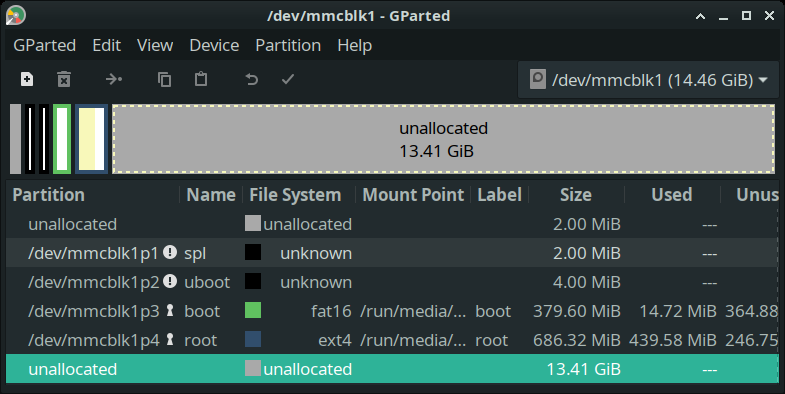
`boot` partition has 2 files...
```text
$ ls -l /run/media/$USER/boot
total 14808
-rw-r--r-- 1 15151064 Apr 6 2011 fitImage
-rw-r--r-- 1 1562 Apr 6 2011 vf2_uEnv.txt
```
`boot/vf2_uEnv.txt` contains the U-Boot Bootloader Configuration...
```text
# This is the sample jh7110_uEnv.txt file for starfive visionfive U-boot
# The current convention (SUBJECT TO CHANGE) is that this file
# will be loaded from the third partition on the
# MMC card.
#devnum=1
partnum=3
# The FIT file to boot from
fitfile=fitImage
# for debugging boot
bootargs_ext=if test ${devnum} = 0; then setenv bootargs "earlyprintk console=tty1 console=ttyS0,115200 rootwait earlycon=sbi root=/dev/mmcblk0p4"; else setenv bootargs "earlyprintk console=tty1 console=ttyS0,115200 rootwait earlycon=sbi root=/dev/mmcblk1p4"; fi;
#bootargs=earlyprintk console=ttyS0,115200 debug rootwait earlycon=sbi root=/dev/mmcblk1p4
# for addr info
fileaddr=0xa0000000
fdtaddr=0x46000000
# boot Linux flat or compressed 'Image' stored at 'kernel_addr_r'
kernel_addr_r=0x40200000
irdaddr=46100000
irdsize=5f00000
# Use the FDT in the FIT image..
setupfdt1=fdt addr ${fdtaddr}; fdt resize;
setupird=setexpr irdend ${irdaddr} + ${irdsize}; fdt set /chosen linux,initrd-start <0x0 0x${irdaddr}>; fdt set /chosen linux,initrd-end <0x0 0x${irdend}>
setupfdt2=fdt set /chosen bootargs "${bootargs}";
bootwait=setenv _delay ${bootdelay}; echo ${_delay}; while test ${_delay} > 0; do sleep 1; setexpr _delay ${_delay} - 1; echo ${_delay}; done
boot2=run bootargs_ext; mmc dev ${devnum}; fatload mmc ${devnum}:${partnum} ${fileaddr} ${fitfile}; bootm start ${fileaddr}; run setupfdt1;run setupird;run setupfdt2; bootm loados ${fileaddr}; run chipa_set_linux; run cpu_vol_set; echo "Booting kernel in"; booti ${kernel_addr_r} ${irdaddr}:${filesize} ${fdtaddr}
```
[`kernel_addr_r`](https://u-boot.readthedocs.io/en/latest/develop/bootstd.html#environment-variables) says that Linux Kernel will be loaded at `0x4020` `0000`...
```text
# boot Linux flat or compressed 'Image' stored at 'kernel_addr_r'
kernel_addr_r=0x40200000
```
Yocto boots from the [Flat Image Tree (FIT)](https://u-boot.readthedocs.io/en/latest/usage/fit/index.html#): `boot/fitImage`
Yocto's `root/boot` looks different from Armbian...
```text
$ ls -l /run/media/$USER/root/boot
total 24376
lrwxrwxrwx 1 17 Mar 9 2018 fitImage -> fitImage-5.15.107
-rw-r--r-- 1 9807808 Mar 9 2018 fitImage-5.15.107
-rw-r--r-- 1 15151064 Mar 9 2018 fitImage-initramfs-5.15.107
```
# Boot NuttX with U-Boot Bootloader
Read the article...
- ["Inspecting the RISC-V Linux Images for Star64 JH7110 SBC"](https://lupyuen.github.io/articles/star64)
_Will we boot NuttX with Armbian or Yocto settings?_
Armbian looks simpler, since it uses a plain Linux Kernel Image File `Image`. (Instead of Yocto's complicated Flat Image Tree)
Hence we'll overwrite Armbian's `armbi_root/boot/Image` by the NuttX Kernel Image.
We'll compile NuttX Kernel to boot at `0x4020` `0000`.
NuttX Kernel will begin with a RISC-V Linux Header. (See next section)
We'll use a Temporary File for the Flattened Device Tree (FDT) since it's missing from Armbian.
# Inside the Armbian Kernel Image
Read the article...
- ["Inspecting the RISC-V Linux Images for Star64 JH7110 SBC"](https://lupyuen.github.io/articles/star64)
_What's inside the Armbian Linux Kernel Image?_
Let's look inside `armbi_root/boot/vmlinuz-5.15.0-starfive2`...
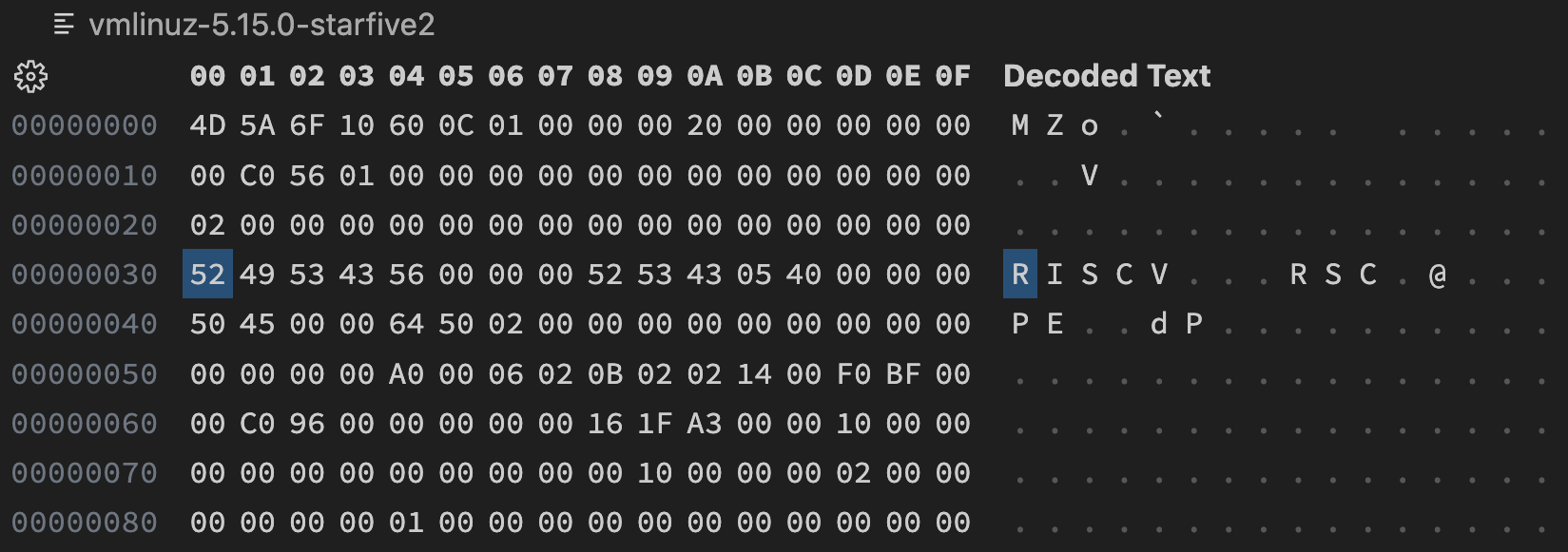
See the "RISCV" at `0x30`? That's the Magic Number for the RISC-V Linux Image Header!
- ["Boot image header in RISC-V Linux"](https://www.kernel.org/doc/html/latest/riscv/boot-image-header.html)
```text
u32 code0; /* Executable code */
u32 code1; /* Executable code */
u64 text_offset; /* Image load offset, little endian */
u64 image_size; /* Effective Image size, little endian */
u64 flags; /* kernel flags, little endian */
u32 version; /* Version of this header */
u32 res1 = 0; /* Reserved */
u64 res2 = 0; /* Reserved */
u64 magic = 0x5643534952; /* Magic number, little endian, "RISCV" */
u32 magic2 = 0x05435352; /* Magic number 2, little endian, "RSC\x05" */
u32 res3; /* Reserved for PE COFF offset */
```
This is how we decode the RISC-V Linux Header...
- [__"Decode the RISC-V Linux Header"__](https://lupyuen.github.io/articles/star64#appendix-decode-the-risc-v-linux-header)
Let's decompile the Kernel Image...
TODO: Explain MZ and the funny RISC-V instruction at the top
# Decompile Armbian Kernel Image with Ghidra
Read the article...
- ["Inspecting the RISC-V Linux Images for Star64 JH7110 SBC"](https://lupyuen.github.io/articles/star64)
We decompile the Armbian Linux Kernel Image with [Ghidra](https://github.com/NationalSecurityAgency/ghidra).
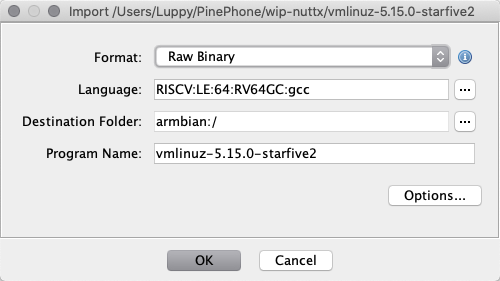
In Ghidra, create a New Project. Click File > Import File.
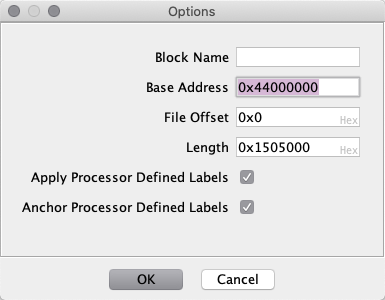
Select `armbi_root/boot/vmlinuz-5.15.0-starfive2` and enter these Import Options...
- Format: Raw Binary
- Language: RISCV > RV64GC (RISCV:LE:64:RV64GC:gcc)
[(StarFive JH7110 has 4 × RV64GC U74 Application Cores)](https://doc-en.rvspace.org/JH7110/Datasheet/JH7110_DS/c_u74_quad_core.html)
- Options > Base Address: 0x44000000
(Based on the U-Boot Configuration from above)
Double-click `vmlinuz-5.15.0-starfive2`, analyse the file with the Default Options.
Ghidra displays the Decompiled Linux Kernel...
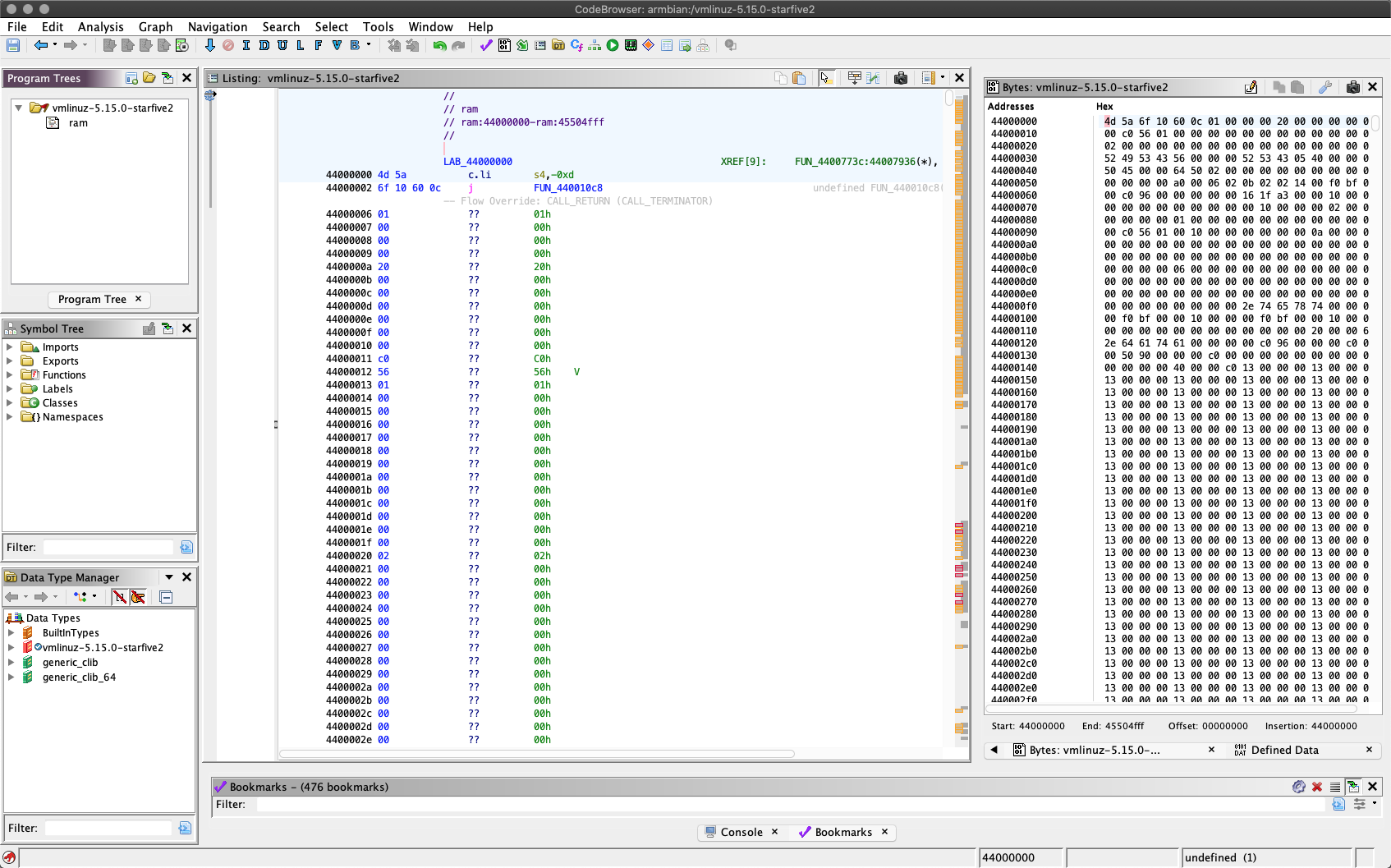
At Address `0x4400` `0002` we see a Jump to `FUN_440010c8`...
```text
// Load -13 into Register S4
li s4,-0xd
// Jump to Actual Boot Code
j FUN_440010c8
```
Double-click `FUN_440010c8` to see the Linux Boot Code...
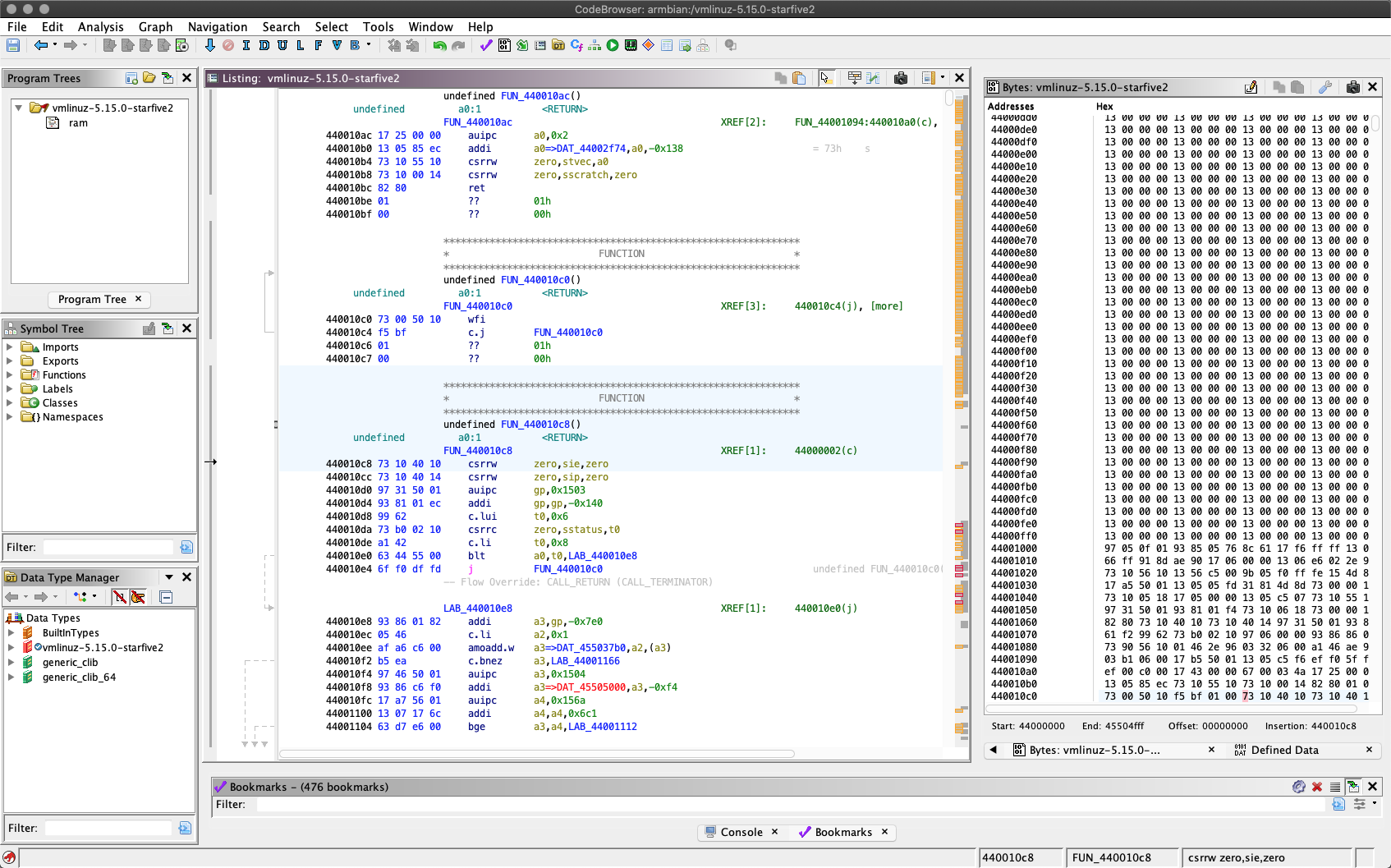
TODO: Explain MZ and the funny RISC-V instruction at the top
TODO: Where is the source file?
TODO: Any interesting CSR Instructions?
# Serial Console on Star64
Read the article...
- ["Booting RISC-V Linux on Star64 JH7110 SBC"](https://lupyuen.github.io/articles/linux)
To access the Serial Console, we connect a [USB Serial Adapter](https://pine64.com/product/serial-console-woodpecker-edition/) to Star64...
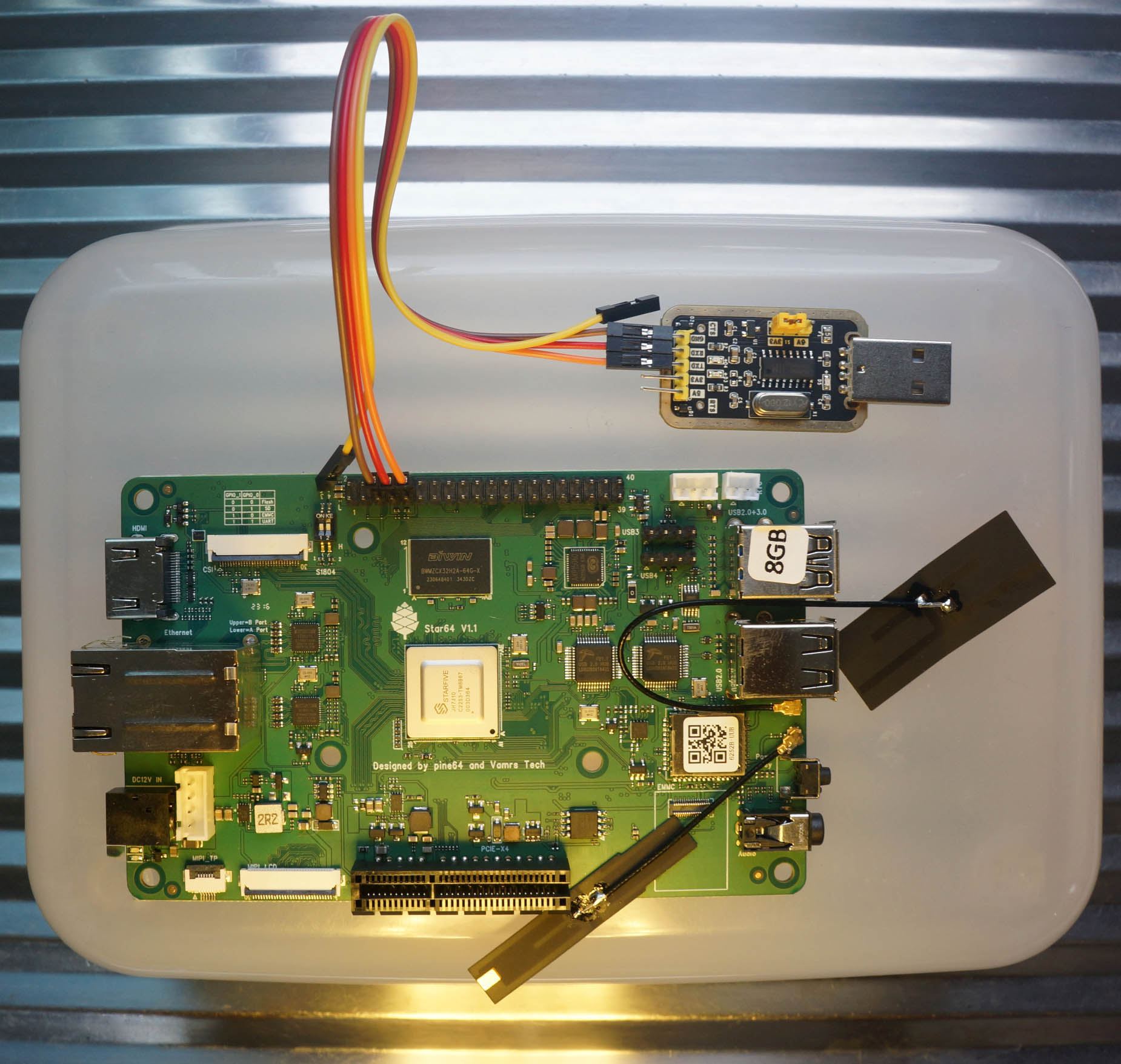
According to [Star64 Schematic](https://files.pine64.org/doc/star64/Star64_Schematic_V1.1_20230504.pdf), UART0 TX and RX (GPIO 5 and 6) are connected to the Pi GPIO Header (Pins 8 and 10).
Thus we connect these pins...
| Star64 GPIO Header | [USB Serial Adapter](https://pine64.com/product/serial-console-woodpecker-edition/) | Wire Colour |
|:----:|:----:|:----|
| Pin 6 (GND) | GND | Brown
| Pin 8 (TX) | RX | Red
| Pin 10 (RX) | TX | Orange
Set the Voltage Jumper to 3V3. (Instead of 5V)
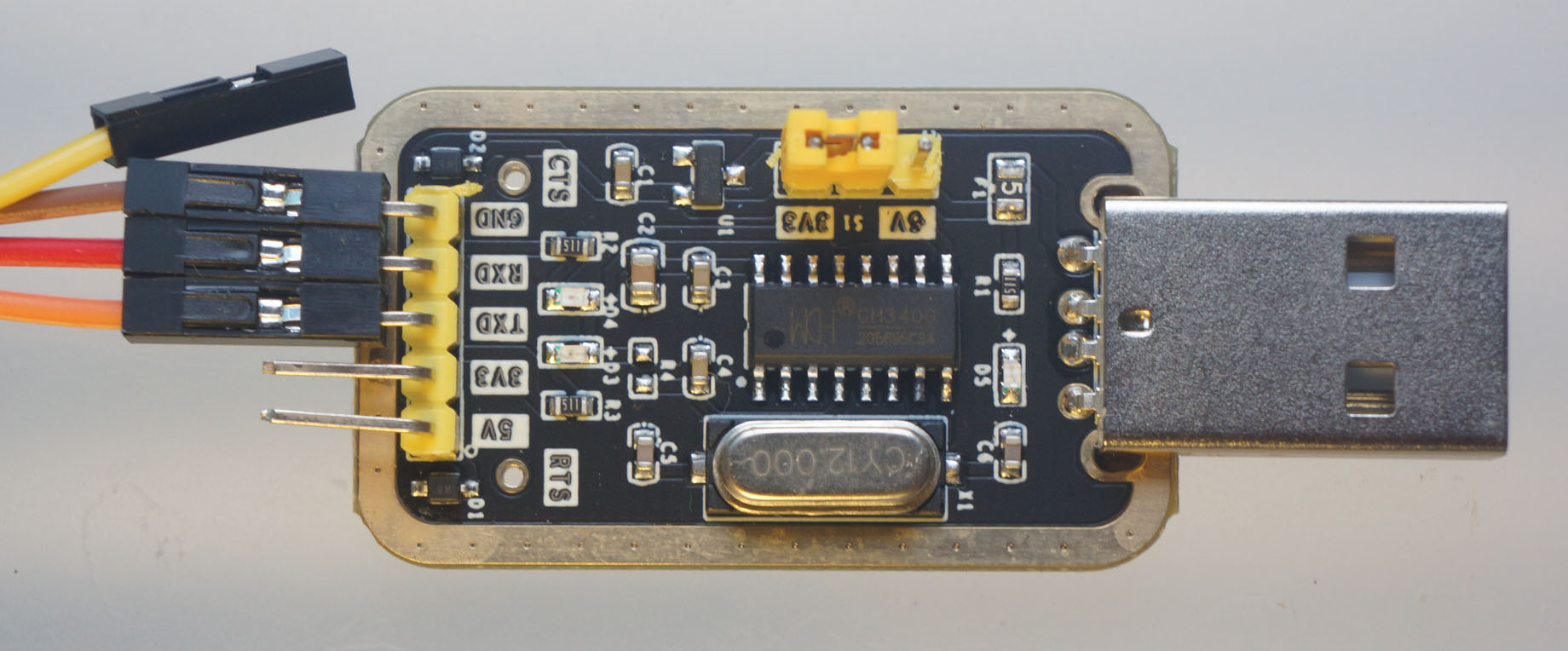
On our computer, connect to the USB Serial Port at 115.2 kbps...
```bash
screen /dev/ttyUSB0 115200
```
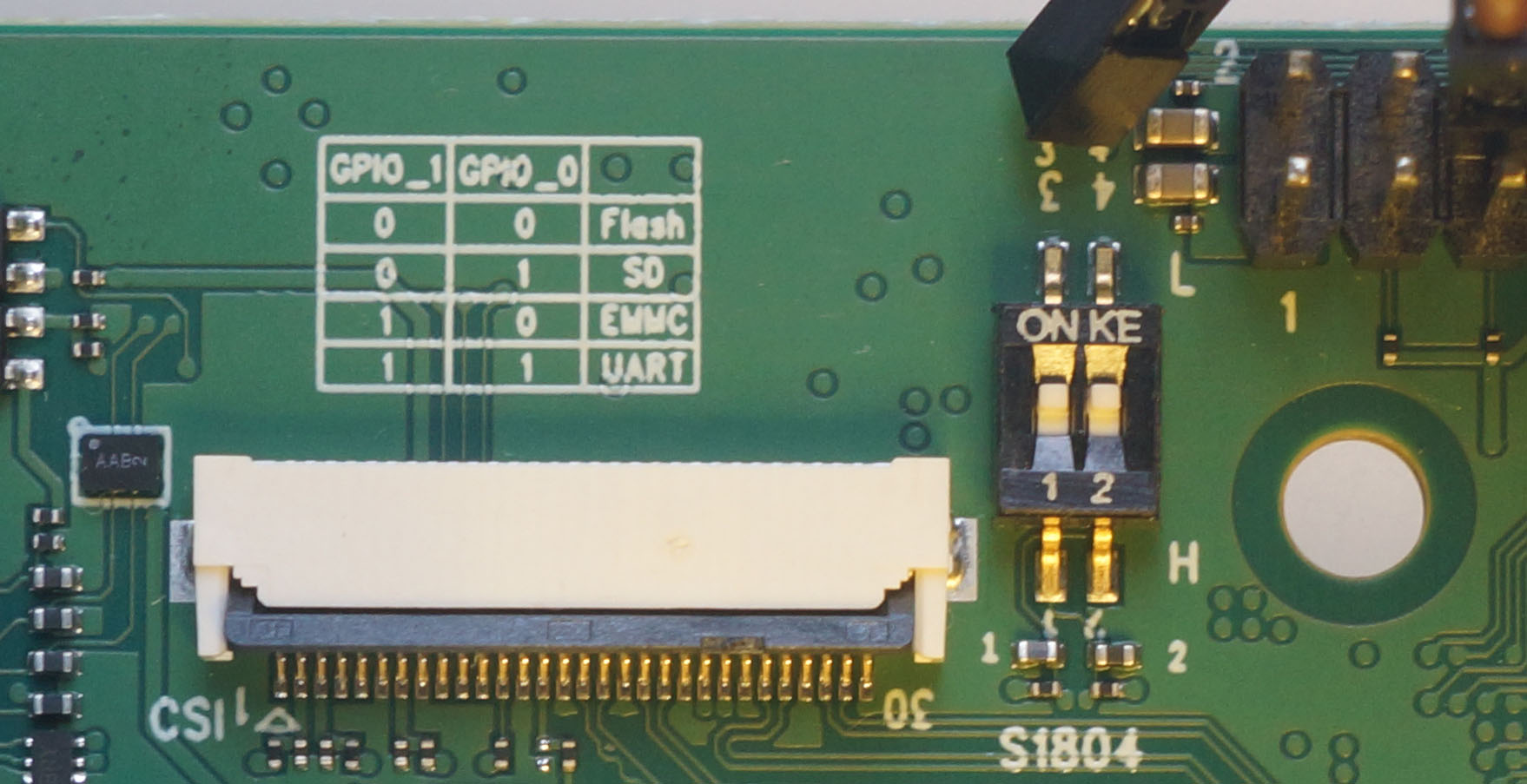
Power up Star64. The DIP Switches for GPIO 0 and 1 default to Low and Low, so Star64 should boot from Flash Memory, which has the U-Boot Bootloader inside.
[(DIP Switch Labels are inverted: __"ON"__ actually means __"Low"__)](https://wiki.pine64.org/wiki/STAR64#Prototype_Bringup_Notes)
We'll see this U-Boot Bootloader Log...
TODO: Explain [OpenSBI](https://www.thegoodpenguin.co.uk/blog/an-overview-of-opensbi/)
# Star64 U-Boot Bootloader Log
Read the article...
- ["Booting RISC-V Linux on Star64 JH7110 SBC"](https://lupyuen.github.io/articles/linux)
Here's the log for U-Boot Bootloader on Star64 (without microSD Card)...
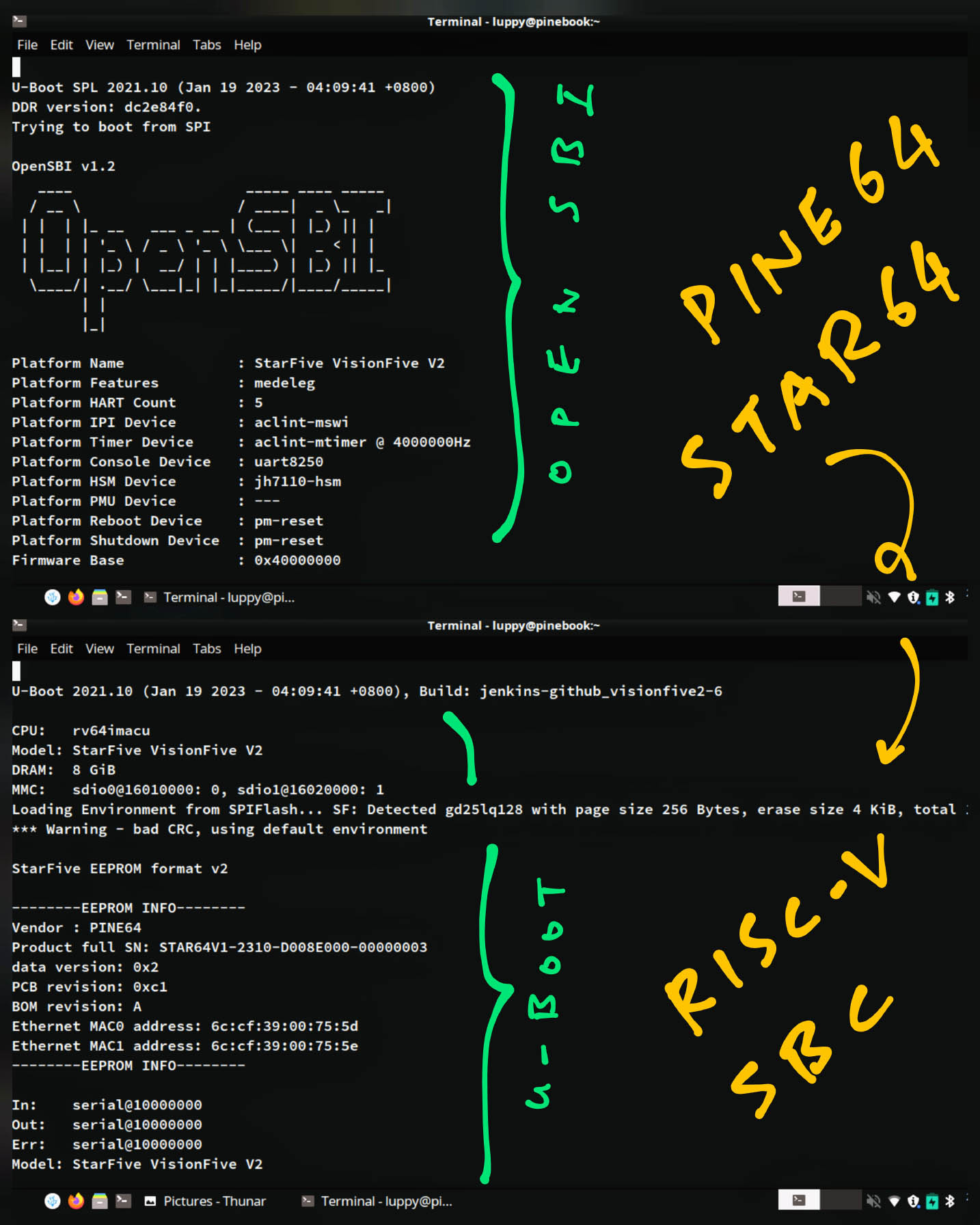
```text
U-Boot SPL 2021.10 (Jan 19 2023 - 04:09:41 +0800)
DDR version: dc2e84f0.
Trying to boot from SPI
OpenSBI v1.2
____ _____ ____ _____
/ __ \ / ____| _ \_ _|
| | | |_ __ ___ _ __ | (___ | |_) || |
| | | | '_ \ / _ \ '_ \ \___ \| _ < | |
| |__| | |_) | __/ | | |____) | |_) || |_
\____/| .__/ \___|_| |_|_____/|____/_____|
| |
|_|
Platform Name : StarFive VisionFive V2
Platform Features : medeleg
Platform HART Count : 5
Platform IPI Device : aclint-mswi
Platform Timer Device : aclint-mtimer @ 4000000Hz
Platform Console Device : uart8250
Platform HSM Device : jh7110-hsm
Platform PMU Device : ---
Platform Reboot Device : pm-reset
Platform Shutdown Device : pm-reset
Firmware Base : 0x40000000
Firmware Size : 288 KB
Runtime SBI Version : 1.0
Domain0 Name : root
Domain0 Boot HART : 1
Domain0 HARTs : 0*,1*,2*,3*,4*
Domain0 Region00 : 0x0000000002000000-0x000000000200ffff (I)
Domain0 Region01 : 0x0000000040000000-0x000000004007ffff ()
Domain0 Region02 : 0x0000000000000000-0xffffffffffffffff (R,W,X)
Domain0 Next Address : 0x0000000040200000
Domain0 Next Arg1 : 0x0000000042200000
Domain0 Next Mode : S-mode
Domain0 SysReset : yes
Boot HART ID : 1
Boot HART Domain : root
Boot HART Priv Version : v1.11
Boot HART Base ISA : rv64imafdcbx
Boot HART ISA Extensions : none
Boot HART PMP Count : 8
Boot HART PMP Granularity : 4096
Boot HART PMP Address Bits: 34
Boot HART MHPM Count : 2
Boot HART MIDELEG : 0x0000000000000222
Boot HART MEDELEG : 0x000000000000b109
U-Boot 2021.10 (Jan 19 2023 - 04:09:41 +0800), Build: jenkins-github_visionfive2-6
CPU: rv64imacu
Model: StarFive VisionFive V2
DRAM: 8 GiB
MMC: sdio0@16010000: 0, sdio1@16020000: 1
Loading Environment from SPIFlash... SF: Detected gd25lq128 with page size 256 Bytes, erase size 4 KiB, total 16 MiB
*** Warning - bad CRC, using default environment
StarFive EEPROM format v2
--------EEPROM INFO--------
Vendor : PINE64
Product full SN: STAR64V1-2310-D008E000-00000003
data version: 0x2
PCB revision: 0xc1
BOM revision: A
Ethernet MAC0 address: 6c:cf:39:00:75:5d
Ethernet MAC1 address: 6c:cf:39:00:75:5e
--------EEPROM INFO--------
In: serial@10000000
Out: serial@10000000
Err: serial@10000000
Model: StarFive VisionFive V2
Net: eth0: ethernet@16030000, eth1: ethernet@16040000
Card did not respond to voltage select! : -110
Card did not respond to voltage select! : -110
bootmode flash device 0
Card did not respond to voltage select! : -110
Hit any key to stop autoboot: 2 1 0
Card did not respond to voltage select! : -110
Couldn't find partition mmc 0:3
Can't set block device
Importing environment from mmc0 ...
## Warning: Input data exceeds 1048576 bytes - truncated
## Info: input data size = 1048578 = 0x100002
Card did not respond to voltage select! : -110
Couldn't find partition mmc 1:2
Can't set block device
## Warning: defaulting to text format
## Error: "boot2" not defined
Card did not respond to voltage select! : -110
ethernet@16030000 Waiting for PHY auto negotiation to complete......... TIMEOUT !
phy_startup() failed: -110FAILED: -110ethernet@16040000 Waiting for PHY auto negotiation to complete......... TIMEOUT !
phy_startup() failed: -110FAILED: -110ethernet@16030000 Waiting for PHY auto negotiation to complete......... TIMEOUT !
phy_startup() failed: -110FAILED: -110ethernet@16040000 Waiting for PHY auto negotiation to complete......... TIMEOUT !
phy_startup() failed: -110FAILED: -110StarFive #
StarFive #
```
Which is OK because we haven't inserted a microSD Card.
## U-Boot Commands for Star64
Here are the U-Boot Commands...
```text
StarFive # help
? - alias for 'help'
base - print or set address offset
bdinfo - print Board Info structure
blkcache - block cache diagnostics and control
boot - boot default, i.e., run 'bootcmd'
bootd - boot default, i.e., run 'bootcmd'
bootefi - Boots an EFI payload from memory
bootelf - Boot from an ELF image in memory
booti - boot Linux kernel 'Image' format from memory
bootm - boot application image from memory
bootp - boot image via network using BOOTP/TFTP protocol
bootvx - Boot vxWorks from an ELF image
cmp - memory compare
config - print .config
coninfo - print console devices and information
cp - memory copy
cpu - display information about CPUs
crc32 - checksum calculation
dhcp - boot image via network using DHCP/TFTP protocol
dm - Driver model low level access
echo - echo args to console
editenv - edit environment variable
eeprom - EEPROM sub-system
efidebug - Configure UEFI environment
env - environment handling commands
erase - erase FLASH memory
eraseenv - erase environment variables from persistent storage
exit - exit script
ext2load - load binary file from a Ext2 filesystem
ext2ls - list files in a directory (default /)
ext4load - load binary file from a Ext4 filesystem
ext4ls - list files in a directory (default /)
ext4size - determine a file's size
ext4write - create a file in the root directory
false - do nothing, unsuccessfully
fatinfo - print information about filesystem
fatload - load binary file from a dos filesystem
fatls - list files in a directory (default /)
fatmkdir - create a directory
fatrm - delete a file
fatsize - determine a file's size
fatwrite - write file into a dos filesystem
fdt - flattened device tree utility commands
flinfo - print FLASH memory information
fstype - Look up a filesystem type
fstypes - List supported filesystem types
fsuuid - Look up a filesystem UUID
go - start application at address 'addr'
gpio - query and control gpio pins
gpt - GUID Partition Table
gzwrite - unzip and write memory to block device
help - print command description/usage
i2c - I2C sub-system
iminfo - print header information for application image
imxtract - extract a part of a multi-image
itest - return true/false on integer compare
ln - Create a symbolic link
load - load binary file from a filesystem
loadb - load binary file over serial line (kermit mode)
loads - load S-Record file over serial line
loadx - load binary file over serial line (xmodem mode)
loady - load binary file over serial line (ymodem mode)
log - log system
loop - infinite loop on address range
ls - list files in a directory (default /)
lzmadec - lzma uncompress a memory region
mac - display and program the system ID and MAC addresses in EEPROM
md - memory display
misc - Access miscellaneous devices with MISC uclass driver APIs
mm - memory modify (auto-incrementing address)
mmc - MMC sub system
mmcinfo - display MMC info
mw - memory write (fill)
net - NET sub-system
nfs - boot image via network using NFS protocol
nm - memory modify (constant address)
panic - Panic with optional message
part - disk partition related commands
ping - send ICMP ECHO_REQUEST to network host
pinmux - show pin-controller muxing
printenv - print environment variables
protect - enable or disable FLASH write protection
random - fill memory with random pattern
reset - Perform RESET of the CPU
run - run commands in an environment variable
save - save file to a filesystem
saveenv - save environment variables to persistent storage
setenv - set environment variables
setexpr - set environment variable as the result of eval expression
sf - SPI flash sub-system
showvar - print local hushshell variables
size - determine a file's size
sleep - delay execution for some time
source - run script from memory
sysboot - command to get and boot from syslinux files
test - minimal test like /bin/sh
tftpboot - boot image via network using TFTP protocol
tftpput - TFTP put command, for uploading files to a server
true - do nothing, successfully
unlz4 - lz4 uncompress a memory region
unzip - unzip a memory region
version - print monitor, compiler and linker version
```
## U-Boot Settings for Star64
Here are the U-Boot Settings...
```text
StarFive # printenv
baudrate=115200
boot_a_script=load ${devtype} ${devnum}:${distro_bootpart} ${scriptaddr} ${prefix}${script}; source ${scriptaddr}
boot_efi_binary=load ${devtype} ${devnum}:${distro_bootpart} ${kernel_addr_r} efi/boot/bootriscv64.efi; if fdt addr ${fdt_addr_r}; then bootefi ${kernel_addr_r} ${fdt_addr_r};else bootefi ${kernel_addr_r} ${fdtcontroladdr};fi
boot_efi_bootmgr=if fdt addr ${fdt_addr_r}; then bootefi bootmgr ${fdt_addr_r};else bootefi bootmgr;fi
boot_extlinux=sysboot ${devtype} ${devnum}:${distro_bootpart} any ${scriptaddr} ${prefix}${boot_syslinux_conf}
boot_prefixes=/ /boot/
boot_script_dhcp=boot.scr.uimg
boot_scripts=boot.scr.uimg boot.scr
boot_syslinux_conf=extlinux/extlinux.conf
boot_targets=mmc0 dhcp
bootargs=console=ttyS0,115200 debug rootwait earlycon=sbi
bootcmd=run load_vf2_env;run importbootenv;run load_distro_uenv;run boot2;run distro_bootcmd
bootcmd_dhcp=devtype=dhcp; if dhcp ${scriptaddr} ${boot_script_dhcp}; then source ${scriptaddr}; fi;setenv efi_fdtfile ${fdtfile}; setenv efi_old_vci ${bootp_vci};setenv efi_old_arch ${bootp_arch};setenv bootp_vci PXEClient:Arch:00027:UNDI:003000;setenv bootp_arch 0x1b;if dhcp ${kernel_addr_r}; then tftpboot ${fdt_addr_r} dtb/${efi_fdtfile};if fdt addr ${fdt_addr_r}; then bootefi ${kernel_addr_r} ${fdt_addr_r}; else bootefi ${kernel_addr_r} ${fdtcontroladdr};fi;fi;setenv bootp_vci ${efi_old_vci};setenv bootp_arch ${efi_old_arch};setenv efi_fdtfile;setenv efi_old_arch;setenv efi_old_vci;
bootcmd_distro=run fdt_loaddtb; run fdt_sizecheck; run set_fdt_distro; sysboot mmc ${fatbootpart} fat c0000000 ${bootdir}/${boot_syslinux_conf};
bootcmd_mmc0=devnum=0; run mmc_boot
bootdelay=2
bootdir=/boot
bootenv=uEnv.txt
bootmode=flash
bootpart=0:3
chip_vision=UNKOWN
chipa_gmac_set=fdt set /soc/ethernet@16030000/ethernet-phy@0 tx_inverted_10 <0x0>;fdt set /soc/ethernet@16030000/ethernet-phy@0 tx_inverted_100 <0x0>;fdt set /soc/ethernet@16030000/ethernet-phy@0 tx_inverted_1000 <0x0>;fdt set /soc/ethernet@16030000/ethernet-phy@0 tx_delay_sel <0x9>;fdt set /soc/ethernet@16040000/ethernet-phy@1 tx_inverted_10 <0x0>;fdt set /soc/ethernet@16040000/ethernet-phy@1 tx_inverted_100 <0x0>;fdt set /soc/ethernet@16040000/ethernet-phy@1 tx_inverted_1000 <0x0>;fdt set /soc/ethernet@16040000/ethernet-phy@1 tx_delay_sel <0x9>
chipa_set=if test ${chip_vision} = A; then run chipa_gmac_set;fi;
chipa_set_linux=fdt addr ${fdt_addr_r};run visionfive2_mem_set;run chipa_set;
chipa_set_linux_force=fdt addr ${fdt_addr_r};run visionfive2_mem_set;run chipa_gmac_set;
chipa_set_uboot=fdt addr ${uboot_fdt_addr};run chipa_set;
chipa_set_uboot_force=fdt addr ${uboot_fdt_addr};run chipa_gmac_set;
devnum=0
distro_bootcmd=for target in ${boot_targets}; do run bootcmd_${target}; done
distroloadaddr=0xb0000000
efi_dtb_prefixes=/ /dtb/ /dtb/current/
eth0addr=6c:cf:39:00:75:5d
eth1addr=6c:cf:39:00:75:5e
ethact=ethernet@16030000
ethaddr=6c:cf:39:00:75:5d
ext4bootenv=ext4load mmc ${bootpart} ${loadaddr} ${bootdir}/${bootenv}
fatbootpart=1:2
fdt_addr_r=0x46000000
fdt_high=0xffffffffffffffff
fdt_loaddtb=fatload mmc ${fatbootpart} ${fdt_addr_r} ${bootdir}/dtbs/${fdtfile}; fdt addr ${fdt_addr_r};
fdt_sizecheck=fatsize mmc ${fatbootpart} ${bootdir}/dtbs/${fdtfile};
fdtaddr=fffc6aa0
fdtcontroladdr=fffc6aa0
fdtfile=starfive/starfive_visionfive2.dtb
importbootenv=echo Importing environment from mmc${devnum} ...; env import -t ${loadaddr} ${filesize}
initrd_high=0xffffffffffffffff
ipaddr=192.168.120.230
kernel_addr_r=0x40200000
load_distro_uenv=fatload mmc ${fatbootpart} ${distroloadaddr} ${bootdir}/${bootenv}; env import ${distroloadaddr} 17c;
load_efi_dtb=load ${devtype} ${devnum}:${distro_bootpart} ${fdt_addr_r} ${prefix}${efi_fdtfile}
load_vf2_env=fatload mmc ${bootpart} ${loadaddr} ${testenv}
loadaddr=0xa0000000
loadbootenv=fatload mmc ${bootpart} ${loadaddr} ${bootenv}
memory_addr=40000000
memory_size=200000000
mmc_boot=if mmc dev ${devnum}; then devtype=mmc; run scan_dev_for_boot_part; fi
mmcbootenv=run scan_mmc_dev; setenv bootpart ${devnum}:${mmcpart}; if mmc rescan; then run loadbootenv && run importbootenv; run ext4bootenv && run importbootenv; if test -n $uenvcmd; then echo Running uenvcmd ...; run uenvcmd; fi; fi
mmcpart=3
netmask=255.255.255.0
partitions=name=loader1,start=17K,size=1M,type=${type_guid_gpt_loader1};name=loader2,size=4MB,type=${type_guid_gpt_loader2};name=system,size=-,bootable,type=${type_guid_gpt_system};
preboot=run chipa_set_uboot;run mmcbootenv
pxefile_addr_r=0x45900000
ramdisk_addr_r=0x46100000
scan_dev_for_boot=echo Scanning ${devtype} ${devnum}:${distro_bootpart}...; for prefix in ${boot_prefixes}; do run scan_dev_for_extlinux; run scan_dev_for_scripts; done;run scan_dev_for_efi;
scan_dev_for_boot_part=part list ${devtype} ${devnum} -bootable devplist; env exists devplist || setenv devplist 1; for distro_bootpart in ${devplist}; do if fstype ${devtype} ${devnum}:${distro_bootpart} bootfstype; then run scan_dev_for_boot; fi; done; setenv devplist
scan_dev_for_efi=setenv efi_fdtfile ${fdtfile}; for prefix in ${efi_dtb_prefixes}; do if test -e ${devtype} ${devnum}:${distro_bootpart} ${prefix}${efi_fdtfile}; then run load_efi_dtb; fi;done;run boot_efi_bootmgr;if test -e ${devtype} ${devnum}:${distro_bootpart} efi/boot/bootriscv64.efi; then echo Found EFI removable media binary efi/boot/bootriscv64.efi; run boot_efi_binary; echo EFI LOAD FAILED: continuing...; fi; setenv efi_fdtfile
scan_dev_for_extlinux=if test -e ${devtype} ${devnum}:${distro_bootpart} ${prefix}${boot_syslinux_conf}; then echo Found ${prefix}${boot_syslinux_conf}; run boot_extlinux; echo SCRIPT FAILED: continuing...; fi
scan_dev_for_scripts=for script in ${boot_scripts}; do if test -e ${devtype} ${devnum}:${distro_bootpart} ${prefix}${script}; then echo Found U-Boot script ${prefix}${script}; run boot_a_script; echo SCRIPT FAILED: continuing...; fi; done
scan_mmc_dev=if test ${bootmode} = flash; then if mmc dev ${devnum}; then echo found device ${devnum};else setenv devnum 0;mmc dev 0;fi; fi; echo bootmode ${bootmode} device ${devnum};
scan_sf_for_scripts=${devtype} read ${scriptaddr} ${script_offset_f} ${script_size_f}; source ${scriptaddr}; echo SCRIPT FAILED: continuing...
script_offset_f=0x1fff000
script_size_f=0x1000
scriptaddr=0x43900000
serial#=STAR64V1-2310-D008E000-00000003
set_fdt_distro=if test ${chip_vision} = A; then if test ${memory_size} = 200000000; then run chipa_gmac_set;run visionfive2_mem_set;fatwrite mmc ${fatbootpart} ${fdt_addr_r} ${bootdir}/dtbs/${fdtfile} ${filesize};else run chipa_gmac_set;run visionfive2_mem_set;fatwrite mmc ${fatbootpart} ${fdt_addr_r} ${bootdir}/dtbs/${fdtfile} ${filesize};fi;else run visionfive2_mem_set;fatwrite mmc ${fatbootpart} ${fdt_addr_r} ${bootdir}/dtbs/${fdtfile} ${filesize};fi;
sf_boot=if sf probe ${busnum}; then devtype=sf; run scan_sf_for_scripts; fi
stderr=serial@10000000
stdin=serial@10000000
stdout=serial@10000000
testenv=vf2_uEnv.txt
type_guid_gpt_loader1=5B193300-FC78-40CD-8002-E86C45580B47
type_guid_gpt_loader2=2E54B353-1271-4842-806F-E436D6AF6985
type_guid_gpt_system=0FC63DAF-8483-4772-8E79-3D69D8477DE4
uboot_fdt_addr=0xfffc6aa0
ver=U-Boot 2021.10 (Jan 19 2023 - 04:09:41 +0800)
visionfive2_mem_set=fdt memory ${memory_addr} ${memory_size};
Environment size: 7246/65532 bytes
StarFive #
```
# Boot Armbian on Star64
Read the article...
- ["Booting RISC-V Linux on Star64 JH7110 SBC"](https://lupyuen.github.io/articles/linux)
Let's boot Armbian on Star64!
We download the Armbian Image for Star64: [Armbian 23.8 Lunar (Minimal)](https://github.com/armbianro/os/releases/download/23.8.0-trunk.56/Armbian_23.8.0-trunk.56_Star64_lunar_edge_5.15.0_minimal.img.xz)
Uncompress the .xz, write the .img to a microSD Card with Balena Etcher.
Here's what happens when we boot the microSD Card on Star64...
- [Armbian Boot Log](https://gist.github.com/lupyuen/d73ace627318375fe20e90e4950f9c50)
Armbian fails to boot...
```text
Found /boot/extlinux/extlinux.conf
Retrieving file: /boot/extlinux/extlinux.conf
383 bytes read in 7 ms (52.7 KiB/s)
1:[6CArmbian
Retrieving file: /boot/uInitrd
10911538 bytes read in 466 ms (22.3 MiB/s)
Retrieving file: /boot/Image
22040576 bytes read in 936 ms (22.5 MiB/s)
append: root=UUID=99f62df4-be35-475c-99ef-2ba3f74fe6b5 console=ttyS0,115200n8 console=tty0 earlycon=sbi rootflags=data=writeback stmmaceth=chain_mode:1 rw rw no_console_suspend consoleblank=0 fsck.fix=yes fsck.repair=yes net.ifnames=0 splash plymouth.ignore-serial-consoles
Retrieving file: /boot/dtb/starfive/jh7110-star64-pine64.dtb
Failed to load '/boot/dtb/starfive/jh7110-star64-pine64.dtb'
Skipping Armbian for failure retrieving FDT
```
The Flattened Device Tree (FDT) is missing! `/boot/dtb/starfive/jh7110-star64-pine64.dtb`
```text
→ ls /Volumes/armbi_root/boot/dtb-5.15.0-starfive2/starfive
evb-overlay jh7110-evb-usbdevice.dtb
jh7110-evb-can-pdm-pwmdac.dtb jh7110-evb.dtb
jh7110-evb-dvp-rgb2hdmi.dtb jh7110-fpga.dtb
jh7110-evb-i2s-ac108.dtb jh7110-visionfive-v2-A10.dtb
jh7110-evb-pcie-i2s-sd.dtb jh7110-visionfive-v2-A11.dtb
jh7110-evb-spi-uart2.dtb jh7110-visionfive-v2-ac108.dtb
jh7110-evb-uart1-rgb2hdmi.dtb jh7110-visionfive-v2-wm8960.dtb
jh7110-evb-uart4-emmc-spdif.dtb jh7110-visionfive-v2.dtb
jh7110-evb-uart5-pwm-i2c-tdm.dtb vf2-overlay
```
The missing Device Tree is noted in this [__Pine64 Forum Post__](https://forum.pine64.org/showthread.php?tid=18276&pid=117607#pid117607). So we might need to check back later for the Official Armbian Image, if it's fixed.
[(__balbes150__ suggests that we try this Armbian Image instead)](https://forum.pine64.org/showthread.php?tid=18420&pid=118331#pid118331)
# Boot Yocto on Star64
Read the article...
- ["Booting RISC-V Linux on Star64 JH7110 SBC"](https://lupyuen.github.io/articles/linux)
Now we boot Yocto on Star64.
We download the Yocto Minimal Image for Star64: [star64-image-minimal](https://pine64.my-ho.st:8443/star64-image-minimal-star64-1.2.wic.bz2)
Uncompress the .bz2, rename as .img. Balena Etcher won't work with .bz2 files!
Write the .img to a microSD Card with Balena Etcher.
Here's what happens when we boot the microSD Card on Star64...
- [Yocto Boot Log](https://gist.github.com/lupyuen/b23edf50cecbee13e5aab3c0bae6c528)
Usernames and Passwords are...
- root / pine64
- pine64 / pine64
[(Source)](https://github.com/Fishwaldo/meta-pine64#usernames)
Yep the Yocto Minimal Image boots OK on Star64!
# Boot Yocto Plasma on Star64
Read the article...
- ["Booting RISC-V Linux on Star64 JH7110 SBC"](https://lupyuen.github.io/articles/linux)
Finally we boot Yocto Plasma on Star64.
We download the Yocto Plasma Image for Star64: [star64-image-plasma](https://pine64.my-ho.st:8443/star64-image-plasma-star64-1.2.wic.bz2)
Uncompress the .bz2, rename as .img. Balena Etcher won't work with .bz2 files!
Write the .img to a microSD Card with Balena Etcher.
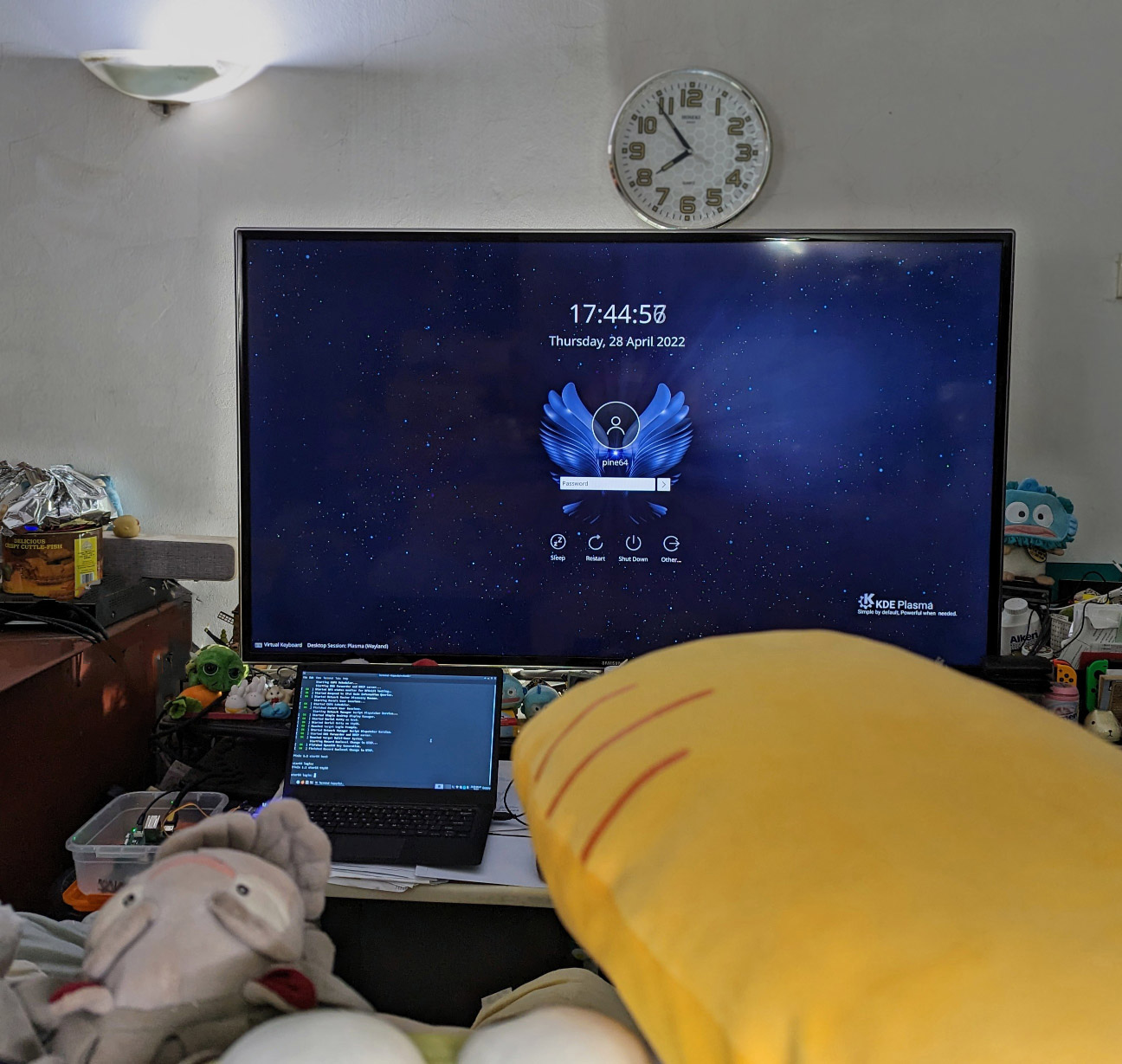
When we boot the microSD Card on Star64, the Plasma Desktop Environment runs OK on a HDMI Display! (Pic below)
Usernames and Passwords are...
- root / pine64
- pine64 / pine64
[(Source)](https://github.com/Fishwaldo/meta-pine64#usernames)
# NuttX prints to QEMU Console
Read the article...
- ["Apache NuttX RTOS on RISC-V: Star64 JH7110 SBC"](https://lupyuen.github.io/articles/nuttx2)
Our NuttX Kernel will print to Star64 Serial Console for debugging. Before that, let's write some RISC-V Assembly Code to print to the QEMU Console!
Earlier we ran NuttX on QEMU Emulator for 64-bit RISC-V...
- ["64-bit RISC-V with Apache NuttX Real-Time Operating System"](https://lupyuen.github.io/articles/riscv)
QEMU emulates a 16550 UART Port. (Similar to Star64 / JH7110)
_What's the Base Address of QEMU's UART Port?_
According to the NuttX Configuration for QEMU: [nsh64/defconfig](https://github.com/lupyuen2/wip-pinephone-nuttx/blob/star64/boards/risc-v/qemu-rv/rv-virt/configs/nsh64/defconfig#L10-L16)
```text
CONFIG_16550_ADDRWIDTH=0
CONFIG_16550_UART0=y
CONFIG_16550_UART0_BASE=0x10000000
CONFIG_16550_UART0_CLOCK=3686400
CONFIG_16550_UART0_IRQ=37
CONFIG_16550_UART0_SERIAL_CONSOLE=y
CONFIG_16550_UART=y
```
Base Address of QEMU's UART Port is `0x1000` `0000`. (Same as Star64 / JH7110 yay!)
_How to print to the 16550 UART Port?_
Let's check the 16550 UART Driver in NuttX. From [uart_16550.c](https://github.com/apache/nuttx/blob/master/drivers/serial/uart_16550.c#L1539-L1553):
```c
/****************************************************************************
* Name: u16550_send
*
* Description:
* This method will send one byte on the UART
*
****************************************************************************/
static void u16550_send(struct uart_dev_s *dev, int ch)
{
FAR struct u16550_s *priv = (FAR struct u16550_s *)dev->priv;
u16550_serialout(priv, UART_THR_OFFSET, (uart_datawidth_t)ch);
}
```
[(u16550_serialout is defined here)](https://github.com/apache/nuttx/blob/master/drivers/serial/uart_16550.c#L610-L624)
To print a character, the driver writes to the UART Base Address (`0x1000` `0000`) at Offset UART_THR_OFFSET.
And we discover that [UART_THR_OFFSET](https://github.com/apache/nuttx/blob/dc69b108b8e0547ecf6990207526c27aceaf1e2e/include/nuttx/serial/uart_16550.h#L172-L200) is 0:
```c
#define UART_THR_INCR 0 /* (DLAB =0) Transmit Holding Register */
#define UART_THR_OFFSET (CONFIG_16550_REGINCR*UART_THR_INCR)
```
So we can transmit to UART Port by simply writing to `0x1000` `0000`. How convenient!
_How to print to the QEMU Console?_
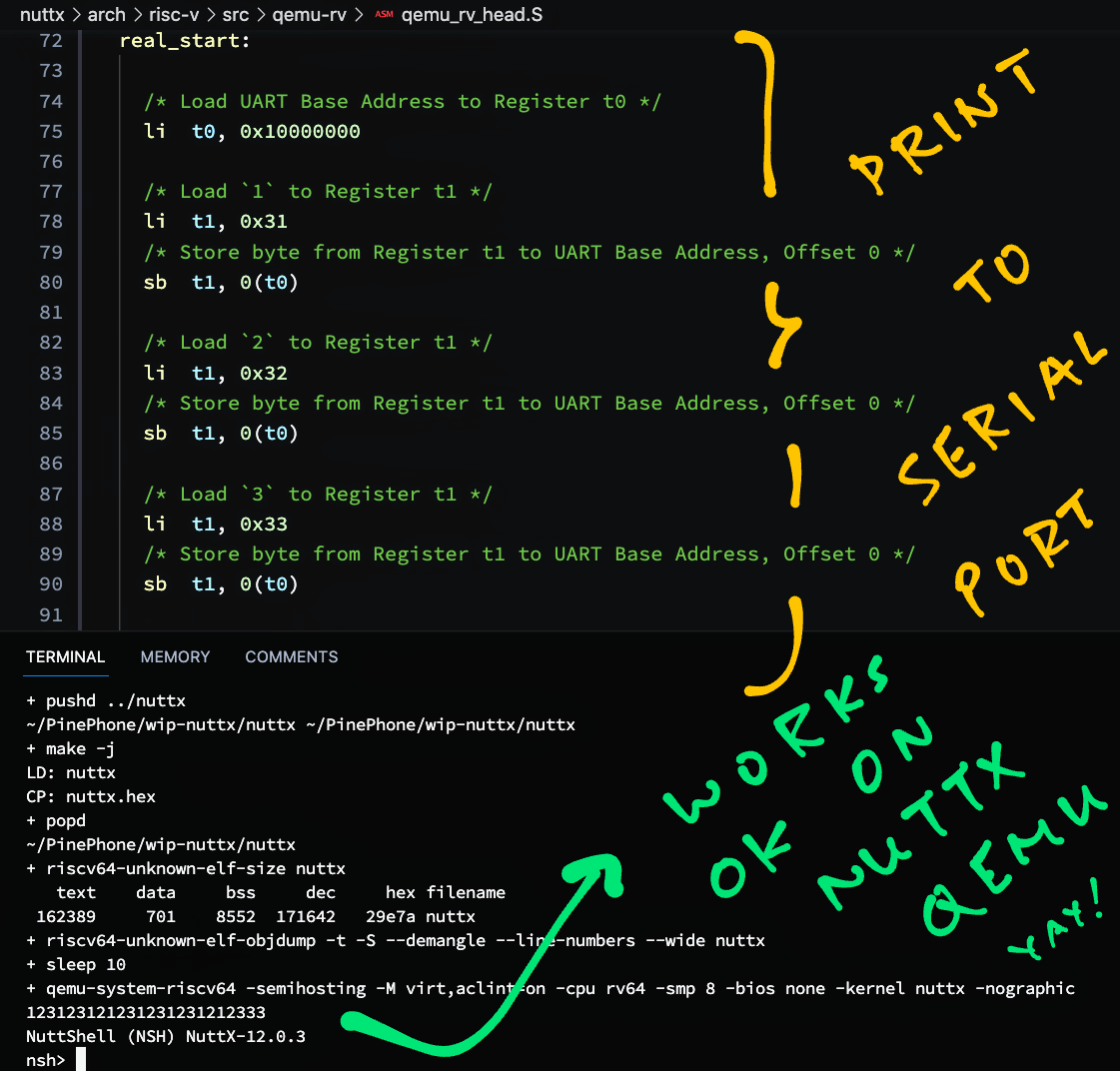
Let's do the printing in RISC-V Assembly Code, so that we can debug the NuttX Boot Code.
From [qemu_rv_head.S](https://github.com/lupyuen2/wip-pinephone-nuttx/blob/star64/arch/risc-v/src/qemu-rv/qemu_rv_head.S#L71-L93):
```text
/* Load UART Base Address to Register t0 */
li t0, 0x10000000
/* Load `1` to Register t1 */
li t1, 0x31
/* Store byte from Register t1 to UART Base Address, Offset 0 */
sb t1, 0(t0)
/* Load `2` to Register t1 */
li t1, 0x32
/* Store byte from Register t1 to UART Base Address, Offset 0 */
sb t1, 0(t0)
/* Load `3` to Register t1 */
li t1, 0x33
/* Store byte from Register t1 to UART Base Address, Offset 0 */
sb t1, 0(t0)
```
This prints "123" to the QEMU Console. Here's the output:
```text
+ qemu-system-riscv64 \
-semihosting \
-M virt,aclint=on \
-cpu rv64 \
-smp 8 \
-bios none \
-kernel nuttx \
-nographic
123123123123123123112323
NuttShell (NSH) NuttX-12.0.3
nsh>
```
Which is correct because QEMU is running with 8 CPUs. Yay!
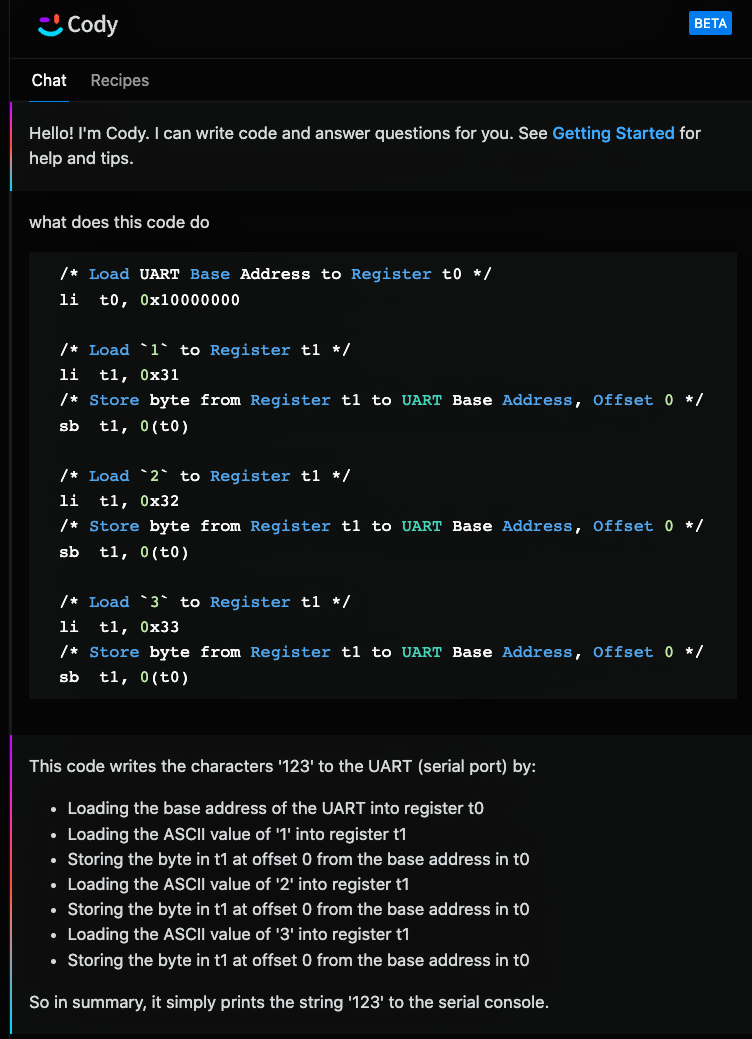
[Cody AI Assistant](https://about.sourcegraph.com/cody) explains our RISC-V Assembly Code...
And offers to optimise our RISC-V Assembly Code...
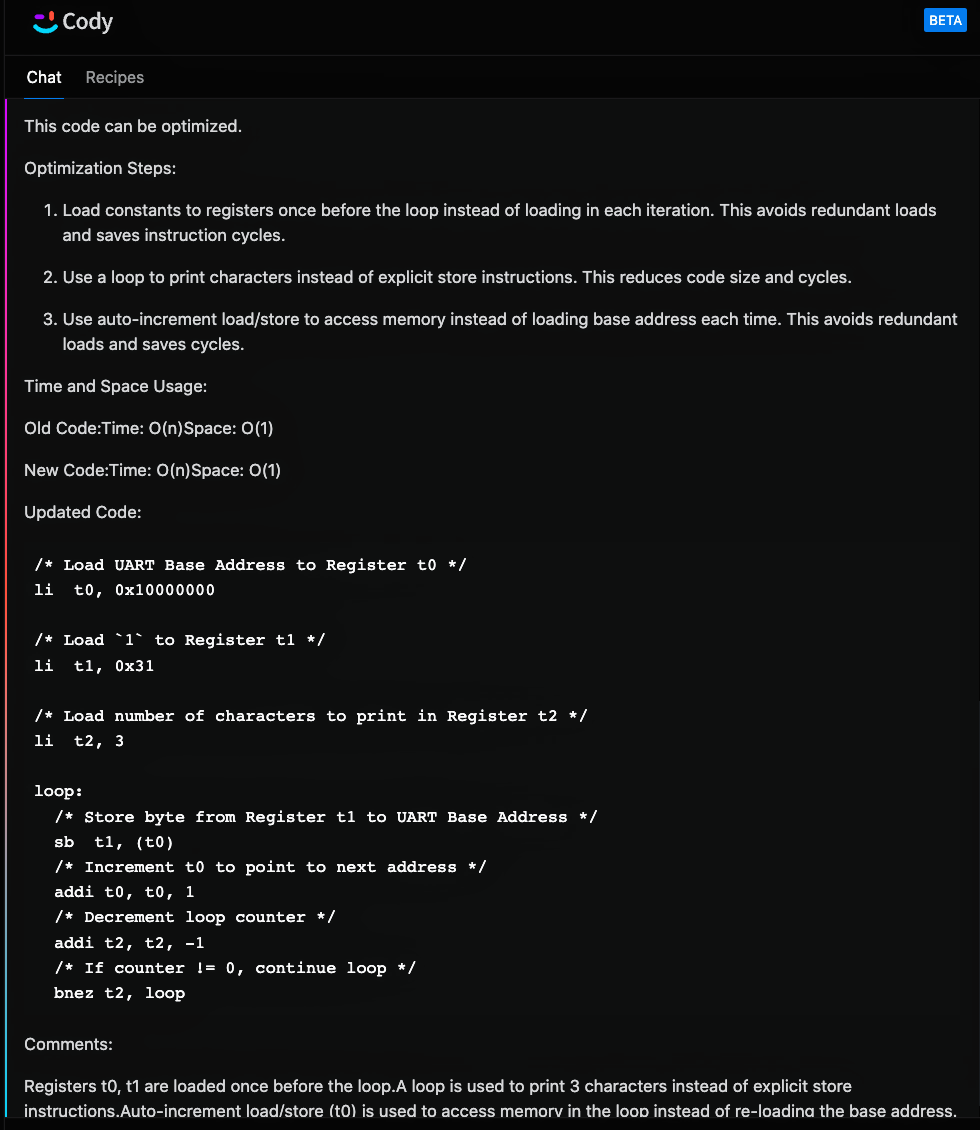
But the output is incorrect ;-)
```text
+ qemu-system-riscv64 -semihosting -M virt,aclint=on -cpu rv64 -smp 8 -bios none -kernel nuttx -nographic
11111111
NuttShell (NSH) NuttX-12.0.3
nsh>
```
The correct output is `123123123123123123112323`. (Because of the 8 CPUs)
# UART Base Address for Star64
Read the article...
- ["Apache NuttX RTOS on RISC-V: Star64 JH7110 SBC"](https://lupyuen.github.io/articles/nuttx2)
We'll take the UART Assembly Code from the previous section and run on Star64 / JH7110. (So we can troubleshoot the NuttX Boot Code)
_Does Star64 / JH7110 use a 16550 UART Controller like QEMU?_
According to the [JH7110 UART Developing Guide](https://doc-en.rvspace.org/VisionFive2/DG_UART/JH7110_SDK/function_layer.html), Star64 / JH7110 uses the 8250 UART Controller...
Which is [compatible with QEMU's 16550 UART Controller](https://en.wikipedia.org/wiki/16550_UART). So our UART Assembly Code for QEMU will run on Star64!
_What's the UART Base Address for Star64 / JH7110?_
Based on [JH7110 System Memory Map](https://doc-en.rvspace.org/JH7110/TRM/JH7110_TRM/system_memory_map.html), UART0 is at `0x1000` `0000`.
Also from the [JH7110 UART Device Tree](https://doc-en.rvspace.org/VisionFive2/DG_UART/JH7110_SDK/general_uart_controller.html): UART Register Base Address is `0x1000` `0000` with range `0x10000`.
[(JH7110 UART Datasheet)](https://doc-en.rvspace.org/JH7110/Datasheet/JH7110_DS/uart.html)
_Isn't that the same UART Base Address as QEMU?_
Let's check the UART Base Address in NuttX for QEMU. From [nsh64/defconfig](https://github.com/lupyuen2/wip-pinephone-nuttx/blob/star64/boards/risc-v/qemu-rv/rv-virt/configs/nsh64/defconfig#L10-L16):
```text
CONFIG_16550_ADDRWIDTH=0
CONFIG_16550_UART0=y
CONFIG_16550_UART0_BASE=0x10000000
CONFIG_16550_UART0_CLOCK=3686400
CONFIG_16550_UART0_IRQ=37
CONFIG_16550_UART0_SERIAL_CONSOLE=y
CONFIG_16550_UART=y
```
NuttX UART Base Address is `0x1000` `0000`. The exact same UART Base Address for QEMU AND Star64!
So no changes needed, our UART Assembly Code will run on QEMU AND Star64 yay!
# RISC-V Linux Kernel Header
Read the article...
- ["Apache NuttX RTOS on RISC-V: Star64 JH7110 SBC"](https://lupyuen.github.io/articles/nuttx2)
For U-Boot Bootloader to boot NuttX, we need to embed the RISC-V Linux Kernel Header...
- [__"Inside the Kernel Image"__](https://lupyuen.github.io/articles/star64#inside-the-kernel-image)
This is how we decode the RISC-V Linux Header...
- [__"Decode the RISC-V Linux Header"__](https://lupyuen.github.io/articles/star64#appendix-decode-the-risc-v-linux-header)
We copy the Arm64 Linux Header from [arm64_head.S](https://github.com/lupyuen2/wip-pinephone-nuttx/blob/star64/arch/arm64/src/common/arm64_head.S#L79-L118)...
And tweak for RISC-V Linux Header, like this: [qemu_rv_head.S](https://github.com/lupyuen2/wip-pinephone-nuttx/blob/star64/arch/risc-v/src/qemu-rv/qemu_rv_head.S#L42-L75):
```text
__start:
/* Begin Test */
/* DO NOT MODIFY. Image Header expected by Linux bootloaders.
*
* This `li` instruction has no meaningful effect except that
* its opcode forms the magic "MZ" signature of a PE/COFF file
* that is required for UEFI applications.
*
* Some bootloaders check the magic "MZ" to see if the image is a valid
* Linux image. But modifying the bootLoader is unnecessary unless we
* need to do a customized secure boot. So we just put "MZ" in the
* header to make the bootloader happy.
*/
c.li s4, -13 /* Magic Signature "MZ" (2 bytes) */
j real_start /* Jump to Kernel Start (2 bytes) */
.long 0 /* Executable Code padded to 8 bytes */
.quad 0x200000 /* Image load offset from start of RAM */
/* TODO: _e_initstack - __start */
.quad 171644 /* Effective size of kernel image, little-endian */
.quad 0x0 /* Kernel flags, little-endian */
.long 0x2 /* Version of this header */
.long 0 /* Reserved */
.quad 0 /* Reserved */
.ascii "RISCV\x00\x00\x00" /* Magic number, "RISCV" (8 bytes) */
.ascii "RSC\x05" /* Magic number 2, "RSC\x05" (4 bytes) */
.long 0 /* Reserved for PE COFF offset */
real_start:
/* Load UART Base Address to Register t0 */
li t0, 0x10000000
```
Note that Image Load Offset must be `0x20` `0000`!
```text
.quad 0x200000 /* Image load offset from start of RAM */
```
That's because our kernel starts at `0x4020` `0000`
Here's the assembled output...
```text
0000000040200000 <__start>:
li s4, -0xd /* Magic Signature "MZ" (2 bytes) */
40200000: 5a4d li s4,-13
j real_start /* Jump to Kernel Start (2 bytes) */
40200002: a83d j 40200040
40200004: 0000 unimp
40200006: 0000 unimp
40200008: 0000 unimp
4020000a: 0020 addi s0,sp,8
4020000c: 0000 unimp
4020000e: 0000 unimp
40200010: 9e7c 0x9e7c
40200012: 0002 c.slli64 zero
...
40200020: 0002 c.slli64 zero
...
4020002e: 0000 unimp
40200030: 4952 lw s2,20(sp)
40200032: 00564353 fadd.s ft6,fa2,ft5,rmm
40200036: 0000 unimp
40200038: 5352 lw t1,52(sp)
4020003a: 00000543 fmadd.s fa0,ft0,ft0,ft0,rne
...
0000000040200040 :
```
Check that the lengths and offsets match the RISC-V Linux Header Format...
- [__"Decode the RISC-V Linux Header"__](https://lupyuen.github.io/articles/star64#appendix-decode-the-risc-v-linux-header)
And our RISC-V Boot Code tested OK with QEMU.
# Set Start Address of NuttX Kernel
Read the article...
- ["Apache NuttX RTOS on RISC-V: Star64 JH7110 SBC"](https://lupyuen.github.io/articles/nuttx2)
Earlier we saw that Star64's U-Boot Bootloader will load Linux Kernels into RAM at Address `0x4020` `0000`...
- ["Armbian Image for Star64"](https://lupyuen.github.io/articles/star64#armbian-image-for-star64)
- ["Yocto Image for Star64"](https://lupyuen.github.io/articles/star64#yocto-image-for-star64)
To boot NuttX on Star64, let's set the Start Address of the NuttX Kernel to `0x4020` `0000`.
From [nsh64/defconfig](https://github.com/lupyuen2/wip-pinephone-nuttx/blob/star64/boards/risc-v/qemu-rv/rv-virt/configs/nsh64/defconfig#L56-L57):
```text
CONFIG_RAM_SIZE=33554432
CONFIG_RAM_START=0x80000000
```
We changed the above NuttX Build Config to `0x40200000`
We also updated the Linker Script: [ld.script](https://github.com/lupyuen2/wip-pinephone-nuttx/blob/star64/boards/risc-v/qemu-rv/rv-virt/scripts/ld.script#L21-L26)
```text
SECTIONS
{
/* Previously 0x80000000 */
. = 0x40200000;
.text :
```
Remember to change this if building for NuttX Kernel Mode: [ld-kernel64.script](https://github.com/lupyuen2/wip-pinephone-nuttx/blob/star64/boards/risc-v/qemu-rv/rv-virt/scripts/ld-kernel64.script#L21-L51):
```text
MEMORY
{
/* Previously 0x80000000 */
kflash (rx) : ORIGIN = 0x40200000, LENGTH = 2048K /* w/ cache */
/* Previously 0x80200000 */
ksram (rwx) : ORIGIN = 0x40400000, LENGTH = 2048K /* w/ cache */
/* Previously 0x80400000 */
pgram (rwx) : ORIGIN = 0x40600000, LENGTH = 4096K /* w/ cache */
}
...
SECTIONS
{
/* Previously 0x80000000 */
. = 0x40200000;
.text :
```
Which should match [knsh64/defconfig](https://github.com/lupyuen2/wip-pinephone-nuttx/blob/star64/boards/risc-v/qemu-rv/rv-virt/configs/knsh64/defconfig):
```text
CONFIG_ARCH_PGPOOL_PBASE=0x40600000
CONFIG_ARCH_PGPOOL_VBASE=0x40600000
// TODO: Fix CONFIG_RAM_SIZE
CONFIG_RAM_SIZE=1048576
CONFIG_RAM_START=0x40200000
```
RISC-V Disassembly of NuttX Kernel shows that the Start Address is correct...
```text
0000000040200000 <__start>:
li s4, -0xd /* Magic Signature "MZ" (2 bytes) */
40200000: 5a4d li s4,-13
j real_start /* Jump to Kernel Start (2 bytes) */
40200002: a83d j 40200040
```
We're ready to boot NuttX on Star64!
# Boot NuttX on Star64
Read the article...
- ["Apache NuttX RTOS on RISC-V: Star64 JH7110 SBC"](https://lupyuen.github.io/articles/nuttx2)
Let's boot NuttX on Star64! We compile [NuttX for 64-bit RISC-V QEMU](https://lupyuen.github.io/articles/riscv#appendix-build-apache-nuttx-rtos-for-64-bit-risc-v-qemu) with these tweaks...
- ["NuttX prints to QEMU Console"](https://github.com/lupyuen/nuttx-star64#nuttx-prints-to-qemu-console)
- ["UART Base Address for Star64"](https://github.com/lupyuen/nuttx-star64#uart-base-address-for-star64)
- ["RISC-V Linux Kernel Header"](https://github.com/lupyuen/nuttx-star64#risc-v-linux-kernel-header)
- ["Set Start Address of NuttX Kernel"](https://github.com/lupyuen/nuttx-star64#set-start-address-of-nuttx-kernel)
For the microSD Image, we pick this [__Armbian Image for Star64__](https://www.armbian.com/star64/)...
- [__Armbian 23.8 Lunar for Star64 (Minimal)__](https://github.com/armbianro/os/releases/download/23.8.0-trunk.56/Armbian_23.8.0-trunk.56_Star64_lunar_edge_5.15.0_minimal.img.xz)
Write the Armbian Image to a microSD Card with Balena Etcher.
We fix the [Missing Device Tree](https://lupyuen.github.io/articles/star64#armbian-image-for-star64)...
```bash
## Fix the Missing Device Tree
sudo chmod go+w /run/media/$USER/armbi_root/boot
sudo chmod go+w /run/media/$USER/armbi_root/boot/dtb/starfive
cp \
/run/media/$USER/armbi_root/boot/dtb/starfive/jh7110-visionfive-v2.dtb \
/run/media/$USER/armbi_root/boot/dtb/starfive/jh7110-star64-pine64.dtb
```
Then we delete the sym-link `/boot/Image` and copy the NuttX Binary Image `nuttx.bin` to `/boot/Image`...
```bash
## We assume that `nuttx` contains the NuttX ELF Image.
## Export the NuttX Binary Image to `nuttx.bin`
riscv64-unknown-elf-objcopy \
-O binary \
nuttx \
nuttx.bin
## Delete Armbian Kernel `/boot/Image`
rm /run/media/$USER/armbi_root/boot/Image
## Copy `nuttx.bin` to Armbian Kernel `/boot/Image`
cp nuttx.bin /run/media/$USER/armbi_root/boot/Image
```
Insert the microSD Card into Star64 and power up.
NuttX boots with `123` yay! [(Which is printed by our Boot Code)](https://github.com/lupyuen/nuttx-star64#nuttx-prints-to-qemu-console)
```text
Starting kernel ...
clk u5_dw_i2c_clk_core already disabled
clk u5_dw_i2c_clk_apb already disabled
123
Unhandled exception: Illegal instruction
```
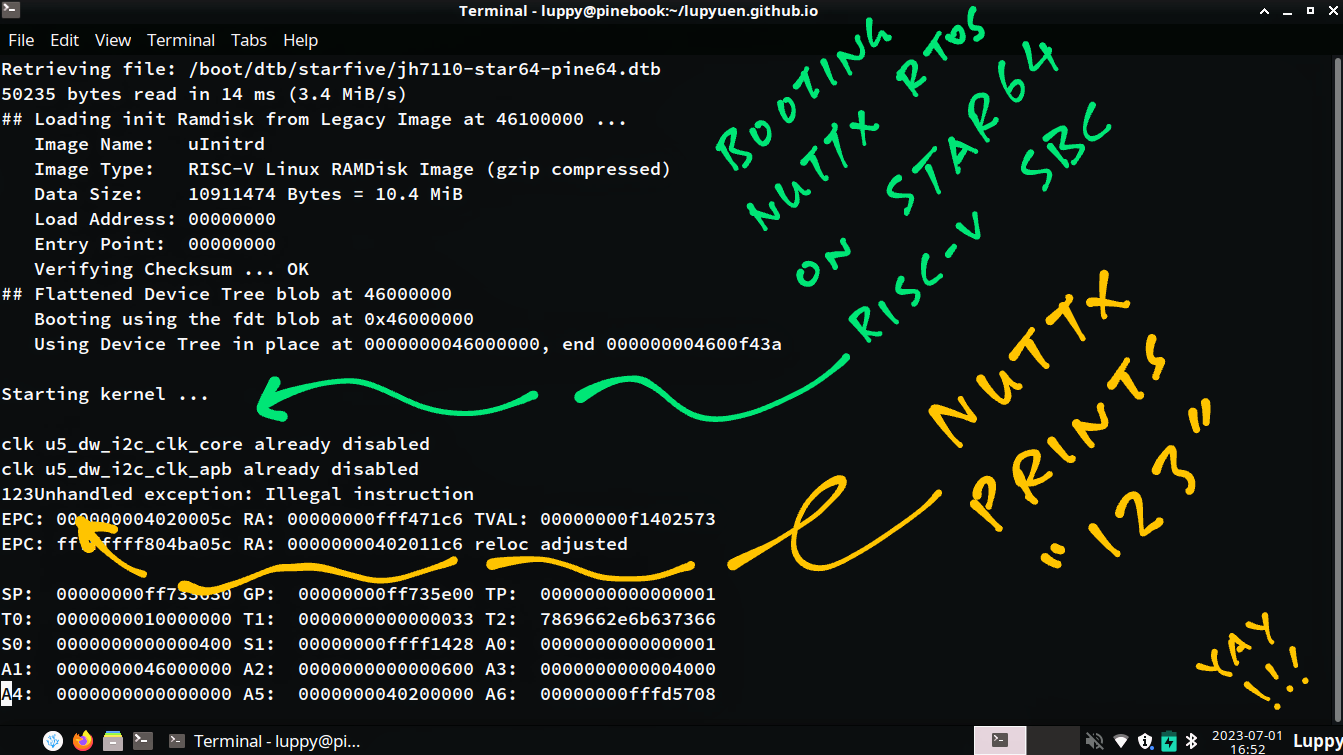
Here's the complete log...
```text
Retrieving file: /boot/extlinux/extlinux.conf
383 bytes read in 7 ms (52.7 KiB/s)
1:[6CArmbian
Retrieving file: /boot/uInitrd
10911538 bytes read in 466 ms (22.3 MiB/s)
Retrieving file: /boot/Image
163201 bytes read in 14 ms (11.1 MiB/s)
append: root=UUID=99f62df4-be35-475c-99ef-2ba3f74fe6b5 console=ttyS0,115200n8 console=tty0 earlycon=sbi rootflags=data=writeback stmmaceth=chain_mode:1 rw rw no_console_suspend consoleblank=0 fsck.fix=yes fsck.repair=yes net.ifnames=0 splash plymouth.ignore-serial-consoles
Retrieving file: /boot/dtb/starfive/jh7110-star64-pine64.dtb
50235 bytes read in 14 ms (3.4 MiB/s)
## Loading init Ramdisk from Legacy Image at 46100000 ...
Image Name: uInitrd
Image Type: RISC-V Linux RAMDisk Image (gzip compressed)
Data Size: 10911474 Bytes = 10.4 MiB
Load Address: 00000000
Entry Point: 00000000
Verifying Checksum ... OK
## Flattened Device Tree blob at 46000000
Booting using the fdt blob at 0x46000000
Using Device Tree in place at 0000000046000000, end 000000004600f43a
Starting kernel ...
clk u5_dw_i2c_clk_core already disabled
clk u5_dw_i2c_clk_apb already disabled
123Unhandled exception: Illegal instruction
EPC: 000000004020005c RA: 00000000fff471c6 TVAL: 00000000f1402573
EPC: ffffffff804ba05c RA: 00000000402011c6 reloc adjusted
SP: 00000000ff733630 GP: 00000000ff735e00 TP: 0000000000000001
T0: 0000000010000000 T1: 0000000000000033 T2: 7869662e6b637366
S0: 0000000000000400 S1: 00000000ffff1428 A0: 0000000000000001
A1: 0000000046000000 A2: 0000000000000600 A3: 0000000000004000
A4: 0000000000000000 A5: 0000000040200000 A6: 00000000fffd5708
A7: 0000000000000000 S2: 00000000fff47194 S3: 0000000000000003
S4: fffffffffffffff3 S5: 00000000fffdbb50 S6: 0000000000000000
S7: 0000000000000000 S8: 00000000fff47194 S9: 0000000000000002
S10: 0000000000000000 S11: 0000000000000000 T3: 0000000000000023
T4: 000000004600b5cc T5: 000000000000ff00 T6: 000000004600b5cc
Code: 0313 0320 8023 0062 0313 0330 8023 0062 (2573 f140)
resetting ...
reset not supported yet
### ERROR ### Please RESET the board ###
```
Why does NuttX crash at `4020005c`? See the next section...
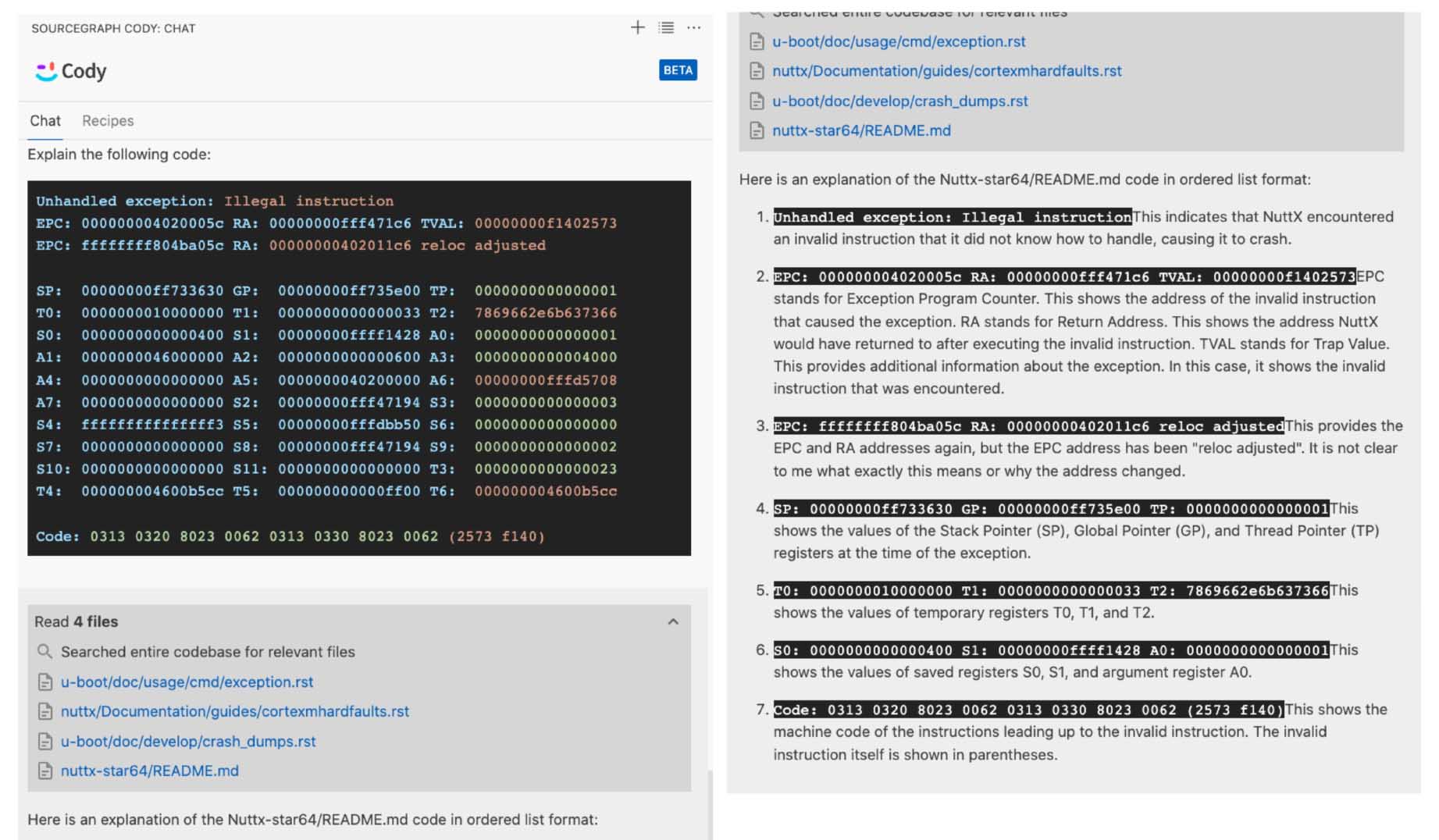
_[Cody AI Assistant](https://about.sourcegraph.com/cody) tries to explain our RISC-V Exception_
# NuttX Fails To Get Hart ID
Read the article...
- ["Apache NuttX RTOS on RISC-V: Star64 JH7110 SBC"](https://lupyuen.github.io/articles/nuttx2)
Earlier we saw NuttX crashing when booting on Star64...
```text
Starting kernel ...
clk u5_dw_i2c_clk_core already disabled
clk u5_dw_i2c_clk_apb already disabled
123
Unhandled exception: Illegal instruction
EPC: 000000004020005c RA: 00000000fff471c6 TVAL: 00000000f1402573
```
_Why did NuttX crash at `4020005c`?_
Here's our RISC-V Boot Code...
From [qemu_rv_head.S](https://github.com/lupyuen2/wip-pinephone-nuttx/blob/ed09c34532ee7c51ac2da816cd6cf0adcce336e6/arch/risc-v/src/qemu-rv/qemu_rv_head.S#L92-L103):
```text
nuttx/arch/risc-v/src/chip/qemu_rv_head.S:95
/* Load mhartid (cpuid) */
csrr a0, mhartid
4020005c: f1402573 csrr a0, mhartid
```
NuttX tries loads the CPU ID or Hardware Thread "Hart" ID from the RISC-V Control and Status Register (CSR). [(Explained here)](https://lupyuen.github.io/articles/riscv#get-cpu-id)
But it fails! Because we don't have sufficient privilege to access the Hart ID...
# RISC-V Privilege Levels
Read the article...
- ["Apache NuttX RTOS on RISC-V: Star64 JH7110 SBC"](https://lupyuen.github.io/articles/nuttx2)
RISC-V runs at 3 Privilege Levels...
- M: Machine Mode (Most powerful)
- S: Supervisor Mode (Less powerful)
- U: User Mode (Least powerful)
NuttX runs at Supervisor Mode, which [doesn't allow access to Machine-Mode CSR Registers](https://five-embeddev.com/riscv-isa-manual/latest/machine.html). (Including [Hart ID](https://five-embeddev.com/riscv-isa-manual/latest/machine.html#hart-id-register-mhartid))
(The `m` in `mhartid` signifies that it's a Machine-Mode Register)
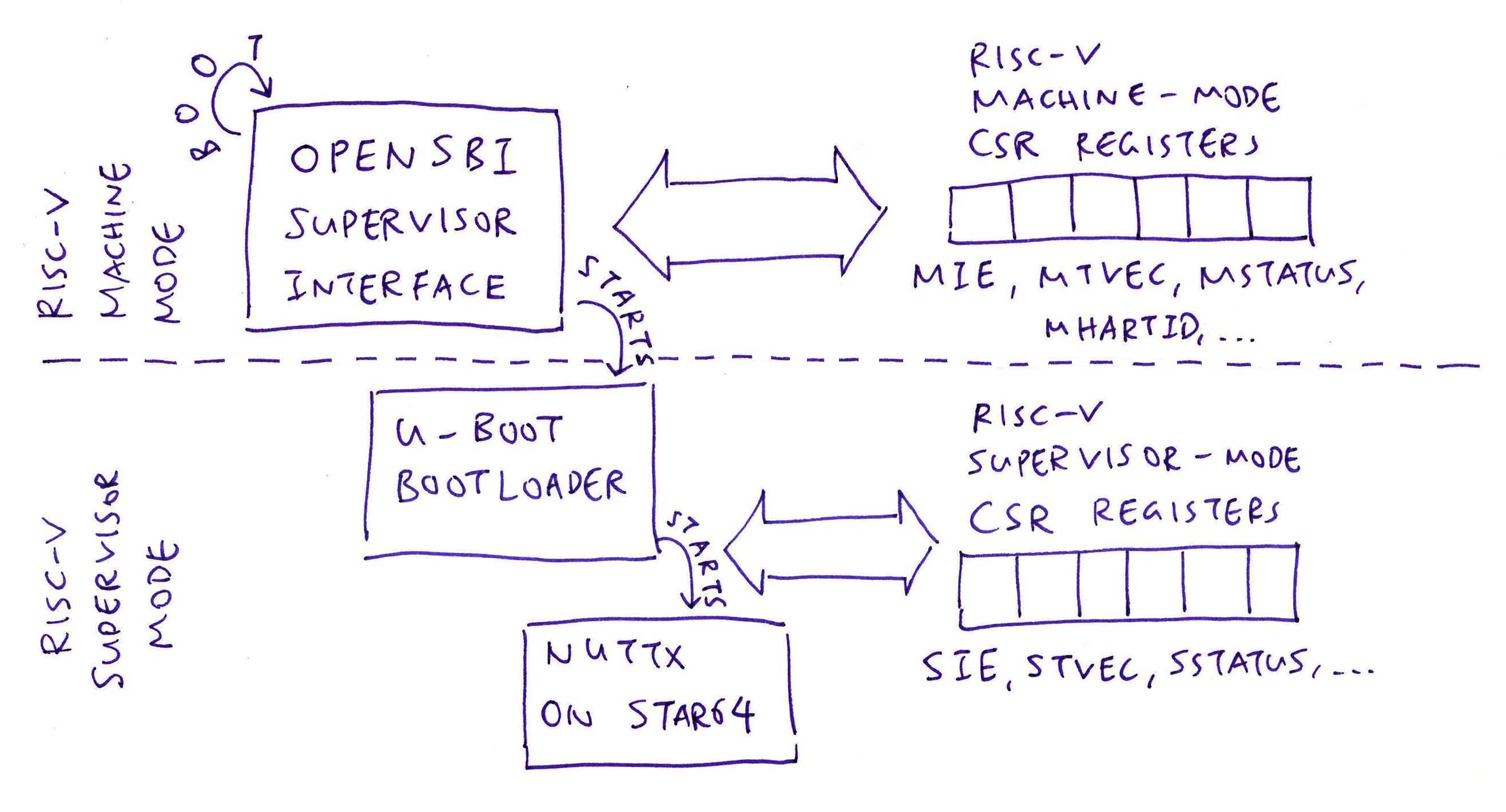
_What runs in Machine Mode?_
[OpenSBI](https://www.thegoodpenguin.co.uk/blog/an-overview-of-opensbi/) (Supervisor Binary Interface) is the first thing that boots on Star64. It runs at Machine Mode and starts the U-Boot Bootloader.
[(See the RISC-V SBI Spec)](https://github.com/riscv-non-isa/riscv-sbi-doc/blob/master/riscv-sbi.pdf)
_What about U-Boot Bootloader?_
U-Boot Bootloader runs in Supervisor Mode. And starts NuttX, also in Supervisor Mode.
So OpenSBI is the only thing that runs in Machine Mode. And can access the Machine-Level Registers.
_QEMU doesn't have this problem?_
Because QEMU runs everything in (super-powerful) __Machine Mode__!
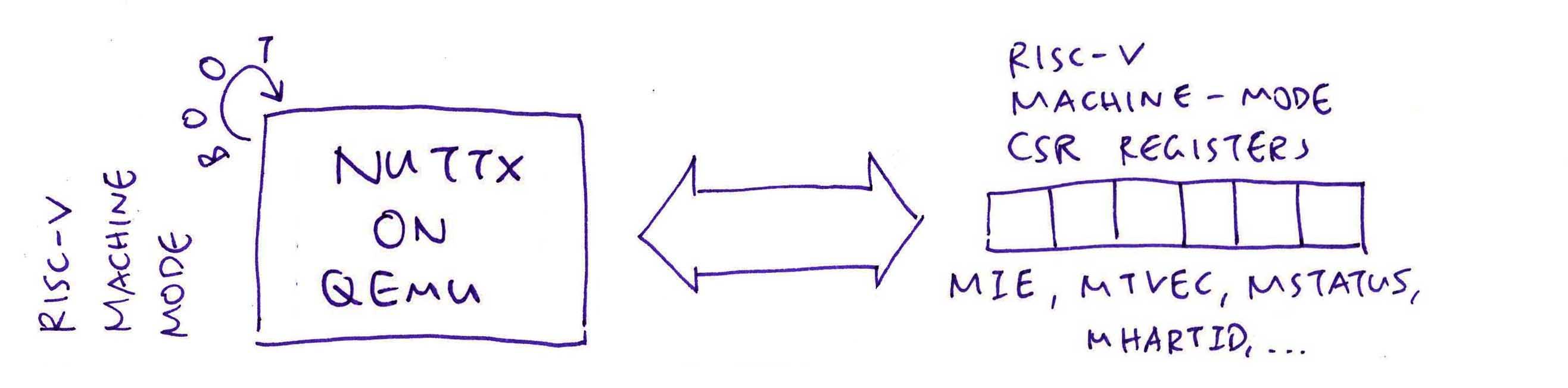
NuttX needs to fetch the Hart ID with a different recipe...
# Downgrade NuttX to Supervisor Mode
Read the article...
- ["Apache NuttX RTOS on RISC-V: Star64 JH7110 SBC"](https://lupyuen.github.io/articles/nuttx2)
_How to get the Hart ID from OpenSBI?_
Let's refer to the Linux Boot Code: [linux/arch/riscv/kernel/head.S](https://github.com/torvalds/linux/blob/master/arch/riscv/kernel/head.S)
(Tip: `CONFIG_RISCV_M_MODE` is False and `CONFIG_EFI` is True)
From [linux/blob/master/arch/riscv/kernel/head.S](https://github.com/torvalds/linux/blob/master/arch/riscv/kernel/head.S#L292-L295):
```c
/* Save hart ID and DTB physical address */
mv s0, a0
mv s1, a1
```
Here we see that U-Boot [(or OpenSBI)](https://github.com/riscv-non-isa/riscv-sbi-doc/blob/master/riscv-sbi.adoc#function-hart-start-fid-0) will pass 2 arguments when it starts our kernel...
- Register A0: Hart ID
- Register A1: RAM Address of Device Tree
So we'll simply read the Hart ID from Register A0. (And ignore A1)
We'll remove `csrr a0, mhartid`.
_What are the actual values of Registers A0 and A1?_
Thanks to our [earlier Crash Dump](https://github.com/lupyuen/nuttx-star64#boot-nuttx-on-star64), we know the actual values of A0 and A1!
```text
SP: 00000000ff733630 GP: 00000000ff735e00 TP: 0000000000000001
T0: 0000000010000000 T1: 0000000000000033 T2: 7869662e6b637366
S0: 0000000000000400 S1: 00000000ffff1428 A0: 0000000000000001
A1: 0000000046000000 A2: 0000000000000600 A3: 0000000000004000
```
This says that...
- Hart ID is 1 (Register A0)
- RAM Address of Device Tree is `0x4600` `0000` (Register A1)
Yep looks correct! But we'll subtract 1 from Register A0 because NuttX expects Hart ID to start with 0.
_What about other CSR Instructions in our NuttX Boot Code?_
We change the Machine-Level `m` Registers to Supervisor-Level `s` Registers.
To Disable Interrupts: Change `mie` to [`sie`](https://five-embeddev.com/riscv-isa-manual/latest/supervisor.html#supervisor-interrupt-registers-sip-and-sie)
```text
/* Disable all interrupts (i.e. timer, external) in mie */
csrw mie, zero
```
[(Source)](https://lupyuen.github.io/articles/riscv#disable-interrupts)
To Load Interrupt Vector Table: Change `mtvec` to [`stvec`](https://five-embeddev.com/riscv-isa-manual/latest/supervisor.html#supervisor-trap-vector-base-address-register-stvec)
```text
/* Load address of Interrupt Vector Table */
csrw mtvec, t0
```
[(Source)](https://lupyuen.github.io/articles/riscv#load-interrupt-vector)
_The Linux Boot Code looks confusing. What are CSR_IE and CSR_IP?_
```text
/* Mask all interrupts */
csrw CSR_IE, zero
csrw CSR_IP, zero
```
[(Source)](https://github.com/torvalds/linux/blob/master/arch/riscv/kernel/head.S#L195-L200)
That's because the Linux Boot Code will work for Machine Level AND Supervisor Level! Here's how `CSR_IE` and `CSR_IP` are mapped to the `m` and `s` CSR Registers...
(Remember: `CONFIG_RISCV_M_MODE` is false for NuttX)
```text
#ifdef CONFIG_RISCV_M_MODE
/* Use Machine-Level CSR Registers */
# define CSR_IE CSR_MIE
# define CSR_IP CSR_MIP
...
#else
/* Use Supervisor-Level CSR Registers */
# define CSR_IE CSR_SIE
# define CSR_IP CSR_SIP
...
#endif /* !CONFIG_RISCV_M_MODE */
```
[(Source)](https://github.com/torvalds/linux/blob/master/arch/riscv/include/asm/csr.h#L391-L444)
Let's fix the Boot Code...
# Fix the NuttX Boot Code
Read the article...
- ["Apache NuttX RTOS on RISC-V: Star64 JH7110 SBC"](https://lupyuen.github.io/articles/nuttx2)
From the previous section, we identified these fixes for the NuttX Boot Code...
1. Remove `csrr a0, mhartid` because OpenSBI will pass Hart ID in Register A0. Subtract 1 from Register A0 because NuttX expects Hart ID to start with 0.
1. To Disable Interrupts: Change `mie` to [`sie`](https://five-embeddev.com/riscv-isa-manual/latest/supervisor.html#supervisor-interrupt-registers-sip-and-sie)
1. To Load Interrupt Vector Table: Change `mtvec` to [`stvec`](https://five-embeddev.com/riscv-isa-manual/latest/supervisor.html#supervisor-trap-vector-base-address-register-stvec)
Here's the updated Boot Code, and our analysis: [qemu_rv_head.S](https://github.com/lupyuen2/wip-pinephone-nuttx/blob/star64/arch/risc-v/src/qemu-rv/qemu_rv_head.S)
```text
real_start:
...
/* Load mhartid (cpuid) */
/* Previously: csrr a0, mhartid */
/* We assume that OpenSBI has passed Hart ID (value 1) in Register a0. */
/* But NuttX expects Hart ID to start at 0, so we subtract 1. */
addi a0, a0, -1
/* Print the Hart ID */
addi t1, a0, 0x30
/* Store byte from Register t1 to UART Base Address, Offset 0 */
sb t1, 0(t0)
```
__If Hart ID is 0:__
- Set Stack Pointer to the Idle Thread Stack
```text
/* Set stack pointer to the idle thread stack */
bnez a0, 1f
la sp, QEMU_RV_IDLESTACK_TOP
j 2f
```
__If Hart ID is 1, 2, 3, ...__
- Validate the Hart ID (Must be less than number of CPUs)
- Compute the Stack Base Address based on `g_cpu_basestack` and Hart ID
- Set the Stack Pointer to the computed Stack Base Address
```text
1:
/* Load the number of CPUs that the kernel supports */
#ifdef CONFIG_SMP
li t1, CONFIG_SMP_NCPUS
#else
li t1, 1
#endif
/* If a0 (mhartid) >= t1 (the number of CPUs), stop here */
blt a0, t1, 3f
csrw sie, zero
/* Previously: csrw mie, zero */
wfi
3:
/* To get g_cpu_basestack[mhartid], must get g_cpu_basestack first */
la t0, g_cpu_basestack
/* Offset = pointer width * hart id */
#ifdef CONFIG_ARCH_RV32
slli t1, a0, 2
#else
slli t1, a0, 3
#endif
add t0, t0, t1
/* Load idle stack base to sp */
REGLOAD sp, 0(t0)
/*
* sp (stack top) = sp + idle stack size - XCPTCONTEXT_SIZE
*
* Note: Reserve some space used by up_initial_state since we are already
* running and using the per CPU idle stack.
*/
li t0, STACK_ALIGN_UP(CONFIG_IDLETHREAD_STACKSIZE - XCPTCONTEXT_SIZE)
add sp, sp, t0
```
__For All Hart IDs:__
- Disable Interrupts
- Load the Interrupt Vector Table
- Jump to `qemu_rv_start`
```
2:
/* Disable all interrupts (i.e. timer, external) in mie */
csrw sie, zero
/* Previously: csrw mie, zero */
/* Don't load the Interrupt Vector Table, use OpenSBI for crash logging */
/* la t0, __trap_vec */
/* csrw stvec, t0 */
/* Previously: csrw mtvec, t0 */
/* Jump to qemu_rv_start */
jal x1, qemu_rv_start
/* We shouldn't return from _start */
```
Note that we don't load the Interrupt Vector Table, because we'll use OpenSBI for crash logging. (Like when we hit M-Mode Instructions)
_What happens when we run this?_
Hart ID is now 0, which is correct...
```text
Starting kernel ...
clk u5_dw_i2c_clk_core already disabled
clk u5_dw_i2c_clk_apb already disabled
123067
```
But `qemu_rv_start` hangs. Why?
```text
/* Print `7` */
li t0, 0x10000000
li t1, 0x37
sb t1, 0(t0)
/* Jump to qemu_rv_start */
jal x1, qemu_rv_start
```
Let's trace `qemu_rv_start`...
# Boot from Network with U-Boot and TFTP
Read the article...
- ["Star64 JH7110 RISC-V SBC: Boot from Network with U-Boot and TFTP"](https://lupyuen.github.io/articles/tftp)
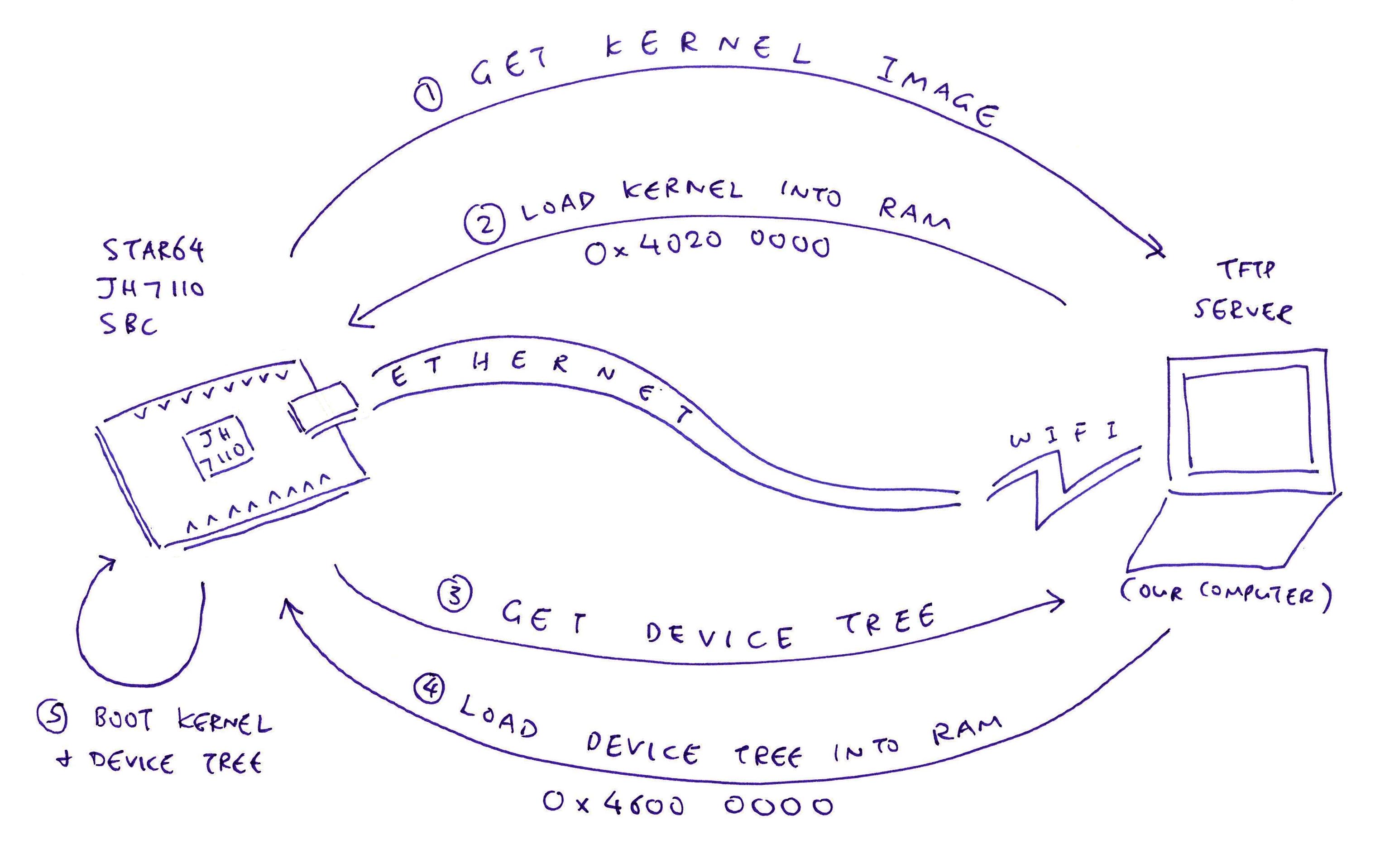
We really should configure U-Boot Bootloader to load the Kernel Image over the network via [TFTP over UDP](https://en.wikipedia.org/wiki/Trivial_File_Transfer_Protocol). Because testing NuttX by swapping microSD Card is getting so tiresome.
Here's how...
## Setup TFTP Server
First we set up a TFTP Server with [`tftpd`](https://crates.io/crates/tftpd)...
```bash
cargo install tftpd
mkdir $HOME/tftproot
sudo tftpd -i 0.0.0.0 -p 69 -d "$HOME/tftproot"
## `sudo` because port 69 is a privileged low port
```
([`tftp_server`](https://crates.io/crates/tftp_server) won't work, it only supports localhost)
We should see...
```text
Running TFTP Server on 0.0.0.0:69 in $HOME/tftproot
Sending a.txt to 127.0.0.1:57125
Sent a.txt to 127.0.0.1:57125
Sending a.txt to 192.168.x.x:33499
Sent a.txt to 192.168.x.x:33499
```
Let's test the TFTP Server...
```bash
echo Test123 >$HOME/tftproot/a.txt
curl -v tftp://127.0.0.1/a.txt
curl -v tftp://192.168.x.x/a.txt
```
(`localhost` won't work because of IPv6, I think)
We should see...
```text
$ curl -v tftp://192.168.x.x/a.txt
* Trying 192.168.x.x:69...
* getpeername() failed with errno 107: Transport endpoint is not connected
* Connected to 192.168.x.x () port 69 (#0)
* getpeername() failed with errno 107: Transport endpoint is not connected
* set timeouts for state 0; Total 300000, retry 6 maxtry 50
* got option=(tsize) value=(8)
* tsize parsed from OACK (8)
* got option=(blksize) value=(512)
* blksize parsed from OACK (512) requested (512)
* got option=(timeout) value=(6)
* Connected for receive
* set timeouts for state 1; Total 0, retry 72 maxtry 50
Test123
* Closing connection 0
```
If it fails...
```text
$ curl -v tftp://192.168.x.x/a.txt
* Trying 192.168.x.x:69...
* getpeername() failed with errno 107: Transport endpoint is not connected
* Connected to 192.168.x.x () port 69 (#0)
* getpeername() failed with errno 107: Transport endpoint is not connected
* set timeouts for state 0; Total 300000, retry 6 maxtry 50
```
In the olden days we would actually do this...
```text
$ tftp 127.0.0.1
tftp> get a.txt
Received 8 bytes in 0.0 seconds
tftp> quit
```
Just like FTP!
## Copy NuttX Image to TFTP Server
Next we copy the NuttX Image and Device Tree to the TFTP Folder...
```bash
## Copy the Device Tree from Armbian microSD
cp \
/run/media/$USER/armbi_root/boot/dtb/starfive/jh7110-visionfive-v2.dtb \
jh7110-star64-pine64.dtb
## Copy NuttX Binary Image and Device Tree to TFTP Folder
## `nuttx.bin` comes from here:
## https://github.com/lupyuen2/wip-pinephone-nuttx/releases/tag/star64-0.0.1
cp nuttx.bin $HOME/tftproot/Image
cp jh7110-star64-pine64.dtb $HOME/tftproot
## Test NuttX Binary Image and Device Tree over TFTP
curl -v tftp://192.168.x.x/Image
curl -v tftp://192.168.x.x/jh7110-star64-pine64.dtb
## We should see...
## Warning: Binary output can mess up your terminal. Use "--output -" to tell
## Warning: curl to output it to your terminal anyway, or consider "--output
## Warning: " to save to a file.
```
## Test U-Boot with TFTP
Now we boot Star64 JH7110 SBC and test the TFTP Commands.
Connect Star64 SBC to the Ethernet wired network and power up.
Star64 fails to boot over the network (because we don't have a [BOOTP Server](https://en.wikipedia.org/wiki/Bootstrap_Protocol) or DHCP+TFTP Combo Server), but that's OK...
```text
ethernet@16030000 Waiting for PHY auto negotiation to complete....... done
BOOTP broadcast 1
*** Unhandled DHCP Option in OFFER/ACK: 43
*** Unhandled DHCP Option in OFFER/ACK: 43
DHCP client bound to address 192.168.x.x (351 ms)
Using ethernet@16030000 device
TFTP from server 192.168.x.x; our IP address is 192.168.x.x
Filename 'boot.scr.uimg'.
Load address: 0x43900000
Loading: *
TFTP server died; starting again
BOOTP broadcast 1
*** Unhandled DHCP Option in OFFER/ACK: 43
*** Unhandled DHCP Option in OFFER/ACK: 43
DHCP client bound to address 192.168.x.x (576 ms)
Using ethernet@16030000 device
TFTP from server 192.168.x.x; our IP address is 192.168.x.x
Filename 'boot.scr.uimg'.
Load address: 0x40200000
Loading: *
TFTP server died; starting again
StarFive #
```
[(Source)](https://github.com/lupyuen/nuttx-star64#u-boot-bootloader-log-for-tftp)
Run these commands...
```bash
## Set the TFTP Server IP
setenv tftp_server 192.168.x.x
## Load the NuttX Image from TFTP Server
## kernel_addr_r=0x40200000
## tftp_server=192.168.x.x
tftpboot ${kernel_addr_r} ${tftp_server}:Image
## Load the Device Tree from TFTP Server
## fdt_addr_r=0x46000000
## tftp_server=192.168.x.x
tftpboot ${fdt_addr_r} ${tftp_server}:jh7110-star64-pine64.dtb
## Set the RAM Address of Device Tree
## fdt_addr_r=0x46000000
fdt addr ${fdt_addr_r}
## Boot the NuttX Image with the Device Tree
## kernel_addr_r=0x40200000
## fdt_addr_r=0x46000000
booti ${kernel_addr_r} - ${fdt_addr_r}
```
[(Inspired by this article)](https://community.arm.com/oss-platforms/w/docs/495/tftp-remote-network-kernel-using-u-boot)
We should see...
```text
StarFive # setenv tftp_server 192.168.x.x
StarFive # tftpboot ${kernel_addr_r} ${tftp_server}:Image
Using ethernet@16030000 device
TFTP from server 192.168.x.x; our IP address is 192.168.x.x
Filename 'Image'.
Load address: 0x40200000
Loading: #############################################################T ####
#################################################################
#############
221.7 KiB/s
done
Bytes transferred = 2097832 (2002a8 hex)
StarFive # tftpboot ${fdt_addr_r} ${tftp_server}:jh7110-star64-pine64.dtb
Using ethernet@16030000 device
TFTP from server 192.168.x.x; our IP address is 192.168.x.x
Filename 'jh7110-star64-pine64.dtb'.
Load address: 0x46000000
Loading: ####
374 KiB/s
done
Bytes transferred = 50235 (c43b hex)
StarFive # fdt addr ${fdt_addr_r}
StarFive # booti ${kernel_addr_r} - ${fdt_addr_r}
## Flattened Device Tree blob at 46000000
Booting using the fdt blob at 0x46000000
Using Device Tree in place at 0000000046000000, end 000000004600f43a
Starting kernel ...
clk u5_dw_i2c_clk_core already disabled
clk u5_dw_i2c_clk_apb already disabled
123067DFAGHBC
```
[(Source)](https://github.com/lupyuen/nuttx-star64#u-boot-bootloader-log-for-tftp)
## Configure U-Boot for TFTP
Let's configure U-Boot so that it will boot from TFTP every time we power up!
```bash
## Remember the TFTP Server IP
setenv tftp_server 192.168.x.x
## Check that it's correct
printenv tftp_server
## Save it for future reboots
saveenv
## Add the Boot Command for TFTP
setenv bootcmd_tftp 'if tftpboot ${kernel_addr_r} ${tftp_server}:Image ; then if tftpboot ${fdt_addr_r} ${tftp_server}:jh7110-star64-pine64.dtb ; then if fdt addr ${fdt_addr_r} ; then booti ${kernel_addr_r} - ${fdt_addr_r} ; fi ; fi ; fi'
## Check that it's correct
printenv bootcmd_tftp
## Save it for future reboots
saveenv
## Test the Boot Command for TFTP
run bootcmd_tftp
## Remember the Original Boot Targets
setenv orig_boot_targets "$boot_targets"
## Should show `mmc0 dhcp`
printenv boot_targets
## Save it for future reboots
saveenv
## Add TFTP to the Boot Targets
setenv boot_targets "$boot_targets tftp"
## Should show `mmc0 dhcp tftp`
printenv boot_targets
## Save it for future reboots
saveenv
```
`bootcmd_tftp` expands to...
```bash
## Load the NuttX Image from TFTP Server
## kernel_addr_r=0x40200000
## tftp_server=192.168.x.x
if tftpboot ${kernel_addr_r} ${tftp_server}:Image ;
then
## Load the Device Tree from TFTP Server
## fdt_addr_r=0x46000000
if tftpboot ${fdt_addr_r} ${tftp_server}:jh7110-star64-pine64.dtb ;
then
## Set the RAM Address of Device Tree
## fdt_addr_r=0x46000000
if fdt addr ${fdt_addr_r} ;
then
## Boot the NuttX Image with the Device Tree
## kernel_addr_r=0x40200000
## fdt_addr_r=0x46000000
booti ${kernel_addr_r} - ${fdt_addr_r} ;
fi ;
fi ;
fi
```
[(From here)](https://community.arm.com/oss-platforms/w/docs/495/tftp-remote-network-kernel-using-u-boot) This is a persistent change, i.e. the device will boot via TFTP on every power up. To revert back to the default boot behaviour:
```bash
## Restore the Boot Targets
setenv boot_targets "$orig_boot_targets"
## Should show `mmc0 dhcp`
printenv boot_targets
## Save it for future reboots
saveenv
```
With Network Boot running, we're now ready for __Automated Testing of Apache NuttX RTOS__ on Star64 SBC!
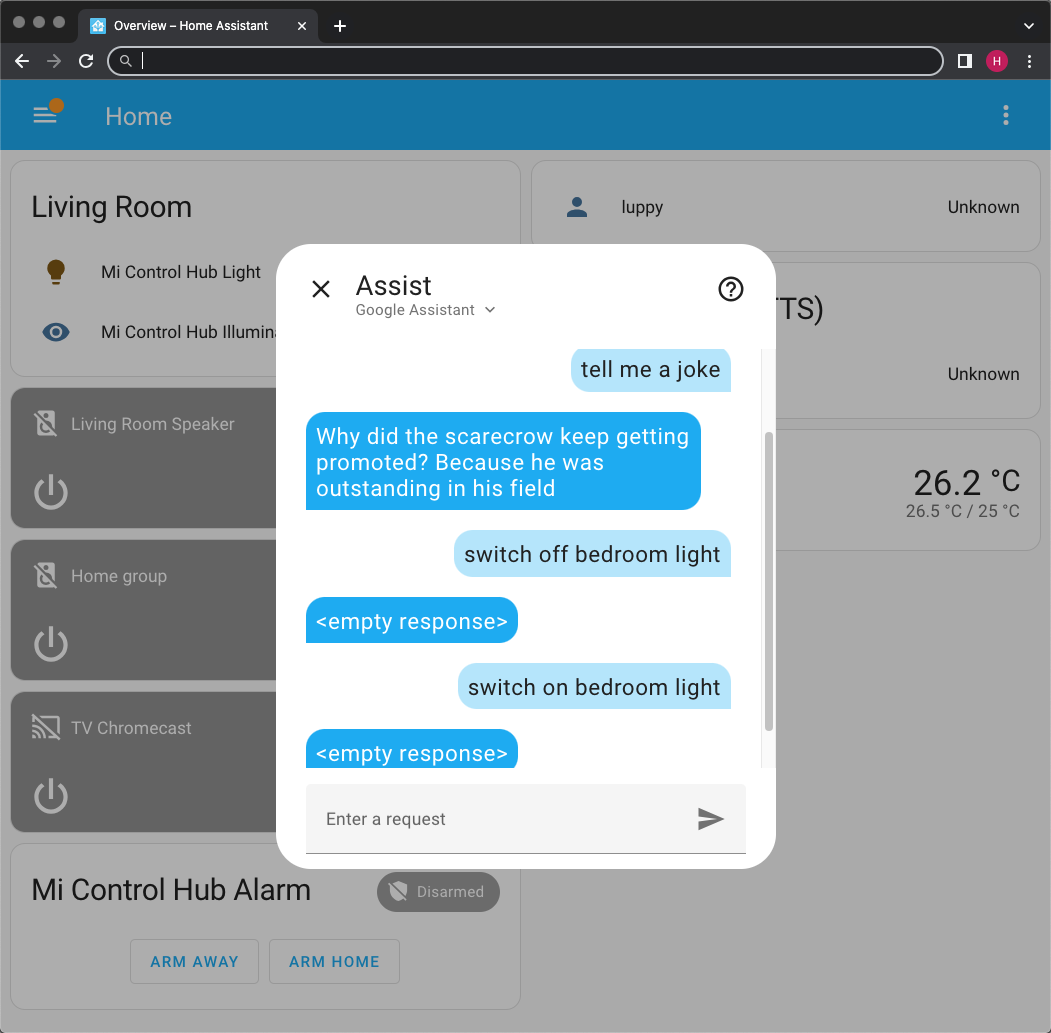
Though we might need a __Smart Power Plug__ to power-cycle our SBC: [__IKEA TRÅDFRI__](https://www.ikea.com/sg/en/p/tradfri-control-outlet-kit-smart-10364797/) and [__DIRIGERA__](https://www.ikea.com/sg/en/p/dirigera-hub-for-smart-products-white-smart-50503409/) via [__Home Assistant API__](https://gist.github.com/lupyuen/01cff0d4ca225984ca8fd0d999d7c76d) (pic below)
## U-Boot Commands for Network Boot
_How does it work?_
`bootcmd` is now...
```text
bootcmd=run load_vf2_env;run importbootenv;run load_distro_uenv;run boot2;run distro_bootcmd
load_vf2_env=fatload mmc ${bootpart} ${loadaddr} ${testenv}
importbootenv=echo Importing environment from mmc${devnum} ...; env import -t ${loadaddr} ${filesize}
load_distro_uenv=fatload mmc ${fatbootpart} ${distroloadaddr} ${bootdir}/${bootenv}; env import ${distroloadaddr} 17c;
boot2 not defined, comes from `boot/vf2_uEnv.txt`
```
`bootcmd` calls `distro_bootcmd`, which runs `bootcmd_mmc0` and `bootcmd_dhcp`...
```text
distro_bootcmd=for target in ${boot_targets}; do run bootcmd_${target}; done
boot_targets=mmc0 dhcp
bootcmd_mmc0=devnum=0; run mmc_boot
bootcmd_distro=run fdt_loaddtb; run fdt_sizecheck; run set_fdt_distro; sysboot mmc ${fatbootpart} fat c0000000 ${bootdir}/${boot_syslinux_conf};
```
`bootcmd_dhcp` is...
```text
bootcmd_dhcp=devtype=dhcp; if dhcp ${scriptaddr} ${boot_script_dhcp}; then source ${scriptaddr}; fi;setenv efi_fdtfile ${fdtfile}; setenv efi_old_vci ${bootp_vci};setenv efi_old_arch ${bootp_arch};setenv bootp_vci PXEClient:Arch:00027:UNDI:003000;setenv bootp_arch 0x1b;if dhcp ${kernel_addr_r}; then tftpboot ${fdt_addr_r} dtb/${efi_fdtfile};if fdt addr ${fdt_addr_r}; then bootefi ${kernel_addr_r} ${fdt_addr_r}; else bootefi ${kernel_addr_r} ${fdtcontroladdr};fi;fi;setenv bootp_vci ${efi_old_vci};setenv bootp_arch ${efi_old_arch};setenv efi_fdtfile;setenv efi_old_arch;setenv efi_old_vci;
```
Which expands to...
```bash
devtype=dhcp
## Load the Boot Script from DHCP+TFTP Server
## scriptaddr=0x43900000
## boot_script_dhcp=boot.scr.uimg
if dhcp ${scriptaddr} ${boot_script_dhcp}
then
source ${scriptaddr}
fi
## Set the EFI Variables
## fdtfile=starfive/starfive_visionfive2.dtb
setenv efi_fdtfile ${fdtfile}
setenv efi_old_vci ${bootp_vci}
setenv efi_old_arch ${bootp_arch}
setenv bootp_vci PXEClient:Arch:00027:UNDI:003000
setenv bootp_arch 0x1b
## Load the Kernel Image from DHCP+TFTP Server...
## kernel_addr_r=0x40200000
if dhcp ${kernel_addr_r}
then
## Load the Device Tree from the DHCP+TFTP Server
## fdt_addr_r=0x46000000
## efi_fdtfile=starfive/starfive_visionfive2.dtb
tftpboot ${fdt_addr_r} dtb/${efi_fdtfile}
## Set the RAM Address of Device Tree
## fdt_addr_r=0x46000000
if fdt addr ${fdt_addr_r}
then
## Boot the EFI Kernel Image
## fdt_addr_r=0x46000000
bootefi ${kernel_addr_r} ${fdt_addr_r}
else
## Boot the EFI Kernel Image
## fdtcontroladdr=fffc6aa0
bootefi ${kernel_addr_r} ${fdtcontroladdr}
fi
fi
## Unset the EFI Variables
setenv bootp_vci ${efi_old_vci}
setenv bootp_arch ${efi_old_arch}
setenv efi_fdtfile
setenv efi_old_arch
setenv efi_old_vci
```
`dhcp` command is...
```text
dhcp - boot image via network using DHCP/TFTP protocol
Usage:
dhcp [loadAddress] [[hostIPaddr:]bootfilename]
```
(Assume [DHCP/TFTP](https://www.emcraft.com/som/using-dhcp) is not used)
`tftpboot` command is...
```text
tftpboot - boot image via network using TFTP protocol
Usage:
tftpboot [loadAddress] [[hostIPaddr:]bootfilename]
```
`fdt` command is...
```text
fdt - flattened device tree utility commands
Usage:
fdt addr [-c] [] - Set the [control] fdt location to
fdt apply - Apply overlay to the DT
fdt move - Copy the fdt to and make it active
fdt resize [] - Resize fdt to size + padding to 4k addr + some optional if needed
fdt print [] - Recursive print starting at
fdt list [] - Print one level starting at
fdt get value - Get and store in
fdt get name - Get name of node and store in
fdt get addr - Get start address of and store in
fdt get size [] - Get size of [] or num nodes and store in
fdt set [] - Set [to ]
fdt mknode - Create a new node after
fdt rm [] - Delete the node or
fdt header [get ] - Display header info
get - get header member and store it in
fdt bootcpu - Set boot cpuid
fdt memory - Add/Update memory node
fdt rsvmem print - Show current mem reserves
fdt rsvmem add - Add a mem reserve
fdt rsvmem delete - Delete a mem reserves
fdt chosen [ ] - Add/update the /chosen branch in the tree
/ - initrd start/end addr
NOTE: Dereference aliases by omitting the leading '/', e.g. fdt print ethernet0.
```
`booti` command is...
```text
booti - boot Linux kernel 'Image' format from memory
Usage:
booti [addr [initrd[:size]] [fdt]]
- boot Linux flat or compressed 'Image' stored at 'addr'
The argument 'initrd' is optional and specifies the address
of an initrd in memory. The optional parameter ':size' allows
specifying the size of a RAW initrd.
Currently only booting from gz, bz2, lzma and lz4 compression
types are supported. In order to boot from any of these compressed
images, user have to set kernel_comp_addr_r and kernel_comp_size environment
variables beforehand.
Since booting a Linux kernel requires a flat device-tree, a
third argument providing the address of the device-tree blob
is required. To boot a kernel with a device-tree blob but
without an initrd image, use a '-' for the initrd argument.
```
`bootefi` command is...
```text
bootefi - Boots an EFI payload from memory
Usage:
bootefi [fdt address]
- boot EFI payload stored at address .
If specified, the device tree located at gets
exposed as EFI configuration table.
bootefi bootmgr [fdt address]
- load and boot EFI payload based on BootOrder/BootXXXX variables.
If specified, the device tree located at gets
exposed as EFI configuration table.
```
Doesn't work for NuttX...
```text
StarFive # bootefi ${kernel_addr_r} ${fdt_addr_r}
Card did not respond to voltage select! : -110
Card did not respond to voltage select! : -110
No EFI system partition
No UEFI binary known at 0x40200000
```
[`autoload`](https://u-boot.readthedocs.io/en/latest/usage/environment.html) setting is...
```text
autoload:
if set to “no” (any string beginning with ‘n’), “bootp” and “dhcp” will just load perform a lookup of the configuration from the BOOTP server, but not try to load any image.
```
# Strange Workaround for TFTP Timeout in U-Boot Bootloader
Read the article...
- ["Strange Workaround for TFTP Timeout in U-Boot Bootloader (Star64 JH7110 RISC-V SBC)"](https://lupyuen.github.io/articles/tftp2)
Why does TFTP time out so often on our SBC? Is it because our TFTP Server sends packets too quickly to our SBC?
Frequent TFTP Timeouts ("T" below) are affecting our NuttX Testing on Star64 JH7110 SBC. Effective transfer rate is only 430 kbps!
```text
Loading: . ##############T ###################################################
. ####################T #########T ####################################
. 53.7 KiB/s
```
[(Source)](https://gist.github.com/lupyuen/9bdb1f5478318631d0480f03f6041d83#file-jh7110-nuttx-math-log-L140-L173)
Let's try something: We send every TFTP Packet twice.
From https://github.com/lupyuen/rs-tftpd-timeout/blob/main/src/worker.rs#L232-L255
```rust
fn send_window(
socket: &T,
window: &Window,
mut block_num: u16,
) -> Result<(), Box> {
// For Every Frame...
for frame in window.get_elements() {
// Send the TFTP Packet
socket.send(&Packet::Data {
block_num,
data: frame.to_vec(),
})?;
// Wait 1 millisecond
static mut DELAY_MS: u64 = 1;
let millis = std::time::Duration::from_millis(DELAY_MS);
std::thread::sleep(millis);
// Send the same TFTP Packet again
// Why does this work?
socket.send(&Packet::Data {
block_num,
data: frame.to_vec(),
})?;
```
Let's test this...
__Before Fixing:__ TFTP Transfer Rate is 48.8 KiB/s (with 6 timeouts)
[(See the log: xinetd + tftpd on Raspberry Pi 4 32-bit)](https://gist.github.com/lupyuen/b36278130fbd281d03fc20189de5485e)
[(Watch the Demo on YouTube)](https://youtu.be/MPBc2Qec6jo)
[(Based on this configuration)](https://community.arm.com/oss-platforms/w/docs/495/tftp-remote-network-kernel-using-u-boot)
__After Fixing:__ TFTP Transfer Rate is 1.1 MiB/s (with NO timeouts)
[(See the log: rs-tftpd-timeout on Raspberry Pi 4 32-bit)](https://gist.github.com/lupyuen/19ab2e16c0c2bb46175bcd8fba7116f2)
[(Watch the Demo on YouTube)](https://youtu.be/ABpi2ABln5o)
[(Based on rs-tftpd-timeout)](https://github.com/lupyuen/rs-tftpd-timeout/blob/main/src/worker.rs#L232-L255)
Yep it works! No more TFTP Timeouts!
(Tested on 32-bit Raspberry Pi 4 and on macOS x64)
TODO: Why does it work? Dropped UDP Packets? We should check with Wireshark
TODO: What if we throttle our TFTP Server to send packets slower? Nope doesn't help
TODO: What if we we reduce the timeout? Nope doesn't work
_Does this problem happen for devices other than Star64 JH7110?_
Nope this TFTP Timeout seems specific to Star64 JH7110. We downloaded a 9 MB file from Pi to macOS over TFTP on Wired Ethernet...
```text
# Before Fixing TFTP Server: 19 Mbps
→ curl --output initrd tftp://192.168.31.10/initrd
% Total % Received % Xferd Average Speed Time Time Time Current
Dload Upload Total Spent Left Speed
100 9015k 0 9015k 0 0 2374k 0 --:--:-- 0:00:03 --:--:-- 2374k
# After Fixing TFTP Server: 3.3 Mbps
→ curl --output initrd tftp://192.168.31.10/initrd
% Total % Received % Xferd Average Speed Time Time Time Current
Dload Upload Total Spent Left Speed
100 9015k 100 9015k 0 0 411k 0 0:00:21 0:00:21 --:--:-- 411k
```
The fixed TFTP Server is slower because of the 1 millisecond delay between packets. And we sent every packet twice.
So maybe U-Boot Bootloader on Star64 JH7110 is too slow to catch all the TFTP Packets?
# Hang in Enter Critical Section
Read the article...
- ["Star64 JH7110 + NuttX RTOS: RISC-V Privilege Levels and UART Registers"](https://lupyuen.github.io/articles/privilege)
NuttX on Star64 JH7110 hangs when entering Critical Section...
From [uart_16550.c](https://github.com/lupyuen2/wip-pinephone-nuttx/blob/star64/drivers/serial/uart_16550.c#L1713-L1737):
```c
int up_putc(int ch)
{
FAR struct u16550_s *priv = (FAR struct u16550_s *)CONSOLE_DEV.priv;
irqstate_t flags;
/* All interrupts must be disabled to prevent re-entrancy and to prevent
* interrupts from firing in the serial driver code.
*/
//// This will hang!
flags = enter_critical_section();
...
u16550_putc(priv, ch);
leave_critical_section(flags);
return ch;
}
```
Which assembles to...
```text
int up_putc(int ch)
{
...
up_irq_save():
nuttx/include/arch/irq.h:675
__asm__ __volatile__
40204598: 47a1 li a5,8
4020459a: 3007b7f3 csrrc a5,mstatus,a5
up_putc():
nuttx/drivers/serial/uart_16550.c:1726
flags = enter_critical_section();
```
But `mstatus` is not accessible at Supervisor Level! Let's trace this.
[`enter_critical_section`](https://github.com/lupyuen2/wip-pinephone-nuttx/blob/star64/include/nuttx/irq.h#L156-L191) calls [`up_irq_save`](https://github.com/lupyuen2/wip-pinephone-nuttx/blob/star64/arch/risc-v/include/irq.h#L660-L689)...
```c
// Disable interrupts and return the previous value of the mstatus register
static inline irqstate_t up_irq_save(void)
{
irqstate_t flags;
/* Read mstatus & clear machine interrupt enable (MIE) in mstatus */
__asm__ __volatile__
(
"csrrc %0, " __XSTR(CSR_STATUS) ", %1\n"
: "=r" (flags)
: "r"(STATUS_IE)
: "memory"
);
/* Return the previous mstatus value so that it can be restored with
* up_irq_restore().
*/
return flags;
}
```
`CSR_STATUS` is defined in [mode.h](https://github.com/lupyuen2/wip-pinephone-nuttx/blob/star64/arch/risc-v/include/mode.h#L35-L103):
```c
#ifdef CONFIG_ARCH_USE_S_MODE
# define CSR_STATUS sstatus /* Global status register */
#else
# define CSR_STATUS mstatus /* Global status register */
#endif
```
So we need to set [CONFIG_ARCH_USE_S_MODE](https://github.com/lupyuen2/wip-pinephone-nuttx/blob/star64/arch/risc-v/Kconfig#L278-L296).
Which is defined in Kernel Mode: [`rv-virt:knsh64`](https://github.com/lupyuen2/wip-pinephone-nuttx/blob/star64/boards/risc-v/qemu-rv/rv-virt/configs/knsh64/defconfig). So we change Build Config to...
```bash
tools/configure.sh rv-virt:knsh64
```
And we bypassed Machine Mode Initialisation during startup...
From [qemu_rv_start.c](https://github.com/lupyuen2/wip-pinephone-nuttx/blob/star64a/arch/risc-v/src/qemu-rv/qemu_rv_start.c#L166-L231)
```c
void qemu_rv_start(int mhartid)
{
// Clear BSS
DEBUGASSERT(mhartid == 0);
if (0 == mhartid) { qemu_rv_clear_bss(); }
// Bypass to S-Mode Init
qemu_rv_start_s(mhartid);
// Skip M-Mode Init
// TODO: What about `satp`, `stvec`, `pmpaddr0`, `pmpcfg0`?
...
}
```
grep for `csr` in `nuttx.S` shows that no more M-Mode Registers are used.
Now Critical Section is OK yay!
```text
Starting kernel ...
clk u5_dw_i2c_clk_core already disabled
clk u5_dw_i2c_clk_apb already disabled
123067DFAGHBCIcd
```
- [See the __Build Steps__](https://github.com/lupyuen2/wip-pinephone-nuttx/releases/tag/star64-0.0.1)
- [See the __Modified Files__](https://github.com/lupyuen2/wip-pinephone-nuttx/pull/31/files)
- [See the __Build Outputs__](https://github.com/lupyuen2/wip-pinephone-nuttx/releases/tag/star64-0.0.1)
_What about `satp`, `stvec`, `pmpaddr0`, `pmpcfg0`?_
We'll handle them in a while.
Sometimes we see this...
```text
Starting kernel ...
clk u5_dw_i2c_clk_core already disabled
clk u5_dw_i2c_clk_apb already disabled
123067DFAGHBCUnhandled exception: Store/AMO access fault
EPC: 0000000040200628 RA: 00000000402004ba TVAL: ffffff8000008000
EPC: ffffffff804ba628 RA: ffffffff804ba4ba reloc adjusted
SP: 0000000040406a30 GP: 00000000ff735e00 TP: 0000000000000001
T0: 0000000010000000 T1: 0000000000000037 T2: ffffffffffffffff
S0: 0000000040400000 S1: 0000000000000200 A0: 0000000000000003
A1: 0000080000008000 A2: 0000000010100000 A3: 0000000040400000
A4: 0000000000000026 A5: 0000000000000000 A6: 00000000101000e7
A7: 0000000000000000 S2: 0000080000008000 S3: 0000000040600000
S4: 0000000040400000 S5: 0000000000000000 S6: 0000000000000026
S7: 00fffffffffff000 S8: 0000000040404000 S9: 0000000000001000
S10: 0000000040400ab0 S11: 0000000000200000 T3: 0000000000000023
T4: 000000004600f43a T5: 000000004600d000 T6: 000000004600cfff
Code: 879b 0277 d7b3 00f6 f793 1ff7 078e 95be (b023 0105)
```
Which fails at...
```text
nuttx/arch/risc-v/src/common/riscv_mmu.c:101
lntable[index] = (paddr | mmuflags);
40200620: 1ff7f793 andi a5,a5,511
40200624: 078e slli a5,a5,0x3
40200626: 95be add a1,a1,a5
40200628: 0105b023 sd a6,0(a1) /* Fails Here */
mmu_invalidate_tlb_by_vaddr():
nuttx/arch/risc-v/src/common/riscv_mmu.h:237
__asm__ __volatile__
4020062c: 12d00073 sfence.vma zero,a3
40200630: 8082 ret
```
TODO: Trace this Store/AMO Access Fault
# Hang in UART Transmit
Read the article...
- ["Star64 JH7110 + NuttX RTOS: RISC-V Privilege Levels and UART Registers"](https://lupyuen.github.io/articles/privilege)
When printing to UART Port, the UART Transmit hangs while waiting for UART Transmit Ready...
From [uart_16550.c](https://github.com/lupyuen2/wip-pinephone-nuttx/blob/star64/drivers/serial/uart_16550.c#L1638-L1642)
```c
static void u16550_putc(FAR struct u16550_s *priv, int ch)
{
//// This will hang!
while ((u16550_serialin(priv, UART_LSR_OFFSET) & UART_LSR_THRE) == 0);
u16550_serialout(priv, UART_THR_OFFSET, (uart_datawidth_t)ch);
}
```
Where [`u16550_serialin`](https://github.com/lupyuen2/wip-pinephone-nuttx/blob/star64a/drivers/serial/uart_16550.c#L596-L611) is defined as...
```c
*((FAR volatile uart_datawidth_t *)priv->uartbase + offset);
```
And [`UART_THR_OFFSET`](https://github.com/lupyuen2/wip-pinephone-nuttx/blob/star64a/include/nuttx/serial/uart_16550.h#L197) is...
```c
#define UART_LSR_OFFSET (CONFIG_16550_REGINCR*UART_LSR_INCR)
```
`CONFIG_16550_REGINCR` is 1...
```text
→ grep 16550 .config
CONFIG_16550_REGINCR=1
CONFIG_16550_REGWIDTH=8
CONFIG_16550_ADDRWIDTH=0
```
As defined according to the Default Config for 16550: [Kconfig-16550](https://github.com/lupyuen2/wip-pinephone-nuttx/blob/star64a/drivers/serial/Kconfig-16550#L501-L520):
```text
config 16550_REGINCR
int "Address increment between 16550 registers"
default 1
---help---
The address increment between 16550 registers. Options are 1, 2, or 4.
Default: 1
config 16550_REGWIDTH
int "Bit width of 16550 registers"
default 8
---help---
The bit width of registers. Options are 8, 16, or 32. Default: 8
config 16550_ADDRWIDTH
int "Address width of 16550 registers"
default 8
---help---
The bit width of registers. Options are 0, 8, 16, or 32.
Default: 8
Note: 0 means auto detect address size (uintptr_t)
```
_But is CONFIG_16550_REGINCR correct for Star64 JH7110?_
Let's check the official Linux Driver. According to [JH7110 Linux Device Tree](https://doc-en.rvspace.org/VisionFive2/DG_UART/JH7110_SDK/general_uart_controller.html)...
```text
reg = <0x0 0x10000000 0x0 0xl0000>;
reg-io-width = <4>;
reg-shift = <2>;
```
`reg-shift` is 2.
And from the Linux 8250 Driver: [8250_dw.c](https://github.com/torvalds/linux/blob/master/drivers/tty/serial/8250/8250_dw.c#L159-L169)
```text
static void dw8250_serial_out(struct uart_port *p, int offset, int value)
{
struct dw8250_data *d = to_dw8250_data(p->private_data);
writeb(value, p->membase + (offset << p->regshift));
if (offset == UART_LCR && !d->uart_16550_compatible)
dw8250_check_lcr(p, value);
}
```
We see that the UART Offset is shifted by 2 (`regshift`). Which means we multiply the UART Offset by 4.
Thus `CONFIG_16550_REGINCR` should be 4, not 1!
_How to fix CONFIG_16550_REGINCR?_
We fix the NuttX Configuration: Device Drivers > Serial Driver Support > 16550 UART Chip support > Address increment between 16550 registers
And change it from 1 to 4: [knsh64/defconfig](https://github.com/lupyuen2/wip-pinephone-nuttx/blob/star64a/boards/risc-v/qemu-rv/rv-virt/configs/knsh64/defconfig#L11)
```text
CONFIG_16550_REGINCR=4
```
Now UART Transmit doesn't hang yay!
```text
Starting kernel ...
clk u5_dw_i2c_clk_core already disabled
clk u5_dw_i2c_clk_apb already disabled
123067DFm45DTpAqGaclbHm45DTpBqm45DTpCqI
```
NuttX now hangs somewhere in `nx_start`
Let's log the NuttX Scheduler...
# Enable Scheduler Logging
Scheduler Logging in NuttX seems to have changed recently. To enable Scheduler Logging...
- `make menuconfig`
- Disable this setting: Device Drivers > System Logging > Prepend timestamp to syslog message
- Enable these settings: Build Setup > Debug Options > Scheduler Debug Features > Scheduler Error, Warnings and Info Output
- Also enable: Build Setup > Debug Options > Binary Loader Debug Features > Binary Loader Error, Warnings and Info Output
After enabling Scheduler Logging and Binary Loader Logging, we see...
```text
123067DFAGaclbHBCqemu_rv_kernel_mappings: map I/O regions
qemu_rv_kernel_mappings: map kernel text
qemu_rv_kernel_mappings: map kernel data
qemu_rv_kernel_mappings: connect the L1 and L2 page tables
qemu_rv_kernel_mappings: map the page pool
qemu_rv_mm_init: mmu_enable: satp=1077956608
Inx_start: Entry
elf_initialize: Registering ELF
uart_register: Registering /dev/console
uart_register: Registering /dev/ttyS0
work_start_lowpri: Starting low-priority kernel worker thread(s)
nx_start_application: Starting init task: /system/bin/init
load_absmodule: Loading /system/bin/init
elf_loadbinary: Loading file: /system/bin/init
elf_init: filename: /system/bin/init loadinfo: 0x404069e8
```
_What is `/system/bin/init`?_
We'll find out in a while...
[Compare with QEMU Kernel Mode Run Log](https://gist.github.com/lupyuen/6888376da6561bdc060c2459dffdef01)
[See the QEMU Kernel Mode Build Log](https://gist.github.com/lupyuen/dce0cdbbf4a4bdf9c79e617b3fe1b679)
# Initialise RISC-V Supervisor Mode
Read the article...
- ["Star64 JH7110 + NuttX RTOS: RISC-V Privilege Levels and UART Registers"](https://lupyuen.github.io/articles/privilege)
Earlier we bypassed the Machine Mode and Supervisor Mode Initialisation during NuttX startup...
From [qemu_rv_start.c](https://github.com/lupyuen2/wip-pinephone-nuttx/blob/star64a/arch/risc-v/src/qemu-rv/qemu_rv_start.c#L166-L231)
```c
void qemu_rv_start(int mhartid)
{
// Clear BSS
DEBUGASSERT(mhartid == 0);
if (0 == mhartid) { qemu_rv_clear_bss(); }
// Bypass to S-Mode Init
qemu_rv_start_s(mhartid);
// Skip M-Mode Init
// TODO: What about `satp`, `stvec`, `pmpaddr0`, `pmpcfg0`?
...
}
```
Now we restore the Supervisor Mode Initialisation, commenting out the Machine Mode Initialisation...
From [qemu_rv_start.c](https://github.com/lupyuen2/wip-pinephone-nuttx/blob/star64a/arch/risc-v/src/qemu-rv/qemu_rv_start.c#L165-L233):
```c
void qemu_rv_start(int mhartid)
{
DEBUGASSERT(mhartid == 0); //
/* NOTE: still in M-mode */
if (0 == mhartid)
{
qemu_rv_clear_bss();
/* Initialize the per CPU areas */
riscv_percpu_add_hart(mhartid);
}
/* Disable MMU and enable PMP */
WRITE_CSR(satp, 0x0);
//WRITE_CSR(pmpaddr0, 0x3fffffffffffffull);
//WRITE_CSR(pmpcfg0, 0xf);
/* Set exception and interrupt delegation for S-mode */
//WRITE_CSR(medeleg, 0xffff);
//WRITE_CSR(mideleg, 0xffff);
/* Allow to write satp from S-mode */
//CLEAR_CSR(mstatus, MSTATUS_TVM);
/* Set mstatus to S-mode and enable SUM */
//CLEAR_CSR(mstatus, ~MSTATUS_MPP_MASK);
//SET_CSR(mstatus, MSTATUS_MPPS | SSTATUS_SUM);
/* Set the trap vector for S-mode */
WRITE_CSR(stvec, (uintptr_t)__trap_vec);
/* Set the trap vector for M-mode */
//WRITE_CSR(mtvec, (uintptr_t)__trap_vec_m);
if (0 == mhartid)
{
/* Only the primary CPU needs to initialize mtimer
* before entering to S-mode
*/
// TODO
//up_mtimer_initialize();
}
/* Set mepc to the entry */
//WRITE_CSR(mepc, (uintptr_t)qemu_rv_start_s);
/* Set a0 to mhartid explicitly and enter to S-mode */
//asm volatile (
// "mv a0, %0 \n"
// "mret \n"
// :: "r" (mhartid)
//);
// Jump to S-Mode Init ourselves
qemu_rv_start_s(mhartid); //
}
```
TODO: Port [__up_mtimer_initialize__](https://github.com/lupyuen2/wip-pinephone-nuttx/blob/star64a/arch/risc-v/src/qemu-rv/qemu_rv_timerisr.c#L151-L210) to Star64
Now NuttX boots further!
```text
123067DFHBCqemu_rv_kernel_mappings: map I/O regions
qemu_rv_kernel_mappings: map kernel text
qemu_rv_kernel_mappings: map kernel data
qemu_rv_kernel_mappings: connect the L1 and L2 page tables
qemu_rv_kernel_mappings: map the page pool
qemu_rv_mm_init: mmu_enable: satp=1077956608
Inx_start: Entry
elf_initialize: Registering ELF
uart_register: Registering /dev/console
uart_register: Registering /dev/ttyS0
work_start_lowpri: Starting low-priority kernel worker thread(s)
nx_start_application: Starting init task: /system/bin/init
load_absmodule: Loading /system/bin/init
elf_loadbinary: Loading file: /system/bin/init
elf_init: filename: /system/bin/init loadinfo: 0x404069e8
riscv_exception: EXCEPTION: Breakpoint. MCAUSE: 0000000000000003, EPC: 0000000040200434, MTVAL: 0000000000000000
riscv_exception: PANIC!!! Exception = 0000000000000003
_assert: Current Version: NuttX 12.0.3 2261b80-dirty Jul 15 2023 20:38:57 risc-v
_assert: Assertion failed panic: at file: common/riscv_exception.c:85 task: Idle Task 0x40200ce6
up_dump_register: EPC: 0000000040200434
up_dump_register: A0: 0000000000000001 A1: 0000000040406778 A2: 0000000000000000 A3: 0000000000000001
up_dump_register: A4: 0000000000000000 A5: 00000000404067e0 A6: 0000000000000074 A7: fffffffffffffff8
up_dump_register: T0: 0000000000000030 T1: 0000000000000007 T2: 0000000000000020 T3: 0000000040406aa0
up_dump_register: T4: 0000000040406a98 T5: 00000000000001ff T6: 000000000000002d
up_dump_register: S0: 0000000000000000 S1: 0000000040406968 S2: 0000000040408720 S3: 0000000000000000
up_dump_register: S4: 0000000000000000 S5: 0000000000000000 S6: 0000000000000000 S7: 0000000000000000
up_dump_register: S8: 00000000fff47194 S9: 0000000000000000 S10: 0000000000000000 S11: 0000000000000000
up_dump_register: SP: 0000000040406760 FP: 0000000000000000 TP: 0000000000000001 RA: 0000000040213e24
dump_stack: User Stack:
dump_stack: base: 0x40406030
dump_stack: size: 00003024
dump_stack: sp: 0x40406760
stack_dump: 0x40406760: 00000000 00000000 40213e6a 00000000 fff47194 00000000 404067d0 00000000
stack_dump: 0x40406780: 00000001 00000000 00000010 00000000 00000000 00000000 40213ffc 00000000
stack_dump: 0x404067a0: 40408720 00000000 40406968 00000000 00000000 00000000 4020c7ec 00000000
stack_dump: 0x404067c0: 00000800 00000000 40219f30 00000000 612f2e2e 2f737070 2f6e6962 74696e69
stack_dump: 0x404067e0: 00000a00 00000000 00000000 00000000 0000