https://github.com/luxury-yacht/app
Luxury Yacht - A cross-platform app for managing Kubernetes clusters and resources
https://github.com/luxury-yacht/app
cloud-native cross-platform desktop k8s k8s-cluster k8s-clusters kubectl kubernetes kubernetes-cluster kubernetes-clusters
Last synced: about 1 month ago
JSON representation
Luxury Yacht - A cross-platform app for managing Kubernetes clusters and resources
- Host: GitHub
- URL: https://github.com/luxury-yacht/app
- Owner: luxury-yacht
- License: gpl-3.0
- Created: 2025-12-18T04:18:10.000Z (8 months ago)
- Default Branch: main
- Last Pushed: 2026-06-29T23:27:07.000Z (about 1 month ago)
- Last Synced: 2026-06-30T00:19:51.427Z (about 1 month ago)
- Topics: cloud-native, cross-platform, desktop, k8s, k8s-cluster, k8s-clusters, kubectl, kubernetes, kubernetes-cluster, kubernetes-clusters
- Language: TypeScript
- Homepage: https://luxury-yacht.app
- Size: 11.4 MB
- Stars: 279
- Watchers: 1
- Forks: 11
- Open Issues: 1
-
Metadata Files:
- Readme: README.md
- Contributing: CONTRIBUTING.md
- License: LICENSE
- Code of conduct: CODE_OF_CONDUCT.md
- Security: SECURITY.md
- Agents: AGENTS.md
Awesome Lists containing this project
- awesome - luxury-yacht/app - Luxury Yacht - A cross-platform app for managing Kubernetes clusters and resources (<a name="TypeScript"></a>TypeScript)
README
# Luxury Yacht
Luxury Yacht is a cross-platform GUI desktop app for managing Kubernetes clusters and resources.
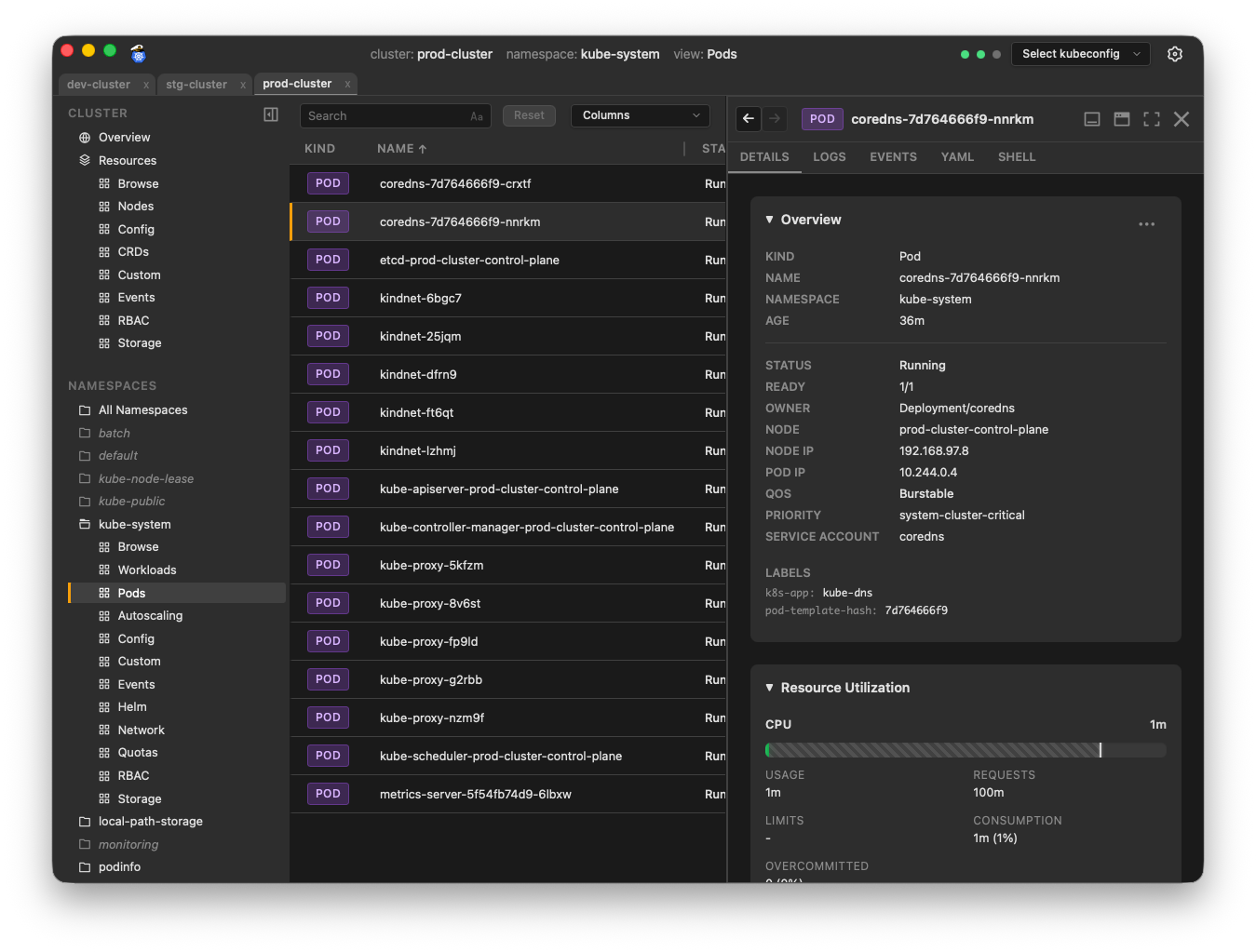
**New to Luxury Yacht?** Check out the [Features](https://luxury-yacht.app/features) page!
**Luxury Yacht is open source and free for personal and commercial use.** No fees, no subscriptions, no telemetry.
## Why Luxury Yacht?
I'm a Kubernetes admin. I've tried most of the other apps in this space. None of them worked quite the way I wanted. I created Luxury Yacht to close those gaps, and make my job (and hopefully yours) a little easier.
Luxury Yacht has all the standard features of a Kubernetes management app. If you've used k9s, Lens, Headlamp, or similar apps, you know what to expect: cluster summary data, real-time metrics, workload status, detailed drilldown info, pod logs, etc.
### Highlights
Here are some of the features of Luxury Yacht that you might not find in other apps.
- **Maybe the best log viewer you've ever used.** Highlight search text. Invert your search to only show lines without the text. Use regular expressions. Show system timestamps for logs without their own timestamps, or logs that have indecipherable formats like unix epoch time. Customize the timestamp format. Show times in UTC or your local time zone. Toggle support for ASCII color codes. Make JSON logs more readable by showing them in tabular or pretty-print format.
- **Object Maps.** Visualize the relationships between objects in your clusters. View a node-level map, an namespace-level map, or drill down to specific objects.
- **Flexible panel layouts.** Organize your info however you like. Dock panels to the right, bottom, or float them as a resizable window. Open multiple object tabs in each panel. Drag tabs between panels, or drag out to create a new floating panel.
- **Object Diff.** Can't understand why a deployment is working correctly in one cluster, but not the other? Open both deployments in the Diff Objects panel to see exactly what the differences are.
- **Command Palette.** Instant access to nearly everything in the app. Open clusters, toggle settings, select a namespace, go straight to a specific object's details, change the app's appearance, and much more.
- **Favorites.** Save a view (and its filters) as a favorite for quick access. Favorites can be cluster-specific, or create a generic favorite that works in any cluster.
- **Themes per cluster.** The flexible theme system allows you to assign colors to specific clusters or patterns in cluster names. Assign your dev clusters a blue theme, and your prod clusters a red theme, so you can instantly know when you're working in production. And, of course, you can have light and dark versions of your themes.
- **Zero-touch setup.** Luxury Yacht uses your existing kubeconfig files. It reads `~/.kube` and loads your clusters into a dropdown menu. Select a cluster from the dropdown to get started. Open Settings to add or change which directories Luxury Yacht scans for kubeconfig files.
- **Node maintenance.** Cordon, drain, and delete nodes with ease.
- **Simple port forwarding.** Right-click on a workload, pod, or service and click Port Forward. Select a port and click Start. That's it. Run multiple port forwards simultaneously, and easily track them in a centralized status console.
- **Shell support with debug containers.** Of course you expect to be able to get a shell in a container, but what if the container doesn't support shell access? Luxury Yacht gives you a simple way to start an ephemeral debug container in that pod, attached to the container.
## Installation
### Direct Downloads
Visit [Downloads](https://luxury-yacht.app/#downloads) on the web site, or go to the [Releases](https://github.com/luxury-yacht/app/releases) page if you know exactly what you need.
### Package Managers
Package manager support is currently limited, but more will be added.
#### Homebrew (macOS only)
```sh
brew install luxury-yacht
```
### Building from Source
If you prefer to build the app from source, see the Development section.
### Troubleshooting
#### The app won't start on Linux
Luxury Yacht requires webkit2 4.1. Some distros don't include it, or don't install it by default. Installation will vary depending on your distro.
| Distro | Installation |
| ------------ | -------------------------------------- |
| Ubuntu 20.04 | Unsupported |
| Ubuntu 22.04 | `sudo apt install libwebkit2gtk-4.1-0` |
If your distro isn't on this (admittedly short) list, you'll have to search your package manager to determine the exact package name. If you have info you'd like to add to this list, email [admin@luxury-yacht.app](mailto:admin@luxury-yacht.app) or open an issue.
## Development
### Prerequisites
- Go 1.26
- Node 25
- [Wails](https://wails.io/)
- [Mage](https://magefile.org/)
- [Staticcheck](https://staticcheck.dev/)
#### Wails
Luxury Yacht is built with [Wails](https://wails.io/), a framework for building cross-platform apps in Go.
To install Wails:
```bash
go install github.com/wailsapp/wails/v2/cmd/wails@v2.12.0
```
Once Wails is installed, run `wails doctor` to see what other dependencies you'll need to install.
📝 _If `wails` is not found, make sure your go `bin` path (typically `$HOME/go/bin`) is in your `PATH`._
#### Staticcheck
Staticcheck is a static analysis linter for Go.
To install Staticcheck:
```bash
go install honnef.co/go/tools/cmd/staticcheck@latest
```
#### Mage
For scripting builds, testing, releases, etc., Luxury Yacht uses [Mage](https://magefile.org/) for cross-platform compatibilty. Makefiles and bash scripts are fine for Linux and macOS, but they don't work in Windows. The `magefile` is written in Go, so should work the same in any OS.
To install Mage:
```bash
go install github.com/magefile/mage@latest
```
To see what `mage` targets are available, run `mage -l` in the repo root.
### Development Mode
The fastest way to get the app up and running for development is to run in Wails development mode. This gives you hot-reloads and access to the browser console for debugging.
```bash
mage dev
```
Note that hot-reload of the Go backend will cause the app to restart, while changes to frontend code will be reflected immediately without an app restart.
### Storybook
[Storybook](https://storybook.js.org/) is available for developing and previewing UI components in isolation.
> _NOTE_: you may need to run `nvm install` in the repo root to install the correct version of node from `.nvmrc`
```bash
mage storybook
```
This starts the Storybook dev server at [http://localhost:6006](http://localhost:6006).
### Build
```bash
mage build
```
### Install
To install the app locally:
```bash
mage install:unsigned
```
## Versions
When updating versions in the app, these are the canonical sources. All scripts/workflows should get app and toolset versions from these sources and these sources only.
#### App Version
App version is derived from `info.productVersion` in [wails.json](wails.json)
```bash
APP_VERSION=$(jq -r '.info.productVersion' wails.json)
```
#### Go Version
Go version is derived from go.mod
```bash
GO_VERSION=$(grep '^go ' go.mod | awk '{print $2}')
```
#### Wails Version
Wails version is derived from go.mod
```bash
WAILS_VERSION=$(grep 'github.com/wailsapp/wails/v2' go.mod | awk '{print $2}')
```
#### Node Version
Node version is derived from .nvmrc
```bash
NODE_VERSION=$(cat .nvmrc | tr -d 'v')
```
## Publishing Releases
Run the prerelease checks. This should surface any problems that could cause the release to fail.
```bash
mage qc:prerelease
```
You should also run the benchmark tests if you're going to make changes to the backend code. Compare the numbers before and after your change to make sure you haven't introduced any major performance hits.
```bash
mage qc:benchmark
```
1. Update the version in [wails.json](wails.json)
1. Commit and push the change.
1. Create and push a tag. The `release` workflow will do the rest.
```bash
git tag $(jq -r '.info.productVersion' wails.json)
git push origin main --tags
```