https://github.com/luyadev/luya-module-remoteadmin
Collect remote informations from other LUYA instances.
https://github.com/luyadev/luya-module-remoteadmin
debug hacktoberfest info luya remoteadmin
Last synced: 9 months ago
JSON representation
Collect remote informations from other LUYA instances.
- Host: GitHub
- URL: https://github.com/luyadev/luya-module-remoteadmin
- Owner: luyadev
- License: mit
- Created: 2016-02-01T15:56:45.000Z (over 10 years ago)
- Default Branch: master
- Last Pushed: 2024-01-14T17:57:18.000Z (over 2 years ago)
- Last Synced: 2025-06-21T13:39:33.718Z (12 months ago)
- Topics: debug, hacktoberfest, info, luya, remoteadmin
- Language: PHP
- Homepage: https://luya.io
- Size: 344 KB
- Stars: 7
- Watchers: 3
- Forks: 4
- Open Issues: 0
-
Metadata Files:
- Readme: README.md
- Changelog: CHANGELOG.md
- License: LICENSE.md
Awesome Lists containing this project
README

# REMOTE Admin Module
[](https://luya.io)
[](https://packagist.org/packages/luyadev/luya-module-remoteadmin)
[](https://packagist.org/packages/luyadev/luya-module-remoteadmin)
[](https://slack.luya.io/)
**The powerful tool for Agencies!**
*What is REMOTE ADMIN?* Well, have you ever created several websites with the same system and delivered them to different Providers? Remote Admin provides you the ability to collect all your [LUYA](https://github.com/zephir/luya#readme) Websites into the REMOTE ADMIN and helps you to see:
+ See all outdated websites (auto compare LUYA version to the lastet version available on packagist).
+ Collect informations about the Website itself, to make sure they are configured well.
+ See how many administrators are active.
+ Direct Link to the Website.
We will add more features in future, to make the [LUYA](https://github.com/zephir/luya#readme) control panel a powerfull tool!
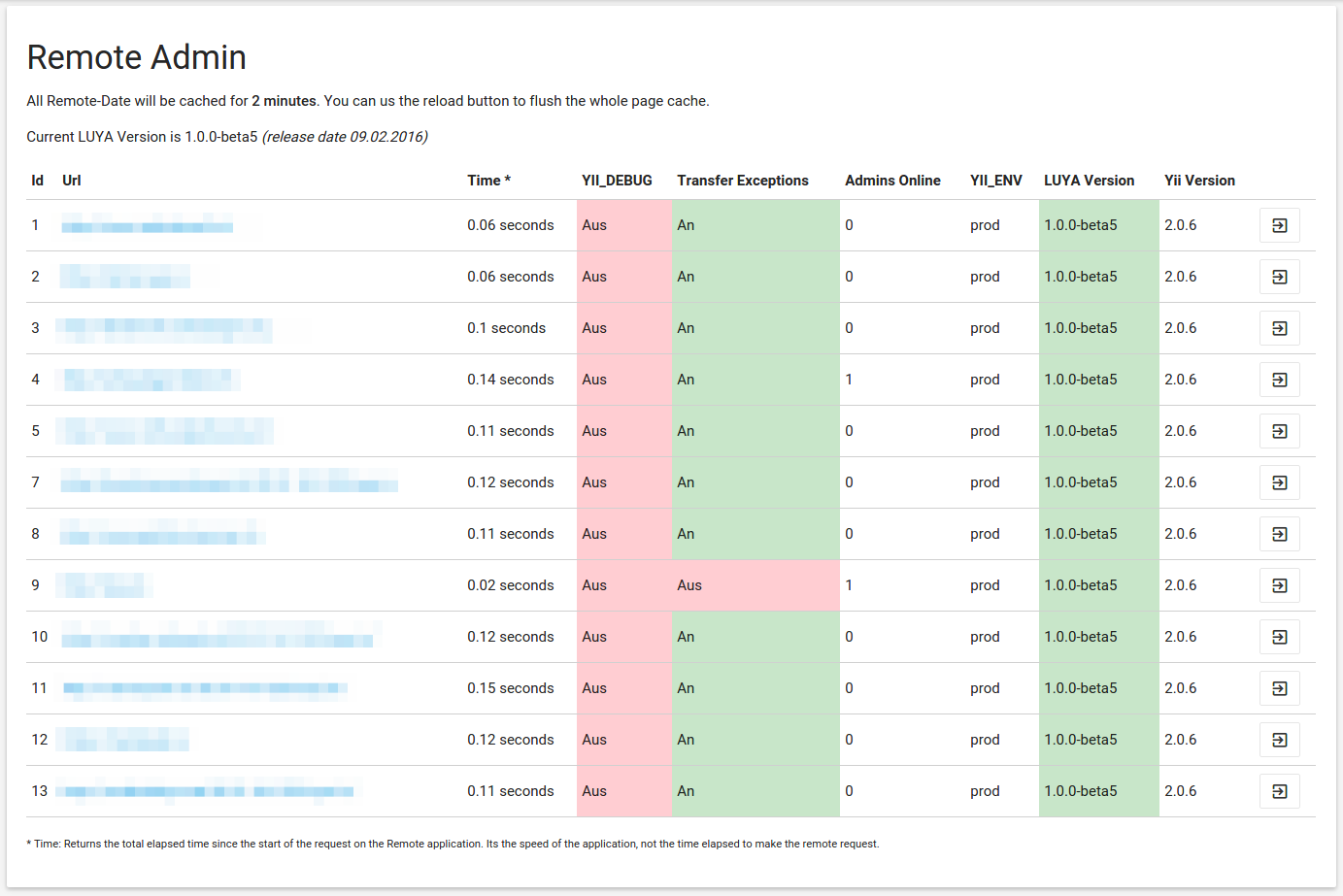
Remote Admin will work out of the box with all [LUYA](https://github.com/zephir/luya#readme) instances you create, just add a `remoteToken` in your project application config and install the remoteadmin module on your privat/company Server/Website and you are able to add all instances.
## Installation
For the installation of modules Composer is required.
```
composer require luyadev/luya-module-remoteadmin:^1.1
```
## Configuration
```php
'modules' => [
//...
'remoteadmin' => [
'class' => 'luya\remoteadmin\Module'
],
]
```
> Remoteadmin requires the LUYA Admin module
Login into your admin interface and your are ready to add LUYA instances.
### Instance Setup
add a remote token to the application you want to control:
```
'remoteToken' => 'ADD_YOUR_SECRET_STRONG_TOKEN_HERE',
```
> Use [Password Generator](http://passwordsgenerator.net/?length=64&symbols=0&numbers=1&lowercase=1&uppercase=1&similar=1&ambiguous=0&client=1&autoselect=0) to generate a strong token
Now you are able to add this instance to your remote admin with the above added remoteToken.
## Auto message cronjob
When you are setting up the `remoteadmin/auto-message --interactive=0` cronjob, we recommend to run this cronjob every 4 hours and also keep in mind, if you have not made a default template the templates from the message sources will be used, therefore make sure `language` property of the application is configured correctly or generate your own default message template.