https://github.com/m-thompson-code/moment-replacement
Example of how to analyze Angular bundle
https://github.com/m-thompson-code/moment-replacement
Last synced: 8 months ago
JSON representation
Example of how to analyze Angular bundle
- Host: GitHub
- URL: https://github.com/m-thompson-code/moment-replacement
- Owner: m-thompson-code
- Created: 2022-06-29T18:56:16.000Z (almost 4 years ago)
- Default Branch: main
- Last Pushed: 2022-07-11T20:50:06.000Z (almost 4 years ago)
- Last Synced: 2025-07-05T23:32:26.215Z (12 months ago)
- Language: TypeScript
- Size: 225 KB
- Stars: 0
- Watchers: 1
- Forks: 0
- Open Issues: 0
-
Metadata Files:
- Readme: README.md
Awesome Lists containing this project
README
# Analyzing Your Angular Bundle
A common reason why an Angular bundle is bloated is that it uses a library like [MomentJS](https://momentjs.com/) that isn't [tree-shakable](https://developer.mozilla.org/en-US/docs/Glossary/Tree_shaking).
This blog post will go over how to analyze your Angular bundle and pinpoint libraries that are bloating your application.
## Why You Should Analyze Your Angular Bundle
It's important to keep an eye on your project dependencies and call out the ones that are bloating your application. MomentJS used to be a staple in my projects until I realized how huge it was.
The following section will walk through how I came to the conclusion to avoid MomentJS using this [demo application](https://m-thompson-code.github.io/moment-replacement/) where I display tomorrow's date.
## How to Analyze Your Angular Bundle
A quick way to analyze your Angular bundle is to use [ngx-builders/analyze](https://github.com/ngx-builders/source-map-analyzer#setting-up-this-builder), a custom [Angular CLI builder](https://angular.io/guide/cli-builder#cli-builders) which allows you to run `source-map-explorer` with Angular. This will show you how your application is bundled and which dependencies are bloating your application.
1. Install `ngx-builders/analyze`
```cmd
ng add @ngx-builders/analyze
```
2. Install `source-map-explorer`
```cmd
npm i -D source-map-explorer
```
3. Update `package.json` to have an analyze npm script:
```json
{
"name": "[YOUR_PROJECT_NAME]",// Likely will be your project name, but doesn't have to be
"scripts": {
"ng": "ng",
// ...
"analyze": "ng run [YOUR_PROJECT_NAME]:analyze",// You can find your project name in angular.json under the projects property
},
}
```
4. Run analyze npm script
```cmd
npm run analyze
```
You should see your application build and your browser should open the results provided by `source-map-explorer`.
## Why Replace MomentJS
This [demo](https://m-thompson-code.github.io/moment-replacement/) has been implemented 3 ways:
1. Using [Native Date API](https://github.com/m-thompson-code/moment-replacement/blob/main/src/app/services/date.service.ts#L10)
2. Using [MomentJS](https://github.com/m-thompson-code/moment-replacement/blob/momentjs/src/app/services/date.service.ts#L11)
3. Using [date-fns](https://github.com/m-thompson-code/moment-replacement/blob/date-fns/src/app/services/date.service.ts#L12)
### Tests
Each of these solutions use the same [tests](https://github.com/m-thompson-code/moment-replacement/blob/main/src/app/services/date.service.spec.ts#L21) to verify implementation achieves the expected behavior:
### Comparing Results
Analyzing how each solution affects the overall bundle for my demo shows:
| Implementation | Total Size |
| --- | --- |
| Native Date API | 202 KB |
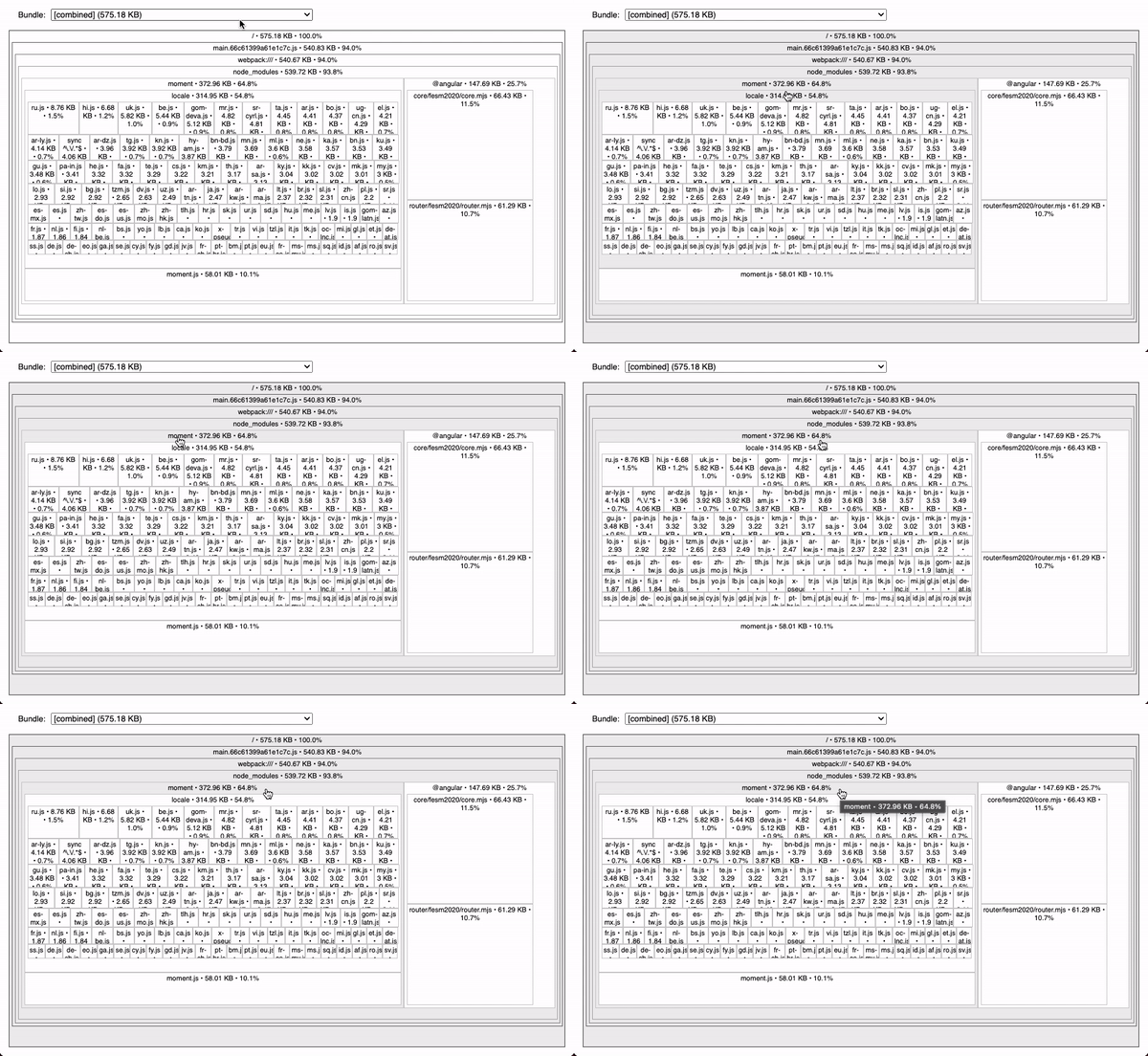
| MomentJS | 575.18 KB |
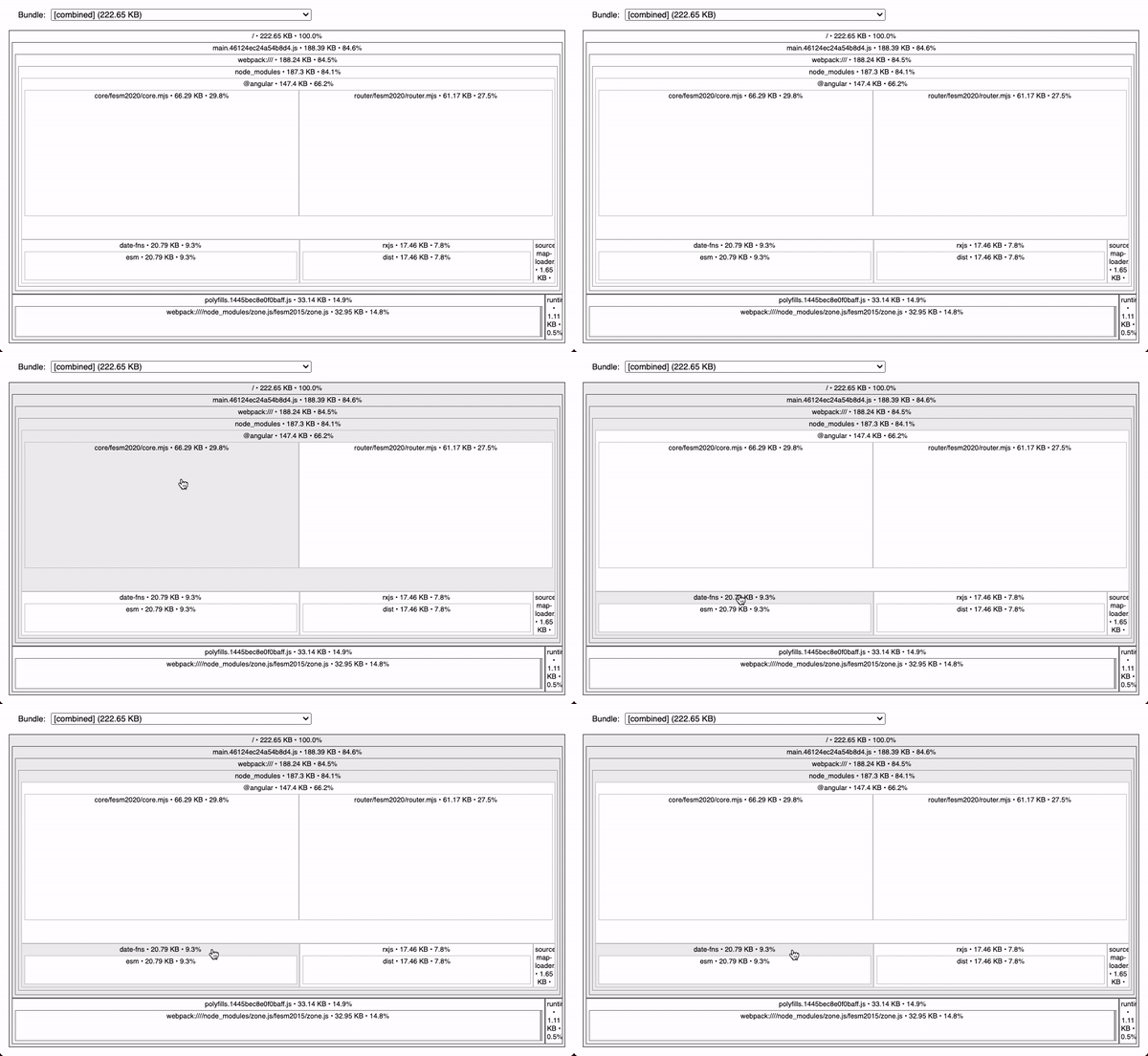
| date-fns | 222.65 KB |
[Using Native Date API](https://m-thompson-code.github.io/moment-replacement/assets/sme-result-native-date.html) negatively impacts my bundle size the least. Total size is **202 KB**.
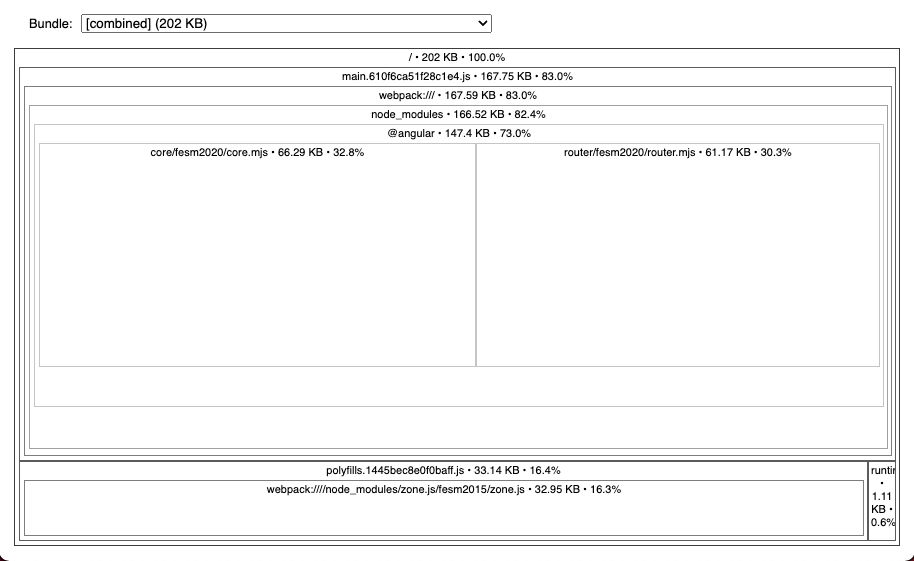
This makes sense since by avoiding any extra libraries, there's no risk of bloating my bundle size. Only downside is that implementation took much longer than using an existing library.
[Using MomentJS](https://m-thompson-code.github.io/moment-replacement/assets/sme-result-momentjs.html) impacts my bundle size the most. Total size is **575.18 KB**. Using MomentJS bloats my application significantly resulting in being **64.8%** of my total bundle size. This is because **MomentJS is not [tree-shakable](https://developer.mozilla.org/en-US/docs/Glossary/Tree_shaking) and results in importing the entire library regardless of how little it is used.**
[Using date-fns](https://m-thompson-code.github.io/moment-replacement/assets/sme-result-date-fns.html) increases my bundle size by **20.79 KB**. Total size is **222.65 KB** resulting in being **9.3%** of my total bundle size. This is a huge improvement over importing MomentJS. This is because date-fns is [tree-shakable](https://developer.mozilla.org/en-US/docs/Glossary/Tree_shaking).
## Conclusion
When considering adding a library to an Angular application, tools such as [ngx-builders](https://github.com/ngx-builders/source-map-analyzer#setting-up-this-builder) and [source-map-explorer](https://github.com/danvk/source-map-explorer#readme) can verify that the library won't bloat that application's bundle size.
Depending on how much time I want to spend implementing all my features from scratch, I might avoid using any library. But if I want to spend less time reinventing the wheel, I'll reach for a well-known libraries such as [date-fns](https://date-fns.org/) that are [tree-shakable](https://developer.mozilla.org/en-US/docs/Glossary/Tree_shaking). One thing is certain, I'll avoid libraries like [MomentJS](https://momentjs.com/) since they result in an unnecessary increase in bundle size.
Long story short, please consider the [alternatives](https://momentjs.com/docs/#/-project-status/recommendations/) to MomentJS.