https://github.com/m4b/rdr
Rdr is a cross-platform binary analysis and reverse engineering library, utilizing a unique symbol map for global analysis.
https://github.com/m4b/rdr
Last synced: about 1 year ago
JSON representation
Rdr is a cross-platform binary analysis and reverse engineering library, utilizing a unique symbol map for global analysis.
- Host: GitHub
- URL: https://github.com/m4b/rdr
- Owner: m4b
- License: bsd-3-clause
- Created: 2015-06-21T20:33:21.000Z (almost 11 years ago)
- Default Branch: master
- Last Pushed: 2023-03-15T15:39:23.000Z (about 3 years ago)
- Last Synced: 2025-04-15T12:18:53.693Z (about 1 year ago)
- Language: OCaml
- Homepage:
- Size: 3.45 MB
- Stars: 84
- Watchers: 13
- Forks: 10
- Open Issues: 4
-
Metadata Files:
- Readme: README.md
- License: LICENSE.txt
Awesome Lists containing this project
README
# Rdr 3.0 - Welcome
[](https://floobits.com/m4b/rdr/redirect)
Welcome to the `rdr` project.
**MAJOR UPDATE**
This project is _completely_ finished, and as such, is no longer under active development. Once I get some spare time, I will publish to opam this version, fix the mach threads hack (or wait until Rust no longer uses the unix threads load command), and probably call it a day!
Of course, if anyone has any suggestions for improvement, pull requests can still be submitted and I'll probably merge it (but we know that's never going to happen) --- and I might add a feature every now and then, but, I consider `rdr` to be stable enough that I use it on a day to day basis, and that I just simply don't have the time to implement some of the nicer features. But I hope you enjoy, and have fun with it!
> `rdr` is now version 3.0, supporting tools like [bin2json](http://github.com/m4b/bin2json), which further supports tools like [the silicon element suite](http://github.com/SiliconElements). Here are some (new) features:
>
> * PE32 support
> * Unified export/import model using the Goblin binary format, a kind of IR for binaries
> * Disassemble symbols in a binary (as opposed to just symbols in the map) --- this is _still_ experimental and very much hacky, llvm-mc must be installed. I'll figure out a better way soon, or write my own x86-64 and ARM64 disassembler, cause I'm crazy.
> * Print Goblin representation `rdr -g`
> * A slightly better symbol tree
> * Import library resolution for ELF, which looks up the imported symbol for a binary using the symbol map/tree
> * Better byte-coverage printing in addition to more extensive coverage
> * Scan the binary with a hexadecimal scan string - _no spaces or 0x_. `rdr --scan 5589e58b450839450c0f4d450c bin/pe/libbeef.dll` or `rdr --scan deadbeef bin/pe/libbeef.dll`
> * Disassemble at a particular offset (experimental): `rdr --do 0x51f bin/pe/libbeef.dll`
> * Print the particular binaries version of a "section". Section headers for ELF, segments for mach-o, and section tables for PE: `rdr --sections bin/elf/deadbeef.elf`
`rdr` is an OCaml tool/library for doing cross-platform analysis of binaries. I typically use it for looking up symbol names, finding the address offset, and then running `gdb` or `lldb` to mess around (you should be using both if you even know what you're doing).
I also find that it's useful for resolving linking errors if you're trying to build some project, especially some random, misconfigured XCode project, or what have you.
Basically it's the best, free, cross-platform reverse engineering tool out there.
See the [usage section](#usage) for a list of features.
Currently, only:
* 64-bit **ELF**
* 64-bit **Mach-o** (also will suck out the first 64-bit binary found in a fat universal binary)
* 32-bit **PE32**
binaries are supported (64-bit PE32, i.e. PE32+ coming soon).
Also, 32-bit binaries aren't cool anymore; stop publishing reverse engineering tutorials on them (in nix land at least: apparently Microsoft [still publishes 32-bit binaries](https://go.microsoft.com/fwlink/?LinkId=532606&clcid=0x409) for general consumption).
Happily, the project has no dependencies (besides the standard libs and `unix` and `str`). I have switched to an `oasis` build system however, and it's awesome, but does add some slight extra complexity (not really). See the [install section](#install) for more details.
# Install
#### Easy (OPAM)
Install with OPAM: `opam install rdr`
#### Slightly Less Easy (Manual)
**NOTE** This will _not_ build on 32-bit systems.
* You must have OCaml and `findlib` installed, and OCaml must be at least version 4.02 (I use the `Bytes` module and ppx annotations). You can install findlib through your package manager; on Arch it's currently `ocaml-findlib`.
* You must run `make`, or execute `ocaml setup.ml -configure && ocaml setup.ml -build` (especially if on 64-bit windows) in the base project directory.
* You may then `sudo make install` (or `sudo ocaml setup.ml -install`) to copy the `rdr` binary to your `/usr/local/bin`, in addition to installing the library with findlib. Or you can just `mv` the generated binary, `main.native`, wherever you want, with whatever name, if that's your fancy.
# Usage
Essentially, `rdr` performs two tasks, and should probably be two programs.
## Binary Analysis
The first is pointing `rdr` at a binary. Example:
````bash
rdr /usr/lib/libc.so.6
````
It should output something like: `ELF X86_64 DYN @ 0x20920`. Which is boring.
You can pass it various flags, `-e` for printing the exports found in the binary (see this post on [ELF exports](http://www.m4b.io/elf/export/binary/analysis/2015/05/25/what-is-an-elf-export.html#conclusion) for what I'm counting as an "export"), `-i` for imports, etc. For mach-o and PE32 binaries, exporthood and importhood are clearly defined, so blog posts detailing this isn't necessary (unless you want a [detailed analysis of the mach binary format](http://www.m4b.io/reverse/engineering/mach/binaries/2015/03/29/mach-binaries.html)).
Some examples:
* `rdr -v` - prints the version
* `rdr -h` - prints a help menu
* `rdr -h /usr/lib/libc.so.6` - prints the program headers, bookkeeping data, and other bureaucratic aspects of binaries specific to the format your analyzing
* `rdr -f printf /usr/lib/libc.so.6` - searches the `libc.so.6` binary for an exported symbol named _exactly_ "printf", and if found, prints its binary offset and size (in bytes). _Watch out for_ `_` prefixed symbols in mach and compiler private symbols in ELF. Definitely watch out for funny (`$`) symbols, like in mach-o Objective C binaries; you'll need to quote the symbol name to escape them, otherwise bash gets mad. Future: regexp multiple returns, and searching imports as well.
* `rdr -D -f printf /usr/lib/libc.so.6` - disassembles the printf symbol if it's found.
* `rdr -l /usr/lib/libc.so.6` - lists the dynamic libraries `libc.so.6` _explicitly_ depends on (I'm looking at _you_ `dlsym`).
* `rdr -i /usr/lib/libc.so.6` - lists the imports the binary depends on. **NOTE** when run on linux ELF binaries, if a system map has been built, it will use that to resolve the import's library. Depending on your machine, can add a slight delay; sorry bout that. On mach-o and PE this delay caused by an extra lookup isn't necessary, since imports are required to state where they come from, because the format was built by sane people (more or less).
* `rdr -G /usr/lib/libz.so.1.2.8` - graphs the libraries, imports, and exports of `libz.so.1.2.8`; run `dot -O -n -Tpng libz.so.1.2.8.gv` to make a pretty picture. Does a simple, hackish check to see if `dot` is in your `${PATH}`, and if so, runs the above dot command for you - you should probably just install it before you run this. [See the examples](#examples) for `rdr` output.
* `rdr -s /usr/lib/libc.so.6` - print the nlist/strippable symbol table, if it exists. Crappy programs like `nm` _only_ use the strippable symbol table, even for exports and imports.
* `rdr -v /usr/lib/libc.so.6` - print everything; you have been warned.
* `rdr -c /usr/lib/libc.so.6` - prints the byte coverage `rdr` generated for the binary
## Symbol Map
`rdr` can create a "symbol map" for you, in `${HOME}/.rdr/`. What's that you ask? It's a map from `exported symbol name -> list of exported symbols`, where symbol information is offset, size, exporting library, etc. In the future I will add tags to the symbol; I'll explain what that means when the time comes.
But in other words, this is a map from keys of symbol names to _lists_ of symbol information, because symbol-to-symbol information is _not a function_. To put that less technically: for any given symbol name, `malloc` for example, you can have multiple libraries which provide (export) that same exact symbol. It is a one to many relationship.
Nevertheless, with such a map, we can perform a variety of useful activities, like looking up a symbol's offset in a library, its size, etc.
Why hasn't this existed before? I don't know.
You build the map first by invoking:
````bash
rdr -b
````
Which defaults to scanning `/usr/lib/` for things it considers "binaries". Basically, it works pretty well.
If you want to recursively search, you give it a directory (or supply none at all, and it uses the default, `/usr/lib`), and the `-r` flag:
````bash
rdr -b -r -d "/usr/lib /usr/local/lib"
````
Spaces or colons (':') in the `-d` string separate different directories; with `-r` set, it searches _each_ recursively.
Be careful (patient); on slow machines, this can take a whole bunch of time, especially on linux, where everything and their mother put their garbage in `/usr/lib` (I'm looking at _you_ node). But on the brightside, if you're lucky enough to have one, on a recent MBP, it's so fast it can build the map in realtime, and then do a symbol lookup (I don't do that).
Anyway, after you've built the map, you can perform _exact_ symbol lookups, for example:
````bash
$ rdr -m -f printf
searching /usr/lib/ for printf:
30f90 printf (334) -> /usr/lib/libtsan.so.0.0.0 [libtsan.so.0]
4ed10 printf (161) -> /usr/lib/libc-2.22.so [libc.so.6]
60c00 printf (284) -> /usr/lib/libasan.so.2.0.0 [libasan.so.2]
````
Where the output format for each symbol is `offset symbol_name (size) -> /path/to/exporting/library [alias]`. The alias is important for ELF, as it allows import resolution in the analyzed binaries (basically what the dynamic linker does --- it's awesome).
If you find a symbol you admire, you can disassemble it by adding the `-D` flag, using `llvm-mc`. This is an experimental feature and subject to change (it'll definitely have to stay in though, cause it's awesome).
Again, I do a simple, hackish check to see if `llvm-mc` is in your `${PATH}`, and if so, the program is run, otherwise an error message is printed. However, to quote a C idiom: "this behavior is undefined" if `llvm-mc` isn't installed and in your `${PATH}`.
Example with `llvm-mc` correctly installed:
````bash
$ rdr -D -m -f printf
searching /usr/lib/ for printf:
4f0a0 printf (161) -> /usr/lib/libc-2.21.so
.text
subq $216, %rsp
testb %al, %al
movq %rsi, 40(%rsp)
movq %rdx, 48(%rsp)
movq %rcx, 56(%rsp)
movq %r8, 64(%rsp)
movq %r9, 72(%rsp)
je 55
movaps %xmm0, 80(%rsp)
movaps %xmm1, 96(%rsp)
movaps %xmm2, 112(%rsp)
movaps %xmm3, 128(%rsp)
movaps %xmm4, 144(%rsp)
movaps %xmm5, 160(%rsp)
movaps %xmm6, 176(%rsp)
movaps %xmm7, 192(%rsp)
leaq 224(%rsp), %rax
movq %rdi, %rsi
leaq 8(%rsp), %rdx
movq %rax, 16(%rsp)
leaq 32(%rsp), %rax
movl $8, 8(%rsp)
movl $48, 12(%rsp)
movq %rax, 24(%rsp)
movq 3464671(%rip), %rax
movq (%rax), %rdi
callq -44329
addq $216, %rsp
retq
````
If you don't like AT&T syntax (FYI you should probably become a real hacker and learn to read and understand both syntax flavors), the lack of options, and a host of other issues w.r.t. disassembly, then you're out of luck for now. Maybe make a pull request?
You can also graph the library dependencies (the `.gv` file is generated _at build time_ in `${HOME}/.rdr/`) with `rdr -m -G`. Currently, it creates a `library_dependency.png` file; in the future, this will be named after the map it was generated from, once named maps become a thing. Also, this `.png` will be probably be enormous.
This can be useful, if for example, you collate a series of binaries and shared libraries into a directory, and then have `rdr` build a map from that directory, and want to graph their interrelated dependencies. If you want it to lookup the correct `/usr/lib` deps, then the full command might be something like: `rdr -b -G -D "$(pwd):/usr/lib/"`, and that map's dependency graph will be in `${HOME}/.rdr/lib_dependency_graph.png`.
Finally, and again at build time, a `stats` file is generated from the system map in `${HOME}/.rdr/`; this simply counts the number of times a symbol was _imported_ by every binary analyzed when the system map was built (so with a `-d` directory specified, the default is `/usr/lib/`, and so it counts every time some symbol `x` was imported in every binary found in `/usr/lib`). Expect this file to change, or various other statistical files to be created in the `${HOME}/.rdr/` directory.
Once versioned/named maps are implemented, the stats will be per map.
There are also times that you will want to `grep` symbols, maybe because you only know a part of it, or etc.
For now, this facility is enabled by writing a _flattened_ symbol map to disk, using `rdr -m -w`, located at `${HOME}/.rdr/`. This file is named `symbols` and you can `grep` it to your heart's content. It is flattened because each element in the list of symbol information a symbol maps to is output to disk.
So, for example, `grep -w "malloc" ~/.rdr/symbols` yields:
````
0x16a50 malloc (13) E -> /usr/lib/ld-2.21.so
0x576f0 malloc (303) E -> /usr/lib/libasan.so.1.0.0
0x7a7b0 malloc (394) E -> /usr/lib/libc-2.21.so
0x346f0 malloc (137) E -> /usr/lib/libgvpr.so.2.0.0
0x5f90 malloc (1543) E -> /usr/lib/libjemalloc.so.1
0xb290 malloc (267) E -> /usr/lib/liblsan.so.0.0.0
0x19c0 malloc (299) E -> /usr/lib/libmemusage.so
0x1200 malloc (33) E -> /usr/lib/libtbbmalloc_proxy.so.2
0x1210 malloc (33) E -> /usr/lib/libtbbmalloc_proxy_debug.so.2
0x367a0 malloc (2395) E -> /usr/lib/libtcmalloc.so.4.2.6
0x3a640 malloc (2395) E -> /usr/lib/libtcmalloc_and_profiler.so.4.2.6
0x3d740 malloc (718) E -> /usr/lib/libtcmalloc_debug.so.4.2.6
0x1d2b0 malloc (2395) E -> /usr/lib/libtcmalloc_minimal.so.4.2.6
0x242a0 malloc (702) E -> /usr/lib/libtcmalloc_minimal_debug.so.4.2.6
0x4d020 malloc (175) E -> /usr/lib/libtsan.so.0.0.0
````
# Project Structure
Because I just knew you were going to ask, I made this _sweet_ graphic, just for you:

# Examples
* `rdr -G /usr/lib/libz.so.1.2.8`: 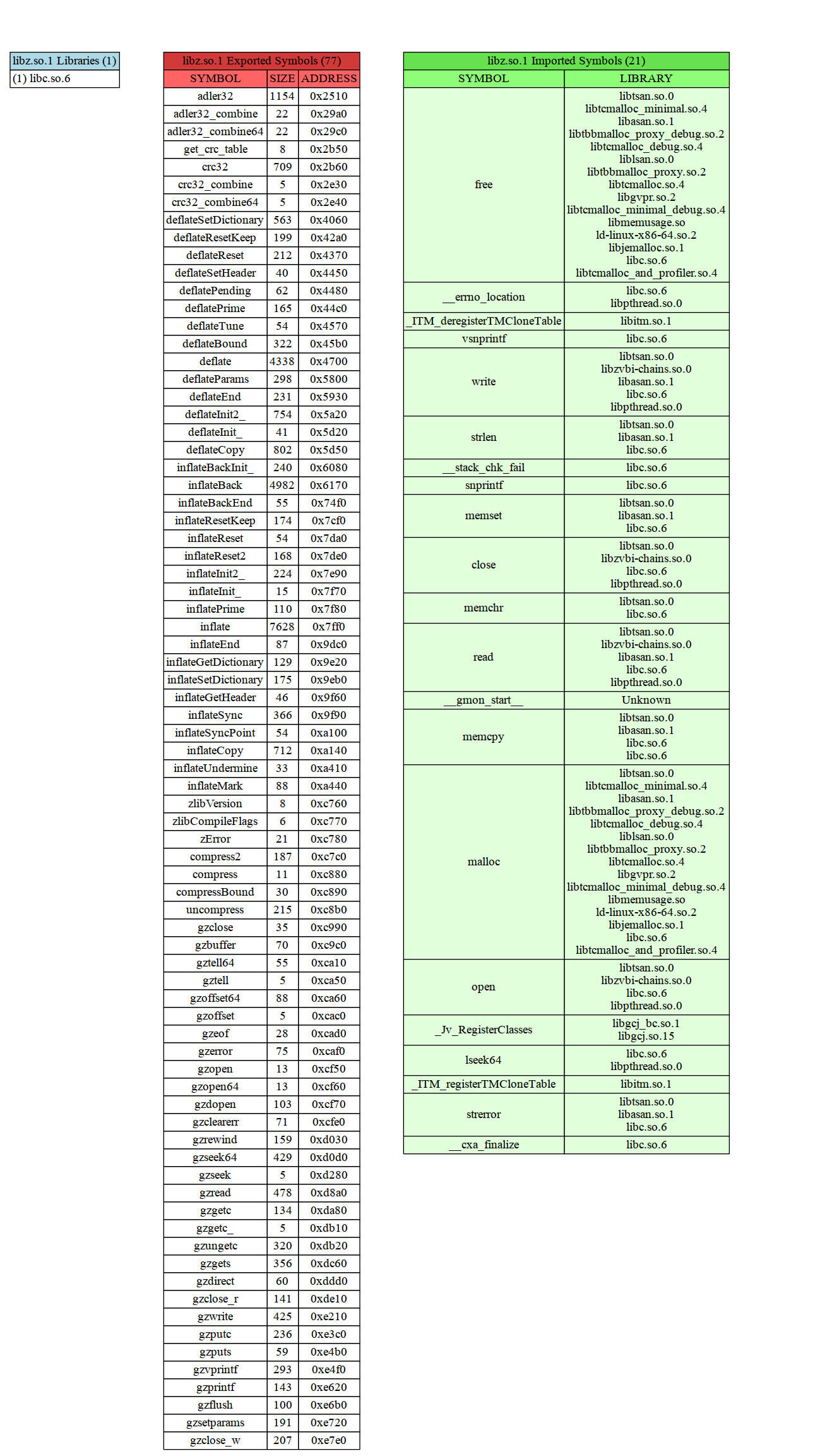
* See my [gallery](http://www.m4b.io/gallery) for more inspiring images of what you can do with `rdr`