https://github.com/macket/telegramblackbot
Telegram bot for grid trading on waves.exchange
https://github.com/macket/telegramblackbot
Last synced: 4 months ago
JSON representation
Telegram bot for grid trading on waves.exchange
- Host: GitHub
- URL: https://github.com/macket/telegramblackbot
- Owner: Macket
- Created: 2021-01-12T09:03:55.000Z (over 5 years ago)
- Default Branch: master
- Last Pushed: 2021-01-15T08:45:37.000Z (over 5 years ago)
- Last Synced: 2025-04-05T02:33:32.866Z (over 1 year ago)
- Language: Python
- Homepage:
- Size: 360 KB
- Stars: 4
- Watchers: 0
- Forks: 3
- Open Issues: 1
-
Metadata Files:
- Readme: README.md
Awesome Lists containing this project
README
# TelegramBlackBot
TelegramBlackBot (based on [BlackBot](https://github.com/Macket/BlackBot)) implements grid trading strategy with Telegram interface. It can work with any assets pair on the Waves DEX.
Grid trading doesn’t care about which way the market’s going — in fact, as a profitable strategy it works best in ranging markets. The strategy places a ladder of sells at regular intervals above market price, and another ladder of buys beneath it. If a sell is filled, those funds are used to place a buy just beneath that sell. Thus you can think of the grid as a series of pairs of buys/sells stretching up and down the price chart, with either the buy or sell in each pair always active.
For example, let’s say the last price is 2000 satoshis you’ve got sells laddered up at 2100, 2200, 2300… If the price hits 2100, you immediately use those funds to place a new buy at 2000. If it drops to 2000 again, you buy back the Incent you sold at 2100. If it rises further, you sell at 2200 and open a buy at 2100. Whichever way the price moves, you’re providing depth — buffering the market and smoothing out any peaks and troughs. Additionally, if you open and then close a trade within a tranche (e.g. you sell at 2200, then buy back at 2100) then you make a small profit.
## Getting Started
TelegramBlackBot requires Python 3.7 and packages specified in ```requirements.txt```.
You can install them with
```
pip install -r requirements.txt
```
Before you start TelegramBlackBot it is necessary to create ```.env``` file:
```
touch .env
```
and fill in this file according to the example below:
```
TELEGRAM_BOT_TOKEN = XXXXXXXXXXXXXXXXXXXXXXXXXXXXXXXXXXXXXXXXXXXXXXX
USER_ID = XXXXXXXXXXX
NODE = http://nodes.wavesnodes.com
NETWORK = mainnet
MATCHER = https://matcher.waves.exchange
ORDER_FEE = 300000
ORDER_LIFETIME = 86400
PRIVATE_KEY = XXXXXXXXXXXXXXXXXXXXXXXXXXXXXXXXXXXXXXXXXXXX
AMOUNT_ASSET = WAVES
PRICE_ASSET = DG2xFkPdDwKUoBkzGAhQtLpSGzfXLiCYPEzeKH2Ad24p
```
```TELEGRAM_BOT_TOKEN``` is the token got from [BotFather](https://t.me/BotFather)
```USER_ID``` is the telegram id of the account which will interact with bot (other users will be ignored)
```NODE``` is the address of the fullnode
```NETWORK``` can be either 'mainnet' or 'testnet'
```MATCHER``` is the matcher address
```ORDER_FEE``` is the fee to place buy and sell orders
```ORDER_LIFETIME``` is the maximum life time (in seconds) for an open order
```PRIVATE_KEY``` is the private key of the trading account
```AMOUNT_ASSET``` and ```PRICE_ASSET``` are the IDs of the traded assets pair
Then you can start TelegramBlackBot with this command:
```
python main.py
```
## Setting grid
Once TelegramBlackBot is started you should go to Telegram, open the bot and send ```/start``` command:
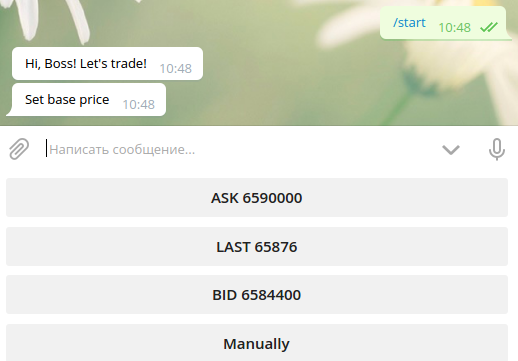
Then you can choose ```ASK```, ```BID``` or ```LAST``` as base price (grid will be created around this price) or set it ```Manually```. After that configure other parameters:
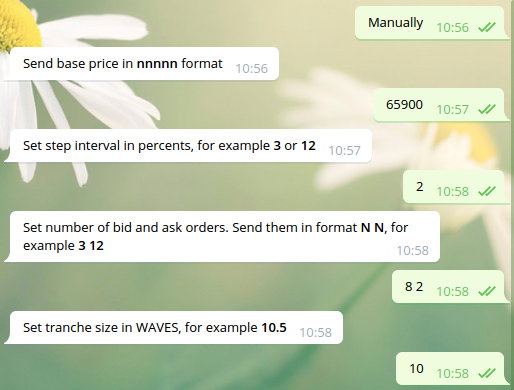
Check them:
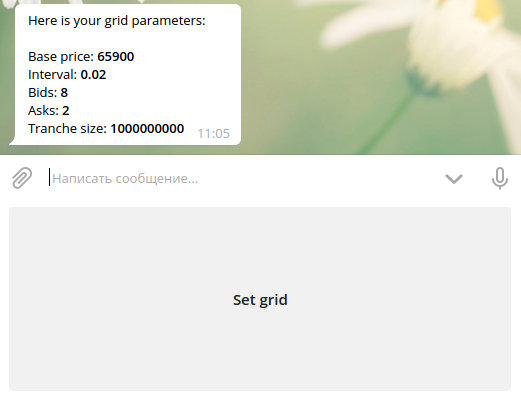
And set grid:
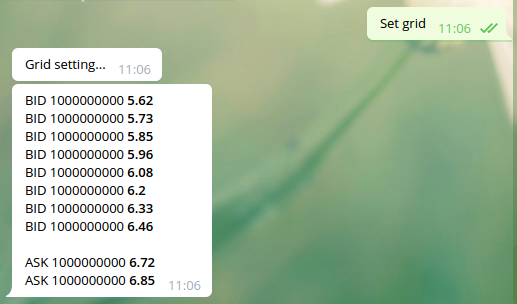
When one of the orders is filled bot will automatically place the new opposite order and you will receive a notification about that:

If you want to reset grid, just send ```/start``` command again and set new parameters.