https://github.com/magiblot/tvterm
A terminal emulator that runs in your terminal. Powered by Turbo Vision.
https://github.com/magiblot/tvterm
Last synced: about 1 year ago
JSON representation
A terminal emulator that runs in your terminal. Powered by Turbo Vision.
- Host: GitHub
- URL: https://github.com/magiblot/tvterm
- Owner: magiblot
- License: mit
- Created: 2021-10-17T00:27:29.000Z (over 4 years ago)
- Default Branch: master
- Last Pushed: 2024-10-24T10:55:09.000Z (over 1 year ago)
- Last Synced: 2024-10-24T14:49:10.297Z (over 1 year ago)
- Language: C++
- Size: 248 KB
- Stars: 81
- Watchers: 5
- Forks: 8
- Open Issues: 3
-
Metadata Files:
- Readme: README.md
Awesome Lists containing this project
- awesome-tuis - tvterm
- awesome-cli-apps-in-a-csv - tvterm - A terminal emulator that runs in your terminal (Unix and Windows). (<a name="terminal"></a>Terminals)
- awesome-cli-apps - tvterm - A terminal emulator that runs in your terminal (Unix and Windows). (<a name="terminal"></a>Terminals)
README
# tvterm
A terminal emulator that runs in your terminal. Powered by Turbo Vision.
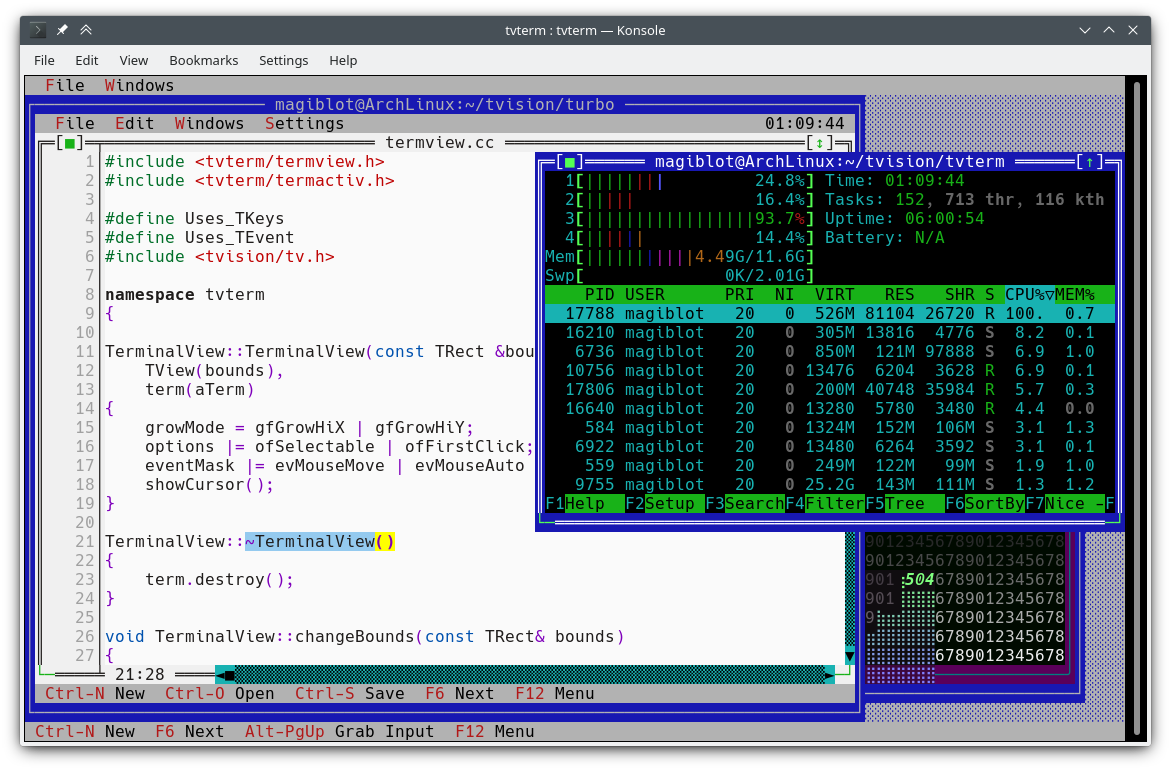
`tvterm` is an experimental terminal emulator widget and application based on the [Turbo Vision](https://github.com/magiblot/tvision) framework. It was created for the purpose of demonstrating new features in Turbo Vision such as 24-bit color support.
`tvterm` relies on Paul Evan's [libvterm](http://www.leonerd.org.uk/code/libvterm/) terminal emulator, also used by [Neovim](https://github.com/neovim/libvterm) and [Emacs](https://github.com/akermu/emacs-libvterm).
Additionally, `tvterm` supports both Unix and Windows (Windows 10 1809 or later).
The original location of this project is https://github.com/magiblot/tvterm.
# Building
First of all, you should clone this repository along its submodules with the `--recursive` option of `git clone` (or run `git submodule init && git submodule update` if you have already cloned it).
Then, make sure the following dependencies are installed:
* CMake.
* A compiler supporting C++14.
* `libvterm`:
* If you initialized the submodules, you can build `libvterm` as part of `tvterm`. Perl is needed for building `libvterm`.
* Otherwise, a system-provided `libvterm` (e.g. `libvterm-dev` in Ubuntu) can be used if enabling the CMake option `-DTVTERM_USE_SYSTEM_LIBVTERM=ON`.
* [Turbo Vision](https://github.com/magiblot/tvision#build-environment)'s dependencies:
* `libncursesw` (Unix only) (e.g. `libncursesw5-dev` in Ubuntu).
* `libgpm` (optional, Linux only) (e.g. `libgpm-dev` in Ubuntu).
* Turbo Vision itself:
* If you initialized the submodules, you can build Turbo Vision as part of `tvterm`.
* Otherwise, clone [Turbo Vision](https://github.com/magiblot/tvision) separately and follow its [build](https://github.com/magiblot/tvision#build-environment) and [install](https://github.com/magiblot/tvision#build-cmake) instructions. Make sure you don't use a version of Turbo Vision older than the one required by `tvterm` (specified in the [`tvision` submodule](https://github.com/magiblot/tvterm/tree/master/deps)). When building `tvterm`, enable the CMake option `-DTVTERM_USE_SYSTEM_TVISION=ON`.
`tvterm` can be built with the following commands:
```sh
cmake . -B ./build -DCMAKE_BUILD_TYPE=Release && # Could also be 'Debug', 'MinSizeRel' or 'RelWithDebInfo'.
cmake --build ./build
```
CMake versions older than 3.13 may not support the `-B` option. You can try the following instead:
```sh
mkdir -p build; cd build
cmake .. -DCMAKE_BUILD_TYPE=Release &&
cmake --build .
```
# Features
This project is still WIP. Some features it may achieve at some point are:
- [x] UTF-8 support.
- [x] fullwidth and zero-width character support.
- [x] 24-bit color support.
- [x] Windows support.
- [ ] Scrollback.
- [ ] Text selection.
- [ ] Find text.
- [ ] Send signal to child process.
- [ ] Text reflow on resize.
- [ ] Having other terminal emulator implementations to choose from.
- [ ] Better dependency management.