https://github.com/magic-script/magic-script-components-react-native
MagicScript Components renderer for ARKit and ARCore
https://github.com/magic-script/magic-script-components-react-native
javascript magicscript
Last synced: about 1 year ago
JSON representation
MagicScript Components renderer for ARKit and ARCore
- Host: GitHub
- URL: https://github.com/magic-script/magic-script-components-react-native
- Owner: magic-script
- License: apache-2.0
- Created: 2019-05-16T18:56:41.000Z (about 7 years ago)
- Default Branch: master
- Last Pushed: 2020-12-17T12:58:27.000Z (over 5 years ago)
- Last Synced: 2024-12-16T17:22:05.147Z (over 1 year ago)
- Topics: javascript, magicscript
- Language: Swift
- Homepage: https://components.magicscript.org
- Size: 47.6 MB
- Stars: 16
- Watchers: 8
- Forks: 2
- Open Issues: 41
-
Metadata Files:
- Readme: README.md
- Contributing: CONTRIBUTING.md
- License: LICENSE
Awesome Lists containing this project
README
[](https://codecov.io/gh/magic-script/magic-script-components-react-native)
[](https://github.com/magic-script/magic-script-components-react-native/actions)
[](https://github.com/magic-script/magic-script-components-react-native/actions)
[](https://github.com/magic-script/magic-script-components-react-native/actions)
[](https://badge.fury.io/js/magic-script-components-react-native)
[](https://www.npmjs.com/package/magic-script-components-react-native)
[](LICENSE)
# MagicScript Components ReactNative
## Prerequisites
Make sure you have:
- properly set up an environment for **React Native** (see [React Native CLI Quickstart](https://reactnative.dev/docs/environment-setup) for iOS|Android),
- installed either [yarn](https://classic.yarnpkg.com/en/docs/install/) or [npm](https://www.npmjs.com/get-npm),
- installed [MagicScript Command Line Toolkit](https://github.com/magic-script/magic-script-cli):
```
npm install -g magic-script-cli
```
## Create a react native project
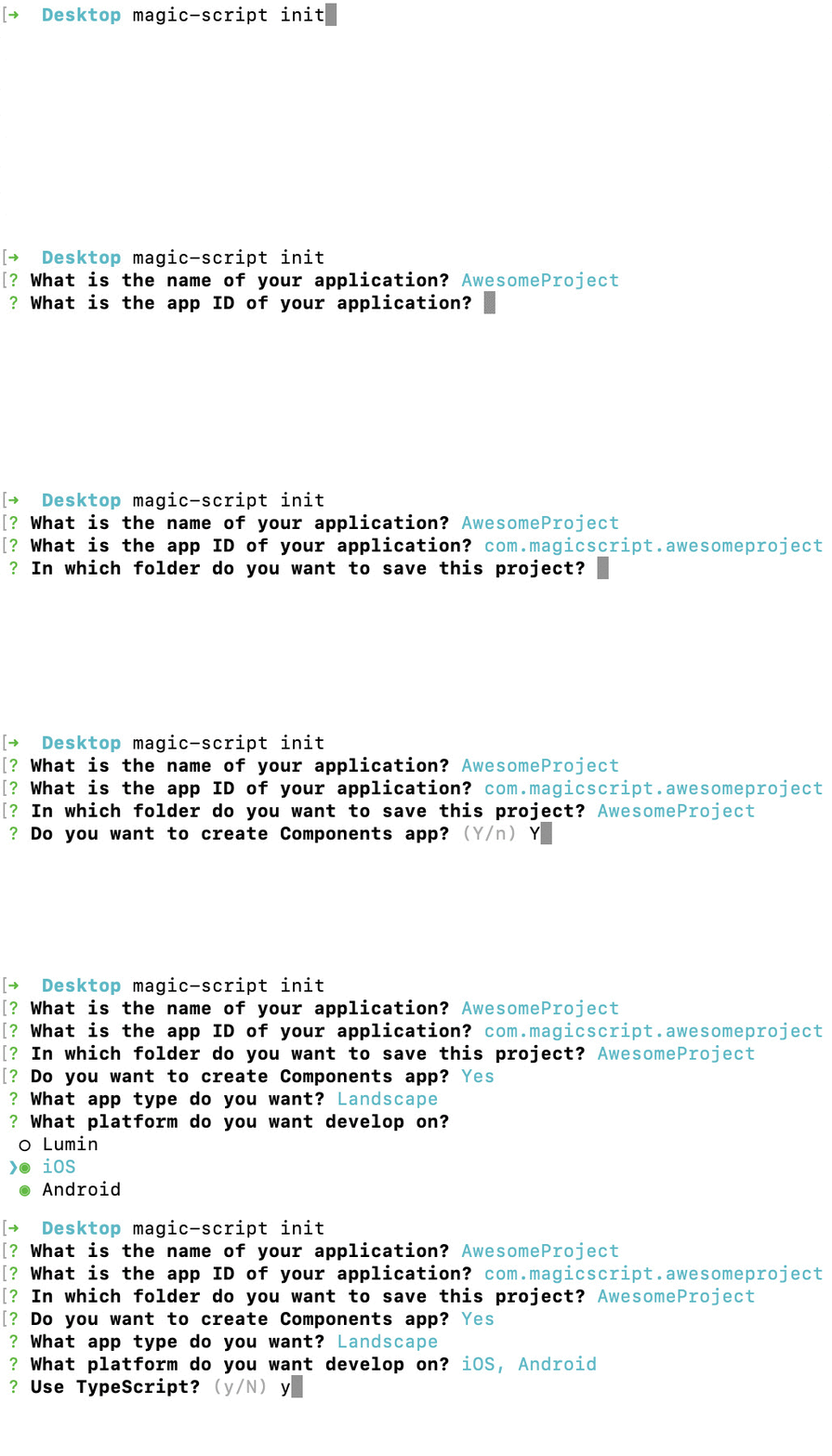
To create a sample project, type the command below and follow instructions in the wizard.
```
magic-script init
````
Remember to select:
- **Components** app,
- **Landscape** app type,
- **iOS** or **Android** platform.
## Build and run the project
1. Move to the root directory of the project
```
cd AwesomeProject
```
2. To build and run the project, type:
```
magic-script build ios
```
or
```
magic-script build android
```
This will build the app for the specified platform and will try to run in on a local emulator.