https://github.com/magicteamc/minecraft-server-auto-setup
Manage Minecraft server / proxy / plugins quickly and easily!
https://github.com/magicteamc/minecraft-server-auto-setup
gate geyser mc-server mc-server-installer minercaft nukkit paper purpur rust rust-crate rust-lang server velocity
Last synced: 9 months ago
JSON representation
Manage Minecraft server / proxy / plugins quickly and easily!
- Host: GitHub
- URL: https://github.com/magicteamc/minecraft-server-auto-setup
- Owner: MagicTeaMC
- License: gpl-3.0
- Created: 2023-02-19T07:34:53.000Z (over 3 years ago)
- Default Branch: v2
- Last Pushed: 2025-09-06T14:57:59.000Z (10 months ago)
- Last Synced: 2025-10-10T10:33:09.631Z (9 months ago)
- Topics: gate, geyser, mc-server, mc-server-installer, minercaft, nukkit, paper, purpur, rust, rust-crate, rust-lang, server, velocity
- Language: Rust
- Homepage:
- Size: 658 KB
- Stars: 16
- Watchers: 1
- Forks: 3
- Open Issues: 0
-
Metadata Files:
- Readme: README.md
- License: LICENSE
Awesome Lists containing this project
README
MCSAST
===
[](https://discord.gg/uQ4UXANnP2)
[](https://github.com/MagicTeaMC/Minecraft-server-auto-setup/actions)
[](https://crates.io/crates/mcsast)
[](https://crates.io/crates/mcsast)
[](https://aur.archlinux.org/packages/mcsast)
Manage Minecraft server / proxy / plugins quickly and easily!
## Quick start
### Install via Cargo
#### Latest stable build from crates.io
```bash
cargo install mcsast
```
#### Latest code from GitHub
```bash
cargo install --git https://github.com/MagicTeaMC/Minecraft-server-auto-setup.git --branch v2
```
#### Latest stable build from AUR
```bash
paru -S mcsast
```
Or with yay
```bast
yay -S mcsast
```
### Run with command
```
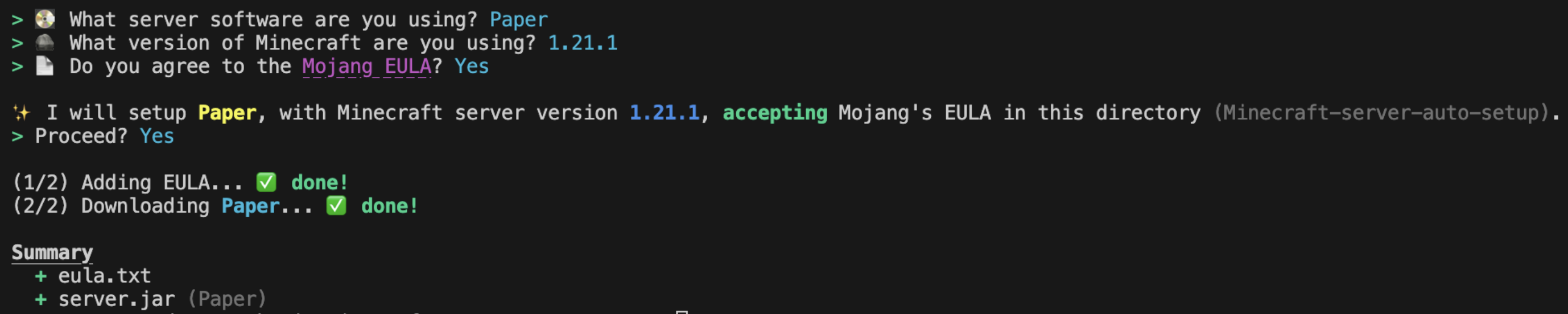
mcsast setup
```
Give information to us with terminal:
## Supported softwares
- [Paper](https://github.com/PaperMC/Paper)
- [Folia](https://github.com/PaperMC/Folia)
- [Purpur](https://github.com/PurpurMC/Purpur/)
- [Velocity](https://github.com/PaperMC/Velocity)
- [Gate](https://github.com/minekube/gate)
- [Nukkit](https://github.com/CloudburstMC/Nukkit)
- [Geyser](https://github.com/GeyserMC/Geyser)
Want to add other software support? [Open an Issue](https://github.com/MagicTeaMC/Minecraft-server-auto-setup/issues).
## Servers commands
### Setup a server
```bash
mcsast setup
```
If you want it to setup automantic, here is a command
Note: The `--mc-version` and `--eula` flags are only required for Java Edition servers (not proxies).
```bash
mcsast setup --software=paper --mc-version=1.21.1 --eula=true -y
```
### Sync latest build of current Minecraft version
```bash
mcsast sync
```
### Upgrade Minecraft version
```bash
mcsast upgrade
```
or
```bash
mcsast upgrade --version 1.21.6
```
## Plugins commands
### Help message
```bash
mcsast plugins
```
### List plugins
```bash
mcsast plugins list
```
### Add plugin
Note: `--force` to install latest unstable version
```bash
mcsast plugins add
```
### Load plugins setup
```bash
mcsast plugins load
```
### Update plugins
Note: `--force` to install latest unstable version
```bash
mcsast plugins update
```
### Remove plugin
```bash
mcsast plugins remove
```
### Search plugins
```bash
mcsast plugins search
```
### Get plugin information
```bash
mcsast plugins info
```
### Export plugins setup
Note: `--output ` to custom output file name
```bash
mcsast plugins export
```