https://github.com/magicxor/yandextaxidataanalyzer
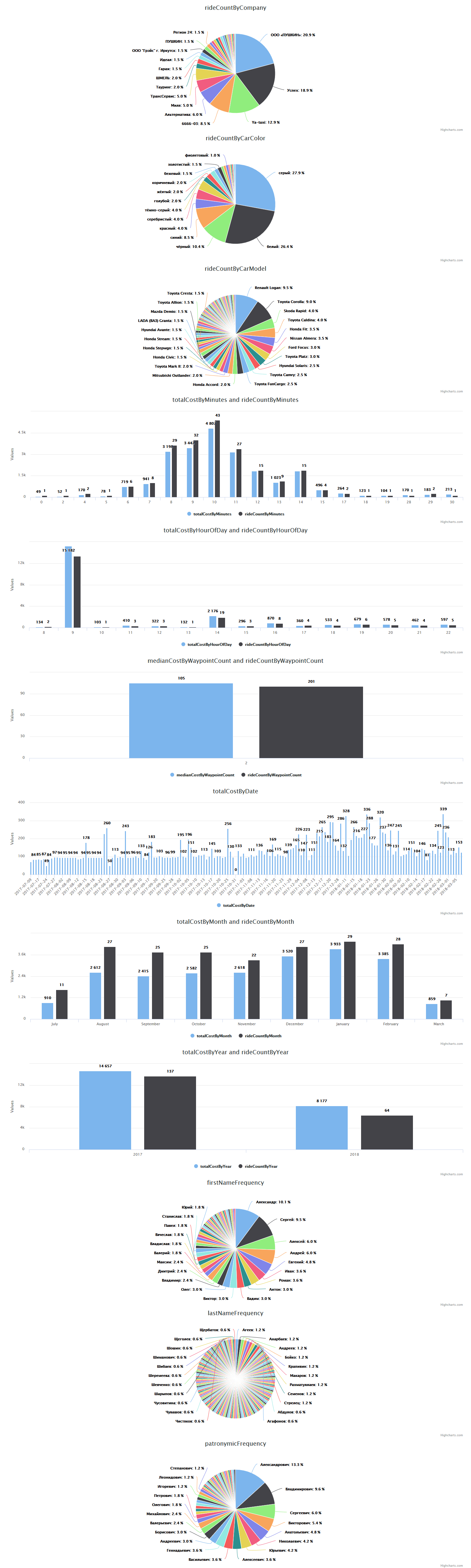
A simple tool for Yandex.Taxi report parsing and visualization
https://github.com/magicxor/yandextaxidataanalyzer
anglesharp charts csharp dotnet dotnet-core highcharts imap javascript js json linq parser reports visualization yandex yandex-taxi
Last synced: about 1 year ago
JSON representation
A simple tool for Yandex.Taxi report parsing and visualization
- Host: GitHub
- URL: https://github.com/magicxor/yandextaxidataanalyzer
- Owner: magicxor
- License: lgpl-3.0
- Created: 2018-03-05T03:56:47.000Z (over 8 years ago)
- Default Branch: master
- Last Pushed: 2020-10-01T08:25:03.000Z (almost 6 years ago)
- Last Synced: 2025-04-05T21:51:12.161Z (over 1 year ago)
- Topics: anglesharp, charts, csharp, dotnet, dotnet-core, highcharts, imap, javascript, js, json, linq, parser, reports, visualization, yandex, yandex-taxi
- Language: C#
- Size: 432 KB
- Stars: 3
- Watchers: 3
- Forks: 2
- Open Issues: 0
-
Metadata Files:
- Readme: README.md
- License: LICENSE
Awesome Lists containing this project
README
# YandexTaxiDataAnalyzer
A simple tool for Yandex.Taxi report parsing and visualization
## Usage
1. Publish YandexTaxiDataAnalyzer.Cli.NetCore project
```
dotnet publish -r win10-x64 -c Release
```
or download binary files.
2. Create appsettings.json file with your data:
```
{
"ApplicationCoreConfiguration": {
"ImapHost": "imap.test.com",
"ImapPort": 993,
"ImapLogin": "test@test.com",
"ImapPassword": "password",
"LogDirectoryName": "logs",
"OutputFileName": "yandex-taxi-stats.json"
}
}
```
3. Run YandexTaxiDataAnalyzer.Cli.NetCore.exe
4. Copy yandex-taxi-stats.json to YandexTaxiDataAnalyzer.Visualization directory and open index.html
## Screenshots