https://github.com/majidbouikken/animatednavigationbar
A heavily customizable bottom navigation bar with some animation modifiers.
https://github.com/majidbouikken/animatednavigationbar
android bottom-navigation cross-platform custom-widgets dart flutter flutter-animation flutter-widget ios navbar widget
Last synced: 26 days ago
JSON representation
A heavily customizable bottom navigation bar with some animation modifiers.
- Host: GitHub
- URL: https://github.com/majidbouikken/animatednavigationbar
- Owner: Majidbouikken
- License: bsd-3-clause
- Created: 2021-04-13T21:08:40.000Z (about 5 years ago)
- Default Branch: master
- Last Pushed: 2022-04-24T13:01:09.000Z (about 4 years ago)
- Last Synced: 2025-08-27T05:26:30.064Z (9 months ago)
- Topics: android, bottom-navigation, cross-platform, custom-widgets, dart, flutter, flutter-animation, flutter-widget, ios, navbar, widget
- Language: Dart
- Homepage:
- Size: 104 KB
- Stars: 2
- Watchers: 1
- Forks: 1
- Open Issues: 0
-
Metadata Files:
- Readme: README.md
- Changelog: CHANGELOG.md
- License: LICENSE
Awesome Lists containing this project
README
# Animated Navigation Bar
A Flutter implementation of a customizable navigation bar with animations.
[](https://pub.dev/packages/animated_navigation_bar)
[](https://github.com/Majidbouikken/AnimatedNavigationBar/blob/master/LICENSE)
[](https://github.com/Majidbouikken/AnimatedNavigationBar/stargazers)
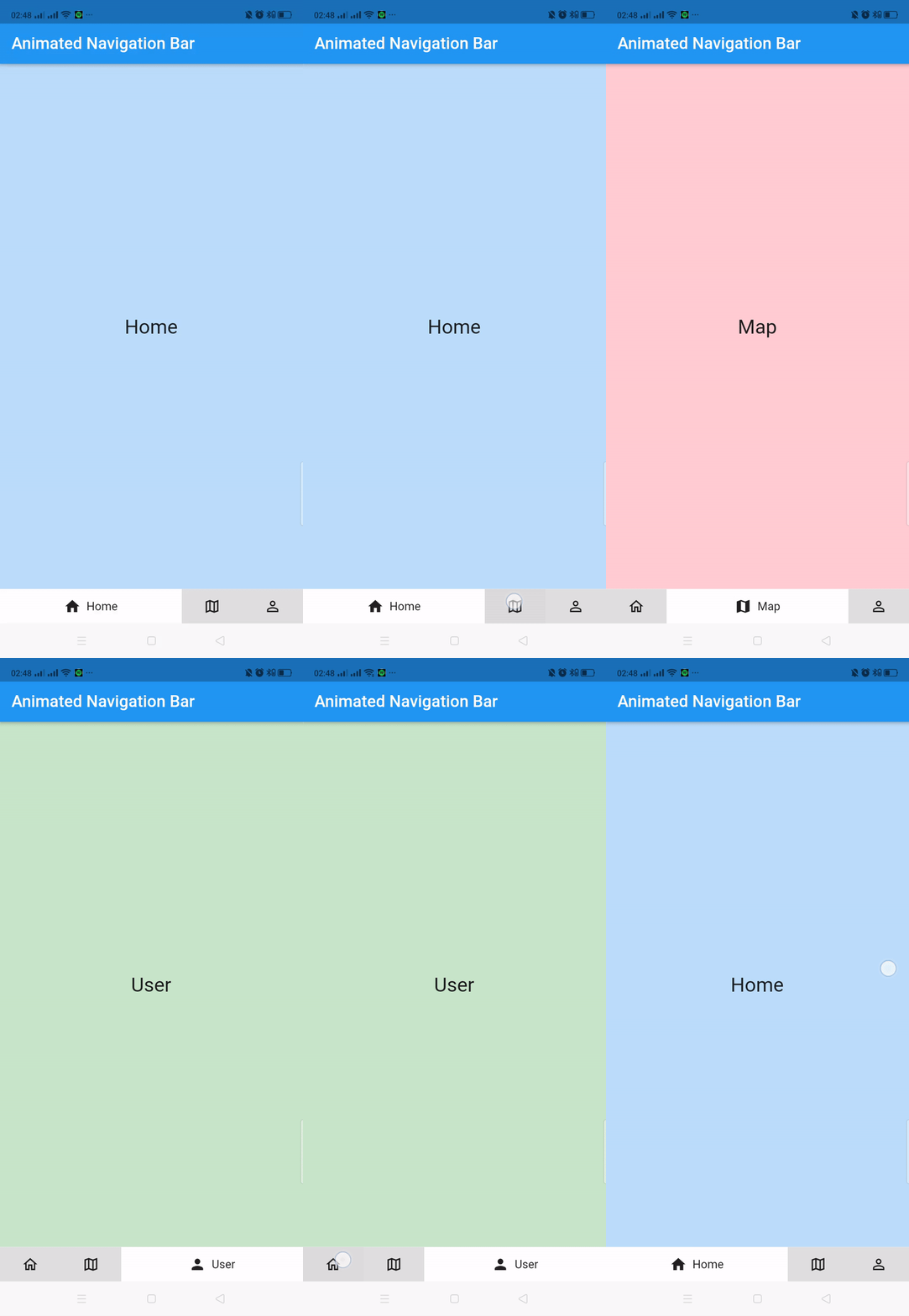
## Getting started
Add the following dependency in the `pubspec.yaml` of your Flutter project :
```yaml
dependencies:
...
animated_navigation_bar:
```
Import the package :
```dart
import 'package:animated_navigation_bar/animatedNavBar.dart';
```
If you need help getting started with Flutter, head over to the official documentation [documentation](https://flutter.io/).
### Constructors
You can create an `AnimatedNavBar` by calling its constructor and passing a list of `AnimatedNavBarPage` as your `Scaffold` body
```dart
Scaffold(
body: AnimatedNavBar(
pages: [
AnimatedNavBarPage(),
AnimatedNavBarPage(),
...
]
),
```
An `AnimatedNavBar` requires multiple things:
* A `Color`, to fill the navigation view and bar with a background color
* A `BorderRadius` with a radius ranged between 0 and 24
* And a list of `AnimatedNavBarPage` as mentioned before with a maximum length of 5 and a minimumm of 1
An `AnimatedNavBarPage` requires multiple things:
* A `Text` of the tab bar page
* An `IconData` of the tab bar page
* And a pageContent, this is the page Widget and it can be whatever Widget you want it to be
### Styling
You can style the `AnimatedNavBar` with a variety of additional parameters
here's an example
```dart
Scaffold(
backgroundColor: Colors.blue,
body: AnimatedNavBar(
borderRadius: Radius.circular(24),
color: Colors.white,
padding: 8,
iconColor: Color(0xFF0D1C2E),
inactiveIconColor: Color(0xFF233B90),
backgroundColor: Colors.blue,
shadow: false,
textStyle: Theme.of(context).textTheme.headline4,
pages: [
// first page
AnimatedNavBarPage(
title: "Home",
icon: Icons.home,
inactiveIcon: Icons.home_outlined,
pageContent: HomePage(),
),
// second page
AnimatedNavBarPage(
title: "Map",
icon: Icons.map,
inactiveIcon: Icons.map_outlined,
pageContent: MapPage(),
),
// third page
AnimatedNavBarPage(
title: "User",
icon: Icons.person,
inactiveIcon: Icons.person_outline,
pageContent: UserPage(),
),
],
),
);
```
## Contributions
Please feel free to contribute to this project
You can fork the project and work on your own version
If you found any bug, please open an [issue](https://github.com/Majidbouikken/AnimatedNavigationBar/issues).
If you fixed a bug or added a feature, please open a [pull request](https://github.com/Majidbouikken/AnimatedNavigationBar/pulls).
## Examples
For a complete understandable project, refer to this [repository](https://github.com/Majidbouikken/MyBazaar).