https://github.com/majkinetor/psinflux
InfluxDb Powershell HTTP API client
https://github.com/majkinetor/psinflux
influxdb powershell
Last synced: 11 months ago
JSON representation
InfluxDb Powershell HTTP API client
- Host: GitHub
- URL: https://github.com/majkinetor/psinflux
- Owner: majkinetor
- License: gpl-2.0
- Created: 2017-04-27T18:40:20.000Z (about 9 years ago)
- Default Branch: master
- Last Pushed: 2020-06-15T13:23:07.000Z (about 6 years ago)
- Last Synced: 2025-05-13T12:05:16.479Z (about 1 year ago)
- Topics: influxdb, powershell
- Language: PowerShell
- Size: 658 KB
- Stars: 6
- Watchers: 2
- Forks: 1
- Open Issues: 0
-
Metadata Files:
- Readme: README.md
- License: LICENSE.txt
Awesome Lists containing this project
README
# PSInflux
This PowerShell 3+ module uses Influx DB [HTTP API](https://docs.influxdata.com/influxdb/v1.2/guides/querying_data) to query and send data.
To install, clone this project then run: `./install.ps1`. To be able to use templated queries in interactive manner, you also need CLI tool [fzf](https://github.com/junegunn/fzf) that you can install via Chocolatey: [`cinst fzf`](https://chocolatey.org/packages/fzf)
## How to use
Set the following environment variables or put them in $PROFILE:
```powershell
$ENV:INFLUX_SERVER = "http://influxdb.server.com:8086"
$ENV:INFLUX_DB = "mydb"
```
Load with `import-module psinflux`. You can use normal PowerShell commands to get help:
* List of functions: `gcm -Module psinflux`
* Help for function: `man iq`
### Query
Use `iq` (alias for `Send-Query`) to query the database:
```powershell
iq select value,tag from measure limit 20
```
For convenience, you don't generally have to put a query inside a PowerShell string.
`iq` (influx query) function parses returned data into PowerShell objects which can be slow for large number of points. Use `iqr` (raw query) to get large collections.
### Templates
Use `itemplate` (alias for `Invoke-Template`) to send predefined queries. Predefined queries can be added by the user and can contain PowerShell placeholders for getting the user input, for example metric or database name. Integrated templates use [fzf](https://github.com/junegunn/fzf) (install via chocolatey: [`cinst fzf`](https://chocolatey.org/packages/fzf)) fuzzy finder as input selector.
[Default template](https://github.com/majkinetor/psinflux/blob/master/templates.txt) is always used and has several predefined queries and selectors/input methods. You can add your own template by using a `$FilePath` parameter or setting `$Env:INFLUX_TEMPLATE` environment variable. User template is then merged with the default one.
Query templates are text files that contain two sections: powershell code and query sentences. Two sections are separated by '---' line. Comments are marked with #.
User can define small Powershell helper scriptblocks and Powershell variables that serve to replace query placeholders, marked with `$PLACEHOLDER` keywords. There are 2 specially named placeholders, those starting with `SELECT_` or `INPUT_` that are replaced with scriptblock invocations. Other $ prefixed words are simple PowerShell variables. Default template defines few generally useful selectors can be reused in user template.
For example, user template can look like this:
```
$SELECT_CPU_FIELDS = { ( iq show field keys from cpu | % fieldkey | fzf "Select 1 or more CPU (with TAB key) fields") -join ',' }
---
select $SELECT_CPU_FIELDS from cpu limit 50 # Select field from the CPU metric
```

### Writing data
To write data points to the database use `Send-Data` function:
```powershell
$cpu_load = Get-Counter '\Processor(_Total)\% Processor Time' | % CounterSamples | % CookedValue
Send-Data "cpu,host=$Env:COMPUTERNAME,user=$Env:USERNAME value=$cpu_load"
```
You can use `[DateTime]::UtcNow.ToString('o')` to send date time instead of nanoseconds until Unix epoch. If you do that, pass parameter `$UseRoundTripTime` to make function automatically convert time points to correct format.
You can also send an array of strings:
```powershell
$time = [DateTime]::UtcNow.ToString('o')
Send-Data "test1 value=1 $time", "test2 value=2 $time" -RoundTripTime
```
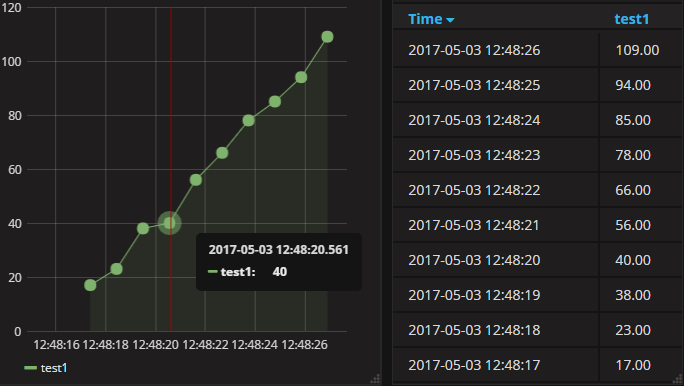
Here is another example:
```powershell
PS> 1..10 | % { $x = 10*$_ + (Get-Random 10); Send-Data "test1 value=$x"; sleep 1 }
StatusCode StatusDescription Headers
---------- ----------------- -------
204 No Content {[Request-Id, 03fed428-2fee-11e7-8c50-000000000000], [X-Influxdb-Version, 1.2.2], [Content-Type, application/json], [Date, Wed, 03 May 2017 10:48:17 GMT]}
204 No Content {[Request-Id, 04997ca0-2fee-11e7-8c51-000000000000], [X-Influxdb-Version, 1.2.2], [Content-Type, application/json], [Date, Wed, 03 May 2017 10:48:18 GMT]}
...
PS> iq select value from test1 order by time desc
time value
---- -----
2017-05-03T10:48:26.893855822Z 109
2017-05-03T10:48:25.841784978Z 94
2017-05-03T10:48:24.789887277Z 85
2017-05-03T10:48:23.729787415Z 78
2017-05-03T10:48:22.673721527Z 66
2017-05-03T10:48:21.617741836Z 56
2017-05-03T10:48:20.561755378Z 40
2017-05-03T10:48:19.497824954Z 38
2017-05-03T10:48:18.437837385Z 23
2017-05-03T10:48:17.384615849Z 17
```
#### Send to StatsD
You can use `Send-Statsd` to write to Statsd server. The following example uses [Telegraf](https://www.influxdata.com/getting-started-with-sending-statsd-metrics-to-telegraf-influxdb/) as StatsD server so sending tags is supported:
```powershell
Send-Statsd "mycounter,host=${Env:COMPUTERNAME}:10|c", "mycounter,host=MEH:100|c" -Ip 127.0.0.1
```