https://github.com/make-software/casper-dao-middleware
A mono-repository that consists of two apps. Handler is used to listen to event from the network, process them and store them in DB and API for exposing stored data.
https://github.com/make-software/casper-dao-middleware
blockchain blockchain-technology casper-network dao golang
Last synced: 10 months ago
JSON representation
A mono-repository that consists of two apps. Handler is used to listen to event from the network, process them and store them in DB and API for exposing stored data.
- Host: GitHub
- URL: https://github.com/make-software/casper-dao-middleware
- Owner: make-software
- License: apache-2.0
- Created: 2022-11-02T13:04:42.000Z (over 3 years ago)
- Default Branch: master
- Last Pushed: 2024-07-08T11:11:09.000Z (about 2 years ago)
- Last Synced: 2025-04-03T07:21:47.102Z (over 1 year ago)
- Topics: blockchain, blockchain-technology, casper-network, dao, golang
- Language: Go
- Homepage:
- Size: 1.29 MB
- Stars: 3
- Watchers: 4
- Forks: 1
- Open Issues: 4
-
Metadata Files:
- Readme: README.md
- Contributing: CONTRIBUTING.md
- License: LICENSE
- Code of conduct: CODE_OF_CONDUCT.md
- Security: SECURITY.md
Awesome Lists containing this project
README
# Casper DAO Middleware
Casper DAO Middleware is a mono-repository that consists of two apps. Handler is used to listen to event from the
network, process them and store them in DB and API for exposing stored data.
## Build
Check various build options with:
```
make help
```
## Run local migrations
- Install [go-migrate](https://github.com/golang-migrate/migrate/tree/master/cmd/migrate)
- Run local migrations
```bash
make sync-db
```
## Testing
Each component could be tested via unit or integrations tests.
## Unit tests
To run unit tests for the component, make sure you are in the root of the component:
```
cd internal/dao/{component} && go test ./...
```
## Integration tests
Setup database command:
```bash
make sync-test-db
```
After your environment is ready, make sure you set up required env variables.
Run integration tests:
```
cd internal/dao/{component} && go test -tags=integration ./...
```
## Run apps locally
- Install [docker](https://docs.docker.com/compose/install/) and [docker-compose](https://docker-docs.netlify.app/compose/install/)
- Run local [docker-compose.yaml](./infra/local/docker-compose.db.yaml) file
```bash
docker-compose -f ./infra/local/docker-compose.db.yaml up -d
```
- Prepare .env files
```bash
cp ./apps/handler/.env.example ./apps/handler/.env && cp ./apps/api/.env.example ./apps/api/.env
```
- Run local migrations
```bash
make sync-db
```
- Run application
```bash
cd ./apps/{app} && go run .
```
## Tools
### Swagger
To generate swagger from the code comments `swag` should be installed locally:
Installation instruction could be found [here](https://github.com/swaggo/swag#getting-started)
To run swagger regeneration:
```bash
make swagger
```
### Linters
The following tools should be enabled in your IDE:
- ```goimports```
- ```golangci-lint```
#### Other systems
Check [this link](https://plantuml.com/graphviz-dot)
## Architecture
The project should be readable, extendable, and flexible. In order to achieve it will follow the layered architecture
approach with the following layers:
```
┌────────────────────────────────────┐
│ Application/Infrastructure layer │
├────────────────────────────────────┤
│ Service layer │
├────────────────────────────────────┤
│ Domain objects layer │
├────────────────────────────────────┤
│ Data access layer │
└────────────────────────────────────┘
```
The approach above is a modification of
the [Fowler's multilayer presentation domain application layering](https://martinfowler.com/bliki/PresentationDomainDataLayering.html):
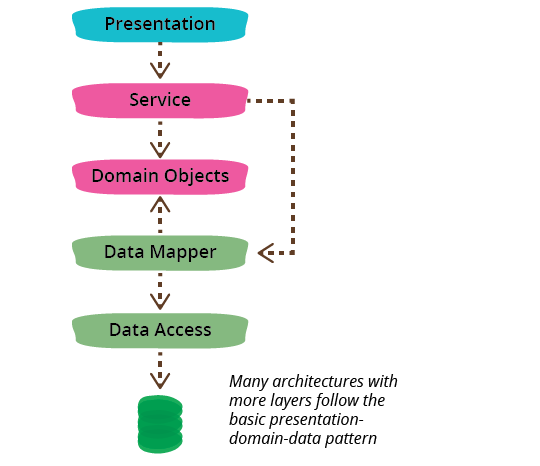
with the following differences:
- Presentation layer is renamed to Application/Infrastructure layer to better reflect its nature
- Data mapper layer is absent because data mapping is done by Go's ```sqlx``` library with struct tags
It is important to follow Fowler's advice and split the project into domain-oriented sub-modules:
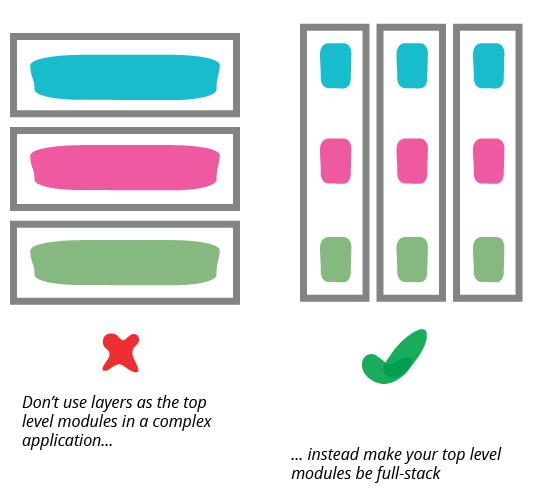
It is important to keep a finite number of building blocks used in the codebase on the lower level of abstractions. The
most typical examples are:
- entities
- repositories
- services (Ihor: I want to try using commands as service actions because they provide a high level of isolation and are
easy to maintain because there is no order for input parameters)
- errors (we should make sure to properly map them in the API, each error should have its own human-readable code,
see [Stripe API](https://stripe.com/docs/error-codes) for example)
- validations (should be as granular as possible)
- events (should be used to link pieces of code where the lowest level of coupling is expected)
In order to make project-level communications easier, the codebase should be built with domain-driven design principles
in mind.
## Structure
In order to satisfy the architecture outlined above, the project structure should be the following:
```
casper-middleware
├───apps The apps directory contains applications
│ └───sample-app An application is a piece of code that has a single function.
│ ├───resources It can have its own resources like configuration, secret keys, etc.
│ │ ├───config.go
│ │ └───etc
│ ├───etc It can contain infrastructure code in subpackages or files.
│ ├───etc.go It can use one or more domain packages defined in the internal directory
│ ├───main.go It always has an entry point
│ └───README.md It always has a README file
│
├───infra The infra directory contains infrastructure-related files
│ ├───docker It can be Docker files
│ ├───terraform or Terraform scripts
│ └───etc
│
├───internal The internal directory contains domain logic packages. It could be called
│ └───sample-domain-package domain or business-logic, but internal may be a better name for a Go project
│ ├───entities A domain package has an entities directory that contains managed domain entities
│ ├───events It can have an events directory for domain-specific events
│ ├───errors It can have an errors directory for domain-specific errors
│ ├───repositories It has n repositories directory with, well, repositories
│ ├───resources It can have a resources directory with database migrations, etc
│ │ └───migrations
│ ├───services It has a services directory with services that describe available
│ │ ├───service-one domain-specific actions. Which can be grouped by a service name or
│ │ ├───service-two can be listed directly in the directory for smaller packages
│ │ ├───...
│ │ └───service-n
│ ├───validations It can have a validations directory with validations that return domain errors
│ ├───etc
│ └───README.md It always has a README file
│
├───pkg The pkg directory contains "third-party" utilities needed by the project
│ └───sample-utility-package Such packages don't expose any domain logic and theoretically can be open-sourced
│ └───README.md
│
└───Makefile Makefile represents singe entry for the project-related commands
```
Plural names were used for higher-level packages to have a possibility to reuse singular names in the code.
The structure shouldn't be considered final and should evolve together with the project.