https://github.com/makoni/swift-adwaita
An imperative Swift 6 wrapper for GTK4 and libadwaita, designed for building native GNOME desktop applications.
https://github.com/makoni/swift-adwaita
adwaita gnome gtk libadwaita linux swift swift6
Last synced: about 2 months ago
JSON representation
An imperative Swift 6 wrapper for GTK4 and libadwaita, designed for building native GNOME desktop applications.
- Host: GitHub
- URL: https://github.com/makoni/swift-adwaita
- Owner: makoni
- License: mit
- Created: 2026-03-23T17:20:41.000Z (3 months ago)
- Default Branch: main
- Last Pushed: 2026-04-29T17:41:25.000Z (2 months ago)
- Last Synced: 2026-04-29T18:34:20.807Z (about 2 months ago)
- Topics: adwaita, gnome, gtk, libadwaita, linux, swift, swift6
- Language: Swift
- Homepage:
- Size: 27.9 MB
- Stars: 6
- Watchers: 0
- Forks: 1
- Open Issues: 1
-
Metadata Files:
- Readme: README.md
- Contributing: CONTRIBUTING.md
- Funding: .github/FUNDING.yml
- License: LICENSE.txt
Awesome Lists containing this project
README
# swift-adwaita
[](https://github.com/makoni/swift-adwaita/actions/workflows/ci.yml)
[](https://swift.org)
[](https://spaceinbox.me/docs/swift-adwaita/documentation/adwaita)
[](LICENSE.txt)

An imperative Swift 6 wrapper for [GTK4](https://docs.gtk.org/gtk4/) and [libadwaita](https://gnome.pages.gitlab.gnome.org/libadwaita/doc/latest/), designed for building native GNOME desktop applications.
Documentation: [API Reference](https://spaceinbox.me/docs/swift-adwaita/documentation/adwaita)
## Apps built with swift-adwaita
- [Swifty Notes](https://github.com/makoni/swifty-notes-gtk)
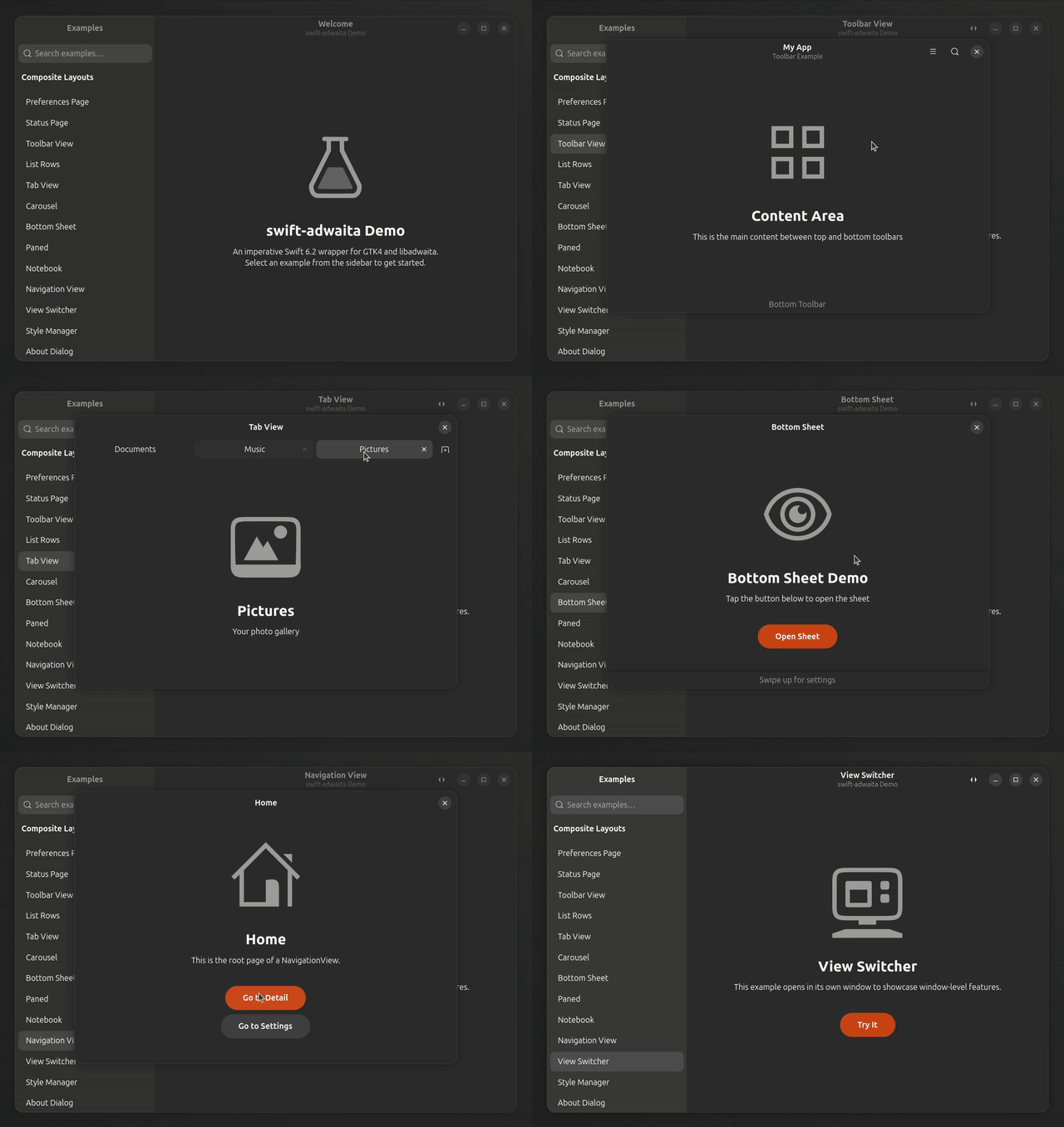
## Demo app
## Features
- **Imperative API** — no declarative DSL; create and configure widgets directly
- **177 widget wrappers** — 74 auto-generated Adwaita + 103 hand-written GTK widgets
- **Zero raw pointers in public API** — all `OpaquePointer`/`gpointer` hidden behind Swift types
- **Type-safe enums** — `SignalName`, `PropertyName`, `CSSClass`, `IconName` instead of raw strings
- **Fluent setters** — method chaining: `Label("Hi").halign(.center).cssClass(.title1)`
- **Type-safe signals** — 50+ signal signatures with `@MainActor` closures
- **Async/await** — `FileDialog.open()`, `UriLauncher.launch()`, `Clipboard.readText()`
- **Keyboard shortcuts** — enum-based `Key` + `KeyModifiers` API
- **Property bindings** — `GObjectRef.bind()` for reactive connections
- **Container protocol** — unified `append()`/`remove()` for Box, ListBox, FlowBox, WrapBox, Carousel
- **Convenience initializers** — `SwitchRow(title:)`, `PreferencesGroup(title:description:)`, etc.
- **Menus & actions** — `GMenuRef`, `SimpleAction`, `MenuButton`
- **Drag & drop** — `DragSource`, `DropTarget`
- **CSS support** — `CSSProvider` + type-safe `CSSClass` enum
- **Animations** — `TimedAnimation`, `SpringAnimation` with callbacks
- **Drawing** — `DrawingArea` with `CairoContext` wrapper
- **Text attributes** — `TextAttributes` for styling entry text (bold, italic, color)
- **Media playback** — `MediaStream`, `Video`, `MediaControls`
- **Localization** — gettext integration via `localized()` and `String.localized`
- **@Setting property wrapper** — type-safe GSettings binding
- **Adaptive layout** — `Breakpoint.minWidth()`, `Breakpoint.maxWidth()` helpers
- **Swift 6 concurrency** — full `@MainActor` isolation, `Sendable` types
- **1194 tests on Linux / 1181 on macOS**, **78 demo examples**, **CI on Ubuntu + macOS**
## Requirements
- Swift 6.2+
- libadwaita 1.5+ development headers
- GtkSourceView 5 development headers
- Linux **or** macOS 13+ (Apple Silicon recommended; Intel best-effort)
### Ubuntu/Debian
```bash
sudo apt install libadwaita-1-dev libgtksourceview-5-dev
```
### Fedora
```bash
sudo dnf install libadwaita-devel gtksourceview5-devel
```
### macOS (Homebrew)
```bash
brew install libadwaita gtksourceview5 pkgconf
```
`libadwaita` pulls `gtk4`, `glib`, `cairo`, `pango`, `gdk-pixbuf`,
`harfbuzz`, `librsvg`, and ~30 more transitive dependencies — about
1.5–2 GB on disk after install.
**Runtime env var (required).** libadwaita aborts at startup with
`No GSettings schemas are installed on the system` unless GLib can
find Homebrew's compiled schemas. Add this to your shell rc, or
prepend it to any `swift run …` / `swift test …` invocation:
```bash
export XDG_DATA_DIRS="/opt/homebrew/share:${XDG_DATA_DIRS:-/usr/local/share:/usr/share}"
```
Intel Macs: replace `/opt/homebrew` with `/usr/local`.
> macOS targets the GTK4 Quartz backend, so HeaderBar / Toast / native
> dialog chrome will look like libadwaita on macOS rather than native
> Cocoa. Build/test cycles are fully supported; Flatpak distribution is
> Linux-only.
## Installation
Install the system packages above first, then add this package to your `Package.swift`:
```swift
dependencies: [
.package(url: "https://github.com/makoni/swift-adwaita.git", branch: "main"),
],
targets: [
.executableTarget(
name: "MyApp",
dependencies: [
.product(name: "Adwaita", package: "swift-adwaita"),
]
),
]
```
## Quick Start
```swift
import Adwaita
@MainActor
func buildApp() {
let app = Application(id: "com.example.HelloWorld")
app.onActivate {
let window = ApplicationWindow(application: app)
window.title = "Hello"
window.defaultWidth = 400
window.defaultHeight = 300
let box = Box(orientation: .vertical, spacing: 12)
box.setMargins(24)
let label = Label("Hello from swift-adwaita!")
.cssClass(.title1)
box.append(label)
let button = Button(label: "Click Me")
.cssClass(.suggestedAction)
.cssClass(.pill)
.halign(.center)
button.onClicked {
label.text = "Button clicked!"
}
box.append(button)
window.setContent(box)
window.present()
}
app.run()
}
buildApp()
```
## Architecture
Three-layer design:
```
CAdwaita System library (pkg-config: libadwaita-1)
│
GObjectSupport GObject lifecycle (ARC), signals, Variant, GValue
│
Adwaita Widget wrappers (74 generated + 103 hand-written)
```
### Key Types
| Type | Description |
|------|-------------|
| `GObjectRef` | Base class — GObject lifecycle with ARC |
| `Widget` | Base for all GTK/Adwaita widgets |
| `SignalConnection` | Handle for signal connections |
| `Application` | App entry point (`AdwApplication`) |
| `ApplicationWindow` | Main window |
### Protocols
| Protocol | Purpose | Conforming Types |
|----------|---------|-----------------|
| `ListModelConvertible` | Pass models to list views | `ListStore`, `StringList`, `FilterListModel`, `SortListModel`, `MapListModel`, `FlattenListModel`, `TreeListModel`, `SelectionFilterModel` |
| `SelectionModelConvertible` | Pass selection to views | `SingleSelection`, `MultiSelection`, `NoSelection` |
| `Container` | Widgets with append/remove | `Box`, `ListBox`, `FlowBox`, `WrapBox`, `Carousel` |
| `Swipeable` | Swipe gesture target | `Carousel`, `NavigationView`, `OverlaySplitView` |
### Type-Safe Enums
| Enum | Replaces | Example |
|------|----------|---------|
| `SignalName` | `"clicked"` | `.clicked`, `.changed`, `.notify("title")` |
| `PropertyName` | `"active"` | `.active`, `.title`, `.custom("my-prop")` |
| `CSSClass` | `"suggested-action"` | `.suggestedAction`, `.pill`, `.title1` |
| `IconName` | `"go-next-symbolic"` | `.goNext`, `.dialogError`, `.custom("my-icon")` |
### Widget Categories
**Layout:** `Box`, `Stack`, `Grid`, `Overlay`, `FlowBox`, `Clamp`, `Paned`, `WrapBox`, `CenterBox`, `Fixed`
**Navigation:** `NavigationView`, `NavigationSplitView`, `OverlaySplitView`, `TabView`, `ViewSwitcher`, `Notebook`, `Carousel`
**Input:** `Button`, `Entry`, `Switch`, `CheckButton`, `ToggleButton`, `Scale`, `SpinRow`, `SearchEntry`, `DropDown`, `Calendar`, `ToggleGroup`
**Display:** `Label`, `Image`, `Picture`, `Spinner`, `ProgressBar`, `LevelBar`, `Avatar`, `Banner`, `Separator`, `Video`
**Lists:** `ListBox`, `ActionRow`, `ExpanderRow`, `ComboRow`, `SwitchRow`, `ButtonRow`, `PreferencesGroup`
**Virtualized Lists:** `ListView`, `GridView`, `ColumnView` + `ListStore`, `StringList`, `SignalListItemFactory`, `TreeListModel`, `FilterListModel`, `SortListModel`
**Containers:** `ScrolledWindow`, `ToolbarView`, `HeaderBar`, `BottomSheet`, `Frame`, `Expander`, `Revealer`, `ActionBar`
**Dialogs:** `AlertDialog`, `Dialog`, `AboutDialog`, `PreferencesDialog`, `FileDialog`
**Menus:** `MenuButton`, `PopoverMenu`, `PopoverMenuBar`, `SplitButton`, `GMenuRef`, `SimpleAction`
**Event Controllers:** `GestureClick`, `GestureDrag`, `GestureLongPress`, `GestureSwipe`, `EventControllerKey`, `EventControllerMotion`, `EventControllerScroll`, `EventControllerFocus`, `DragSource`, `DropTarget`, `ShortcutController`
**Feedback:** `Toast`, `ToastOverlay`, `EmojiChooser`
**Styling:** `CSSProvider`, `CSSClass`, `StyleManager`, `TextAttributes`
**Animation:** `TimedAnimation`, `SpringAnimation`, `CallbackAnimationTarget`, `PropertyAnimationTarget`
**Media:** `MediaStream`, `Video`, `MediaControls`
**Drawing:** `DrawingArea`, `CairoContext`
**System:** `Clipboard`, `Display`, `Monitor`, `UriLauncher`, `Settings`
## Examples
### Fluent Setters
```swift
let label = Label("Welcome")
.halign(.center)
.vexpand()
.margins(24)
.cssClass(.title1)
.tooltip("A greeting label")
let button = Button(icon: .goNext)
.cssClass(.suggestedAction)
.cssClass(.circular)
```
### Type-Safe Icons and CSS
```swift
let img = Image(icon: .dialogInformation)
let btn = Button(icon: .documentSave, onClicked: { print("Saved!") })
label.addCSSClass(.dimLabel)
list.addCSSClass(.boxedList)
button.addCSSClass(.destructiveAction)
```
### Dialogs, clipboard, URI launching
Every async-looking surface in swift-adwaita ships in two shapes:
- A **callback form** — `…(parent: window) { result in … }`. The closure runs on the main actor from the GLib main loop. **Use this inside a running GTK application** (any handler called from `onClicked` / `onActivate` / a GTK signal in general).
- An **`async` form** — `try await …`. Convenient in tests, macOS CLIs, or anywhere something else is draining Swift's `DispatchQueue.main`. Don't use it inside a `g_application_run` app.
#### Why the split
Swift's default `MainActor` executor is `DispatchQueue.main`, and the GLib main loop does not drain it — so a `Task { @MainActor in await dialog.open(...) }` kicked off from a button click just sits there and the dialog never appears. The callback forms side-step Swift Concurrency entirely and go through a GLib-native `GAsyncReadyCallback`, which GLib's loop does dispatch.
#### Callback form (prefer this in GTK apps)
```swift
let dialog = FileDialog()
dialog.title = "Open a File"
openButton.onClicked {
dialog.open(parent: window) { result in
switch result {
case let .success(path?): print("Selected: \(path)")
case .success(nil): print("User cancelled")
case let .failure(error): print("Error: \(error.message)")
}
}
}
// Clipboard — same idea, no Result wrapping because there's no error domain.
widget.clipboard.readText { text in
label.text = text ?? ""
}
// URI launcher.
UriLauncher(uri: "https://gnome.org").launch(parent: window) { success in
print("Launched: \(success)")
}
```
The same shape is available on `FileDialog.save/selectFolder`, `ColorDialog.chooseRGBA`, `FontDialog.chooseFont`, `Clipboard.readTexture`, and `Texture.load(from:completion:)`.
#### Async form (tests / non-GTK)
```swift
let path = try await dialog.open(parent: window) // ok in XCTest, don't do this inside onClicked.
```
### Adaptive Layout
```swift
let bp = Breakpoint.maxWidth(500)
bp.addSetter(box, property: .custom("orientation"), value: "vertical")
bp.onApply { sidebar.visible = false }
bp.onUnapply { sidebar.visible = true }
window.addBreakpoint(bp)
```
### Drawing
```swift
let da = DrawingArea()
da.contentWidth = 200
da.contentHeight = 200
da.setDrawFunc { cr, width, height in
cr.setSourceRGB(0.2, 0.4, 0.8)
cr.roundedRectangle(x: 10, y: 10, width: 180, height: 180, radius: 20)
cr.fill()
}
```
### Keyboard Shortcuts
```swift
button.addKeyboardShortcut(key: .s, modifiers: .control) {
print("Save!")
return true
}
widget.addKeyboardShortcut(key: .z, modifiers: [.control, .shift]) {
print("Redo!")
return true
}
```
### Menus & Actions
```swift
let menu = GMenuRef()
menu.append("Cut", action: "win.cut")
menu.append("Copy", action: "win.copy")
let menuBtn = MenuButton()
menuBtn.iconName = "open-menu-symbolic"
menuBtn.setMenuModel(menu)
let action = SimpleAction(name: "cut")
action.onActivate { print("Cut!") }
window.addAction(action)
```
### Localization
```swift
setTextDomain("myapp")
let greeting = localized("Hello")
let label = Label("Welcome".localized)
```
### Virtualized Lists
```swift
var items = ["Apple", "Banana", "Cherry"]
let store = ListStore()
for _ in items { store.appendPlaceholder() }
let factory = SignalListItemFactory()
factory.onSetup { listItem in
listItem.child = Label("")
}
factory.onBind { listItem in
listItem.child?.cast(Label.self).text = items[listItem.position]
}
let selection = SingleSelection(model: store)
let listView = ListView(model: selection, factory: factory)
```
### Drag & Drop
```swift
let drag = DragSource()
drag.setTextContent("Hello!")
sourceWidget.addController(drag)
let drop = DropTarget.forText()
drop.onDrop { text in
if let text { label.text = text }
return true
}
targetWidget.addController(drop)
```
### Custom CSS
```swift
CSSProvider.loadGlobal("""
.my-widget {
background: linear-gradient(135deg, @accent_bg_color, @headerbar_bg_color);
border-radius: 12px;
padding: 24px;
}
""")
widget.addCSSClass("my-widget")
```
## Demo App
An interactive gallery with 78 examples showcasing every widget:
```bash
swift run DemoApp
```
Features sidebar navigation with search, source code viewer, and windowed demos for navigation/window-level widgets.
## Building
### Linux
```bash
swift build # Build library
xvfb-run swift test --no-parallel # Run the test suite under a virtual display
swift run DemoApp # Launch demo gallery
```
### macOS
```bash
swift build # Build library
# Tests need GSettings schemas at runtime.
XDG_DATA_DIRS=/opt/homebrew/share swift test --no-parallel
# DemoApp likewise:
XDG_DATA_DIRS=/opt/homebrew/share swift run DemoApp
```
For an Xcode-driven build that produces a regular macOS `.app` bundle
(Cmd+R, breakpoints, Archive), see `examples/macos/DemoApp/` — it's
a working starter project that wraps the demo gallery via the
`DemoAppLib` library product.
> Linux runs the test suite via swift-testing; macOS runs an XCTest
> mirror suite under `Tests/AdwaitaTests/macOS/` because swift-testing's
> per-test autorelease pool transitions corrupt memory after `gtk_init`
> registers Cocoa CFRunLoop callbacks. Both paths exercise the same
> logic. If you add a new test, place the swift-testing version under
> `Tests/AdwaitaTests/` (gated `#if !os(macOS)`) and an XCTest mirror
> under `Tests/AdwaitaTests/macOS/` (gated `#if os(macOS)`).
## Distribution with Flatpak
Flatpak is the recommended way to distribute GTK4/libadwaita apps on Linux. The GNOME runtime provides GTK4 and libadwaita, and the Swift SDK extension provides the compiler — your app only ships its own binary.
### Prerequisites
Install Flatpak tools and runtimes:
```bash
# Install flatpak-builder
sudo apt install flatpak-builder # Ubuntu/Debian
sudo dnf install flatpak-builder # Fedora
# Install GNOME SDK and Swift extension
flatpak install flathub org.gnome.Sdk//48 org.freedesktop.Sdk.Extension.swift6//24.08
```
### Flatpak Manifest
Create a manifest file (e.g., `com.example.MyApp.yml`):
```yaml
app-id: com.example.MyApp
runtime: org.gnome.Platform
runtime-version: "48"
sdk: org.gnome.Sdk
sdk-extensions:
- org.freedesktop.Sdk.Extension.swift6
command: MyApp
finish-args:
- --share=ipc
- --socket=fallback-x11
- --socket=wayland
- --device=dri
build-options:
append-path: /usr/lib/sdk/swift6/bin
prepend-ld-library-path: /usr/lib/sdk/swift6/lib
modules:
- name: MyApp
buildsystem: simple
sources:
- type: dir
path: .
build-commands:
- swift build -c release --product MyApp --static-swift-stdlib
- install -Dm755 .build/release/MyApp /app/bin/MyApp
- install -Dm644 com.example.MyApp.desktop /app/share/applications/com.example.MyApp.desktop
- install -Dm644 com.example.MyApp.metainfo.xml /app/share/metainfo/com.example.MyApp.metainfo.xml
- install -Dm644 com.example.MyApp.svg /app/share/icons/hicolor/scalable/apps/com.example.MyApp.svg
```
Key points:
- `--static-swift-stdlib` links the Swift runtime statically — the SDK extension is only needed at build time
- The GNOME runtime provides GTK4 and libadwaita at runtime
- You also need a `.desktop` file, `metainfo.xml`, and an app icon
### Build and Run
```bash
# Build and install locally
flatpak-builder --force-clean --user --install build-dir com.example.MyApp.yml
# Run
flatpak run com.example.MyApp
```
### Demo App Flatpak
The included DemoApp has a complete Flatpak setup in the `flatpak/` directory:
```bash
flatpak-builder --force-clean --user --install build-dir flatpak/io.github.makoni.SwiftAdwaitaDemo.yml
flatpak run io.github.makoni.SwiftAdwaitaDemo
```
For more details, see the guide.
## License
MIT License. See [LICENSE.txt](LICENSE.txt).