https://github.com/mambacodes/beanonymous
BeAnonymous is a Python based application with which you can generate videos in the exact same way as the one made by Anonymous.
https://github.com/mambacodes/beanonymous
anonymous python video-generator
Last synced: 9 months ago
JSON representation
BeAnonymous is a Python based application with which you can generate videos in the exact same way as the one made by Anonymous.
- Host: GitHub
- URL: https://github.com/mambacodes/beanonymous
- Owner: MambaCodes
- License: apache-2.0
- Created: 2022-11-30T13:49:30.000Z (over 3 years ago)
- Default Branch: main
- Last Pushed: 2025-05-17T19:03:27.000Z (about 1 year ago)
- Last Synced: 2025-10-27T04:37:45.210Z (9 months ago)
- Topics: anonymous, python, video-generator
- Language: Python
- Homepage:
- Size: 36.9 MB
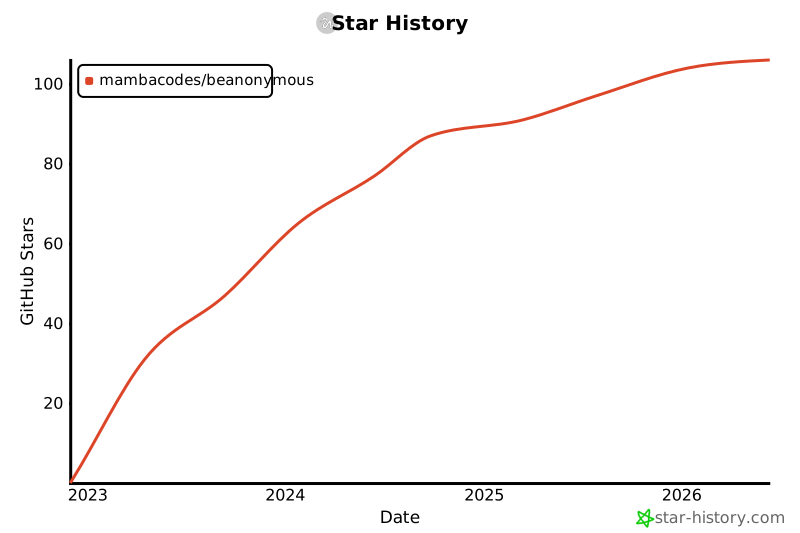
- Stars: 106
- Watchers: 1
- Forks: 13
- Open Issues: 0
-
Metadata Files:
- Readme: README.md
- Contributing: CONTRIBUTING.md
- License: LICENSE
- Code of conduct: CODE_OF_CONDUCT.md
Awesome Lists containing this project
README

Be Anonymous
" The Anonymous Video Generator "
## Introduction
A simple template based video generator project written in Python. The project can be used to create videos like those of the popular Hacking group "Anonymous". We have a built-in video script editor to create your own custom video, which will be played on the screen. This works on various Python Libraries and Audio Post Processors like FFMPEG
### InShort
It is an Anonymous Video Generator with which you can Build viral and shareable videos, complete with audio narration, custom video style and background music.
# Getting Started
Below are the Instructions on setting up the project Locally.
Also This Project uses the concept of Virtual Environments in Python so if you don't know how they work then refer to this [doc](
https://docs.python.org/3/tutorial/venv.html)
## Prequisites
Below are the Things you will need to use the software and How to install them :
- Operating System - Windows
- Python 3.11.5 Tested
- Pip 3 (Usually gets Installed with Python)
- FFMPEG - [Follow this Installation Tutorial](https://www.youtube.com/watch?v=4jx2_j5Seew)
if all the above prequisities are Satisfied, you may proceed to the next section.
## Installation
Follow these instructions to Setup your Own instance of the App :
### 1 : Clone the Repo
```sh
git clone https://github.com/MambaCodes/BeAnonymous.git
```
### 2 : Cd to the folder
```sh
cd BeAnonymous
```
### 3 : Create & Activate a Python Virtual Environment
After you cd into the repo folder, ensure you see the following cmd/terminal prompt
```sh
Something.../BeAnonymous $
```
If not, repeat the previous step.
After this, run the following command in cmd/terminal:
```sh
python -m venv myenv
```
once your Virtual Environment is Created, Activate it using the following command in cmd/terminal:
```sh
myenv/Scripts/activate
```
### 4 : Install the PIP packages/dependencies
Once your Virtual Environment is setup, your Terminal should look like this :
```sh
(myenv) Something...\BeAnonymous>
```
otherwise follow the previous step again.
After this, run the following command in cmd/terminal:
```sh
pip install -r requirements.txt
```
### 5 : It's done 🎉 | Run the app
```bash
(name_of_env) Something...\BeAnonymous>python main.py
```
And Congrats 🎉 the Application would start if you have followed each step correctly.
## 📐 How it Works

# Preview of App Interface ([Figma](https://www.figma.com/file/j5xS8mmcligDYr73Ba55Ru/BeAnonymous?node-id=0%3A1&t=CwW9WR9BCzLs5T4b-1))

## Screenshot of Real Application

# DEMO Output Video :
[](https://www.youtube.com/watch?v=hmOEzcqPmREhttps://www.youtube.com/watch?v=hmOEzcqPmRE)
# Roadmap
- [ ] Add 'Subtitiles' Feature into VideoGenerator
# Contributing
Contributions are what make the open source community such an amazing place to learn, inspire, and create. Any contributions you make are **greatly appreciated**.
If you have a suggestion that would make this better, please fork the repo and create a pull request. You can also simply open an issue with the tag "enhancement".
Don't forget to give the project a star! Thanks again!
1. Fork the Project
2. Create your Feature Branch (`git checkout -b feature/AmazingFeature`)
3. Commit your Changes (`git commit -m 'Add some AmazingFeature'`)
4. Push to the Branch (`git push origin feature/AmazingFeature`)
5. Open a Pull Request
# License
Distributed under the Apache License 2.0. See [`LICENSE.txt`](/LICENSE.txt) for more information.
## 📝 Contact Me
If you want to contact me, you can
reach me at dyeusyt@gmail.com
# Acknowledgments
- **Parth Jadhav and team** for their Amazing [Tkinter Designer](https://github.com/ParthJadhav/Tkinter-Designer). This really helped me while making the intial UI using tkinter.
- **Tom Schimansky** for CustomTkinter [CustomTkinter](https://github.com/TomSchimansky/CustomTkinter)
- Anonymous for Motivation of this Application
- "Anonymous Group" [Youtube Channel](https://www.youtube.com/@AnonymousGroup) for the Stock Footage clip.
## Star History
[](https://www.star-history.com/#MambaCodes/BeAnonymous&Date)