https://github.com/manavarya09/design-extract
Extract any website's complete design system with one command. DTCG tokens, semantic+primitive+composite, MCP server for Claude Code/Cursor/Windsurf, multi-platform emitters (iOS SwiftUI, Android Compose, Flutter, WordPress), Tailwind v4, Figma variables, shadcn/ui, CSS health audit, WCAG remediation, Chrome extension. MIT, Playwright, Node 20+.
https://github.com/manavarya09/design-extract
accessibility agent-skill ai chrome-extension claude-code-plugin cli css cursor design-system design-to-code design-tokens dtcg figma mcp-server npx playwright shadcn-ui skills-sh tailwind web-scraping
Last synced: 2 days ago
JSON representation
Extract any website's complete design system with one command. DTCG tokens, semantic+primitive+composite, MCP server for Claude Code/Cursor/Windsurf, multi-platform emitters (iOS SwiftUI, Android Compose, Flutter, WordPress), Tailwind v4, Figma variables, shadcn/ui, CSS health audit, WCAG remediation, Chrome extension. MIT, Playwright, Node 20+.
- Host: GitHub
- URL: https://github.com/manavarya09/design-extract
- Owner: Manavarya09
- License: mit
- Created: 2026-04-15T10:11:22.000Z (6 months ago)
- Default Branch: main
- Last Pushed: 2026-10-21T16:36:14.000Z (5 days ago)
- Last Synced: 2026-10-22T20:16:20.801Z (4 days ago)
- Topics: accessibility, agent-skill, ai, chrome-extension, claude-code-plugin, cli, css, cursor, design-system, design-to-code, design-tokens, dtcg, figma, mcp-server, npx, playwright, shadcn-ui, skills-sh, tailwind, web-scraping
- Language: HTML
- Homepage: https://www.designlang.app
- Size: 13.7 MB
- Stars: 4,316
- Watchers: 13
- Forks: 362
- Open Issues: 24
-
Metadata Files:
- Readme: README.md
- Changelog: CHANGELOG.md
- Contributing: CONTRIBUTING.md
- Funding: .github/FUNDING.yml
- License: LICENSE
- Code of conduct: CODE_OF_CONDUCT.md
- Security: SECURITY.md
- Support: SUPPORT.md
Awesome Lists containing this project
README


Built by Manav Arya Singh (@Manavarya09)
[](https://www.npmjs.com/package/designlang)
## Sponsors


Atlas Cloud — powers OpenAI-compatible --smart classification. For AI coding workflows, try the Atlas Cloud coding plan.
Bloome — deploys your AI clone to handle every audience conversation, running in the cloud, 24/7.
Try designlang on Bloome.
---
**designlang** points a headless browser at any URL and reads the design system off the live DOM. One command emits 17+ files — DTCG tokens, Tailwind config, shadcn theme, Figma variables, motion tokens, typed component anatomy, brand voice, page-intent labels, and a paste-ready prompt pack for v0 / Lovable / Cursor / Claude Artifacts.
It also goes where extractors don't: **layout patterns**, **responsive behavior across 4 breakpoints**, **hover / focus / active states**, **WCAG contrast scoring**, **multi-page consistency**, **drift checks against a live source-of-truth**, **visual-diffs**, and a **shareable graded report card**.
## Quick start
```bash
npx designlang https://stripe.com # extract everything
npx designlang dna stripe.com # place it in the measured design space: neighbours + percentiles ← v13.1
npx designlang site stripe.com # whole-site: one canonical system + consistency grade ← v12.23
npx designlang fidelity stripe.com --clone localhost:3000 # score a clone vs the original (visual + motion) ← v12.24
npx designlang gallery # static shareable gallery of measured clones ← v12.24
npx designlang studio # live token editor: edit, preview, export, share ← v12.19
npx designlang verify stripe.com # fidelity score: rebuild from tokens vs live ← v12.18
npx designlang pair stripe.com linear.app # fuse two designs (visuals A × voice B) ← v12.8
npx designlang brand stripe.com # full brand-guidelines book (13 chapters) ← v12.7
npx designlang theme-swap stripe.com --primary "#ff4800" # recolour around your brand ← v12.6
npx designlang pack stripe.com # one polished design-system directory ← v12.4
npx designlang remix stripe.com --as cyberpunk # restyle in another vocabulary ← v12.3
npx designlang remix stripe.com --all # emit all 6 vocabs at once ← v12.3
npx designlang grade https://stripe.com --badge # report card + SVG badge ← v12.2
npx designlang battle stripe.com vercel.com # head-to-head graded fight ← v12.2
npx designlang clone https://stripe.com # working Next.js starter
npx designlang --full https://stripe.com # screenshots + responsive + interactions
```
Drop a live design-score badge in any README:
```markdown

```
## Watch it read — live Extraction Theatre (`v13`)
Don't take the output on faith — **watch it happen.** On
[designlang.app/watch](https://designlang.app/watch) you paste a URL and a real
headless Chromium opens the page and reads its entire design system in real
time: a split stage with the live browser on the left and the design system —
palette, type, spacing, motion — assembling itself on the right as each token
lifts off the page.
It's driven by the *actual* extraction (the browser's CDP screencast streamed
frame-by-frame alongside the real token events), recorded so a shared link
replays the exact run. No install, no account. Every gallery card can be watched
the same way, and the [gallery](https://designlang.app/gallery) now spans **37
real-graded design systems**.
## Whole-site design system (`site`)
Most extractors read a single URL. `designlang site` crawls a site's canonical
pages (home, pricing, docs, blog, about, product…) and synthesizes **one**
de-duplicated system. Every token is elected by *coverage* — the share of pages
that use it — so what's genuinely site-wide is separated from one-off,
page-local choices. Near-identical colours are merged in OKLab. It's fully
deterministic and free; no API key.
```bash
npx designlang site stripe.com --max-pages 8
```
You get, alongside the standard pack emitted from the **canonical** system:
| File | What it is |
|---|---|
| `*-site-system.json` | canonical unified tokens + coverage + drift |
| `*-site-coverage.md` | every token tagged 🟢 site-wide / 🟡 section / 🔴 page-local, with the pages using it |
| `*-site-consistency.md` | a 0–100 consistency grade, per-category breakdown, and the off-system outliers to consolidate |
## Measured clone fidelity (`fidelity` + `gallery`)
Cloning tools all *claim* "pixel-perfect" — none of them **measure** it. `designlang
fidelity` does. Point it at the original and your clone (often a local dev
server) and it returns one honest number, both halves of the clone:
- **Visual** — full-page screenshots of each, pixel-diffed.
- **Motion** — `extractMotion()` on both, compared across feel, durations,
easings, springs, keyframe kinds, scroll-linked motion, and choreography/
stagger. (Most clones reproduce static pixels and drop the motion entirely;
this is where they lose.)
The two blend into a 0–100 score + letter grade, and — the part competitors
don't ship — a **ranked correction plan**: the exact next edits that will raise
the score, hardest-hitting first. Measure → fix → re-run until it converges.
```bash
npx designlang fidelity https://stripe.com --clone http://localhost:3000
npx designlang fidelity https://stripe.com --clone http://localhost:3000 --min 90 # CI gate
```
Generating the clone with `designlang clone`? Add `--fidelity` and it grades the
clone's token basis against the live site the moment it's built — writing
`FIDELITY.md` + a correction plan straight into the project, no separate step:
```bash
npx designlang clone https://stripe.com --fidelity
```
You get `fidelity.md` (score + motion table + correction plan), `fidelity.json`,
a shareable `fidelity-card.svg` (`88% · B · stripe.com`), and a `fidelity-diff.png`
loss heatmap.
Then publish them. `designlang gallery` scans your reports and builds a
deployable static site — an index of score cards plus a permalink page per clone
(each with an OG card, so a shared link unfurls the number).
```bash
npx designlang gallery --title "Our clones" --base-url https://clones.example.com
```
## A measured design space (`dna`)
Every extractor on the market answers *what* a design uses. None of them answers
**where it sits**. `designlang grade` returns a letter — but a letter with no
reference frame is a thermometer with no scale on it.
`designlang dna` reduces a design to **30 deterministic features** across five
axes — colour, type, space, shape, motion — and ranks it against a corpus of
real design systems:
```bash
npx designlang dna raycast.com
```
```
Design DNA · https://raycast.com
30 features, 100% measurable
vs 8 systems (default)
color 65th percentile
type 56th percentile
space 42th percentile
shape 79th percentile
motion 67th percentile
Nearest
0.14 https://railway.app
0.15 https://linear.app
0.19 https://notion.so
```
Distance is the mean absolute difference across the features both designs have,
so `0.14` reads as "the average feature is 14% of its range apart" — a number you
can reason about, unlike a Euclidean distance in 30 dimensions.
The report goes past similarity to **what makes a design look the way it does**:
the features furthest from the middle of the corpus, in plain language
(*"corner radius — 100th percentile, far above the corpus"*).
Bring your own reference frame — your products, your competitors, a target look:
```bash
npx designlang dna-corpus acme.com acme.com/pricing competitor.com
npx designlang dna acme.com/new-page --corpus ./corpus.json
```
Three things it refuses to do, because a design score that overclaims is worse
than no score at all:
- **A missing measurement stays missing.** Features the page never exposed are
`null`, never a substituted midpoint, and distance skips them instead of
comparing against an invented value.
- **Every number carries its evidence.** Distances report how many features
backed them, percentiles name the corpus and its size, and the report warns
when coverage was partial.
- **The space is versioned.** Feature order and normalization are frozen per
vector version, and a corpus built by different rules is rejected rather than
silently compared against.
## Install
```bash
npm i -g designlang # global
designlang install-browser # one-time: the Chromium designlang drives
npx skills add Manavarya09/design-extract # as an agent skill (40+ agents)
```
`npm install` no longer downloads a browser, so it works in CI, Docker and
behind proxies. `install-browser` fetches the Chromium matching the bundled
Playwright (add `--with-deps` on bare Linux). Without it, designlang falls back
to an installed Google Chrome.
## Use in Claude Code (plugin)
designlang ships as a **Claude Code plugin** — eleven slash commands that wrap
the CLI. Install it from inside Claude Code:
```text
/plugin marketplace add Manavarya09/design-extract
/plugin install designlang@designlang
```
The first command registers this repo as a plugin marketplace; the second
installs the `designlang` plugin from it. Restart Claude Code if prompted, then
the commands are available:
| Command | What it does |
|---|---|
| `/extract ` | full design language → DTCG, Tailwind, Figma, motion, voice |
| `/site ` | crawl a whole site → one canonical design system + consistency grade |
| `/grade ` | shareable HTML report card + SVG badge |
| `/battle ` | head-to-head graded comparison |
| `/remix --as ` | restyle in 6 vocabularies (brutalist, swiss, art-deco, cyberpunk, soft-ui, editorial) |
| `/pack ` | one downloadable design-system bundle |
| `/theme-swap ` | OKLCH-correct recolour around a new brand primary |
| `/brand ` | full editorial brand-guidelines book (13 chapters) |
| `/pair ` | fuse two designs across configurable axes |
| `/studio` | live token editor — preview, dark mode, export, share |
| `/verify ` | rebuild from tokens, pixel-diff vs live, fidelity score |
| `/fidelity --clone ` | score a clone vs the original (visual + motion) + correction plan |
| `/gallery [dir]` | build a static shareable gallery of measured clones |
| `/dna ` | place a design in the measured design space — nearest systems, per-axis percentiles, outliers |
> Prefer raw MCP tools? The CLI ships an MCP server that extracts live URLs:
>
> ```bash
> claude mcp add designlang -- npx -y designlang mcp
> ```
>
> `extract_design(url)` returns a job id; poll `get_job_status`, then pass the
> id to `get_tokens`, `get_colors`, `get_typography`, `get_components`,
> `get_findings`, `compute_drift` (against a baseline job) or `export`
> (dtcg, tailwind, shadcn, figma, css, design-md). Add `--output-dir ` to
> also serve an extraction already on disk as resources.
## Atlas Cloud for `--smart`
`designlang --smart` can now use Atlas Cloud through its OpenAI-compatible chat API, so low-confidence classifiers can stay zero-dependency while routing to Atlas-hosted models.
```bash
export ATLASCLOUD_API_KEY=""
export ATLASCLOUD_MODEL="deepseek-ai/deepseek-v4-pro"
npx designlang https://stripe.com --smart
```
- Atlas Cloud envs: `ATLASCLOUD_API_KEY`, `ATLASCLOUD_MODEL`, optional `ATLASCLOUD_API_BASE`
- Alias envs also work: `ATLAS_CLOUD_API_KEY`, `ATLAS_CLOUD_MODEL`, `ATLAS_CLOUD_API_BASE`
- Existing `OPENAI_API_KEY` and `ANTHROPIC_API_KEY` flows keep working unchanged
## What you get
Each run writes 17+ files to `./design-extract-output/`. The headline outputs:
| File | What it is |
|---|---|
| `*-design-language.md` | 19-section markdown — feed any LLM to recreate the design |
| `*-design-tokens.json` | W3C DTCG tokens (primitive + semantic + composite layers) |
| `*-tailwind.config.js` | Drop-in Tailwind theme |
| `*-shadcn-theme.css` | shadcn/ui `globals.css` variables |
| `*-figma-variables.json` | Figma Variables import (light + dark) |
| `*-variables.css` | CSS custom properties |
| `*-anatomy.tsx` | Typed React stubs for every detected component + variants |
| `*-motion-tokens.json` | Durations, easings, springs, scroll-linked flag; with `--motion-runtime` also choreography (stagger) + scroll recipes + observed durations |
| `*-voice.json` | Brand voice — tone, pronoun posture, CTA verbs |
| `*-prompts/` | Paste-ready prompts for v0, Lovable, Cursor, Claude Artifacts |
| `*-mcp.json` | Disk-backed MCP server payload |
| `*-grade.html` | **v12.1** Shareable Design Report Card (letter grade + evidence) |
| `*-grade.svg` | **v12.2** Shields.io-style design-score badge (drop into any README) |
| `*-battle.html` | **v12.2** Head-to-head graded battle card from `designlang battle` |
| `*-remix..html` | **v12.3** Site restyled in another vocabulary — brutalist / swiss / art-deco / cyberpunk / soft-ui / editorial |
Multi-platform (`--platforms web,ios,android,flutter,wordpress,all`) adds `ios/`, `android/`, `flutter/`, and a WordPress block theme. `--emit-agent-rules` adds Cursor / Claude Code / generic agent rule files.
## Why designlang vs anything else
Other tools give you the paint. designlang reads the architecture:
- **Layout system** — grids, flex containers, container widths, gaps — not just tokens.
- **Responsive** — crawls 4 breakpoints and reports what changes (`--responsive`).
- **Interaction states** — programmatically hovers and focuses, captures the deltas (`--interactions`, `--deep-interact`).
- **Motion language** — durations, easing families, spring detection, scroll-linked flag, `feel` fingerprint (springy / smooth / mechanical / mixed).
- **Runtime motion (`--motion-runtime`)** — drives the page (load / scroll / hover / focus) and reads `document.getAnimations()` to capture what *actually* animates: real durations, **choreography/stagger** sequences, and **scroll recipes** (parallax / reveal / pin). Folded into `*-motion-tokens.json` and previewable live in the studio's Motion tab.
- **Component anatomy** — slot trees with variant × size × state matrices, emitted as typed `.tsx`.
- **Brand voice** — tone, pronoun posture, heading style, CTA verb inventory.
- **Page intent + section roles** — `landing` / `pricing` / `docs` etc., with semantic regions (`hero`, `feature-grid`, `pricing-table`, `cta`…).
- **Multi-page consistency** — auto-discovers canonical pages, reconciles shared vs per-route tokens.
- **WCAG** — every fg/bg pair scored, with a remediation palette suggesting nearest passing colors.
- **Drift + lint + visual-diff** — `designlang drift`, `lint`, `visual-diff` all CI-ready, exit non-zero on failure.
- **Live-site sync** — treat the deployed site as source of truth (`designlang sync`).
- **MCP server** — `designlang mcp` exposes tokens, regions, components, and contrast pairs to any MCP-aware agent.
```bash
designlang grade https://stripe.com # ← v12.1: shareable report card
designlang clone https://stripe.com # → working Next.js app
designlang apply https://stripe.com -d ./app # auto-detect framework, write tokens
designlang brands stripe.com vercel.com linear.app # N-brand matrix
designlang drift https://yourapp.com --tokens ./src/tokens.json
designlang lint ./src/tokens/design-tokens.json # CI-ready linter
designlang visual-diff https://staging.app https://app # single-file HTML diff
designlang mcp # stdio MCP server for Cursor / Claude Code
designlang doctor # sanity-check the local install
```
## All features
| Feature | Flag / Command | Description |
|---------|---------------|-------------|
| Base extraction | `designlang ` | Colors, typography, spacing, shadows, radii, CSS vars, breakpoints, animations, components |
| Layout system | automatic | Grid patterns, flex usage, container widths, gap values |
| Accessibility | automatic | WCAG 2.1 contrast ratios for all fg/bg pairs |
| Design scoring | automatic | 7-category quality rating (A-F) with actionable issues |
| Gradients | automatic | Gradient type, direction, stops, classification |
| Z-index map | automatic | Layer hierarchy, z-index wars detection |
| SVG icons | automatic | Deduplicated icons, size/style classification, color palette |
| Font files | automatic | Source detection (Google/self-hosted/CDN/system), @font-face CSS |
| Image styles | automatic | Aspect ratios, shapes, filters, pattern classification |
| Dark mode | `--dark` | Extracts dark color scheme + light/dark diff |
| Auth pages | `--cookie`, `--cookie-file`, `--header` | Extract from authenticated/protected pages; cookie files in JSON / Playwright storageState / Netscape formats |
| Self-signed / dev TLS | `--insecure` | Ignore HTTPS/SSL certificate errors |
| User-Agent override | `--user-agent ` | Set a custom User-Agent string |
| Chrome extension | `chrome-extension/` | One-click handoff from any tab, MV3, `activeTab` only |
| Multi-page | `--depth ` | Crawl N internal pages; emits shared-vs-per-route token reconciliation (`*-tokens-shared.json`, `*-tokens-routes/.json`, `*-routes-report.md`) |
| Screenshots | `--screenshots` | Capture buttons, cards, inputs, nav, hero, full page |
| Responsive | `--responsive` | Crawl at 4 viewports, map breakpoint changes |
| Interactions | `--interactions` | Capture hover/focus/active state transitions |
| Auto-interact | `--deep-interact` | Scroll, open menus/modals/accordions, hover CTAs before extraction |
| Runtime motion | `--motion-runtime` | Capture real motion via `document.getAnimations()` — durations, stagger/choreography, scroll recipes |
| Everything | `--full` | Enable screenshots + responsive + interactions + deep-interact + motion-runtime |
| Apply | `designlang apply ` | Auto-detect framework and write tokens to your project |
| Clone | `designlang clone ` | Generate a working Next.js starter with extracted design |
| Score | `designlang score ` | Rate design quality with visual bar chart breakdown |
| Grade (v12.1) | `designlang grade ` | Shareable HTML "Design Report Card" — letter grade, 8 dimensions, evidence, strengths + fixes |
| Battle (v12.2) | `designlang battle ` | Head-to-head graded battle card with verdict, dimension table, palette comparison |
| Badge (v12.2) | `designlang grade --badge` | Shields.io-style SVG badge — `design · B · 87` — drop into any README. Live endpoint: `designlang.app/badge/.svg` |
| Remix (v12.3) | `designlang remix --as ` | Restyle the audited page in another vocabulary (brutalist / swiss / art-deco / cyberpunk / soft-ui / editorial). `--all` emits all 6 |
| Pack (v12.4) | `designlang pack ` | Bundle every output (tokens / components / Storybook / starter / prompts) into one polished design-system directory |
| Theme-swap (v12.6) | `designlang theme-swap --primary ` | Recolour the extracted design around a new brand primary. OKLCH hue rotation, neutrals preserved, type/spacing/motion untouched |
| Brand book (v12.7) | `designlang brand ` | Full editorial brand-guidelines document (13 chapters: cover, about, logo, colour, type, spacing, shape, iconography, motion, components, voice, a11y, tokens, how-to-use). Print-ready, dark-mode toggle, hand-off-ready |
| Pair (NEW v12.8) | `designlang pair ` | Fuse two designs across 7 axes (colours/type/spacing/shape/motion/voice/components). Defaults to "visuals from A, voice + type from B". `--brand` also emits a brand book of the fused identity |
| Design DNA (NEW v13.1) | `designlang dna ` | Reduce a design to a 30-feature vector (colour / type / space / shape / motion) and rank it against a corpus of real design systems — nearest neighbours, per-axis percentiles, outlier features |
| DNA corpus (NEW v13.1) | `designlang dna-corpus ` | Build your own reference frame — your products, your competitors — for `dna` to measure against |
| Watch | `designlang watch ` | Monitor for design changes on interval |
| Diff | `designlang diff ` | Compare two sites (MD + HTML) |
| Multi-brand | `designlang brands ` | N-site comparison matrix |
| Sync | `designlang sync ` | Update local tokens from live site |
| History | `designlang history ` | Track design changes over time |
| MCP server | `designlang mcp` | Expose extraction as MCP resources + tools |
| Multi-platform | `--platforms ` | Emit iOS / Android / Flutter / WordPress outputs |
| Agent rules | `--emit-agent-rules` | Cursor, Claude Code, generic agent rule files |
| Stack fingerprint | automatic | Framework + Tailwind + analytics detection |
| CSS health | automatic | Specificity, !important, unused CSS, keyframes |
| A11y remediation | automatic | Nearest palette color passing AA / AAA for every failing pair |
| Semantic regions | automatic | nav / hero / pricing / testimonials / cta / footer classification |
| Reusable components | automatic | DOM subtree + style-vector clustering with variants |
| DTCG tokens | default | W3C Design Tokens v1 with semantic + composite layers (`--tokens-legacy` for pre-v7) |
## Full CLI Reference
```
designlang [options]
Options:
-o, --out Output directory (default: ./design-extract-output)
-n, --name Output file prefix (default: derived from URL)
-w, --width Viewport width (default: 1280)
--height Viewport height (default: 800)
--wait Wait after page load for SPAs (default: 0)
--dark Also extract dark mode styles
--depth Internal pages to crawl (default: 0)
--screenshots Capture component screenshots
--responsive Capture at multiple breakpoints
--interactions Capture hover/focus/active states
--deep-interact Auto-interact pass (scroll, menus, modals, accordions, hover CTAs)
--motion-runtime Capture runtime motion via getAnimations() (durations, choreography, scroll recipes)
--full Enable all captures (implies --deep-interact + --motion-runtime)
--cookie Cookies for authenticated pages (name=value)
--cookie-file Load cookies from JSON / storageState / Netscape cookies.txt
--header Custom headers (name:value)
--user-agent Override the browser User-Agent string
--insecure Ignore HTTPS/SSL certificate errors (self-signed, dev, proxies)
--selector Only extract from elements matching this CSS selector (e.g. ".pricing-card")
--system-chrome Use the system Chrome install instead of the bundled Chromium (skips 150MB download)
--json Print full extraction as JSON to stdout (for piping into other tools)
--framework Only generate specific theme (react, shadcn)
--platforms Additional platforms: web,ios,android,flutter,wordpress,all (additive)
--emit-agent-rules Emit Cursor / Claude Code / CLAUDE.md / agents.md rule files
--tokens-legacy Emit pre-v7 flat design-tokens.json shape (backward compat)
--no-history Skip saving to history
--verbose Detailed progress output
Commands:
apply Extract and apply design directly to your project
clone Generate a working Next.js starter from extracted design
score Rate design quality (7 categories, A-F, bar chart)
grade Generate a shareable HTML Design Report Card (--format html|md|json|svg|all, --badge, --open)
battle Head-to-head graded battle card (--format html|md|json|all, --open)
remix Restyle in another vocabulary (--as brutalist|swiss|art-deco|cyberpunk|soft-ui|editorial, --all, --list, --open)
pack Bundle every output into one design-system directory (--with-clone, --open)
theme-swap --primary Recolour around a new brand primary (--from, --format html|md|json|tokens|all, --open)
brand Generate a full editorial brand-guidelines book (--format html|md|json|all, --open)
pair Fuse two designs across 7 axes (--colors-from, --typography-from, --spacing-from, --shape-from, --motion-from, --voice-from, --components-from, --brand)
watch Monitor for design changes on interval
diff Compare two sites' design languages
brands Multi-brand comparison matrix
sync Sync local tokens with live site
history View design change history
install-browser Download the Chromium designlang drives (--with-deps on bare Linux)
mcp Launch stdio MCP server: extract live URLs as jobs (--output-dir also serves one on disk)
lint (v9) Audit a local token file (.json/.css) — CI-ready
drift --tokens (v9) Check local tokens for drift against a live site
visual-diff (v9) Side-by-side HTML diff of two URLs
fidelity --clone Score a clone vs the original — visual pixel-diff + motion fidelity → one grade + ranked correction plan (--min, --motion-runtime)
gallery [dir] Build a shareable static gallery of measured clones (--title, --base-url)
```
## Example output
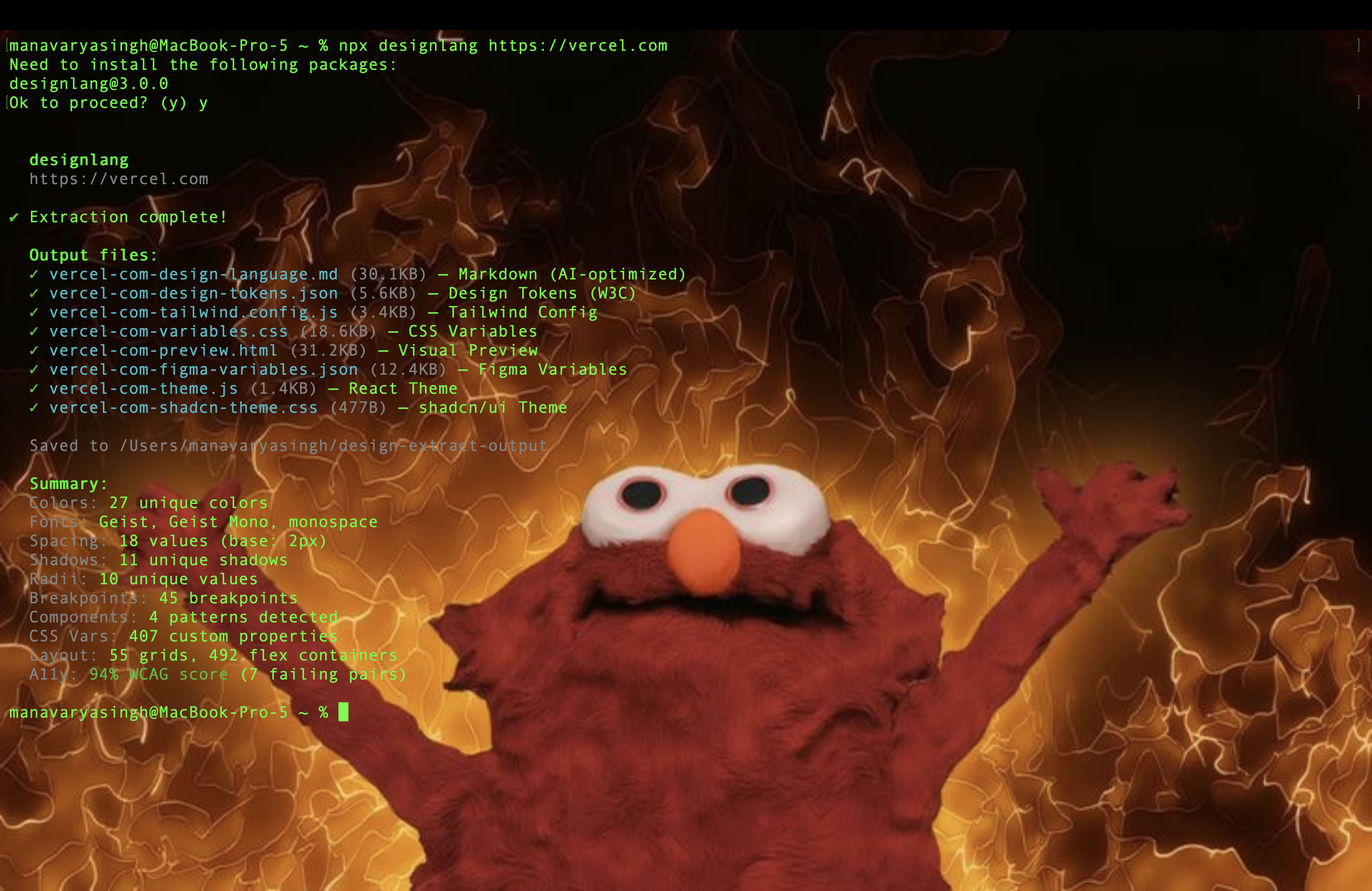
`designlang https://vercel.com --full` →
```
Colors: 27 · Fonts: Geist + Geist Mono · Spacing: 18 (base 2px)
Shadows: 11 · Radii: 10 · CSS vars: 407 · Layout: 55 grids / 492 flex
Responsive: 4 viewports, 3 breakpoint changes · Interactions: 8 transitions
A11y: 94% WCAG · Score: 68/100 (D) · 4 issues
→ 17 files written to ./design-extract-output/
→ Run `designlang grade https://vercel.com` for a shareable report card
```
## How it works
1. **Crawl** — Headless Chromium via Playwright, waits for network idle and fonts
2. **Extract** — One `page.evaluate()` walks up to 5,000 DOM elements, collecting 25+ computed properties, inline SVGs, font sources, and image metadata
3. **Process** — 17 extractor modules parse, deduplicate, cluster, and classify the raw data
4. **Format** — 12+ formatter modules emit the output files
5. **Score** — Accessibility extractor calculates WCAG contrast ratios for all color pairs
6. **Capture** — Optional: screenshots, responsive viewport crawling, interaction state recording
## Install Everywhere
designlang ships surfaces beyond the CLI:
| Surface | Path | Description |
|---------|------|-------------|
| **CLI** | `npx designlang ` | Main entry point. |
| **VS Code extension** | [`vscode-extension/`](vscode-extension/) | "Extract design from URL" command + auto-inject into workspace. |
| **Raycast extension** | [`raycast-extension/`](raycast-extension/) | Extract, score, and "copy CLI command" from Raycast. |
| **Figma plugin** | [`figma-plugin/`](figma-plugin/) | Paste a URL inside Figma, get a full Variables collection. |
| **GitHub Action** | [`github-action/`](github-action/) | "Design regression guard" — diffs tokens on every PR and comments. |
| **Chrome extension** | [`chrome-extension/`](chrome-extension/) | One-click handoff from any tab (MV3, `activeTab` only). |
| **Doctor** | `designlang doctor` | One-screen health check of the local install — Node, playwright, Chromium binary, output dir, network. Exits `1` if anything fails. |
| **MCP server** | `npx designlang mcp` | Exposes the extracted design as MCP resources + tools for Cursor, Claude Code, Windsurf, etc. See [`docs/MCP-REGISTRY.md`](docs/MCP-REGISTRY.md). |
| **Claude Code plugin** | [`.claude-plugin/`](.claude-plugin/) | Five slash commands inside Claude Code — `/extract`, `/grade`, `/battle`, `/remix`, `/pack`. |
## Claude Code plugin
Drop designlang straight into Claude Code as a plugin. Every CLI command becomes a slash command:
```bash
/plugin install Manavarya09/design-extract
```
Then inside any Claude Code session:
| Slash command | What it does |
|---|---|
| `/extract ` | Full extraction → DTCG tokens, Tailwind, Figma vars, motion, voice |
| `/grade ` | Shareable HTML "Design Report Card" (+ `--badge` for an SVG) |
| `/battle ` | Head-to-head graded battle card |
| `/remix --as ` | Restyle in brutalist / swiss / art-deco / cyberpunk / soft-ui / editorial |
| `/pack ` | Bundle every output into one design-system directory |
Manifest: [`.claude-plugin/plugin.json`](.claude-plugin/plugin.json) · marketplace: [`.claude-plugin/marketplace.json`](.claude-plugin/marketplace.json) · commands: [`commands/`](commands/) · skills: [`skills/`](skills/).
## Agent skill (other ecosystems)
Works with **Cursor, Codex, and 40+ AI coding agents** via the skills ecosystem:
```bash
npx skills add Manavarya09/design-extract
```
In Cursor / Codex / etc., use `/extract-design `.
## Contributing
See [CONTRIBUTING.md](CONTRIBUTING.md). PRs welcome!
## License
[MIT](LICENSE) - [Manav Arya Singh](https://www.manavaryasingh.com) !!