https://github.com/manchumahara/cbxwpwritelog
A simple dev plugin that helps to write something to debug log file and view log file
https://github.com/manchumahara/cbxwpwritelog
codeboxr devtools manchumahara php plugin wordpress wpdebug
Last synced: 3 months ago
JSON representation
A simple dev plugin that helps to write something to debug log file and view log file
- Host: GitHub
- URL: https://github.com/manchumahara/cbxwpwritelog
- Owner: manchumahara
- License: gpl-2.0
- Created: 2018-01-25T07:17:11.000Z (over 8 years ago)
- Default Branch: master
- Last Pushed: 2023-03-07T07:04:33.000Z (over 3 years ago)
- Last Synced: 2025-01-13T20:52:42.580Z (over 1 year ago)
- Topics: codeboxr, devtools, manchumahara, php, plugin, wordpress, wpdebug
- Language: Hack
- Homepage: https://codeboxr.com/
- Size: 314 KB
- Stars: 12
- Watchers: 3
- Forks: 2
- Open Issues: 0
-
Metadata Files:
- Readme: README.md
- License: LICENSE.txt
Awesome Lists containing this project
README
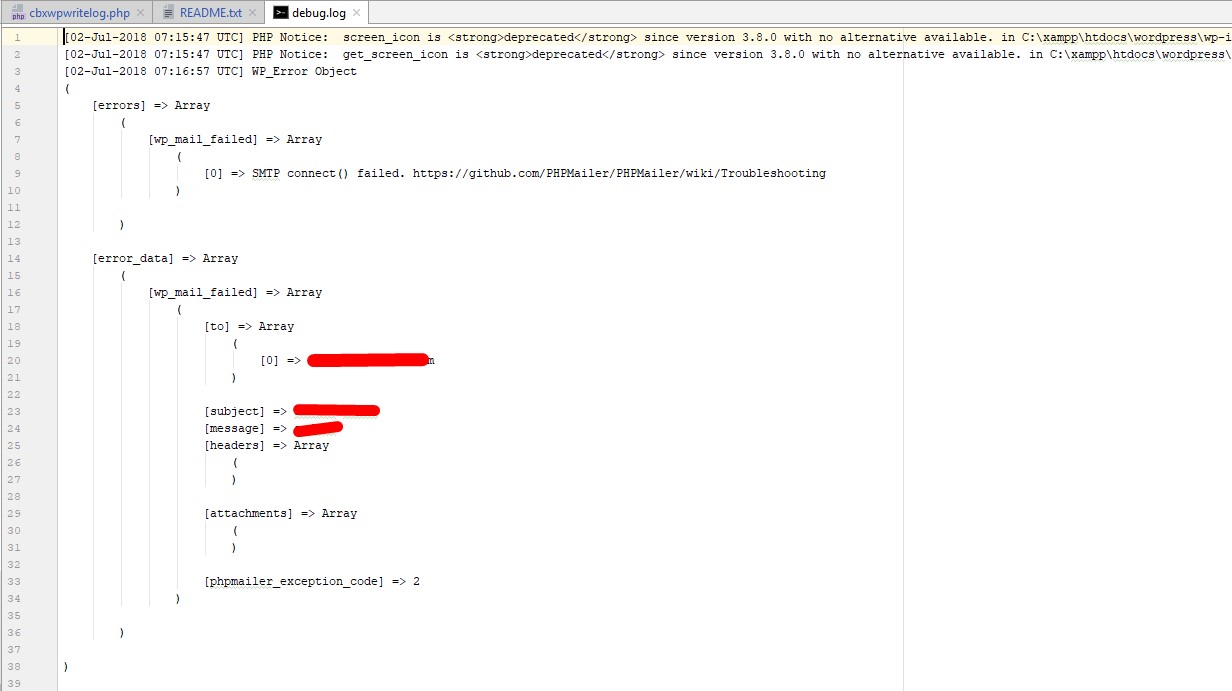
This plugin adds a helper function to write log in wordpress debug file. This plugin also writes email send fail logs
Usages:
01. Write log
```php
if (function_exists( 'write_log' ) ) {
write_log('testing a variable output');
write_log($name);
}
```
02. View Log
[http://your_domain/?cbxwpwritelog=1](http://your_domain/?cbxwpwritelog=1)
For any query [contact us](https://codeboxr.com/contact-us/)
# Installation
This section describes how to install the plugin and get it working.
e.g.
1. Upload `cbxwpwritelog` folder to the `/wp-content/plugins/` directory
2. Activate the plugin through the 'Plugins' menu in WordPress
3. call function `` in your templates or plugin anywhere where you need to
4. There are other ways to install a plugin please check WordPress Codex https://codex.wordpress.org/Managing_Plugins
To enable debug you need put following in your WordPress wp-config.php file
```php
//to enable debug
define('WP_DEBUG', true); //enable debugs
define( 'WP_DEBUG_DISPLAY', true); //displays debug , if you don't show set it false
define( 'WP_DEBUG_LOG', true); //stores debug in wp-content/debug.log or as you configure your wp content folder
//to enable/disable email fail or success debug
define('CBXWPWRITELOG_EMAIL_FAILED', false); //set true to enable email fail debug
define('CBXWPWRITELOG_EMAIL_SENT', false); //set true to enable email success debug
```
# Screenshots
# Changelog
= 1.0.4 =
* View error log http://your_domain/?cbxwpwritelog=1
= 1.0.3 =
* Debug boolean in better way
= 1.0.2 =
* Email sent or fail debug
= 1.0.1 =
* Initial version released