https://github.com/mannuelf/nuc-studio-1-project-frontend
Interactive world map. https://factbookexplorers.netlify.app/ UI to visualise Economic data retrieved. Built with MapBox written in Typescript.
https://github.com/mannuelf/nuc-studio-1-project-frontend
javascript mapbox-gl typescript
Last synced: about 1 month ago
JSON representation
Interactive world map. https://factbookexplorers.netlify.app/ UI to visualise Economic data retrieved. Built with MapBox written in Typescript.
- Host: GitHub
- URL: https://github.com/mannuelf/nuc-studio-1-project-frontend
- Owner: mannuelf
- Created: 2020-10-15T14:44:31.000Z (over 5 years ago)
- Default Branch: main
- Last Pushed: 2023-09-14T05:36:54.000Z (almost 3 years ago)
- Last Synced: 2025-09-12T09:00:25.241Z (9 months ago)
- Topics: javascript, mapbox-gl, typescript
- Language: TypeScript
- Homepage:
- Size: 9.89 MB
- Stars: 1
- Watchers: 0
- Forks: 0
- Open Issues: 6
-
Metadata Files:
- Readme: README.md
Awesome Lists containing this project
README
# Factbook Explorers
[](https://app.netlify.com/sites/factbookmap/deploys)
Demo URL: [https://factbookmap.netlify.app/](https://factbookmap.netlify.app/)
Data source:
## Backend
Python Flask API: [https://github.com/mannuelf/nuc-studio-1-project-backend](https://github.com/mannuelf/nuc-studio-1-project-backend)
### ENDPOINTS
[https://https://factbookapi.themwebs.me/population-levels](https://https://factbookapi.themwebs.me/population-levels)
[https://https://factbookapi.themwebs.me/gross-gdp](https://https://factbookapi.themwebs.me/gross-gdp)
## Built with
This project is built with node.js and ParcelJs, install both on your machine.
[https://nodejs.org/en/](https://nodejs.org/en/)
[https://parceljs.org/](https://parceljs.org/)
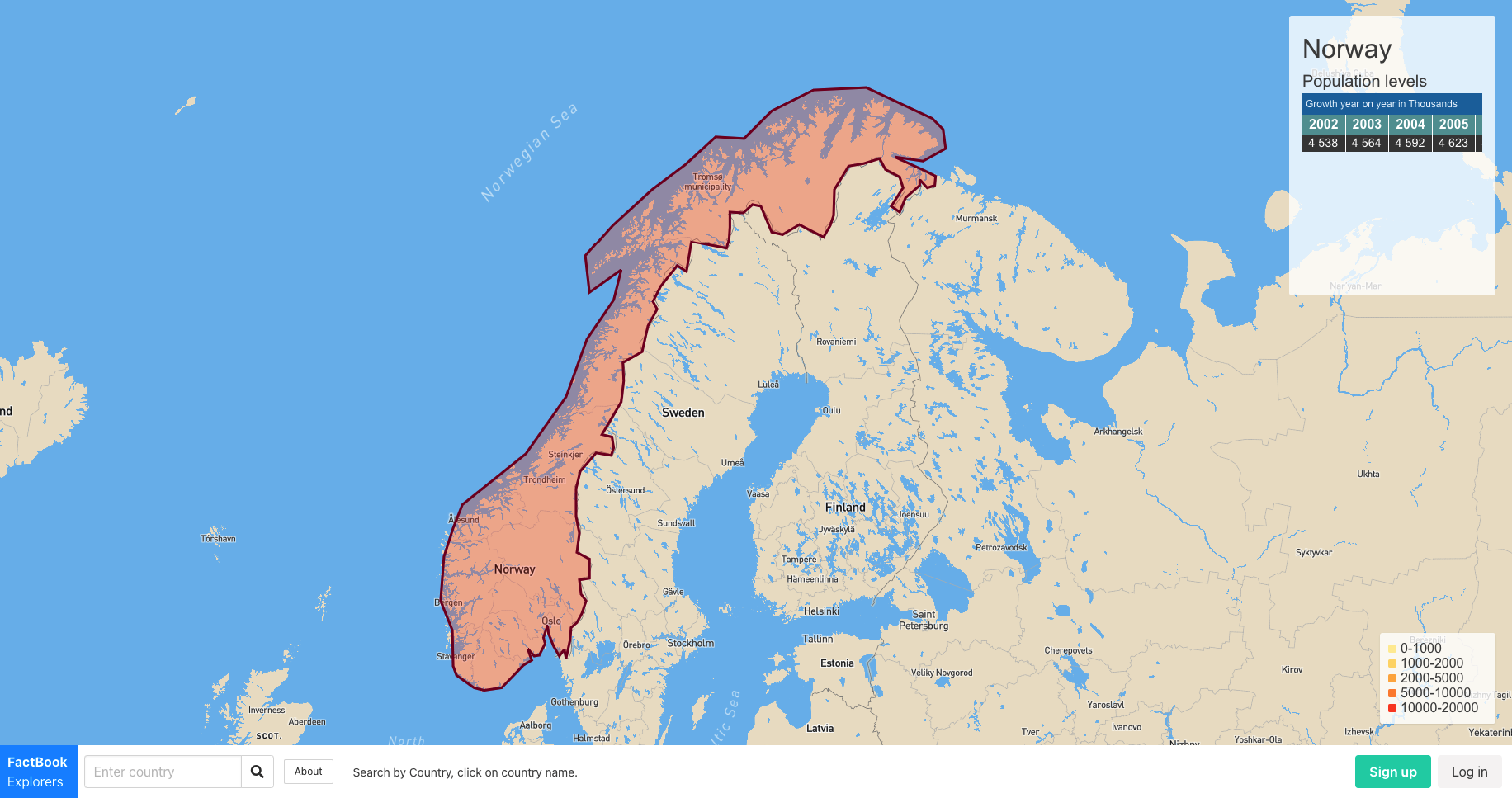
## Screenshot of UI
## To develop
Clone repo:
```bash
git clone https://github.com/mannuelf/nuc-studio-1-project-frontend/
cd nuc-studio-1-project-frontend
```
Install the npm packages using the terminal. This will install ParcelJs a modern bundler. [https://parceljs.org/](https://parceljs.org/)
```bash
npm install
```
## Start the development server
```bash
npm run develop
```
Start coding and Navigate to [http://localhost:1234](http://localhost:1234)
## Environment Variables
Secrets are store in hidden dot files called .env.local and .env.production.
[https://parceljs.org/env.html](https://parceljs.org/env.html)
signup for your own API KEYS on map and place the secrets in files called `.env.local` inside place these constants:
```bash
MAPBOX_TOKEN=" place your token here "
MAPBOX_STYLE_URL=" place your style url here"
```
The config module will use NODE.JS's `NODE_ENV=*` key to extract your keys out of the environment variable files and make your key available in the scope of any JS module you create.
## Contribution Guidelines
We are using Github Issue and Project board to manage tasks.
[https://github.com/mannuelf/nuc-studio-1-project-frontend/issues](https://github.com/mannuelf/nuc-studio-1-project-frontend/issues)
[https://github.com/mannuelf/nuc-studio-1-project-frontend/projects/1](https://github.com/mannuelf/nuc-studio-1-project-frontend/projects/1)
To contribute:
Create and issue using the issus board.
1. Assign it to yourself and
2. Label it using appropriate label
3. Assign issue to Project

### Coding
1. keep `main` branch clean and deployable at all times, do not code on it.
2. Fork Repo or
3. if already on the team create a feature branch
4. Work on your task
5. Create a Pull Request.
## But why?
We want to write with modern ES6 JavaScript with imports & exports + TypeScript. I have made the files TypeScript so that we can get better error linting.
Just write normal JavaScript in the TypeScript file, valid JavaScript is valid TypeScript.
Parcel will compile your the modern JS into ES5 for older browser support.
## Mapbox
Mapbox is awesome, their api is well documented and easy to code around. However it has some limitations on the FREE version, which is what we are using. Due to this we have to manually map and draw polygon data.
## GeoJSON polygon
[https://geojson.io/](https://geojson.io/)
Manual draw polygon shapes around country using .
[https://docs.mapbox.com/mapbox-gl-js/example/geojson-polygon/](https://docs.mapbox.com/mapbox-gl-js/example/geojson-polygon/)
## Point-in-polygon query with boundaries
[https://docs.mapbox.com/help/tutorials/point-in-polygon-query-with-mapbox-boundaries/](https://docs.mapbox.com/help/tutorials/point-in-polygon-query-with-mapbox-boundaries/)
## Choropleth map
[https://docs.mapbox.com/help/tutorials/choropleth-studio-gl-pt-2/](https://docs.mapbox.com/help/tutorials/choropleth-studio-gl-pt-2/)
Have built an adaptation of a choropleth map, instead of using MapBox data, we use our own data from our own service via JSON API.
## Mapbox Playground
You can use the playground to test GPS coordinates before using them in application.
[View playground](https://docs.mapbox.com/search-playground/#{%22url%22:%22%22,%22index%22:%22mapbox.places%22,%22approx%22:true,%22staging%22:false,%22onCountry%22:true,%22onWorldview%22:true,%22onType%22:true,%22onProximity%22:true,%22onBBOX%22:true,%22onLimit%22:true,%22onLanguage%22:true,%22countries%22:[],%22worldviews%22:[],%22proximity%22:%22%22,%22typeToggle%22:{%22country%22:false,%22region%22:false,%22district%22:false,%22postcode%22:false,%22locality%22:false,%22place%22:false,%22neighborhood%22:false,%22address%22:false,%22poi%22:false},%22types%22:[],%22bbox%22:%22%22,%22limit%22:%22%22,%22autocomplete%22:true,%22languages%22:[],%22languageStrict%22:false,%22onDebug%22:false,%22selectedLayer%22:%22%22,%22debugClick%22:{},%22localsearch%22:false,%22query%22:%22Norway%22})