https://github.com/mannuelf/traefik-and-docker-vps-setup
How I host www.themwebs.me with Traefik and Docker on a single VPS and Cloudflare DNS.
https://github.com/mannuelf/traefik-and-docker-vps-setup
docker docker-compose traefik vps-setup
Last synced: 3 months ago
JSON representation
How I host www.themwebs.me with Traefik and Docker on a single VPS and Cloudflare DNS.
- Host: GitHub
- URL: https://github.com/mannuelf/traefik-and-docker-vps-setup
- Owner: mannuelf
- License: mit
- Created: 2023-09-14T10:57:03.000Z (almost 3 years ago)
- Default Branch: main
- Last Pushed: 2025-01-31T08:05:19.000Z (over 1 year ago)
- Last Synced: 2025-01-31T09:19:28.914Z (over 1 year ago)
- Topics: docker, docker-compose, traefik, vps-setup
- Language: HTML
- Homepage: https://www.themwebs.me
- Size: 492 KB
- Stars: 0
- Watchers: 2
- Forks: 1
- Open Issues: 0
-
Metadata Files:
- Readme: README.md
- Contributing: CONTRIBUTING.md
- License: LICENSE
- Code of conduct: CODE_OF_CONDUCT.md
- Security: SECURITY.md
Awesome Lists containing this project
README
> This is still a fair enough approach but if you want something more automated I recommend [dokploy.com](https://dokploy.com) bare in mind it will create more containers so it will require more resources
# Traefik, Docker, VPS setup
[🍴 FORK repo](https://github.com/mannuelf/them-webs-vps/fork) so you get updates when they happen.
Single VPS deployment using [Traefik](https://traefik.io/traefik/).
How I host [WWW.THEMWEBS.ME](https://www.themwebs.me/) with Traefik and Docker on a single VPS and Cloudflare DNS.
### Host on Hostinger
[Click here](https://hostinger.com?REFERRALCODE=EJ7MANNUEKQI) (affiliate link)
[Click here](https://hostinger.com) (non affiliate link)
## Github Action
.github/workflows/deploy.yml
The repo is `rsync'ed` to the server using a Github Action.
Follow this [guide on Zellwk blog](https://zellwk.com/blog/github-actions-deploy) to understand how it works.
## Dev setup
- Install [Docker](https://docs.docker.com/get-docker/)
- Install [Docker Compose](https://docs.docker.com/compose/install/)
- Each service is a docker container with its own `Dockerfile`.
- The `docker-compose.yml` file is used to orchestrate the containers from the root of the project. You can host any kind of codebase with this.
- `home` folder is the homepage. for this VPS. It is a static website hosted with nginx.
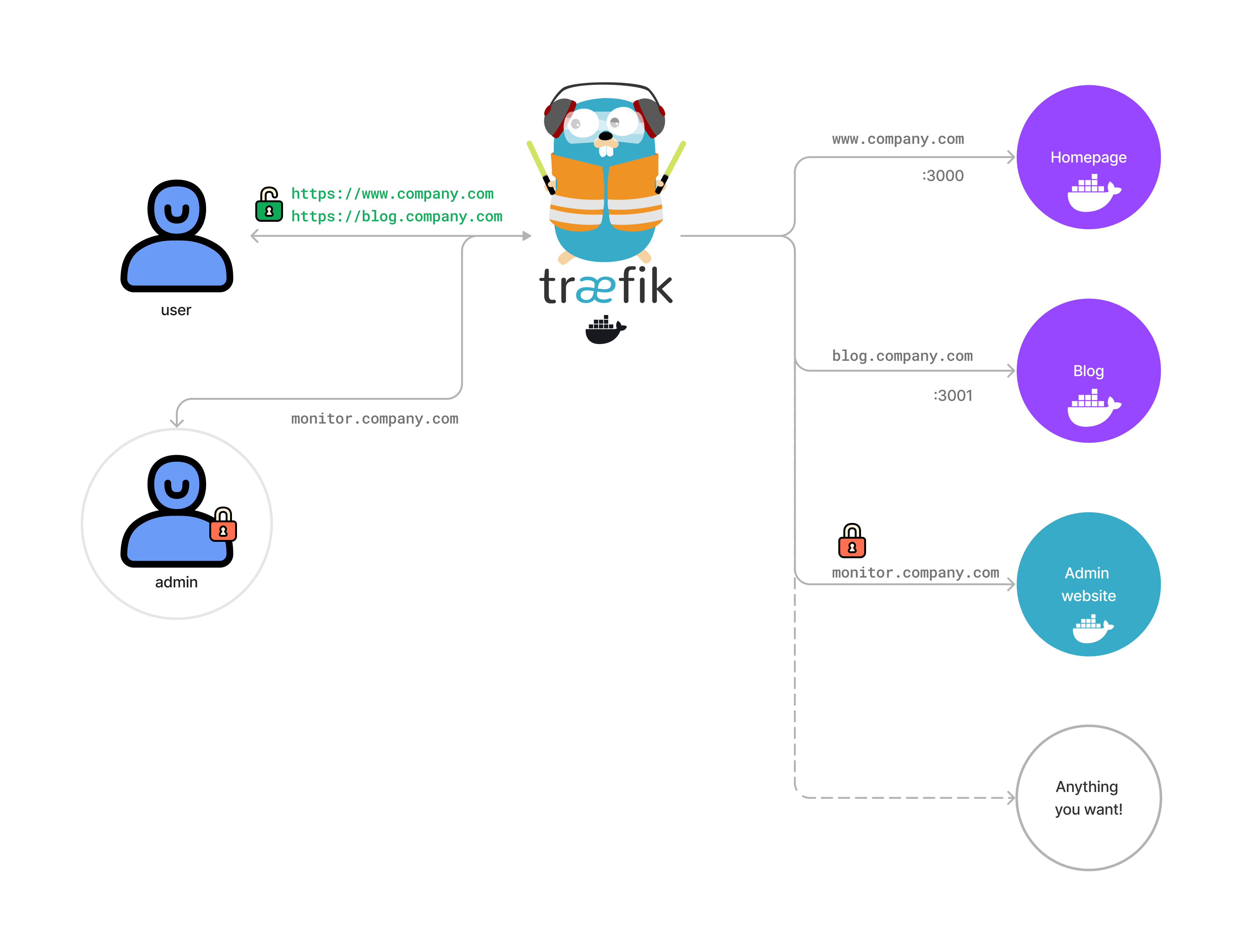
- Traefik has a dashboard at `https://monitor.yourdomain.com` this is configured in `traefik_dynamic.toml` file.
- username: `addUserName` password: `create a hash with htpasswd`
- `htpasswd -nb addUserName mySecurePasswordEnteredManually`
- add the hash to the [traefik_dynamic.toml](./traefik_dynamic.toml) file.
- Host your homepage in the `home` folder.
- Traefik will route the traffic to the correct container based on the domain name / sub domain name.
- Traefik will also automatically generate SSL certificates using [Let's Encrypt](https://letsencrypt.org/).
- Traefik will give you a monitoring dashboard at `https://monitor.yourdomain.com` this is configured in `traefik_dynamic.toml` file.
Run `docker compose up -d` in project root for the first time. This will create the network and all the containers.
## Add a new service
- Create a new folder in the root of the project. Add a `Dockerfile` to this new folder.
- Update the `docker-compose.yml` with its configs, should be similar to the one in the `home` folder and home configs.
- Google NodeJS Docker(insert favourite stack jargon) to find a nice example of NodeJS Dockerfile to build from.
```dockerfile
FROM nginx:alpine
COPY . /usr/share/nginx/html
```
- that example will build a basic nginx container with the contents of the current folder and server a static website.
- Push to github and the Github Action will deploy the new service to the server.
log onto server and run `docker compose up -d --build` to start the new service. (this part can also be automated with some bash script 🥸)
## Run Traefik
Traefik itself is also a docker container. It needs access to the docker socket to be able to listen to events and update its configuration.
for testing purpose only you can quickly run this command to see how it works. Generally always the docker compose file will take care of this.
```bash
docker run -d \
-v /var/run/docker.sock:/var/run/docker.sock \
-v $PWD/traefik.toml:/traefik.toml \
-v $PWD/traefik_dynamic.toml:/traefik_dynamic.toml \
-v $PWD/acme.json:/acme.json \
-p 80:80 \
-p 443:443 \
--network web \
--name traefik \
traefik:latest
```
## Cloudflare DNP API (Optional)
I use cloudflare as my DNS provider. To be able to update the DNS records I need to create an API token. But you can use any DNS provider
```bash
curl -X GET "https://api.cloudflare.com/client/v4/user/tokens/verify" \
-H "Authorization: Bearer CF_DNS_API_TOKEN" \
-H "Content-Type:application/json"
```
## TODO
- run rootless containers
- investigate Podman for orchestration on localhost
- add environmet variables so that you can run a local instance of the production instance.
- make scripts automate some of the setup