https://github.com/manoranjanads/strapi_prod
An easy automated deployment for Headless CMS Strapi on to AWS with Ansible.
https://github.com/manoranjanads/strapi_prod
ansible aws strapi terraform
Last synced: 9 months ago
JSON representation
An easy automated deployment for Headless CMS Strapi on to AWS with Ansible.
- Host: GitHub
- URL: https://github.com/manoranjanads/strapi_prod
- Owner: manoranjanads
- Created: 2021-03-06T01:28:12.000Z (over 5 years ago)
- Default Branch: master
- Last Pushed: 2021-03-08T00:58:11.000Z (over 5 years ago)
- Last Synced: 2024-10-02T09:53:53.725Z (almost 2 years ago)
- Topics: ansible, aws, strapi, terraform
- Language: JavaScript
- Homepage: https://strapi.manoranjana.me
- Size: 361 KB
- Stars: 1
- Watchers: 1
- Forks: 0
- Open Issues: 0
-
Metadata Files:
- Readme: README.md
Awesome Lists containing this project
README
# Automated Strapi for AWS
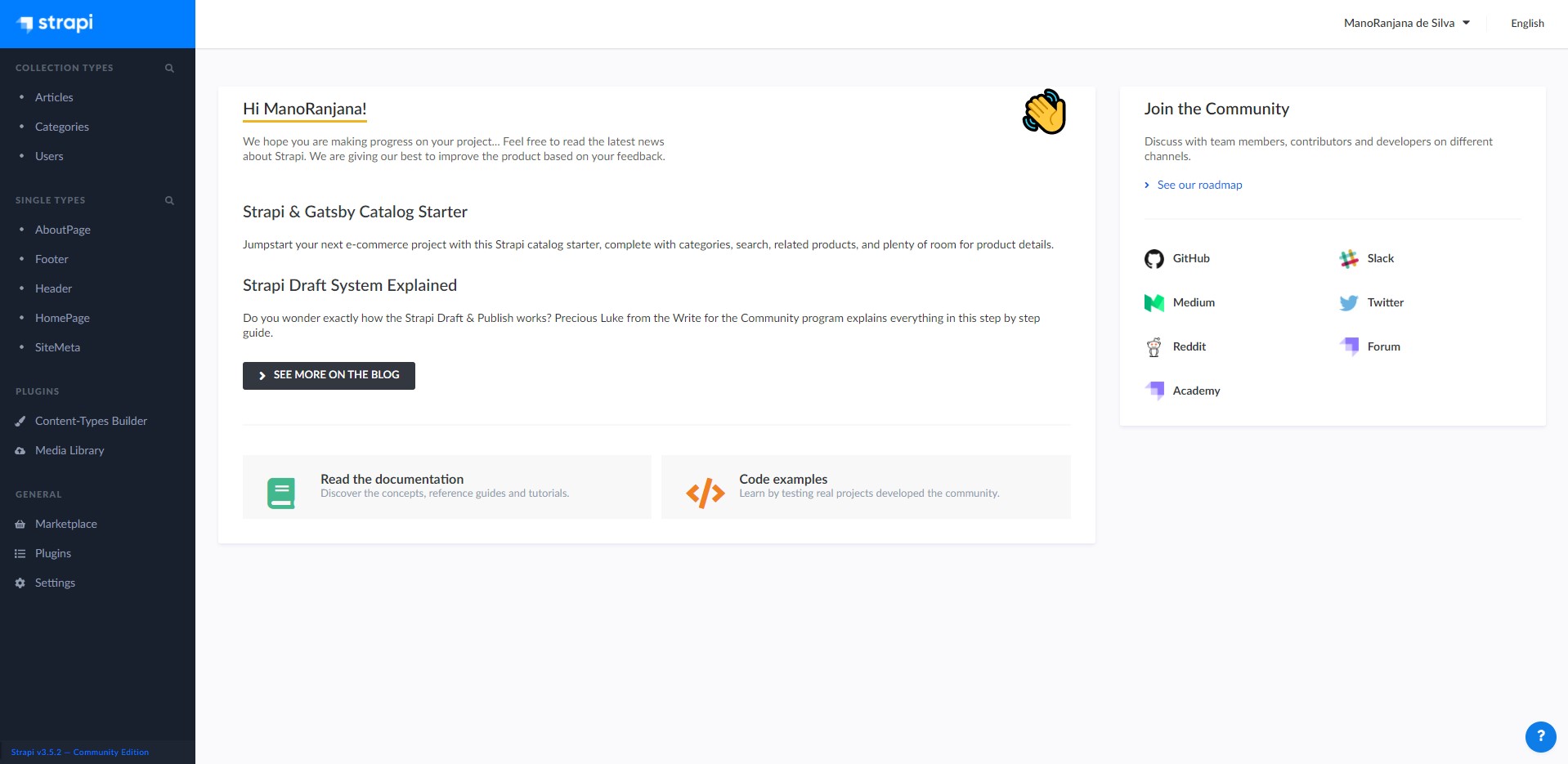
### DEMO - https://strapi.manoranjana.me

## Features
- Pre-built APIs (home, header, about etc.)
- User roles and authentications
- Code Automation with Ansible
- Postgre DB integration (AWS RDS)
- AWS S3 integration
- Webhook support (CI/CD)
## Prerequisite
You should have an active [AWS](https://aws.amazon.com/) account. Just enough!
## How to start
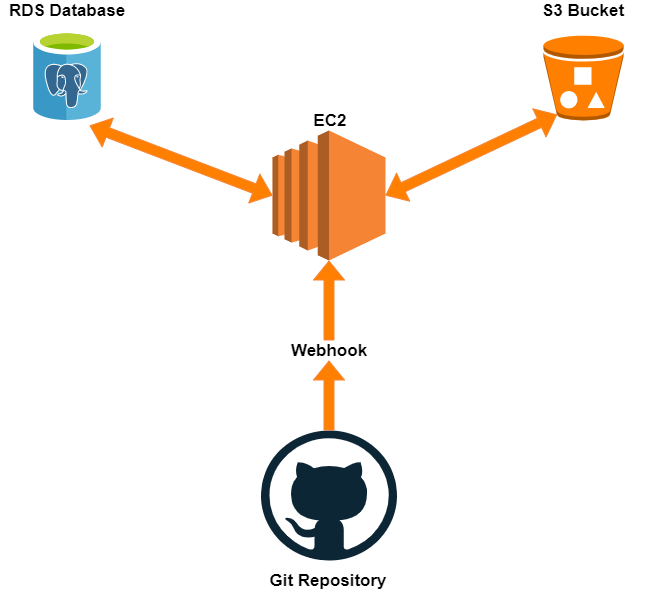
First you need to setup an EC2 instance in your AWS account with Ubuntu 20.04. Then you have to create RDS Database as you preffer. (Currently, I have setup for PostgreSQL on RDS). Next, create a S3 Bucket.
Keep in mind!
You should setup security rules for your setup allowing bellow ports in AWS Security groups.
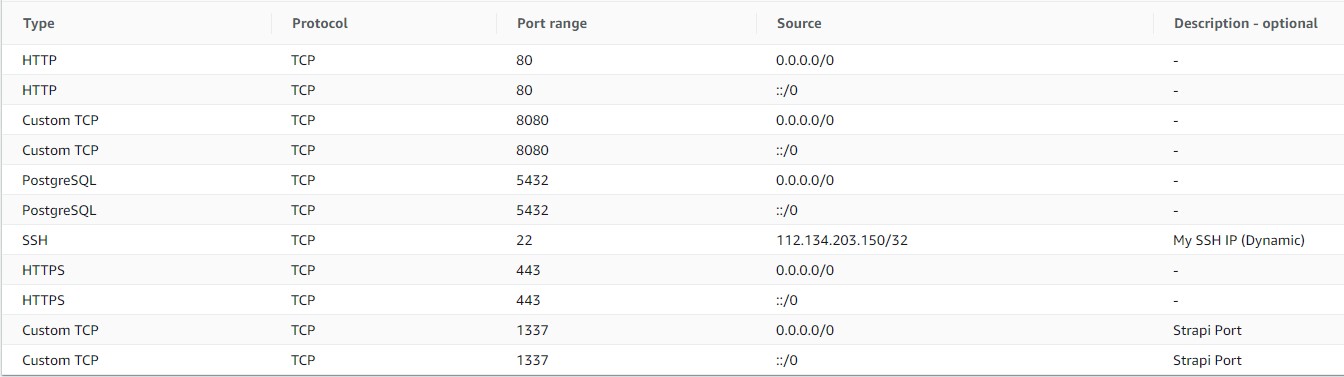
Once you setup all, create your security credentials on AWS. Now you are ready to launch the app.
### DNS Setup
Once you setup, you should point a full qualified domain to your EC2 public repository by it's Public IP address.
Create an **A RECORD** pointing your domain as follows:
A RECORD - strapi.manoranjana.me - 44.125.35.15
## Automatic Deployment
Once you ready, you can open up the Ansible code you have downloaded.
Then navigate to `inventory.yml` and replace your AWS pem file with yours and your EC2 Public IP. Now go to `group_vars/all.yml` and replace with your variables as required. Then, return back to the root and run as follows in your terminal:
ansible-playbook -i inventory.yml strapi_main.yml
**Reminder:** You should have installed Ansible on your local machine before proceed. I recommend to use Ansible on Windows WSL2, Ubutu 20.04 or MacOS for all works.
## How it Works
This is awesome!
If you run the Ansible script above, you don't have to do anything else.
All most all the setups including, packages, Nginx Server, R3 SSL, Automatic services are properly installed on your EC2 instance.
#### High Level Architecture
#### Webhook Configuration (CI/CD)
By using a Webhook, you can easily trigger the EC2 instance. You should follow up steps bellow:
You will need to access the `Settings` tab for your `Strapi Project Repository`:
1. Navigate and click to `Settings` for your repository.
2. Click on `Webhooks`, then click `Add Webhook`.
3. The fields are filled out like this:
- Payload URL: Enter `http://your-ip-address:8080`
- Content type: Select `application/json`
- Which events would you like to trigger this webhook: Select `Just the push event`
- Secret: Enter `YourSecret`
- Active: Select the checkbox
4. Review the fields and click `Add Webhook`.
**Note:** Above instructions are mostly compatible with GitHub. But you also can use GitLab or any other provider as well.
Once you setup webhook, every time you push anything to your project, it automatically triggers the EC2 instance and rebuild itself.
### Check API Endpoints
You can check whether your API responses are working to the public, simply by making a GET request on one of the API on your project as follows:
*Ex:*
GET http://strapi.manoranjana.me/about-page
(Replace your domain and check.)
If the status is **200 OK** and show the content body properly, that means you can use these public endpoints to any of your works as required.
## How to Contribute
If you spot any bugs, please use [Issue Tracker](https://github.com/mrghonline/strapi_prod) or if you want to add a new feature directly please create a new [Pull Request](https://github.com/mrghonline/strapi_prod/pulls).
## Join with Me
If you like my work and want to contact me just visit my [Official Website](https://manoranjana.me/).
## License
Copyright © 2021 Mano. ([@mr](https://manoranjana.me))
The project is released under the [MIT License](https://opensource.org/licenses/MIT).