https://github.com/manuelgil/vscode-angular-generator
Angular File Generator is a Visual Studio Code extension that allows you to generate Angular files with a few clicks. It is based on the Angular CLI and uses the same schematics as the CLI. It also allows you to generate files from the terminal.
https://github.com/manuelgil/vscode-angular-generator
angular angular-cli vscode vscode-extension
Last synced: about 1 year ago
JSON representation
Angular File Generator is a Visual Studio Code extension that allows you to generate Angular files with a few clicks. It is based on the Angular CLI and uses the same schematics as the CLI. It also allows you to generate files from the terminal.
- Host: GitHub
- URL: https://github.com/manuelgil/vscode-angular-generator
- Owner: ManuelGil
- License: mit
- Created: 2023-12-08T05:03:54.000Z (over 2 years ago)
- Default Branch: main
- Last Pushed: 2024-11-08T03:21:08.000Z (over 1 year ago)
- Last Synced: 2024-11-08T04:22:46.007Z (over 1 year ago)
- Topics: angular, angular-cli, vscode, vscode-extension
- Language: TypeScript
- Homepage: https://marketplace.visualstudio.com/items?itemName=imgildev.vscode-angular-generator
- Size: 7.68 MB
- Stars: 4
- Watchers: 2
- Forks: 2
- Open Issues: 3
-
Metadata Files:
- Readme: README.md
- Changelog: CHANGELOG.md
- Contributing: CONTRIBUTING.md
- Funding: .github/FUNDING.yml
- License: LICENSE
- Code of conduct: CODE_OF_CONDUCT.md
Awesome Lists containing this project
README
# Angular File Generator for VSCode
[](https://marketplace.visualstudio.com/items?itemName=imgildev.vscode-angular-generator)
[](https://marketplace.visualstudio.com/items?itemName=imgildev.vscode-angular-generator)
[](https://marketplace.visualstudio.com/items?itemName=imgildev.vscode-angular-generator)
[](https://marketplace.visualstudio.com/items?itemName=imgildev.vscode-angular-generator&ssr=false#review-details)
[](https://github.com/ManuelGil/vscode-angular-generator)
[](https://github.com/ManuelGil/vscode-angular-generator/blob/main/LICENSE)
Are you tired of manually creating files for your Angular projects in Visual Studio Code? We have the solution for you! Introducing the **Angular File Generator** extension for VSCode.
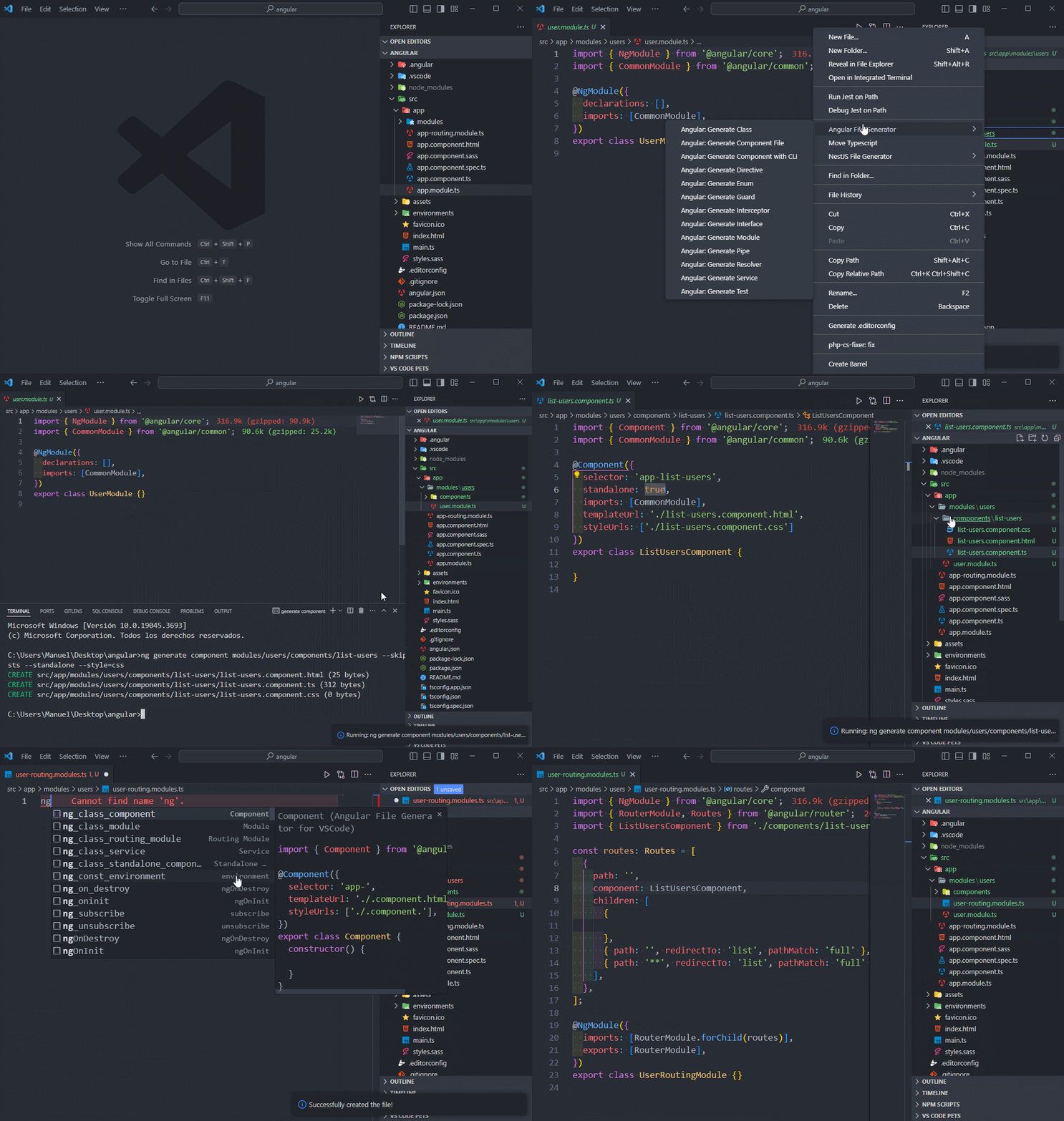
With this powerful extension, you can streamline your Angular development workflow by generating files with just a few clicks. Whether you need a new class, interface, module, or any other Angular component, our extension has you covered.
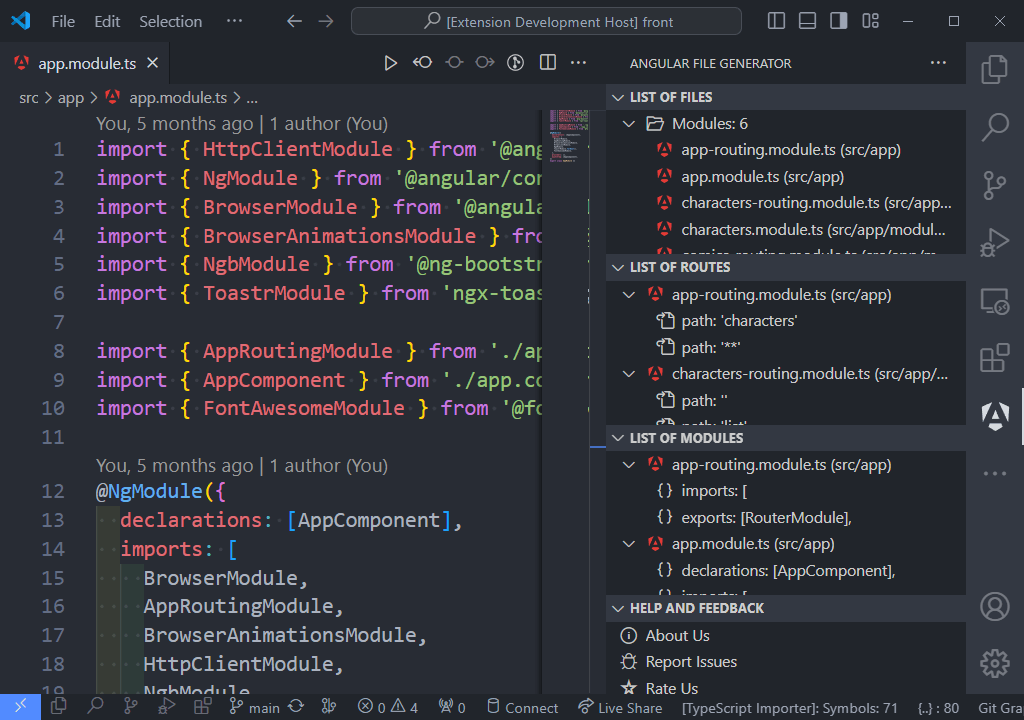
## Table of Contents
- [Angular File Generator for VSCode](#angular-file-generator-for-vscode)
- [Table of Contents](#table-of-contents)
- [Requirements](#requirements)
- [Project Settings](#project-settings)
- [Settings Options](#settings-options)
- [Features](#features)
- [Files](#files)
- [Commands](#commands)
- [Snippets](#snippets)
- [Follow Me](#follow-me)
- [VSXpert Template](#vsxpert-template)
- [Other Extensions](#other-extensions)
- [Contributing](#contributing)
- [Code of Conduct](#code-of-conduct)
- [Changelog](#changelog)
- [Authors](#authors)
- [License](#license)
## Requirements
- VSCode 1.88.0 or later
## Project Settings
Configure your project by creating or updating a settings.json file at the project's root. If you already have a `.vscode/settings.json` file, skip the first two steps.
1. Open the command palette in VSCode:
- `CTRL + SHIFT + P` (Windows)
- `CMD + SHIFT + P` (Mac OS)
2. Type `Preferences: Open Workspace Settings (JSON)`.
3. In the `.vscode/settings.json` file, copy and paste the following settings:
```jsonc
{
"angular.enable": true, // Enable or disable the extension
"angular.components.standalone": true, // Standalone option when generating a new component
"angular.components.style": "css", // Style file extension when generating a new component
"angular.files.include": [
"ts"
], // Extensions to include in the Sidebar Angular File Generator
"angular.files.exclude": [
"**/node_modules/**",
"**/dist/**",
"**/out/**",
"**/build/**",
"**/.*/**"
], // Glob patterns of files or folders to exclude in the Sidebar Angular File Generator
"angular.files.watch": [
"modules",
"components",
"services"
], // Folders to watch
"angular.files.showPath": true, // Show the path in the list of files in the Sidebar Angular File Generator
"angular.terminal.cwd": "/path/to/your/project/", // Current working directory for the terminal. The directory must be absolute
"angular.submenu.customCommands": [
{
"name": "Template 1",
"command": "ng g c",
"args": "--style css --standalone true --inline-style --inline-template"
},
{
"name": "Template 2",
"command": "ng g c",
"args": "--style scss --standalone false --inline-style --inline-template"
}
], // Custom commands to execute in the custom command submenu
"angular.submenu.templates": [
{
"name": "Template 1",
"description": "Description of Template 1",
"type": "component",
"template": [
"import { Component, OnInit } from '@angular/core';",
"",
"@Component({",
" selector: '{{EntityName}}',",
" templateUrl: './{{EntityName}}.component.html',",
" styleUrls: ['./{{EntityName}}.component.css']",
"})",
"export class {{ComponentName}}Component implements OnInit {",
"",
" constructor() { }",
"",
" ngOnInit(): void { }",
"",
"}"
]
}
], // Templates to generate files in the submenu
"angular.submenu.activateItem": {
"terminal": {
"component": true,
"guard": true,
"pipe": true,
"service": true,
"custom": true
},
"file": {
"class": true,
"component": true,
"directive": true,
"enum": true,
"guard": true,
"interceptor": true,
"interface": true,
"module": true,
"pipe": true,
"resolver": true,
"service": true,
"spec": true,
"template": true
}
}, // Activate items in the submenu
"angular.fileGenerator.skipFolderConfirmation": false, // Skip folder confirmation when generating a new file
}
```
4. **Restart VS Code**
Your project is now set up to automatically format code upon saving.
## Settings Options
Configure the Angular File Generator extension to suit your needs. The following settings are available:
- `angular.enable`: Enable or disable the extension. The default is `true`.
- `angular.components.standalone`: Sets the standalone option when generating a new component. The default is `true`.
- `angular.components.style`: Sets the style file extension when generating a new component. The default is `css`.
- `angular.files.include`: The list of extensions to include in the Sidebar Angular File Generator. The default is `ts`.
- `angular.files.exclude`: Glob patterns of files or folders to exclude in the Sidebar Angular File Generator. The default is `**/node_modules/**`, `**/dist/**`, `**/out/**`, `**/build/**`, and `**/.*/**`.
- `angular.files.watch`: The list of types of files to watch in the Sidebar Angular File Generator. The default is `modules`, `components`, and `services`.
- `angular.files.showPath`: Show the path in the list of files in the Sidebar Angular File Generator. The default is `true`.
- `angular.terminal.cwd`: Sets the current working directory for the terminal. The directory must be absolute.
- `angular.submenu.customCommands`: The list of custom commands to execute in the custom command submenu. The default is an empty array.
- `angular.submenu.templates`: The list of templates to execute in the submenu. The default is an empty array.
- `angular.submenu.activateItem`: Activate items in the submenu.
- `angular.fileGenerator.skipFolderConfirmation`: Skip folder confirmation when generating a new file. The default is `false`.
The `angular.submenu.customCommands` setting is an array of objects with the following properties:
- `name`: The name of the command. Example: "Template 1".
- `command`: The command to execute. Example: "ng g c".
- `args`: The arguments to pass to the command. Example: "--style css --standalone true --inline-style --inline-template".
The `angular.submenu.templates` setting is an array of objects with the following properties:
- `name`: The name of the template. Example: "Service".
- `description`: A description of the template. Example: "Creates a service file".
- `type`: The type of component. Example: "service".
- `template`: The template content for the file. Use `{{ComponentName}}` as a placeholder for the component name and `{{EntityName}}` for the lowercase component name or any other placeholder you want to use.
For more information on configuring the Angular File Generator extension, see the [Project Settings](#project-settings) section.
## Features
### Files
| Title | Purpose |
| --- | --- |
| Angular: Generate Class | Creates a new, generic class definition |
| Angular: Generate Component File | Creates a new, generic component definition |
| Angular: Generate Directive | Creates a new, generic directive definition |
| Angular: Generate Enum | Generates a new, generic enum definition |
| Angular: Generate Guard | Generates a new, generic route guard definition |
| Angular: Generate Interceptor | Creates a new, generic interceptor definition |
| Angular: Generate Interface | Creates a new, generic interface definition |
| Angular: Generate Module | Creates a new, generic NgModule definition |
| Angular: Generate Pipe | Creates a new, generic pipe definition |
| Angular: Generate Resolver | Generates a new, generic resolver definition |
| Angular: Generate Service | Creates a new, generic service definition |
| Angular: Generate Test | Creates a new, generic test definition |
| Angular: Generate Template | Creates a new file with a template definition |
### Commands
| Title | Purpose |
| --- | --- |
| Angular: New Application | Creates a new Angular application |
| Angular: Start Server | Builds and serves your application, rebuilding on file changes |
| Angular: Version | Outputs Angular CLI version |
| Angular: Run Tests | Runs unit tests in a project |
| Angular: Run E2E | Builds and serves an Angular application, then runs end-to-end tests |
| Angular: Disable Analytics | Disables analytics gathering and reporting for the user |
| Angular: Enable Analytics | Enables analytics gathering and reporting for the user |
| Angular: Info Analytics | Prints analytics gathering and reporting configuration in the console |
| Angular: Prompt Analytics | Prompts the user to set the analytics gathering status interactively |
| Angular: Clean Cache | Deletes persistent disk cache from disk |
| Angular: Disable Cache | Disables persistent disk cache for all projects in the workspace |
| Angular: Enable Cache | Enables disk cache for all projects in the workspace |
| Angular: Info Cache | Prints persistent disk cache configuration and statistics in the console |
| Angular: Generate Component with CLI | Creates a new, generic component definition |
| Angular: Generate Guard with CLI | Creates a new, generic guard definition |
| Angular: Generate Pipe with CLI | Creates a new, generic pipe definition |
| Angular: Generate Service with CLI | Creates a new, service service definition |
| Angular: Generate Environments | Generates and configures environment files for a project |
| Angular: Generate Library | Creates a new, generic library project in the current workspace |
### Snippets
| Title | Purpose |
| --- | --- |
| ng_class_module | export class Module {} |
| ng_class_routing_module | export class RoutingModule {} |
| ng_const_routes | export const routes: Routes = [] |
| ng_class_component | export class Component {} |
| ng_class_standalone_component | export class Component {} |
| ng_class_service | export class Service {} |
| ng_unsubscribe | private unsubscribe: Subscription[] = []; |
| ng_subscribe | this.unsubscribe.push(this.subscr); |
| ng_on_destroy | ngOnDestroy {} |
| ng_oninit | ngOnInit {} |
| ng_const_environment | export const environment = {} |
| ng_if | @if (condition) {} |
| ng_if_else | @if (condition) {} @else {} |
| ng_if_else_if | @if (condition) {} @else if (condition) {} |
| ng_else_if | @else if (condition) {} |
| ng_else | @else {} |
| ng_for | @for (condition) {} |
| ng_empty | @empty {} |
| ng_switch | @switch (condition) {} |
| ng_case | @case (condition) {} |
| ng_default | @default {} |
| ng-defer | @defer (condition) {} |
| ng-placeholder | @placeholder {} |
| ng-loading | @loading {} |
| ng_router_outlet | \\ |
| ng_router_link | \\ |
## Follow Me
If you enjoy using this extension, consider following me for updates on this and future projects:
[](https://github.com/ManuelGil)
[](https://twitter.com/imgildev)
## VSXpert Template
This extension was created using [VSXpert](https://vsxpert.com), a template that helps you create Visual Studio Code extensions with ease. VSXpert provides a simple and easy-to-use structure to get you started quickly.
## Other Extensions
- [Angular File Generator](https://marketplace.visualstudio.com/items?itemName=imgildev.vscode-angular-generator)
- [NestJS File Generator](https://marketplace.visualstudio.com/items?itemName=imgildev.vscode-nestjs-generator)
- [T3 Stack / NextJS / ReactJS File Generator](https://marketplace.visualstudio.com/items?itemName=imgildev.vscode-nextjs-generator)
- [JSON Flow](https://marketplace.visualstudio.com/items?itemName=imgildev.vscode-json-flow)
- [Auto Barrel](https://marketplace.visualstudio.com/items?itemName=imgildev.vscode-auto-barrel)
- [CodeIgniter 4 Spark](https://marketplace.visualstudio.com/items?itemName=imgildev.vscode-codeigniter4-spark)
## Contributing
Angular File Generator for VSCode is open-source software, and we welcome contributions from the community. If you'd like to contribute, please fork the [GitHub repository](https://github.com/ManuelGil/vscode-angular-generator) and submit a pull request with your changes.
Before contributing, please read our [Contribution Guidelines](./CONTRIBUTING.md) for instructions on coding standards, testing, and more.
## Code of Conduct
We are committed to providing a friendly, safe, and welcoming environment for all, regardless of gender, sexual orientation, disability, ethnicity, religion, or similar personal characteristic. Please review our [Code of Conduct](./CODE_OF_CONDUCT.md) before participating in our community.
## Changelog
For a complete list of changes, see the [CHANGELOG.md](./CHANGELOG.md)
## Authors
- **Manuel Gil** - _Owner_ - [ManuelGil](https://github.com/ManuelGil)
See also the list of [contributors](https://github.com/ManuelGil/vscode-angular-generator/contributors) who participated in this project.
## License
Angular File Generator for VSCode is licensed under the MIT License - see the [MIT License](https://opensource.org/licenses/MIT) for details.