https://github.com/manuelgil/vscode-code-mark-plus
Visual Studio Code extension that helps you insert, remove, and highlight custom comments in your code. It streamlines your workflow by automatically applying dynamic highlights to important keywords (like `TODO`, `FIXME`, and `NOTE`).
https://github.com/manuelgil/vscode-code-mark-plus
comments highlight highlighter highlighting vscode vscode-extension
Last synced: 10 months ago
JSON representation
Visual Studio Code extension that helps you insert, remove, and highlight custom comments in your code. It streamlines your workflow by automatically applying dynamic highlights to important keywords (like `TODO`, `FIXME`, and `NOTE`).
- Host: GitHub
- URL: https://github.com/manuelgil/vscode-code-mark-plus
- Owner: ManuelGil
- License: mit
- Created: 2025-03-03T22:42:46.000Z (10 months ago)
- Default Branch: main
- Last Pushed: 2025-03-03T22:43:40.000Z (10 months ago)
- Last Synced: 2025-03-04T09:39:44.886Z (10 months ago)
- Topics: comments, highlight, highlighter, highlighting, vscode, vscode-extension
- Language: TypeScript
- Homepage: https://marketplace.visualstudio.com/items?itemName=imgildev.vscode-code-mark-plus
- Size: 357 KB
- Stars: 0
- Watchers: 1
- Forks: 0
- Open Issues: 0
-
Metadata Files:
- Readme: README.md
- Changelog: CHANGELOG.md
- Contributing: CONTRIBUTING.md
- Funding: .github/FUNDING.yml
- License: LICENSE
- Code of conduct: CODE_OF_CONDUCT.md
Awesome Lists containing this project
README
# CodeMark+
[](https://marketplace.visualstudio.com/items?itemName=imgildev.vscode-code-mark-plus)
[](https://marketplace.visualstudio.com/items?itemName=imgildev.vscode-code-mark-plus)
[](https://marketplace.visualstudio.com/items?itemName=imgildev.vscode-code-mark-plus)
[](https://marketplace.visualstudio.com/items?itemName=imgildev.vscode-code-mark-plus&ssr=false#review-details)
[](https://github.com/ManuelGil/vscode-code-mark-plus)
[](https://github.com/ManuelGil/vscode-code-mark-plus/blob/main/LICENSE)
## Overview
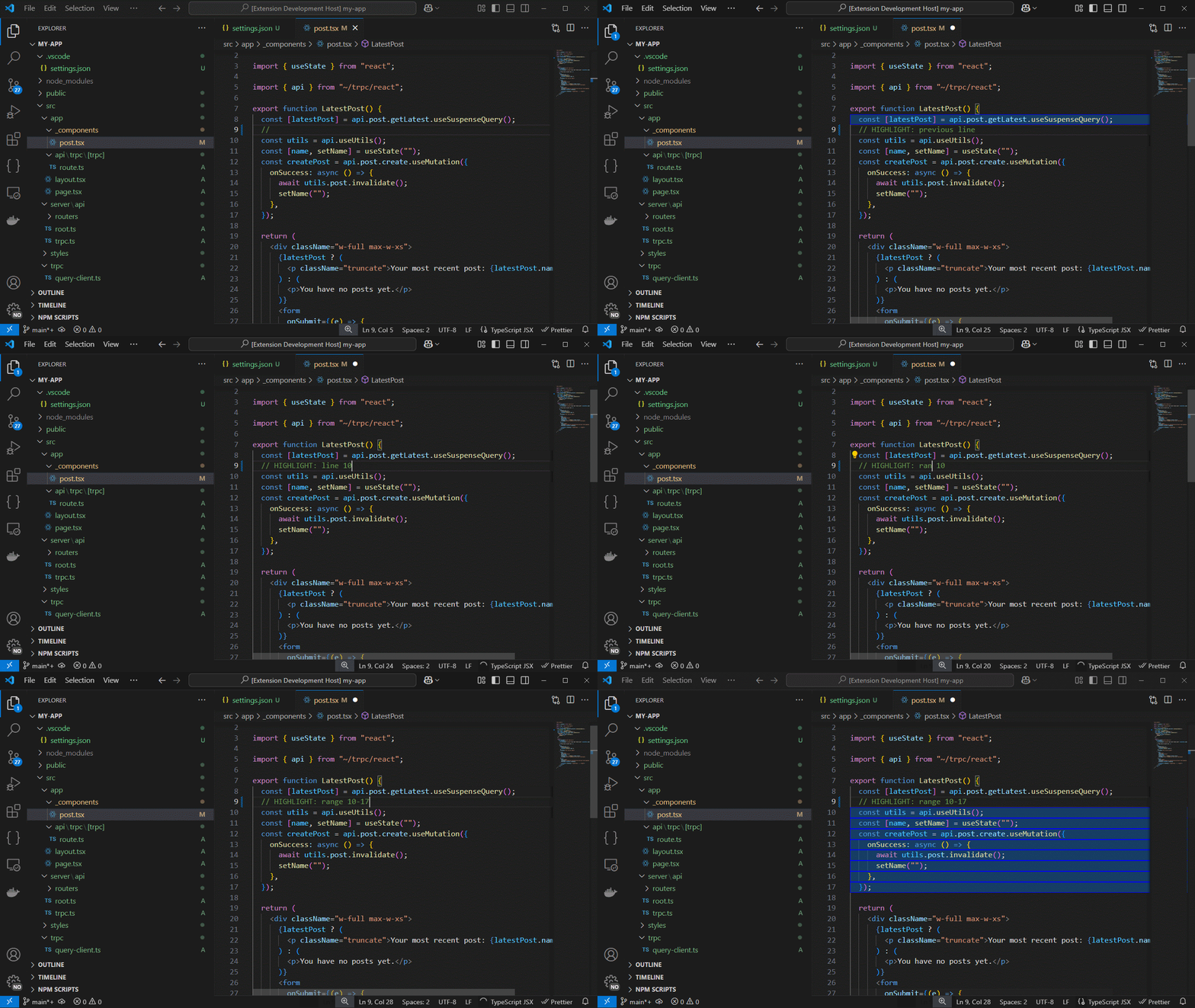
**CodeMark+** is a powerful Visual Studio Code extension that helps you insert, remove, and highlight custom comments in your code. It streamlines your workflow by automatically applying dynamic highlights to important keywords (like `TODO`, `FIXME`, and `NOTE`) and by enabling special inline directives for more advanced highlighting (such as highlighting the next, previous, or a range of lines).
Whether you’re debugging, documenting, or simply organizing your code, CodeMark+ provides a fully customizable solution that works across multiple programming languages.
## Table of Contents
- [CodeMark+](#codemark)
- [Overview](#overview)
- [Table of Contents](#table-of-contents)
- [Features](#features)
- [Installation](#installation)
- [Usage](#usage)
- [Dynamic Keyword Highlighting](#dynamic-keyword-highlighting)
- [Special Highlight Directives](#special-highlight-directives)
- [Insert \& Remove Comments](#insert--remove-comments)
- [Configuration Options](#configuration-options)
- [General Settings](#general-settings)
- [Highlight Rules](#highlight-rules)
- [Special Highlight Decoration](#special-highlight-decoration)
- [Custom Comment Templates](#custom-comment-templates)
- [Commands and Keybindings](#commands-and-keybindings)
- [Troubleshooting](#troubleshooting)
- [Support](#support)
- [Feedback](#feedback)
- [Follow Me](#follow-me)
- [VSXpert Template](#vsxpert-template)
- [Other Extensions](#other-extensions)
- [Contributing](#contributing)
- [Code of Conduct](#code-of-conduct)
- [Changelog](#changelog)
- [License](#license)
## Features
- **Multi-Language Support:**
Works with JavaScript, TypeScript, Java, C#, PHP, Dart, Python, C++, Ruby, and Go.
- **Dynamic Keyword Highlighting:**
Automatically highlights keywords like `TODO`, `FIXME`, and `NOTE` based on customizable rules.
- **Special Highlight Directives:**
Recognize inline directives such as:
- `// HIGHLIGHT: next line`
- `// HIGHLIGHT: previous line`
- `// HIGHLIGHT: current line`
- `// HIGHLIGHT: line 10`
- `// HIGHLIGHT: range 5-8`
- `// HIGHLIGHT: block`
to highlight specific lines, ranges, or code blocks.
- **Customizable Comment Templates:**
Define your own comment formats using Mustache syntax.
- **Real-Time Updates:**
Highlighting is applied dynamically as you work, and changes in settings update the highlights in real-time.
- **Configurable Activation:**
Easily enable or disable dynamic highlighting with a single configuration option.
## Installation
1. **Open Visual Studio Code.**
2. Navigate to the **Extensions** view by pressing `Ctrl+Shift+X` (or `Cmd+Shift+X` on macOS).
3. Search for **CodeMark+**.
4. Click **Install**.
5. Reload VSCode if prompted. The extension activates automatically.
## Usage
### Dynamic Keyword Highlighting
When enabled, CodeMark+ automatically scans your document for keywords defined in your configuration (such as `TODO`, `FIXME`, and `NOTE`) and applies your custom styles.
### Special Highlight Directives
Place a special inline directive in your code to highlight additional lines. For example:
```js
// HIGHLIGHT: next line
console.log('This line will be highlighted.');
```
Other supported directives include:
- `previous line`
- `current line`
- `line ` (e.g., `line 12`)
- `range -` (e.g., `range 5-10`)
- `block` (to highlight an entire block of code)
### Insert & Remove Comments
- **Insert Comment:**
Use the command `codeMarkPlus.insertComment` to insert a custom comment based on your templates.
- **Remove Single-Line Comments:**
Use the command `codeMarkPlus.removeSingleLineComments` to remove inserted comments from your code.
## Configuration Options
You can customize CodeMark+ through your VSCode settings. Below are the main options:
### General Settings
| Setting | Type | Default | Description |
|--------------------------------------|---------|-----------|---------------------------------------------------------|
| `codeMarkPlus.enable` | boolean | true | Enable or disable CodeMark+ features. |
| `codeMarkPlus.defaultLanguage` | string | "javascript" | Default language for comments. |
| `codeMarkPlus.isCommentMessageWrapped` | boolean | false | Wrap comments with borders if enabled. |
| `codeMarkPlus.commentDelimiter` | string | "~" | Delimiter used between comment parts. |
| `codeMarkPlus.commentMessagePrefix` | string | "🔹" | Prefix for inserted comments. |
| `codeMarkPlus.commentMessageSuffix` | string | ":" | Suffix for inserted comments. |
| `codeMarkPlus.addEmptyLineBeforeComment` | boolean | false | Add an empty line before the comment block. |
| `codeMarkPlus.addEmptyLineAfterComment` | boolean | false | Add an empty line after the comment block. |
| `codeMarkPlus.literalOpen` | string | "{" | Opening character for template literals. |
| `codeMarkPlus.literalClose` | string | "}" | Closing character for template literals. |
| `codeMarkPlus.useCurrentPosition` | boolean | false | Use current cursor position for inserting comments. |
| `codeMarkPlus.author` | string | "Unknown" | Default author name for comments. |
| `codeMarkPlus.version` | string | "1.0.0" | Default version for comments. |
| `codeMarkPlus.license` | string | "MIT" | Default license for comments. |
| `codeMarkPlus.highlightActive` | boolean | true | Enable or disable dynamic highlighting. |
### Highlight Rules
Define your custom highlight rules for keywords:
```json
"codeMarkPlus.highlightRules": [
{ "keyword": "TODO", "color": "rgba(255,204,0,0.3)", "bold": true },
{ "keyword": "FIXME", "color": "rgba(255,0,0,0.3)", "bold": true, "underline": true },
{ "keyword": "NOTE", "color": "rgba(0,255,0,0.3)", "italic": true }
]
```
### Special Highlight Decoration
Customize the appearance of the special highlight applied for directives:
```json
"codeMarkPlus.specialHighlightDecoration": {
"backgroundColor": "rgba(0,128,255,0.3)",
"border": "1px solid blue",
"isWholeLine": true
}
```
### Custom Comment Templates
Define custom comment templates for different languages using Mustache syntax. For example:
```json
"codeMarkPlus.customTemplates": [
{
"language": "javascript",
"template": [
"{{indent}}/**",
"{{indent}} * @description the {{functionName}} method",
"{{indent}} * @signature {{signature}}",
"{{indent}} * @params:",
"{{#parameters}}{{indent}} * - {{.}}",
"{{/parameters}}",
"{{indent}} * @returns {Type} - {{returnType}}",
"{{indent}} * @file {{fileName}}",
"{{indent}} * @date {{date}}",
"{{indent}} * @author {{author}}",
"{{indent}} * @version {{version}}",
"{{indent}} * @license {{license}}",
"{{indent}} */"
]
},
{
"language": "python",
"template": [
"{{indent}}\"\"\"",
"{{indent}}Description: the {{functionName}} method",
"{{indent}}Signature: {{signature}}",
"{{indent}}Parameters:",
"{{#parameters}}{{indent}} - {{.}}",
"{{/parameters}}",
"{{indent}}Returns: {{returnType}}",
"{{indent}}File: {{fileName}}",
"{{indent}}Date: {{date}}",
"{{indent}}Author: {{author}}",
"{{indent}}Version: {{version}}",
"{{indent}}License: {{license}}",
"{{indent}}\"\"\""
]
}
]
```
## Commands and Keybindings
While the extension primarily provides dynamic highlighting, it also includes commands for comment insertion and removal:
| Command | Keybinding (Windows/Linux) | Keybinding (macOS) | Description |
|--------------------------------------|----------------------------|-----------------------------------|--------------------------------------------|
| `codeMarkPlus.insertComment` | `Ctrl+Alt+U` | `Cmd+Alt+U` | Insert a custom comment using a template. |
| `codeMarkPlus.removeSingleLineComments` | `Ctrl+Alt+Shift+U` | `Cmd+Alt+Shift+U` | Remove inserted single-line comments. |
*(Note: Adjust keybindings if needed.)*
## Troubleshooting
If highlighting isn’t working as expected:
- **Verify your configuration:** Ensure that `codeMarkPlus.highlightActive` is enabled and that your highlight rules are correctly defined.
- **Reload VSCode:** Use the `Developer: Reload Window` command.
- **Check the Output Panel:** Look for errors in the "Log (Extension Host)" channel.
- **Test with a Simple File:** Create a test file with known keywords and directives to confirm functionality.
## Support
If you encounter any issues or have suggestions for improvements, please [open an issue](https://github.com/ManuelGil/vscode-code-mark-plus/issues) on GitHub.
## Feedback
If you enjoy using CodeMark+, please consider leaving a review on the [VSCode Marketplace](https://marketplace.visualstudio.com/items?itemName=imgildev.vscode-code-mark-plus).
## Follow Me
Stay updated on the latest features, improvements, and future projects by following me:
- [GitHub](https://github.com/ManuelGil)
- [Twitter (X)](https://twitter.com/imgildev)
## VSXpert Template
This extension was created using [VSXpert](https://vsxpert.com), a template designed to help you quickly create Visual Studio Code extensions with ease.
## Other Extensions
Explore other extensions developed by me:
- [Angular File Generator](https://marketplace.visualstudio.com/items?itemName=imgildev.vscode-angular-generator)
- [NestJS File Generator](https://marketplace.visualstudio.com/items?itemName=imgildev.vscode-nestjs-generator)
- [T3 Stack / NextJS / ReactJS File Generator](https://marketplace.visualstudio.com/items?itemName=imgildev.vscode-nextjs-generator)
- [JSON Flow](https://marketplace.visualstudio.com/items?itemName=imgildev.vscode-json-flow)
- [Auto Barrel](https://marketplace.visualstudio.com/items?itemName=imgildev.vscode-auto-barrel)
- [CodeIgniter 4 Spark](https://marketplace.visualstudio.com/items?itemName=imgildev.vscode-codeigniter4-spark)
## Contributing
We welcome contributions from the community! To contribute, fork the [GitHub repository](https://github.com/ManuelGil/vscode-code-mark-plus) and submit a pull request.
Before contributing, please review our [Contribution Guidelines](./CONTRIBUTING.md) for details on coding standards and best practices.
## Code of Conduct
We strive to create a welcoming, inclusive, and respectful environment for all contributors. Please read our [Code of Conduct](./CODE_OF_CONDUCT.md) before participating in this project.
## Changelog
See the full list of changes in the [CHANGELOG.md](./CHANGELOG.md) file.
## License
This extension is licensed under the MIT License. See the [MIT License](https://opensource.org/licenses/MIT) for more details.