https://github.com/manuelgil/vscode-typescript-generator
Simplifies TypeScript development by providing customizable templates for generating TypeScript classes, interfaces, enums, types, functions, and variables directly from VS Code
https://github.com/manuelgil/vscode-typescript-generator
code-generator file-generator typescript typescript-codegen typescript-files typescript-generator vscode vscode-extension vscode-file-utils
Last synced: 2 months ago
JSON representation
Simplifies TypeScript development by providing customizable templates for generating TypeScript classes, interfaces, enums, types, functions, and variables directly from VS Code
- Host: GitHub
- URL: https://github.com/manuelgil/vscode-typescript-generator
- Owner: ManuelGil
- License: mit
- Created: 2024-12-19T05:19:05.000Z (over 1 year ago)
- Default Branch: main
- Last Pushed: 2025-02-01T02:21:37.000Z (over 1 year ago)
- Last Synced: 2025-02-13T12:58:53.195Z (over 1 year ago)
- Topics: code-generator, file-generator, typescript, typescript-codegen, typescript-files, typescript-generator, vscode, vscode-extension, vscode-file-utils
- Language: TypeScript
- Homepage: https://marketplace.visualstudio.com/items?itemName=imgildev.vscode-typescript-generator
- Size: 862 KB
- Stars: 1
- Watchers: 1
- Forks: 0
- Open Issues: 1
-
Metadata Files:
- Readme: README.md
- Changelog: CHANGELOG.md
- Contributing: CONTRIBUTING.md
- Funding: .github/FUNDING.yml
- License: LICENSE
- Code of conduct: CODE_OF_CONDUCT.md
Awesome Lists containing this project
README
# Auto TS Generator
[](https://marketplace.visualstudio.com/items?itemName=imgildev.vscode-typescript-generator)
[](https://marketplace.visualstudio.com/items?itemName=imgildev.vscode-typescript-generator)
[](https://marketplace.visualstudio.com/items?itemName=imgildev.vscode-typescript-generator)
[](https://marketplace.visualstudio.com/items?itemName=imgildev.vscode-typescript-generator&ssr=false#review-details)
[](https://github.com/ManuelGil/vscode-typescript-generator)
[](https://github.com/ManuelGil/vscode-typescript-generator/blob/main/LICENSE)
_A powerful VSCode-based editor extension that accelerates TypeScript development by generating structured, customizable files with a single click._
## Overview
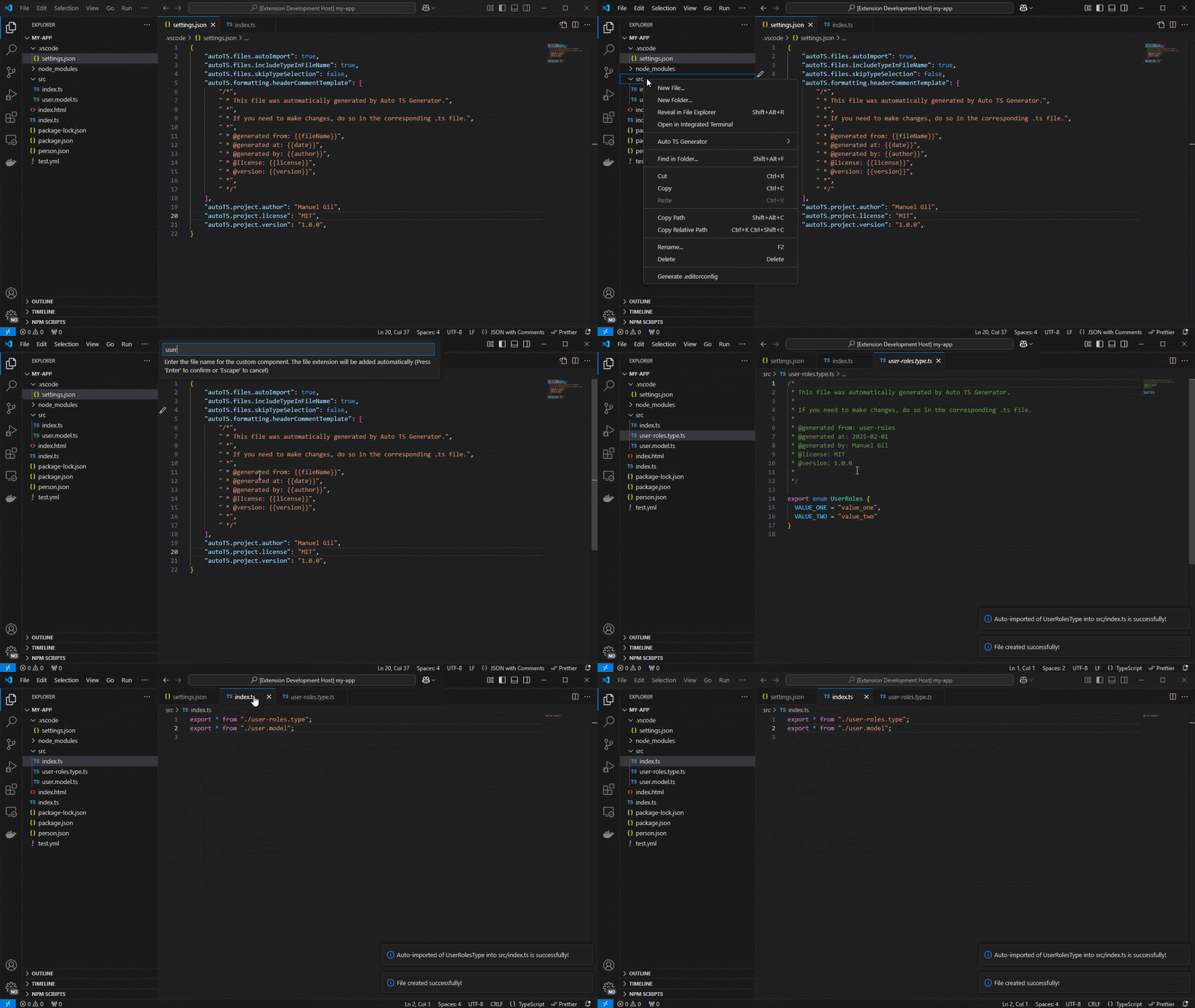
**Auto TS Generator** empowers you to scaffold TypeScript classes, interfaces, enums, functions, React components, Node/Express/Fastify modules and servers, and more, directly from VSCode, VSCodium, WindSurf, Cursor, or any compatible editor.
## Index
- [Auto TS Generator](#auto-ts-generator)
- [Overview](#overview)
- [Index](#index)
- [Key Features](#key-features)
- [Usage](#usage)
- [Project Setup](#project-setup)
- [Settings Configuration](#settings-configuration)
- [Recommended Quick Mode](#recommended-quick-mode)
- [Custom Templates](#custom-templates)
- [Template Variables](#template-variables)
- [Installation](#installation)
- [Resources](#resources)
- [Contributing](#contributing)
- [Code of Conduct](#code-of-conduct)
- [Changelog](#changelog)
- [Authors](#authors)
- [Follow Me](#follow-me)
- [Other Extensions](#other-extensions)
- [Recommended Browser Extension](#recommended-browser-extension)
- [License](#license)
## Key Features
| Feature | Description |
| ----------------------------------- | --------------------------------------------------------------------------------------------------------------------------------------------- |
| **Customizable Templates** | Define your own boilerplate for classes, interfaces, enums, services, components, and more. |
| **Dynamic Variables** | Over 30 template placeholders, naming formats (`PascalCase`, `kebab-case`, etc.), dates, metadata. |
| **Smart Generate** | Use a single `Auto TS: Generate` command to pick what to scaffold from one contextual flow. |
| **Auto Import** | Automatically add new exports to barrel files or insert import statements in open files. |
| **Context-Aware Target Resolution** | Reuses the active folder/file context and selected workspace so generation starts where you are already working. |
| **Rich Command Palette** | Commands for generating `class`, `interface`, `enum`, `type`, `function`, `variable` and framework artifacts (React, Node, Express, Fastify). |
| **Context Menu Integration** | Right-click on any folder in Explorer, choose **Auto TS Generator**, and pick your artifact. |
| **Project-Level Configuration** | Control file extensions, formatting, naming conventions, header comments, and more via `settings.json`. |
| **VSCode-based Editor Support** | Compatible with VSCode, VSCodium, WindSurf, Cursor, and any editor implementing the VSCode extension API. |
| **Version & Update Notifications** | First-run welcome message, release notes prompt after upgrades, and auto-check for new releases. |
## Usage
1. **Explorer Context Menu**
Right-click on a folder → **Auto TS Generator** → select a file type:
- **Generic**: Class · Interface · Enum · Type · Function · Variable
- **Custom Component**: Your own user-defined template
- **Node**: Module · Server
- **Express**: Controller · Middleware · Route · Server
- **Fastify**: Controller · Middleware · Route · Server
- **React**: Functional Component
All generation commands remain available from this menu. Context signals are used to improve ordering and recommendations, not to hide commands.
2. **Command Palette**
Press `Ctrl+Shift+P` (Windows/Linux) or `Cmd+Shift+P` (macOS), type `Auto TS`, and select any of the above commands.
Recommended primary entry point:
- **Auto TS: Generate** → select a file type in one place.
- Smart Generate shows grouped options (**Recommended** and **Other**) and preselects the top contextual recommendation.
3. **Automatic Update Check**
On activation, the extension compares its version with the Marketplace's latest. If a newer version exists, you'll be prompted to update.
## Project Setup
1. **Open VS Code Command Palette**
- Windows: `Ctrl + Shift + P`
- macOS: `Cmd + Shift + P`
2. **Open Workspace Settings**
- Type `Preferences: Open Workspace Settings (JSON)`.
3. **Add Configuration to `.vscode/settings.json`**
```json
{
"autoTS.enable": true,
"autoTS.files.defaultLanguage": "TypeScript",
"autoTS.files.fileExtension": "ts",
"autoTS.files.skipFolderConfirmation": true,
"autoTS.files.includeTypeInFileName": false,
"autoTS.files.skipTypeSelection": true,
"autoTS.files.autoImport": true,
"autoTS.files.defaultBarrelFileName": "index",
"autoTS.formatting.useSingleQuotes": true,
"autoTS.formatting.excludeSemiColonAtEndOfLine": false,
"autoTS.formatting.keepExtensionOnExport": false,
"autoTS.formatting.endOfLine": "lf",
"autoTS.formatting.useStrict": false,
"autoTS.formatting.headerCommentTemplate": [],
"autoTS.formatting.insertFinalNewline": true,
"autoTS.project.author": "Jane Doe",
"autoTS.project.owner": "Jane Doe",
"autoTS.project.maintainers": "Jane Doe, John Doe",
"autoTS.project.license": "MIT",
"autoTS.project.version": "1.0.0",
"autoTS.templates.customComponents": [
{
"name": "Service",
"description": "Generates a service file",
"type": "service",
"template": ["import { Injectable } from '@angular/core';", "", "@Injectable({", " providedIn: 'root'", "})", "export class {{fileNamePascalCase}}Service {", "", " constructor() { }", "", "}"]
},
{
"name": "Component",
"description": "Generates a component file",
"type": "component",
"template": ["import { Component, OnInit } from '@angular/core';", "", "@Component({", " selector: 'app-{{fileName}}',", " templateUrl: './{{fileName}}.component.html',", " styleUrls: ['./{{fileName}}.component.scss']", "})", "export class {{fileNamePascalCase}}Component implements OnInit {", "", " constructor() { }", "", " ngOnInit(): void { }", "", "}"]
}
]
}
```
4. **Restart VS Code** to apply the settings.
## Settings Configuration
You can customize the behavior of **Auto TS Generator** by modifying the settings in your `.vscode/settings.json` file. Below is a list of configurable options:
- `autoTS.enable`: Toggle the extension on or off. Default is `true`.
- `autoTS.files.defaultLanguage`: Set the default language for generated files. Default is `TypeScript`.
- `autoTS.files.fileExtension`: Set the file extension for generated files. Default is `.ts`.
- `autoTS.files.skipFolderConfirmation`: Skip the folder confirmation dialog when creating files. Default is `true`.
- `autoTS.files.includeTypeInFileName`: Add the type to the file name (e.g., `myNewFile.component`). Default is `false`.
- `autoTS.files.skipTypeSelection`: Skip the type selection dialog when creating files. Default is `true`.
- `autoTS.files.autoImport`: Automatically imports generated files. Default is `true`.
- `autoTS.files.defaultBarrelFileName`: Default name for barrel files (e.g., `index`). Default is `index`.
- `autoTS.formatting.useSingleQuotes`: Format code with single quotes. Default is `true`.
- `autoTS.formatting.excludeSemiColonAtEndOfLine`: Exclude semicolons at the end of lines. Default is `false`.
- `autoTS.formatting.keepExtensionOnExport`: Keep file extension on exports. Default is `false`.
- `autoTS.formatting.endOfLine`: Set the end-of-line character (e.g., `lf`). Default is `lf`.
- `autoTS.formatting.useStrict`: Enable strict mode in generated files. Default is `false`.
- `autoTS.formatting.headerCommentTemplate`: Custom header comment template for generated files. Default is an empty array.
- `autoTS.formatting.insertFinalNewline`: Insert a final newline at the end of files. Default is `true`.
- `autoTS.project.author`: Set the author of the project. Default is an empty string.
- `autoTS.project.owner`: Set the owner of the project. Default is an empty string.
- `autoTS.project.maintainers`: Set the maintainers of the project. Default is an empty string.
- `autoTS.project.license`: Set the license of the project. Default is `MIT`.
- `autoTS.project.version`: Set the version of the project. Default is `1.0.0`.
- `autoTS.templates.customComponents`: Custom templates for generating components (e.g., services, components). Default is an empty array.
You can modify these settings to suit your project's requirements and coding standards.
### Recommended Quick Mode
To minimize prompts and speed up generation, keep these defaults enabled:
```json
{
"autoTS.files.skipFolderConfirmation": true,
"autoTS.files.autoImport": true
}
```
Benefits:
- Fewer interactive steps per generated file
- Faster export/barrel updates without manual edits
- Better flow when generating multiple files in sequence
The extension also keeps your selected workspace folder in multi-root setups and automatically resolves generation context from your active editor when possible.
## Custom Templates
Add user-defined templates under `autoTS.templates.customComponents`:
- `name`: Template name (e.g., `Service`).
- `description`: Brief description.
- `type`: File type (e.g., `service`).
- `template`: Array of strings representing file content; use template variables.
## Template Variables
| Variable | Description | Example Value |
| ---------------------------------- | ------------------------------------ | ------------------------ |
| `{{fileName}}` | Original file name | `myNewFile` |
| `{{fileNameCamelCase}}` | CamelCase | `myNewFile` |
| `{{fileNamePascalCase}}` | PascalCase | `MyNewFile` |
| `{{fileNameKebabCase}}` | kebab-case | `my-new-file` |
| `{{fileNameSnakeCase}}` | snake_case | `my_new_file` |
| `{{fileNameConstantCase}}` | CONSTANT_CASE | `MY_NEW_FILE` |
| `{{fileNameDotCase}}` | dot.case | `my.new.file` |
| `{{fileNamePathCase}}` | path/case | `my/new/file` |
| `{{fileNameSentenceCase}}` | Sentence case | `My new file` |
| `{{fileNameLowerCase}}` | Lowercase | `my new file` |
| `{{fileNameTitleCase}}` | Title Case | `My New File` |
| `{{fileNamePluralCase}}` | Pluralized | `myNewFiles` |
| `{{fileNameSingularCase}}` | Singularized | `myNewFile` |
| `{{fileNameWithTypeAndExtension}}` | File name + type + extension | `myNewFile.component.ts` |
| `{{fileNameWithType}}` | File name + type | `myNewFile.component` |
| `{{fileNameWithExtension}}` | File name + extension | `myNewFile.ts` |
| `{{folderName}}` | Parent folder name | `src/components` |
| `{{fileType}}` | File type (component, service, etc.) | `component` |
| `{{fileTypeName}}` | File type in Title Case | `Service` |
| `{{fileTypeNameCamelCase}}` | File type in camelCase | `service` |
| `{{fileTypeNamePascalCase}}` | File type in PascalCase | `Service` |
| `{{fileTypeNameKebabCase}}` | File type in kebab-case | `service` |
| `{{fileTypeNameSnakeCase}}` | File type in snake_case | `service` |
| `{{fileTypeNameConstantCase}}` | File type in CONSTANT_CASE | `SERVICE` |
| `{{fileTypeNameDotCase}}` | File type in dot.case | `service` |
| `{{fileTypeNamePathCase}}` | File type in path/case | `service` |
| `{{fileTypeNameSentenceCase}}` | File type in Sentence case | `Service` |
| `{{fileTypeNameLowerCase}}` | File type in lowercase | `service` |
| `{{fileTypeNameUpperCase}}` | File type in uppercase | `SERVICE` |
| `{{fileTypeNamePlural}}` | File type plural | `services` |
| `{{fileTypeNameSingular}}` | File type singular | `service` |
| `{{fileTypeWithExtension}}` | File type + extension | `service.ts` |
| `{{fileExtension}}` | File extension | `ts` |
| `{{date}}` | Current date | `2025-01-31` |
| `{{year}}` | Current year | `2025` |
| `{{time}}` | Current time | `12:34:56` |
| `{{timestamp}}` | Unix timestamp | `1672531199` |
| `{{timestampISO}}` | ISO timestamp | `2025-01-31T12:34:56Z` |
| `{{author}}` | Project author | `Jane Doe` |
| `{{owner}}` | Project owner | `Jane Doe` |
| `{{maintainers}}` | Project maintainers | `Jane Doe, John Doe` |
| `{{license}}` | Project license | `MIT` |
| `{{version}}` | Project version | `1.0.0` |
## Installation
1. Open your VSCode-based editor (VSCode, VSCodium, WindSurf, Cursor).
2. Go to **Extensions** (`Ctrl+Shift+X` / `Cmd+Shift+X`).
3. Search for **"Auto TS Generator"** (author: Manuel Gil).
4. Click **Install**.
5. (Optional) Clone or download the repo and open it to test the latest dev version.
## Resources
- **VSCode Marketplace**
[https://marketplace.visualstudio.com/items?itemName=imgildev.vscode-typescript-generator](https://marketplace.visualstudio.com/items?itemName=imgildev.vscode-typescript-generator)
- **Open VSX**
[https://open-vsx.org/extension/imgildev/vscode-typescript-generator](https://open-vsx.org/extension/imgildev/vscode-typescript-generator)
- **GitHub Repository**
[https://github.com/ManuelGil/vscode-typescript-generator](https://github.com/ManuelGil/vscode-typescript-generator)
## Contributing
Auto TS Generator is open-source and welcomes community contributions:
1. Fork the [GitHub repository](https://github.com/ManuelGil/vscode-typescript-generator).
2. Create a new branch:
```bash
git checkout -b feature/your-feature
```
3. Make your changes, commit them, and push to your fork.
4. Submit a Pull Request against the `main` branch.
Before contributing, please review the [Contribution Guidelines](https://github.com/ManuelGil/vscode-typescript-generator/blob/main/CONTRIBUTING.md) for coding standards, testing, and commit message conventions. Open an Issue if you find a bug or want to request a new feature.
## Code of Conduct
We are committed to providing a friendly, safe, and welcoming environment for all, regardless of gender, sexual orientation, disability, ethnicity, religion, or other personal characteristic. Please review our [Code of Conduct](https://github.com/ManuelGil/vscode-typescript-generator/blob/main/CODE_OF_CONDUCT.md) before participating in our community.
## Changelog
For a complete list of changes, see the [CHANGELOG.md](https://github.com/ManuelGil/vscode-typescript-generator/blob/main/CHANGELOG.md).
## Authors
- **Manuel Gil** – _Owner_ – [@ManuelGil](https://github.com/ManuelGil)
For a complete list of contributors, please refer to the [contributors](https://github.com/ManuelGil/vscode-typescript-generator/contributors) page.
## Follow Me
- **GitHub**: [](https://github.com/ManuelGil)
- **X (formerly Twitter)**: [](https://twitter.com/imgildev)
## Other Extensions
- **[Auto Barrel](https://marketplace.visualstudio.com/items?itemName=imgildev.vscode-auto-barrel)**
Automatically generates and maintains barrel (`index.ts`) files for your TypeScript projects.
- **[Angular File Generator](https://marketplace.visualstudio.com/items?itemName=imgildev.vscode-angular-generator)**
Generates boilerplate and navigates your Angular (9→20+) project from within the editor, with commands for components, services, directives, modules, pipes, guards, reactive snippets, and JSON2TS transformations.
- **[NestJS File Generator](https://marketplace.visualstudio.com/items?itemName=imgildev.vscode-nestjs-generator)**
Simplifies creation of controllers, services, modules, and more for NestJS projects, with custom commands and Swagger snippets.
- **[NestJS Snippets](https://marketplace.visualstudio.com/items?itemName=imgildev.vscode-nestjs-snippets-extension)**
Ready-to-use code patterns for creating controllers, services, modules, DTOs, filters, interceptors, and more in NestJS.
- **[T3 Stack / NextJS / ReactJS File Generator](https://marketplace.visualstudio.com/items?itemName=imgildev.vscode-nextjs-generator)**
Automates file creation (components, pages, hooks, API routes, etc.) in T3 Stack (Next.js, React) projects and can start your dev server from VSCode.
- **[Drizzle ORM Snippets](https://marketplace.visualstudio.com/items?itemName=imgildev.vscode-drizzle-snippets)**
Collection of code snippets to speed up Drizzle ORM usage, defines schemas, migrations, and common database operations in TypeScript/JavaScript.
- **[CodeIgniter 4 Spark](https://marketplace.visualstudio.com/items?itemName=imgildev.vscode-codeigniter4-spark)**
Scaffolds controllers, models, migrations, libraries, and CLI commands in CodeIgniter 4 projects using Spark, directly from the editor.
- **[CodeIgniter 4 Snippets](https://marketplace.visualstudio.com/items?itemName=imgildev.vscode-codeigniter4-snippets)**
Snippets for accelerating development with CodeIgniter 4, including controllers, models, validations, and more.
- **[CodeIgniter 4 Shield Snippets](https://marketplace.visualstudio.com/items?itemName=imgildev.vscode-codeigniter4-shield-snippets)**
Snippets tailored to CodeIgniter 4 Shield for faster authentication and security-related code.
- **[Mustache Template Engine - Snippets & Autocomplete](https://marketplace.visualstudio.com/items?itemName=imgildev.vscode-mustache-snippets)**
Snippets and autocomplete support for Mustache templates, making HTML templating faster and more reliable.
## Recommended Browser Extension
For developers who work with `.vsix` files for offline installations or distribution, the complementary [**One-Click VSIX**](https://chromewebstore.google.com/detail/imojppdbcecfpeafjagncfplelddhigc?utm_source=item-share-cb) extension is recommended, available for both Chrome and Firefox.
> **One-Click VSIX** integrates a direct "Download Extension" button into each VSCode Marketplace page, ensuring the file is saved with the `.vsix` extension, even if the server provides a `.zip` archive. This simplifies the process of installing or sharing extensions offline by eliminating the need for manual file renaming.
- [Get One-Click VSIX for Chrome →](https://chromewebstore.google.com/detail/imojppdbcecfpeafjagncfplelddhigc?utm_source=item-share-cb)
- [Get One-Click VSIX for Firefox →](https://addons.mozilla.org/es-ES/firefox/addon/one-click-vsix/)
## License
This project is licensed under the **MIT License**. See the [LICENSE](https://github.com/ManuelGil/vscode-typescript-generator/blob/main/LICENSE) file for details.