https://github.com/maplephp/blunder
Blunder is a pretty error handling framework for PHP
https://github.com/maplephp/blunder
blunder debugging-tool error error-handling error-management error-presentation php php-errors pretty-error-interface
Last synced: 12 months ago
JSON representation
Blunder is a pretty error handling framework for PHP
- Host: GitHub
- URL: https://github.com/maplephp/blunder
- Owner: MaplePHP
- License: apache-2.0
- Created: 2024-08-10T08:38:03.000Z (almost 2 years ago)
- Default Branch: main
- Last Pushed: 2024-09-30T16:57:46.000Z (almost 2 years ago)
- Last Synced: 2024-12-01T05:50:03.181Z (over 1 year ago)
- Topics: blunder, debugging-tool, error, error-handling, error-management, error-presentation, php, php-errors, pretty-error-interface
- Language: PHP
- Homepage:
- Size: 66.4 KB
- Stars: 4
- Watchers: 1
- Forks: 0
- Open Issues: 0
-
Metadata Files:
- Readme: README.md
- License: LICENSE
Awesome Lists containing this project
README
# MaplePHP Blunder
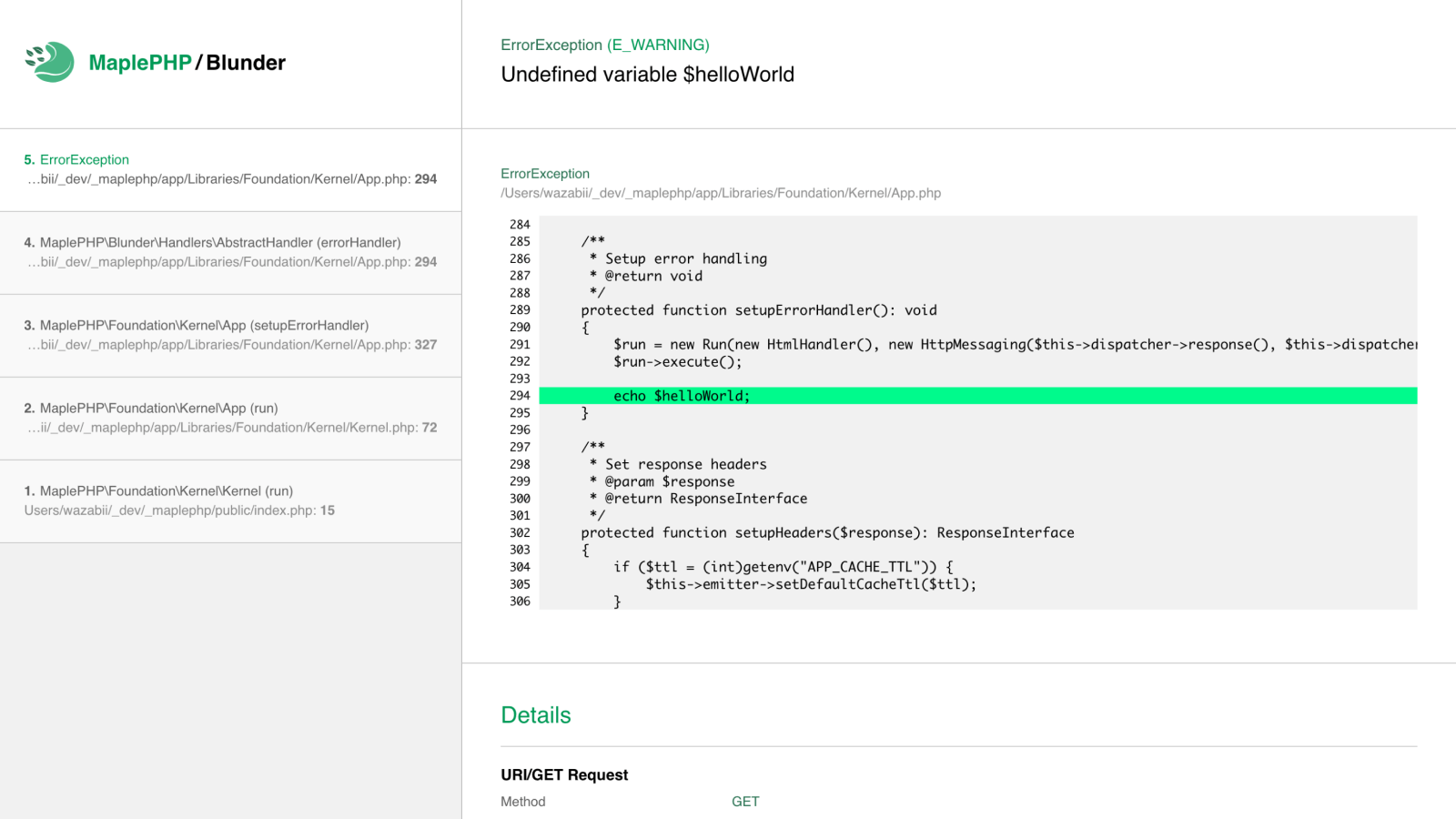
**Blunder is a pretty error handling framework for PHP.** It provides a pretty, user-friendly interface that simplifies
debugging with excellent memory management. Blunder offers various handlers, including HTML, JSON, XML, CLI, plain text,
and silent modes, allowing flexible error presentation. Seamlessly integrating with tools like the PSR-7 and PSR-3
compliant MaplePHP Log library, Blunder is an excellent choice for managing errors in PHP applications, helping users easily
identify and resolve issues.
With Blunder, you can easily control how errors are handled—whether you want to suppress specific severities, redirect them to
logging, or assign them to different handlers. For example, you can automatically log all Deprecated warnings while keeping
Warnings visible for debugging. This level of customization ensures a smooth and efficient error-handling experience tailored
to your needs.
## Installation
Installation with composer
```bash
composer require maplephp/blunder
```
## Pretty Example
Here is a simple example to load the pretty error interface:
```php
use MaplePHP\Blunder\Run;
use MaplePHP\Blunder\Handlers\HtmlHandler;
$run = new Run(new HtmlHandler());
$run->load();
```
## Handlers
All handlers utilize the namespace `MaplePHP\Blunder\Handlers\[TheHandlerName]`.
* **HtmlHandler**: A user-friendly and visually appealing handler.
* **TextHandler**: Outputs a minified HTML text.
* **PlainTextHandler**: Outputs minified plain text.
* **JsonHandler**: Outputs errors as JSON.
* **XmlHandler**: Outputs errors as XML.
* **CliHandler**: Prompt handler for the command-line interface (CLI)
* **SilentHandler**: Suppresses error output but can log errors to files. You can choose to output fatal errors if necessary.
## Excluding Specific Error Severities from the Handler
With Blunder, you can exclude specific error severities from the handler. This allows you to control how certain errors are processed without affecting the overall error handling behavior.
### 1. Exclude Severity Levels
This method removes the specified severities from Blunder’s handler, allowing them to be processed by PHP’s default error reporting.
```php
$run = new Run(new HtmlHandler());
$run->severity()->excludeSeverityLevels([E_DEPRECATED, E_USER_DEPRECATED]);
$run->load();
```
**Effect:**
- `E_DEPRECATED` and `E_USER_DEPRECATED` will no longer be handled by Blunder.
- PHP’s default error handling will take over for these severities.
---
### 2. Exclude and Redirect Severities
Instead of letting PHP handle the excluded severities, you can redirect them to a custom function for further processing, such as logging.
#### **Behavior:**
- **`return true;`** → Completely suppresses errors of the excluded severities.
- **`return false;`** → Uses PHP’s default error handler for the excluded severities.
- **`return null|void;`** → Keeps using Blunder’s error handler as usual.
```php
$run = new Run(new HtmlHandler());
$run->severity()
->excludeSeverityLevels([E_WARNING, E_USER_WARNING])
->redirectTo(function ($errNo, $errStr, $errFile, $errLine) {
error_log("Custom log: $errStr in $errFile on line $errLine");
return true; // Suppresses output for excluded severities
});
```
**Example Use Case:**
- Log warnings instead of displaying them.
- Ensure deprecated notices are logged but not shown in production.
---
### 3. Redirect Excluded Severities to a New Handler
You can also redirect excluded severities to a completely different error handler.
```php
$run = new Run($errorHandler);
$run->severity()
->excludeSeverityLevels([E_WARNING, E_USER_WARNING])
->redirectTo(function ($errNo, $errStr, $errFile, $errLine) {
return new JsonHandler();
});
```
**Effect:**
- `E_WARNING` and `E_USER_WARNING` will be processed by `JsonHandler` instead of `HtmlHandler` or PHP’s default error handling.
---
**Note:**
You can find a full list of available PHP error severities [here](https://www.php.net/manual/en/errorfunc.constants.php).
---
## Enabling or Disabling Trace Lines
This allows you to control the level of detail shown in error messages based on your debugging needs.
You can customize this behavior using the configuration:
```php
$handler = new CliHandler();
// Enable or disable trace lines
$handler->enableTraceLines(true); // Set false to disable
$run = new Run($handler);
$run->load();
```
### **Options:**
- `true` → Enables trace lines (default in all cases except for in the CliHandler).
- `false` → Disables trace lines, making error messages cleaner.
This allows you to control the level of detail shown in error messages based on your debugging needs.
## Remove location headers
This will remove location headers and make sure that no PHP redirect above this code will execute.
```php
$run = new Run(new HtmlHandler());
$run->removeLocationHeader(true);
$run->load();
```
## Setting the Exit Code for Errors
To make Blunder trigger a specific exit code when an error occurs. This is useful in unit testing and CI/CD, ensuring tests fail on errors.
```php
$run = new Run(new CliHandler());
$run->setExitCode(1);
$run->load();
```
## Event Handling
You can use Blunder's **event** functionality to handle errors, such as logging them to a file. The example below shows how to display a pretty error page in development mode and log errors in production.
#### 1. Install MaplePHP Log
We use [MaplePHP Log](https://github.com/MaplePHP/Log) in the example, a PSR-3 compliant logging library.
```bash
composer require maplephp/log
```
#### 2. Create an Event
Here is a complete example with explanatory comments.
```php
// Add the namespaces
use MaplePHP\Blunder\Run;
use MaplePHP\Blunder\Handlers\HtmlHandler;
use MaplePHP\Blunder\Handlers\SilentHandler;
use MaplePHP\Log\Logger;
use MaplePHP\Log\Handlers\StreamHandler;
// Bool to switch between dev and prod mode
$production = true;
// Initialize Blunder
$handler = ($production ? new SilentHandler() : new HtmlHandler());
$run = new Run($handler);
// Create the event
$run->event(function($item, $http) use($production) {
if ($production) {
// Initialize the MaplePHP PSR-3 compliant log library
$log = new Logger(new StreamHandler("/path/to/errorLogFile.log", StreamHandler::MAX_SIZE, StreamHandler::MAX_COUNT));
// The code below uses "getStatus" to call PSR-3 log methods like $log->error() or $log->warning().
call_user_func_array([$log, $item->getStatus()], [
$item->getMessage(),
[
'flag' => $item->getSeverity(),
'file' => $item->getFile(),
'line' => $item->getLine()
]
]);
}
});
// Load the error handling, and done
$run->load();
```
## HTTP Messaging
The Blunder `Run` class can take two arguments. The first argument is required and should be a class handler (`HandlerInterface`). The second argument is optional and expects an HTTP message class used to pass an already open PSR-7 response and `ServerRequest` instance instead of creating a new one for better performance.
```php
// $run = new Run(HandlerInterface, HttpMessagingInterface(ResponseInterface, ServerRequestInterface));
$run = new Run(new HtmlHandler(), new HttpMessaging($response, $request));
```
## Exception Chaining
When rethrowing an exception with a different type, PHP resets the file and line number to the location of the new `throw` statement. This can make debugging harder, as the error message will point to the wrong file instead of the original source of the exception.
To preserve the original exception’s file and line number while changing its type, you can use the **`preserveExceptionOrigin`** method provided by Blunder.
#### Example: Preserving the Original Exception’s Location
```php
try {
// An exception has been triggered inside dispatch()
$dispatch = $row->dispatch();
} catch (Throwable $e) {
// By default, rethrowing with a new exception class changes the error location
$exception = new RuntimeException($e->getMessage(), (int) $e->getCode());
// Preserve the original exception's file and line number
if (method_exists($e, "preserveExceptionOrigin")) {
$e->preserveExceptionOrigin($exception);
}
throw $exception;
}
```