https://github.com/mapluisch/chatgpt-without-login
Scripts in various languages to use ChatGPT without login, registration, or API access.
https://github.com/mapluisch/chatgpt-without-login
chatgpt chatgpt-api chatgpt-app chatgpt-free chatgpt-instant-access chatgpt-node chatgpt-python chatgpt35-turbo headless nodejs nodejs-chatgpt nodejs-openai nodejs-openai-api openai openai-chatgpt openai-python puppeteer pyppeteer python3
Last synced: about 1 year ago
JSON representation
Scripts in various languages to use ChatGPT without login, registration, or API access.
- Host: GitHub
- URL: https://github.com/mapluisch/chatgpt-without-login
- Owner: mapluisch
- License: mit
- Created: 2024-04-02T10:05:54.000Z (over 2 years ago)
- Default Branch: main
- Last Pushed: 2024-06-28T20:20:49.000Z (over 2 years ago)
- Last Synced: 2025-04-08T06:29:09.613Z (over 1 year ago)
- Topics: chatgpt, chatgpt-api, chatgpt-app, chatgpt-free, chatgpt-instant-access, chatgpt-node, chatgpt-python, chatgpt35-turbo, headless, nodejs, nodejs-chatgpt, nodejs-openai, nodejs-openai-api, openai, openai-chatgpt, openai-python, puppeteer, pyppeteer, python3
- Language: JavaScript
- Homepage:
- Size: 53.7 KB
- Stars: 45
- Watchers: 3
- Forks: 8
- Open Issues: 1
-
Metadata Files:
- Readme: README.md
- License: LICENSE
Awesome Lists containing this project
README
Scripts for using ChatGPT without login
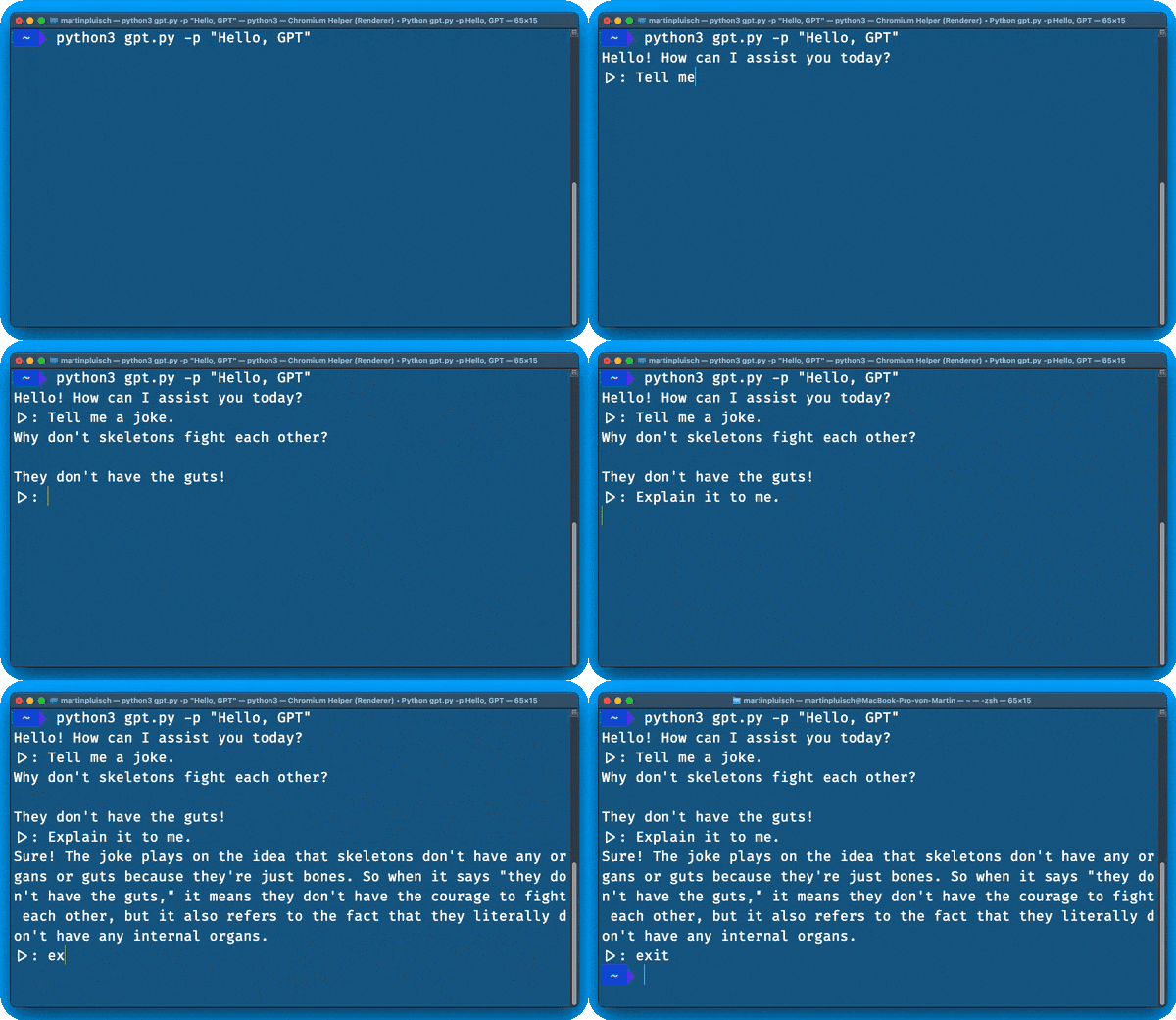
Example for accessing ChatGPT (3.5) without an account or API access via Python. Only for educational purposes.
## Heads-up
[OpenAI just announced instant access to ChatGPT 3.5 without signing up](https://openai.com/blog/start-using-chatgpt-instantly); this repo contains scripts in multiple programming languages for programmatic instant access, i.e., headless chats with ChatGPT via https://chat.openai.com (without signing up or requiring API keys).
Instant access is currently rolling out and (based on some quick tests of mine) is **currently only available in the US and Canada (IP-based)**.
## Supported Languages (more to come)
- Python
- JavaScript (Node.js)
## Python
### Setup / Dependencies
Grab the `gpt.py` script from within the `python` directory.
The script relies on `playwright`, a headless browser library.
Install it first using `pip install playwright` (or `pip3`, depending on your setup).
### Usage
#### Calling it from your own script
With my `gpt.py` in the same directory, you can call it using some prompt using this example (`test_implementation.py`):
```python
import asyncio
from gpt import GPT
async def run_session():
# create gpt instance & send initial prompt
session = GPT(prompt="Tell me a joke.", streaming=True)
await session.start()
# (optional) send additional prompts and handle them
print("\n -- asking GPT to explain the joke -- \n")
await session.handle_prompt("Explain the joke.")
# gracefully close the session again
await session.close()
asyncio.run(run_session())
```
The first prompt of a *new* session always takes a bit longer, as the headless browser has to init. Subsequent prompts are handled as fast as you'd expect it from the typical GPT browser UI.
#### CLI Arguments
You can also chat with GPT using CLI; just call `python3 gpt.py` with the following args (all of them are optional):
- `-p`, `--prompt`
- the initial prompt text to send to ChatGPT.
- **type**: `str`
- **default**: "Hello, GPT"
- `-ns`, `--no-streaming`
- if true, the script doesn't print GPT's response in chunks ("streaming"-esque), but rather waits until it is fully typed out before printing it.
- **type**: bool (`store_true`)
- **default**: false
- `-x`, `--proxy`
- the proxy server to use, e.g., `http://proxyserver:port`.
- **type**: `str`
- **default**: None
- `-st`, `--session-token`
- your `__Secure-next-auth.session-token` in order to use your OpenAI account (i.e. to minimize rate limiting, use 4o, etc.)
- **type**: `str`
- **default**: None
You can start a streaming-based conversation with `python3 gpt.py`.
## Node.js
### Setup / Dependencies
Grab the `gpt.js` script from within the `nodejs` directory.
The Node.js script relies on `playwright`, a headless browser library, and `commander`.
Install both using `npm install playwright commander`.
### Usage
#### Calling it from your own script
With `gpt.js` in the same directory, you can call it using some prompt using this example (`test_implementation.js`):
```javascript
const { GPT } = require('./gpt.js');
(async () => {
try {
// create gpt instance & send initial prompt
const gptSession = new GPT("Tell me a joke.", true);
await gptSession.start();
// (optional) send additional prompts and handle them
console.log("\n -- asking GPT to explain the joke -- \n")
await gptSession.handlePrompt("Explain the joke.");
// gracefully close the session again
await gptSession.close();
} catch (error) {
console.error("Error in GPT session:", error);
}
})();
```
The first prompt of a *new* session always takes a bit longer, as the headless browser has to init. Subsequent prompts are handled as fast as you know it from the typical GPT browser UI.
#### CLI Arguments
You can also chat with GPT using Node CLI; call `node gpt.js` with the following args:
- `-p`, `--prompt`
- the initial prompt text to send to ChatGPT.
- **type**: `str`
- **default**: "Hello, GPT"
- `-ns`, `--no-streaming`
- if true, the script doesn't print GPT's response in chunks ("streaming"-esque), but rather waits until it is fully typed out before printing it.
- **type**: bool (`store_true`)
- **default**: false
- `-x`, `--proxy`
- the proxy server to use, e.g., `http://proxyserver:port`.
- **type**: `str`
- **default**: None
- `-st`, `--session-token`
- your `__Secure-next-auth.session-token` in order to use your OpenAI account (i.e. to minimize rate limiting, use 4o, etc.)
- **type**: `str`
- **default**: None
You can start a streaming-based conversation with `node gpt.js`.
## ToDo
- [x] support response streaming
- [x] support conversations
- [ ] support different output formats (with / without IDs, json, prettify...)
### Disclaimer
*This project is only meant for educational purposes. Please use OpenAI's API for requests.*
Also, this is a barebones example and still WIP - if you find issues / bugs, please report them 😊