https://github.com/mappls-api/mappls-nearby-ui-ios-distribution
Mappls Nearby UI Native for iOS distributed via the SPM (Swift Package Manager).
https://github.com/mappls-api/mappls-nearby-ui-ios-distribution
Last synced: 8 months ago
JSON representation
Mappls Nearby UI Native for iOS distributed via the SPM (Swift Package Manager).
- Host: GitHub
- URL: https://github.com/mappls-api/mappls-nearby-ui-ios-distribution
- Owner: mappls-api
- License: other
- Created: 2025-05-20T06:37:08.000Z (about 1 year ago)
- Default Branch: main
- Last Pushed: 2025-06-09T09:20:10.000Z (12 months ago)
- Last Synced: 2025-10-21T09:57:46.463Z (8 months ago)
- Language: Swift
- Size: 5.86 KB
- Stars: 0
- Watchers: 0
- Forks: 0
- Open Issues: 0
-
Metadata Files:
- Readme: Readme.md
- License: LICENSE.md
Awesome Lists containing this project
README
[ ](https://www.mapmyindia.com/api)
# Mappls Nearby Search Widget for iOS
## [Introduction](#Introduction)
The MapplsNearbyUI makes it easy to integrate a widget with your iOS application. The Nearby Search widget provided as a means to enable radially search for Nearby Places on Mappls Map.
The widget offers the following basic functionalities:
- Ability to search for nearby places directly with Mappls Map visual interface.
- A single method to initiate nearby search across all categories of places available on Mappls.
- Ability to get information from Mappls Nearby Search widget through a callback.
## [Widget Preview](#Widget)
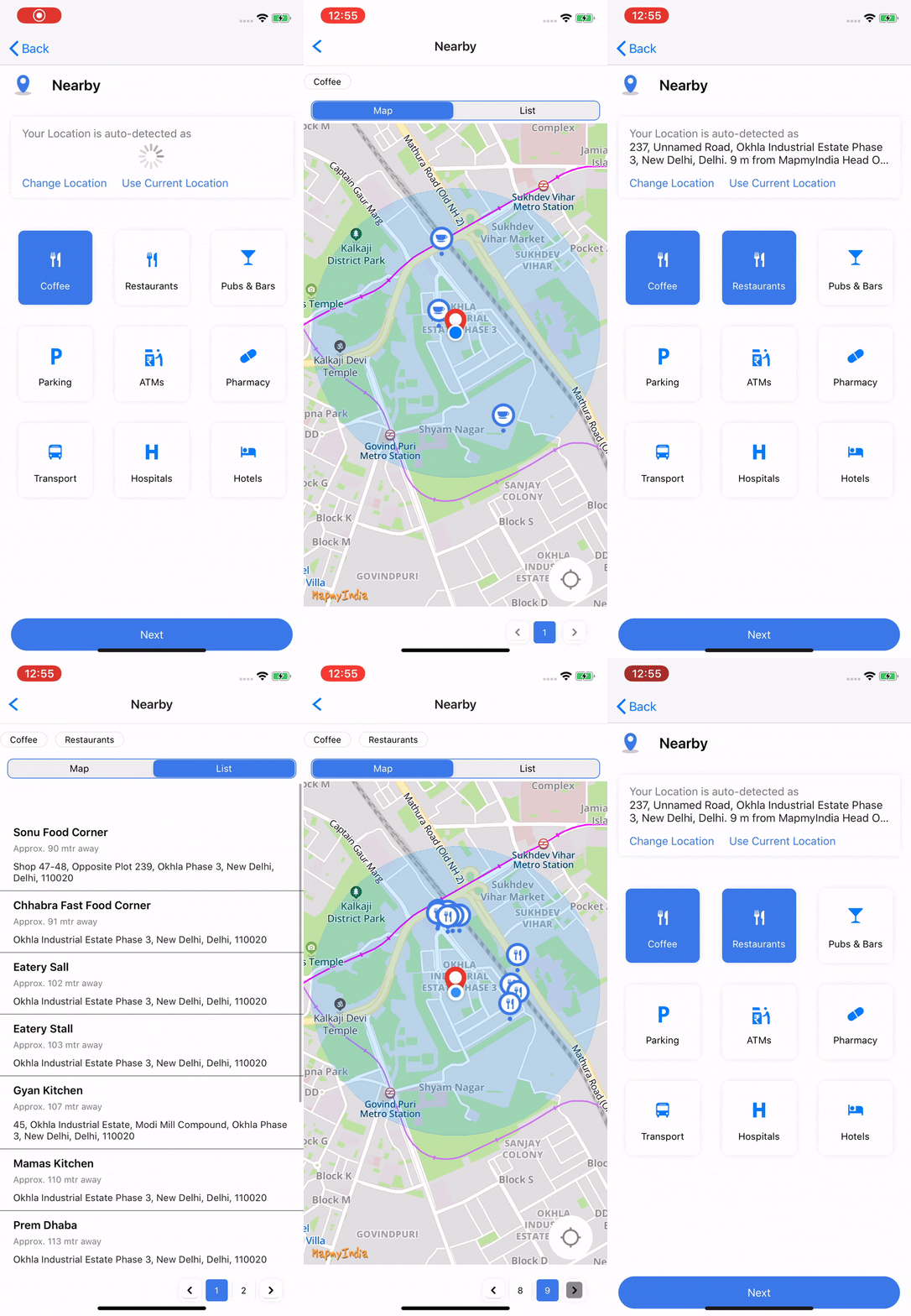
This can be done by following simple steps.
## [Installation](#Installation)
To add a package dependency to your Xcode project, select File > Swift Packages > Add Package Dependency and enter its repository URL. See [Adding Package Dependencies to Your App](https://developer.apple.com/documentation/xcode/adding-package-dependencies-to-your-app).
### [Version History](#Version-History)
| Version | Dated | Description |
| `2.0.0 `| 09 Feb 2025 | - Authentication and authorization mechanisms have been revised.|
| --- | --- | --- |
| :---- | :---- | :---- |
| `1.0.2` | 25 Feb 2025 | 'bitcode' disabled to support Xcode 15. |
#### [Dependencies](#Dependencies)
This library depends upon several Mappls's own libraries. All dependent libraries will be automatically installed using CocoaPods.
Below are list of dependencies which are required to run this SDK:
- [MapplsAPICore](https://github.com/mappls-api/mappls-ios-sdk/docs/v1.0.0/MapplsAPICore.md)
- [MapplsAPIKit](https://github.com/mappls-api/mappls-ios-sdk/docs/v1.0.0/MapplsAPIKit.md)
- [MapplsMap](https://github.com/mappls-api/mappls-ios-sdk/docs/v1.0.0/MapplsMap.md)
- [MapplsUIWidgets](https://github.com/mappls-api/mappls-ios-sdk/docs/v1.0.0/MapplsUIWidgets.md)
#### [Authorization](#Authorization)
##### [MapplsAPICore](#MapplsAPICore)
It is required to set Mappls keys to use any Mappls SDK. Please refer the documentation [here](https://github.com/mappls-api/mappls-ios-sdk/docs/v1.0.0/MapplsAPICore.md).
**Step 2:-**
## [Launching with default configuration](#Launching-with-default-configuration)
### [MapplsNearbyCategoriesViewController](#MapplsNearbyCategoriesViewController)
`MapplsNearbyCategoriesViewController` is type of UIViewController which is entry ViewController for MapplsNearbyUI SDK.
```swift
let nearbyUI = MapplsNearbyCategoriesViewController()
self.navigationController?.pushViewController(nearbyUI, animated: false)
```
Thats all ! you are now ready with the MapplsNearbyUI widget within your app.
To enhance further and making UI as per your own requirements, refer to the section below:
#### [Properties of MapplsNearbyCategoriesViewController](#Properties-of-MapplsNearbyCategoriesViewController)
- **nearbyCategories:** - An array of an object of type `MapplsNearbyCategories` which will help to make your own custom categories to show on `MapplsNearbyCategoriesViewController`.
It can be used as follows.
``` swift
var nearbyCategories = [MapplsNearbyCategories]()
let selectedImage = UIImage(named: "placePickerMarker")?.withRenderingMode(.alwaysTemplate)
let categoriesImage = UIImage(named: "Coffee")
let coffeeCategory = MapplsNearbyCategories(title: "Coffee", selectedBackgroundColor: selectedColor, unselectedBackgroundColor: .white, selectedImage: selectedImage ?? UIImage(), unselectedImage: selectedImage ?? UIImage(), unselectedTextColor: .black, selectedTextColor: .white, isSelected: true, categoryKeywords: ["FODCOF"], mapNearbyCategoryIcon: categoriesImage)
nearbyCategories.append(coffeeCategory)
nearbyUI.nearbyCategories = nearbyCategories
```
- **nearbyCategoryConfiguration:-** A object of type `MapplsNearbyCategoryConfiguration` which will be required to set the UI Configuration of `MapplsNearbyCategoriesViewController`
- **nearbyConfiguration:-** A object of type [MapplsNearbyConfiguration](#MapplsNearbyConfiguration) which will be required in `MapplsNearbyMapViewController` to configure the UI components and nearby request parametes.
- **delegate:-** A delegate object of type `MapplsNearbyCategoriesViewControllerDelegate` to provide different callbacks as per different actions of MapplsNearbyUI.
### [MapplsNearbyCategoriesViewControllerDelegate](#MapplsNearbyCategoriesViewControllerDelegate)
It is a protocol class that will be used for callback methods as shown below:
#### Call Back Handler
``` swift
/// A delegate method which will be called when the user click next button in `MapplsNearbyCategoriesViewController` class
/// - Parameters:
/// - refLocation: It is location selected from place picker or your current location or location provided by used as refLocation.
/// - selectedCategories: It is the array of `MapplsNearbyCategories` items selected from the categories
/// - error: This will show an error message in case of any failure in `MapplsNearbyCategoriesViewController` class on next button clicked.
func didNextButtonClicked(refLocation: String?, selectedCategories: [MapplsNearbyCategories]?, error: String? )
```
``` swift
/// A delegate method will be called when the nearby icon is taped on the map. It will return a nearby response for the taped icon.
/// - Parameter place: A concrete subclass of `MapplsSuggestion` to represent suggestedLocations object in results of requests.
func didSelectNearbyIcon(place: MapplsAtlasSuggestion)
```
``` swift
/// A delegate method will be called when the nearby result in ListView is tapped. It will return a nearby response for the tapped item.
/// - Parameter place: A concrete subclass of `MapplsSuggestion` to represent suggestedLocations object in results of requests.
func didSelectNearbySuggestionFromTable(place: MapplsAtlasSuggestion)
```
## Our many happy customers:

For any queries and support, please contact:
[ ](https://about.mappls.com/api/)
Email us at [apisupport@mappls.com](mailto:apisupport@mappls.com)

[Support](https://about.mappls.com/contact/)
Need support? contact us!
[
 ](https://stackoverflow.com/questions/tagged/mappls-api)[](https://about.mappls.com/blog/)[](https://github.com/mappls-api)[
](https://stackoverflow.com/questions/tagged/mappls-api)[](https://about.mappls.com/blog/)[](https://github.com/mappls-api)[
](https://www.npmjs.com/org/mapmyindia)
[
 ](https://www.facebook.com/Mapplsofficial)[](https://twitter.com/mappls)[](https://www.linkedin.com/company/mappls/)[](https://www.youtube.com/channel/UCAWvWsh-dZLLeUU7_J9HiOA)
](https://www.facebook.com/Mapplsofficial)[](https://twitter.com/mappls)[](https://www.linkedin.com/company/mappls/)[](https://www.youtube.com/channel/UCAWvWsh-dZLLeUU7_J9HiOA)
@ Copyright 2022 CE Info Systems Pvt. Ltd. All Rights Reserved.
Terms & Conditions | Privacy Policy | Supplier Sustainability Policy | Health & Safety Policy | Environmental Policy & CSR Report
Customer Care: +91-9999333223