https://github.com/mar10/persisto
Persistent Javascript objects and web forms using Web Storage
https://github.com/mar10/persisto
html-forms web-storage
Last synced: over 1 year ago
JSON representation
Persistent Javascript objects and web forms using Web Storage
- Host: GitHub
- URL: https://github.com/mar10/persisto
- Owner: mar10
- License: other
- Created: 2016-04-05T15:19:07.000Z (over 10 years ago)
- Default Branch: master
- Last Pushed: 2023-01-24T05:01:18.000Z (over 3 years ago)
- Last Synced: 2024-04-14T16:29:53.472Z (over 2 years ago)
- Topics: html-forms, web-storage
- Language: TypeScript
- Homepage: https://mar10.github.io/persisto/
- Size: 1.57 MB
- Stars: 20
- Watchers: 6
- Forks: 5
- Open Issues: 9
-
Metadata Files:
- Readme: README.md
- Changelog: CHANGELOG.md
- Contributing: .github/CONTRIBUTING.md
- License: LICENSE.txt
Awesome Lists containing this project
README
# persisto
[](https://github.com/mar10/persisto/releases/latest)
[](https://travis-ci.org/github/mar10/persisto)
[](https://www.npmjs.com/package/persisto)
[](https://www.jsdelivr.com/package/npm/persisto)
[](http://www.typescriptlang.org/)
[](https://github.com/mar10/grunt-yabs)
[](https://stackoverflow.com/questions/tagged/persisto)
> Persistent JavaScript objects and web forms using Web Storage.
**Features**
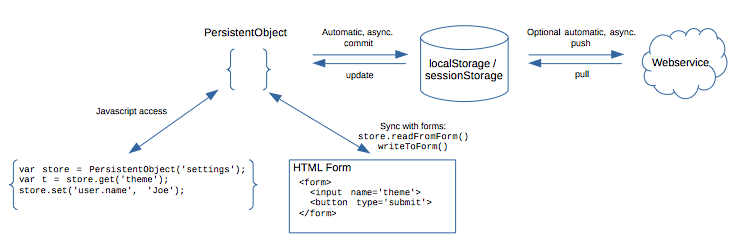
1. Persist JavaScript objects (`{...}`) to
[`localStorage` / `sessionStorage`](https://developer.mozilla.org/en-US/docs/Web/API/Web_Storage_API).
Use the `get()`/`set()` API for direct (even nested) access, avoiding the
need to convert from/to JSON.
2. Cache access to
[`localStorage` / `sessionStorage`](https://developer.mozilla.org/en-US/docs/Web/API/Web_Storage_API)
(deferred writing appears to be 10-15 times faster).
3. Make JavaScript objects editable in HTML forms.
A simple naming convention maps data properties to form elements.
Listen for input change events and automatically store data.
4. Optionally synchronize the data with a remote endpoint.
[Demo](https://mar10.github.io/persisto) —
[API Documentation](https://mar10.github.io/persisto/api)
Overview:
Requirements:
- jQuery not required since v2.0
- Recent major browser (Internet Explorer is **not** supported!)
Requirements for [version 1.x](https://github.com/mar10/persisto/tree/maintain_1.x):
- jQuery
- IE 8+ or any recent major browser
## Usage
[Download the latest persisto.js](https://github.com/mar10/persisto/releases)
or include directly from CDN: [](https://www.jsdelivr.com/package/npm/persisto) or
[UNPKG](https://unpkg.com/persisto@latest/dist/persisto.umd.min.js):
```html
```
then instantiate a `PersistentObject`:
```js
let store = new mar10.PersistentObject("mySettings", {
defaults: {
theme: "default",
},
});
```
`store` now contains the data that was stored in `localStorage.mySettings` if
present. Otherwise, `store` is initialized to the default values that we
passed with the `.defaults` option.
We can access data using `set`, `get`, `remove`, `reset`:
```js
store.get("theme"); // -> 'default'
store.set("owner", { name: "joe", age: 42 });
store.set("owner.role", "manager");
store.get("owner.age"); // -> 42
store.remove("owner.age");
// -> store now holds {theme: "default", owner: {name: "joe", role: "manager"}}
```
Every _modifying_ operation triggers a deferred commit, so that shortly afterwards
the data is serialized to JSON and written to `localStorage.mySettings`.
**More:**
- Try the [online example](https://plnkr.co/plunk/PI8Z2lqn0WfcHvL8).
- Run the [unit tests](https://rawgit.com/mar10/persisto/master/test/unit/test-core.html).
## Synchronize Data with HTML Forms
Form input elements can be synchronized with a `PersistentObject` by using two
API calls (`readFromForm()` and `writeToForm()`).
This can be automated by passing the `attachForm` option.
Example:
```js
document.addEventListener("DOMContentLoaded", function (event) {
// Maintain client's preferences and define some defaults:
var settingsStore = new mar10.PersistentObject("mySettings", {
attachForm: "#form1", // Allow users to edit and save settings
// remote: "https://example.com/my/data-store",
defaults: {
nickname: "anonymous",
theme: "default",
},
});
settingsStore.ready
.then((value) => {
console.log(settingsStore + ": is initialized.");
})
.catch((reason) => {
console.log(settingsStore + ": init failed.");
});
});
```
Supported elements are `` (type text, checkbox, or radio), ``,
and `` (single and multivalue).
By convention, the html form **must use element names that match the data properties**.
```html
Nickname:
Theme:
Standard
Light
Dark
Submit
```
Note also that only fields are synchronized, that already existed in the storage
data. Use the `addNew` option if _all_ form fields should be evaluated and create
new properties in the store object:
```js
settingsStore.readFromForm(this, {
addNew: true,
});
```
## Pros and Cons
- Any `PersistentObject` instance is stored as one monolythic JSON string.
_Persisto_ deferres and collates these updates, but modifying a single
property of a large data object still comes with some overhead.
Splitting data into several `PersistentObject`s may remedy the problem.
But if your data model is more like a table with hundredth's of rows, a
responsive database backend may be a better choice.
- Asynchronous operations bear the risk of potential conflicts.
There is currently no builtin support for resolving those.
# HOWTOs
### Storing Arrays
Arrays are only a special form of plain JavaScript objects, so we can store and
access them as top level type like this:
```js
let store = new mar10.PersistentObject("mySettings", {
defaults: ["a", "b", "c"],
});
store.get("[0]"); // 'a'
store.set("[1]", "b2");
```
However if we use child properties, it is even easier:
```js
let store = new mar10.PersistentObject("mySettings", {
defaults: {
values: ["a", "b", "c"]
}
});
store.get("values")[0]; // 'a'
store.get("values[0]"); // 'a'
S.each(store.get("values"), function(idx, obj) { ... });
store.set("values[1]", "b2");
```
### Performance and Direct Access
In general, performance costs of `set()` and `get()` calls should be
neglectable, compared to the resulting synchronization times, but in some cases
direct access of the internal data object may be preferred.
In this case modifications must be signalled by a call to `setDirty()`.
```js
store._data.owner = { name: "joe", age: 42 };
store._data.owner.role = "manager";
delete store._data.owner.age;
store.setDirty(); // schedule a commit
```
### Asynchronous Operation
By default, changed values will be commited to webStorage after a small delay
(see `.commitDelay` option). This allows to collate sequences of multiple changes
into one single write command.
However there are situations, where this is not desirable:
```js
store.set("foo", "bar");
// Page reload would prevent the delayed commit from happen, so we force
// synchronization:
store.commit();
location.reload();
```
An alternative would be to disable delay completely by setting `commitDelay: 0`.
### Synchronize with Remote Endpoints
Optionally, we may specify an endpoint URL that is used to synchronize the data
with a web server using HTTP REST requests (GET and PUT):
```js
// Wait fpr page beeing loaded...
document.addEventListener("DOMContentLoaded", function (event) {
let store = new mar10.PersistentObject("mySettings", {
remote: "persist/settings",
});
store.ready
.then(function (value) {
console.log("PersistentStore is initialized and has pulled data.");
})
.catch(function (reason) {
console.error("Error loading persistent objects", arguments);
});
});
```
# API Reference
### Options and Events
The following options are available:
https://mar10.github.io/persisto/api/interfaces/persisto_options.persistooptions.html
### Methods
Following a list of available methods:
https://mar10.github.io/persisto/api/classes/persisto.persistentobject.html