https://github.com/marcbone/liborl
Cartesian motion generation for Franka Emika Panda robots
https://github.com/marcbone/liborl
Last synced: about 1 year ago
JSON representation
Cartesian motion generation for Franka Emika Panda robots
- Host: GitHub
- URL: https://github.com/marcbone/liborl
- Owner: marcbone
- License: eupl-1.2
- Created: 2020-12-03T13:56:22.000Z (over 5 years ago)
- Default Branch: master
- Last Pushed: 2023-07-27T06:54:10.000Z (almost 3 years ago)
- Last Synced: 2025-03-24T00:38:07.957Z (about 1 year ago)
- Language: C++
- Size: 87.9 KB
- Stars: 46
- Watchers: 2
- Forks: 11
- Open Issues: 3
-
Metadata Files:
- Readme: README.md
- License: LICENSE
Awesome Lists containing this project
README
# LibORL
LibORL is a high level motion planning library for [Franka Emika](https://www.franka.de/) Panda robots. It is a wrapper around [libfranka](https://github.com/frankaemika/libfranka) which provides
simple to use motion functionality in cartesian space.
LibORL was created during the Open-Robotics-Lab (therefore the name ORL) at the [Institute for Robotics and Process Control (IRP)](https://www.rob.cs.tu-bs.de/)
at TU Braunschweig. The name is probably not the best but "orl" makes a nice C++ namespace :)
## Requirements
* [libfranka](https://frankaemika.github.io/docs/installation_linux.html)
* Eigen3
## Installation
```bash
mkdir build
cd build
cmake .. -DCMAKE_BUILD_TYPE=Release
cmake --build .
sudo make install
```
after that you can use it in your own CMake project like this:
```cmake
find_package(orl REQUIRED)
add_executable(your_target main.cpp)
target_link_libraries(your_target orl::orl)
```
## Generate Documentation
```bash
cd doxygen
doxygen Doxyfile
firefox html/index.html
```
## Features
LibORL is a library with which you can easily generate cartesian motions
and execute them on the robot.
These are the key features of this library:
* Easy trajectory generation in cartesian space + optional elbow control
* Impedance mode which can follow an moving attractor Pose
* Different kinds of speed profiles
* Trajectory generation using B-Splines, Bezier-Curves or circles
* Abort movements when there is too much force applied on the end-effector
* Move to specific joint configurations
* Usage of the Gripper
The basic workflow is like this;
* Define a PoseGenerator (a function which gets a progress of the movement, the initial pose of the robot and the current robot state and returns a pose)
* Apply a SpeedProfile (you can use a QuinticPolynomial a Cosine function or an S-Curve Speed Profile)
* (optional) create a StopCondition. For example you can say that the robot abort the motion if there is an external force pushing the robot. Be careful with this when you open the gripper afterwards! Look at the docs.
* Let the robot execute the PoseGenerator by providing a duration for the motion.
## Showcase
[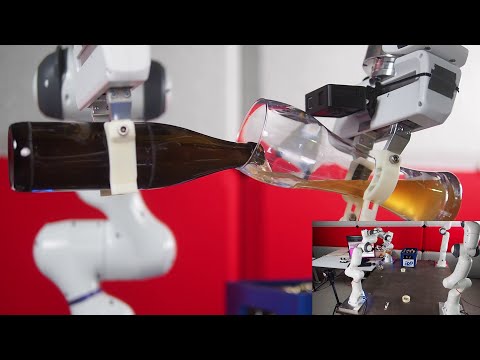](https://www.youtube.com/watch?v=POVh1aRzogc)
LibORL was used in a beer pouring task to execute the motions. You can find out more about this project in this [blog post](https://pouya-moh.com/bartender-robots).
## Intro
Consider the following example which moves the robot to the position (0.5,0,0.3) within 2 seconds
```cpp
using namespace orl;
const double execution_time = 2.0;
Robot franka("franka"); // IP-Address or hostname of the robot
auto pose_generator = PoseGenerators::AbsoluteMotion({0.5,0,0.3});
apply_speed_profile(pose_generator, SpeedProfiles::QuinticPolynomialProfile());
franka.move_cartesian(pose_generator, execution_time);
```
a simplified version of this is
```cpp
using namespace orl;
const double execution_time = 2.0;
Robot franka("franka"); // IP-Address or hostname of the robot
franka.absolute_cart_motion({0.5,0,0.3}, execution_time);
```
Ok but what about Orientations? For that you have to define a Pose. There are multiple ways. One way is to set a Position
and an Orientation. We initialize the orientation with roll, pitch, yaw values
```cpp
using namespace orl;
const double execution_time = 2.0;
Robot franka("franka"); // IP-Address or hostname of the robot
Pose goal_pose({0,2,3}, {-M_PI,0,0});
auto pose_generator = PoseGenerators::MoveToPose(goal_pose);
apply_speed_profile(pose_generator, SpeedProfiles::QuinticPolynomialProfile());
franka.move_cartesian(pose_generator, execution_time);
```
or simplified
```cpp
using namespace orl;
const double execution_time = 2.0;
Robot franka("franka"); // IP-Address or hostname of the robot
Pose goal_pose({0,2,3}, {-M_PI,0,0});
franka.move_cartesian(goal_pose, execution_time);
```
But can we calculate Position and Orientation separately?
Yes. you can compose a PoseGenerator by combining a PositionGenerator and an OrientationGenerator. So lets define an OrientationGenerator which does not change the orientation at all:
```cpp
OrientationGenerator constant_orientation_generator = [=](const PoseGeneratorInput &input) -> Eigen::Quaterniond {
return input.initial_pose.quaternion();
};
```
We can see that OrientationGenerators are just pure functions, just like Like Position- and PoseGenerators.
So our OrientationGenerator takes the PoseGeneratorInput and returns the Quaternion of the initial pose.
Let us also define a PositionGenerator which does nothing:
```cpp
PositionGenerator constant_position_generator = [=](const PoseGeneratorInput &input) -> Eigen::Vector3d {
return input.initial_pose.getPosition();
};
```
When you calculate a PositionGenerator you should try to provide equidistant points. That means if you take the distance
from the points that you get by taking inputs like [0,0.01,0.02,...,0.99,1] that all output points should have the same distance from their neighbors.
Sadly, this is not always true in our library as the Bezier and B-Spline Motions do not have this property and that means that some parts of the movement are executed faster than others.
So now that we have Position and OrientationGenerators we can generate our PoseGenerator and directly apply a SpeedProfile
```cpp
PoseGenerator constant_pose_generator = generate_pose_generator(constant_position_generator,constant_orientation_generator,SpeedProfiles::QuinticPolynomialProfile())
```
after that we can send our PoseGenerator to the robot and give him 5 seconds to execute the PoseGenerator
```cpp
franka.move_cartesian(constant_pose_generator,5)
```
Of course the robot does nothing. But there are a set of Position-/OrientationGenerators which you can use. Look into the PoseGenerator.h
There are also a set of PoseGenerators in orl::PoseGenerators namespace. Lets look at a simple one:
```cpp
PoseGenerator RelativeMotion(const Position &translation, Frame frame = Frame::RobotBase,
const boost::optional &maybe_orientation_generator = boost::none);
```
This PoseGenerator describes a Relative Movement. We already used this one in the first example. But what about the other Parameters?
We have 3 different Frames. The most important one is the RobotBase Frame which describes a the Pose of the End-Effector with respect to the RobotBase.
There is also the UnitFrame which describes the motion with respect to a zero translation and rotation. As the RelativeMotion only changes the position you can give it a custom
OrientationGenerator. If you do not provide an OrientationGenerator the orientation will stay the same.
Lets define a pose_generator which moves the from the current position of the robot 50 cm in x direction
```cpp
PoseGenerator pose_generator_robot = PoseGenerators::RelativeMotion({0.5,0,0}, Frame::RobotBase);
```
And now we define one which moves from the Unit-Frame to 0.3 meter in z-direction
```cpp
PoseGenerator pose_generator_unit = PoseGenerators::RelativeMotion({0,0,0.3}, Frame::UnitFrame);
```
You can think of each Pose as homogenous matrix and you can multiply them. But we can do the same for PoseGenerators:
```cpp
PoseGenerator pose_generator_combined = pose_generator_unit * pose_generator_robot;
```
So we can treat PoseGenerators like Matrices. For example we can create a Screw motion by using by combining a
a Relative Motion with a ScrewMotion like in the pose_generators_example.cpp:
```cpp
Position circle_center = Position(0.45, -0.1, 0.39);
auto no_rotation = generate_constant_orientation_orientation_generator();
auto circle = PoseGenerators::CirclePoseGenerator(circle_center, -M_PI * 2, Plane::YZ, no_rotation);
auto move_horizontal = PoseGenerators::RelativeMotion(Position(0.2, 0, 0.), Frame::UnitFrame);
auto pose_generator = move_horizontal * circle;
apply_speed_profile(pose_generator);
robot.move_cartesian(pose_generator, 5);
```

## PoseGenerators
The following PoseGenerators are already available:
* CirclePoseGenerator()
* RelativeMotion()
* AbsoluteMotion()
* BezierMotion()
* BSplineMotion()
But you can also define your own. There are also multiple Position- and OrientationGenerators predefined.
## SpeedProfiles
The following SpeedProfiles are already available:
* CosineProfile()
* QuinticPolynomialProfile()
* LinearProfile() <- does nothing
* SCurveProfile()
Note that the S-Curve Profile is the fastest profile. However you can get joint_{velocity,acceleration}_discontinuities
when the robot is not able to achieve your desired profile in joint space. In this case you have to slow down your S-Curve Profile.
But you can also define your own SpeedProfile
## StopConditions
StopConditions can be used to abort a movement. It is a function which takes a PoseGenerator input and returns true if and only if
the motion should be aborted. See the fore_stop_example.cpp
There is only one implemented StopCondition which is triggered by Force. But feel free to define your own.
You can specify a force threshold and a minimum amount of time in percent
when the StopCondition can be activated. It is important to realize that if you specify a StopCondition the program will
not crash due to a cartesian reflex error. It will catch this Exception and will continue. So be careful if you want open the gripper
after one. Also note that the measured Force on the end-effector is not always zero and it can be hard to tune the Force
value so that it will not be triggered immediately.

## Impedance Mode
There is also an impedance Mode where you can set the attractor point with a PoseGenerator. See the impedance_example.cpp
## Licence
This library is copyrighted © 2020 Marco Boneberger, Maximilian von Unwerth, Pouya Mohammadi
Licensed under the EUPL, Version 1.2 or – as soon they will be approved by the European Commission - subsequent versions of the EUPL (the "Licence");
You may not use this work except in compliance with the Licence.
You may obtain a copy of the Licence at:
[https://joinup.ec.europa.eu/software/page/eupl](https://joinup.ec.europa.eu/software/page/eupl)
Unless required by applicable law or agreed to in writing, software distributed under the Licence is distributed on an "AS IS" basis
WITHOUT WARRANTIES OR CONDITIONS OF ANY KIND, either express or implied.
See the Licence for the specific language governing permissions and limitations under the Licence.
This software includes third party source code from [libfranka](https://github.com/frankaemika/libfranka)
in the folder [3rdparty/libfranka](3rdparty/libfranka) which has its own license. Please see [3rdparty/libfranka/README.md](3rdparty/libfranka/README.md) and
[3rdparty/libfranka/LICENSE-APACHE](3rdparty/libfranka/LICENSE-APACHE)