https://github.com/marcellgranat/currr
The currr package is a wrapper for the purrr::map() family but extends the iteration process with a certain number of checkpoints ( currr = checkpoints + purr), where the evaluated results are saved, and we can always restart from there.
https://github.com/marcellgranat/currr
checkpoints parallel-computing purrr
Last synced: 4 months ago
JSON representation
The currr package is a wrapper for the purrr::map() family but extends the iteration process with a certain number of checkpoints ( currr = checkpoints + purr), where the evaluated results are saved, and we can always restart from there.
- Host: GitHub
- URL: https://github.com/marcellgranat/currr
- Owner: MarcellGranat
- License: other
- Created: 2023-02-03T16:30:26.000Z (over 3 years ago)
- Default Branch: main
- Last Pushed: 2024-08-21T13:46:26.000Z (almost 2 years ago)
- Last Synced: 2025-10-22T03:58:32.220Z (8 months ago)
- Topics: checkpoints, parallel-computing, purrr
- Language: R
- Homepage: https://marcellgranat.com/currr
- Size: 62.5 KB
- Stars: 20
- Watchers: 1
- Forks: 0
- Open Issues: 2
-
Metadata Files:
- Readme: README.md
- License: LICENSE
Awesome Lists containing this project
README
# currr 
[](https://cran.r-project.org/package=currr)
## Overview
> A long journey is best broken into small steps, and the importance of
> taking a rest must never be underestimated.
The **currr** package is a wrapper for the `purrr::map()` family but
extends the iteration process with a certain number of **checkpoints**
(`currr` = `c`heckpoints + `purrr`), where the evaluated results are
saved, and we can always restart from there.
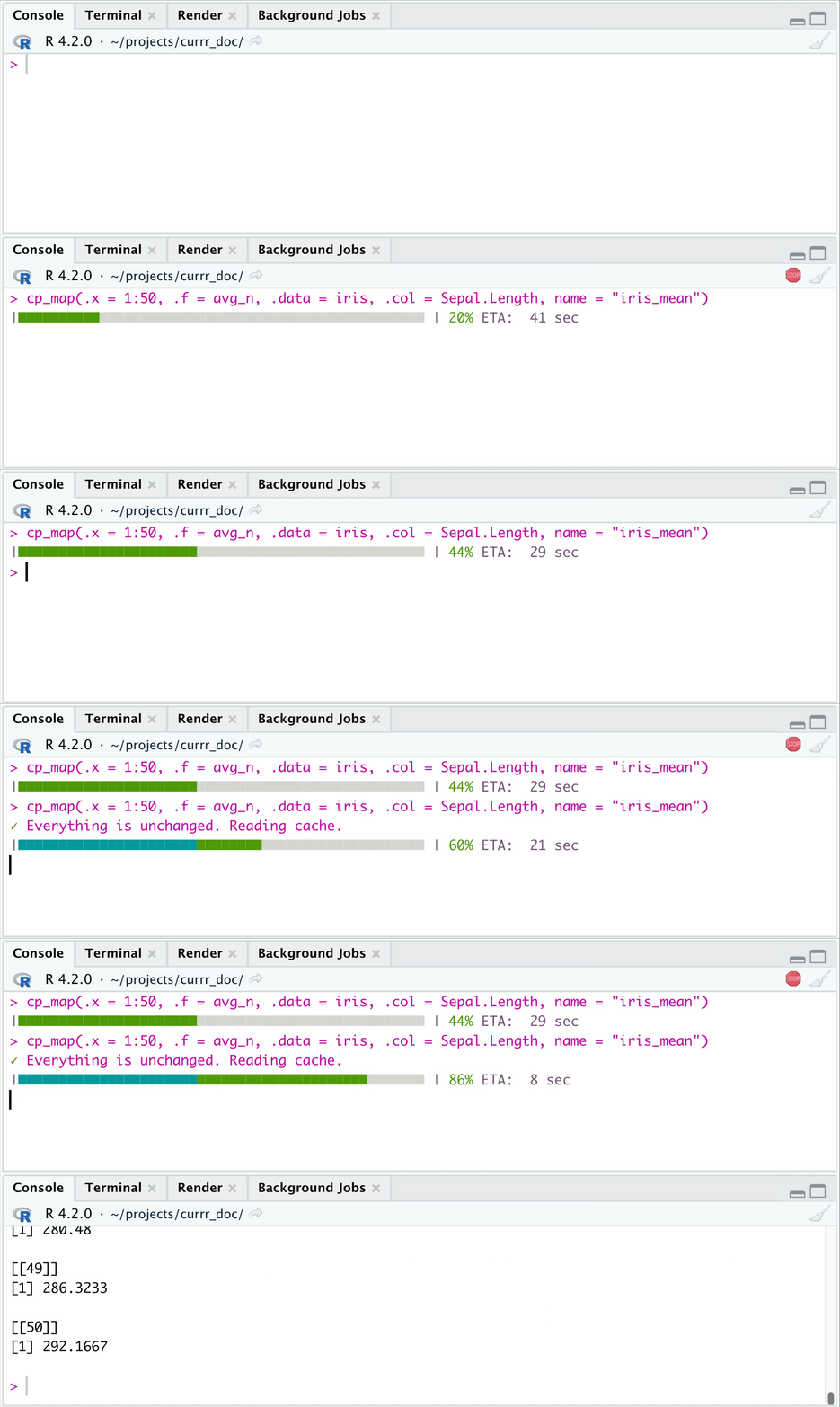
Implementations of the family of map() functions with a frequent saving
of the intermediate results. The contained functions let you **start**
the evaluation of the iterations **where you stopped** (reading the
already evaluated ones from the cache), and **work with the currently
evaluated iterations** while the remaining ones are running in a
background job. **Parallel** computing is also easier with the `workers`
parameter.
## Installation
``` r
install.packages("currr")
```
## Usage
The following example uses `currr` to present an everyday issue: run a
time-demanding iteration, but you want to rerun it again.
``` r
library(tidyverse)
library(currr)
options(currr.folder = ".currr", currr.wait = Inf)
# folder in your wd, where to save cache data
avg_n <- function(.data, .col, x) {
# meaningless function that takes about 1 sec
Sys.sleep(1)
.data |>
dplyr::pull({{ .col }}) |>
(\(m) mean(m) * x) ()
}
```
### Checkpoints
``` r
tictoc::tic(msg = "First evaluation")
cp_map(.x = 1:50, .f = avg_n, .data = iris,
.col = Sepal.Length,
name = "iris_mean") |>
head(3)
#> [[1]]
#> [1] 5.843333
#>
#> [[2]]
#> [1] 11.68667
#>
#> [[3]]
#> [1] 17.53
tictoc::toc() # ~ 1:50 => 50 x 1 sec
#> First evaluation: 50.351 sec elapsed
tictoc::tic(msg = "Second evaluation")
cp_map(.x = 1:50, .f = avg_n, .data = iris,
.col = Sepal.Length,
name = "iris_mean") |>
head(3)
#> ✓ Everything is unchanged. Reading cache.
#> [[1]]
#> [1] 5.843333
#>
#> [[2]]
#> [1] 11.68667
#>
#> [[3]]
#> [1] 17.53
tictoc::toc() # ~ 0 sec
#> Second evaluation: 0.034 sec elapsed
```
If the `.x` input and `.f` are the same, then the 2nd time you call the
function, it reads the outcome from the specified folder (`.currr`).
Also if `.x` changes, but some of its part remain the same, then that
part is taken from the previously saved results, and only the new
elements of `.x` are called for evaluation. (If `.f` changes, then the
process will start from zero.)
``` r
tictoc::tic(msg = "Partly modification")
cp_map(.x = 20:60, .f = avg_n, .data = iris,
.col = Sepal.Length,
name = "iris_mean") |>
head(3)
#> ⚠ .x has changed. Looking for mathcing result to save them as cache
#> ◌ Cache updated based on the new .x values
#> [[1]]
#> [1] 116.8667
#>
#> [[2]]
#> [1] 122.71
#>
#> [[3]]
#> [1] 128.5533
tictoc::toc() # ~ 50:60 => 10 x 1 sec
#> Partly modification: 10.378 sec elapsed
```
You can remove the cache files, if you want to reset the process (or
remove the already unnecessary files from your folder).
``` r
# only cache files for iris_mean
remove_currr_cache("iris_mean")
# all cache files
remove_currr_cache()
```
### Parallel process
You can also use multicore process (built on the `parallel` package).
After evaluation, the computation will automatically reset to
sequential.
``` r
options(currr.workers = 5) # <
tictoc::tic(msg = "Parallel computation")
cp_map(.x = 1:50, .f = avg_n, .data = iris,
.col = Sepal.Length,
name = "iris_mean") |>
head(3)
#> [[1]]
#> [1] 5.843333
#>
#> [[2]]
#> [1] 11.68667
#>
#> [[3]]
#> [1] 17.53
tictoc::toc() # ~ 50 / 5 => 10 sec
#> Parallel computation: 21.159 sec elapsed
```
### Background process
This is another functionality that makes `currr` to be cool. Working in
RStudio you can set the `wait` parameter to 0-1/1+, define how many
iterations you want to wait, and then let R work on the remaining
iterations in the background, while you can work with the evaluated
ones. If wait \< 1, then it is interpreted as what proportion of the
iterations you want to wait. Whenever you recall the function, it will
return the already evaluated ones (use the `fill` parameter to specify
whether you want to get `NULL`s to the pending ones.)
``` r
options(currr.wait = 20, currr.fill = FALSE)
```
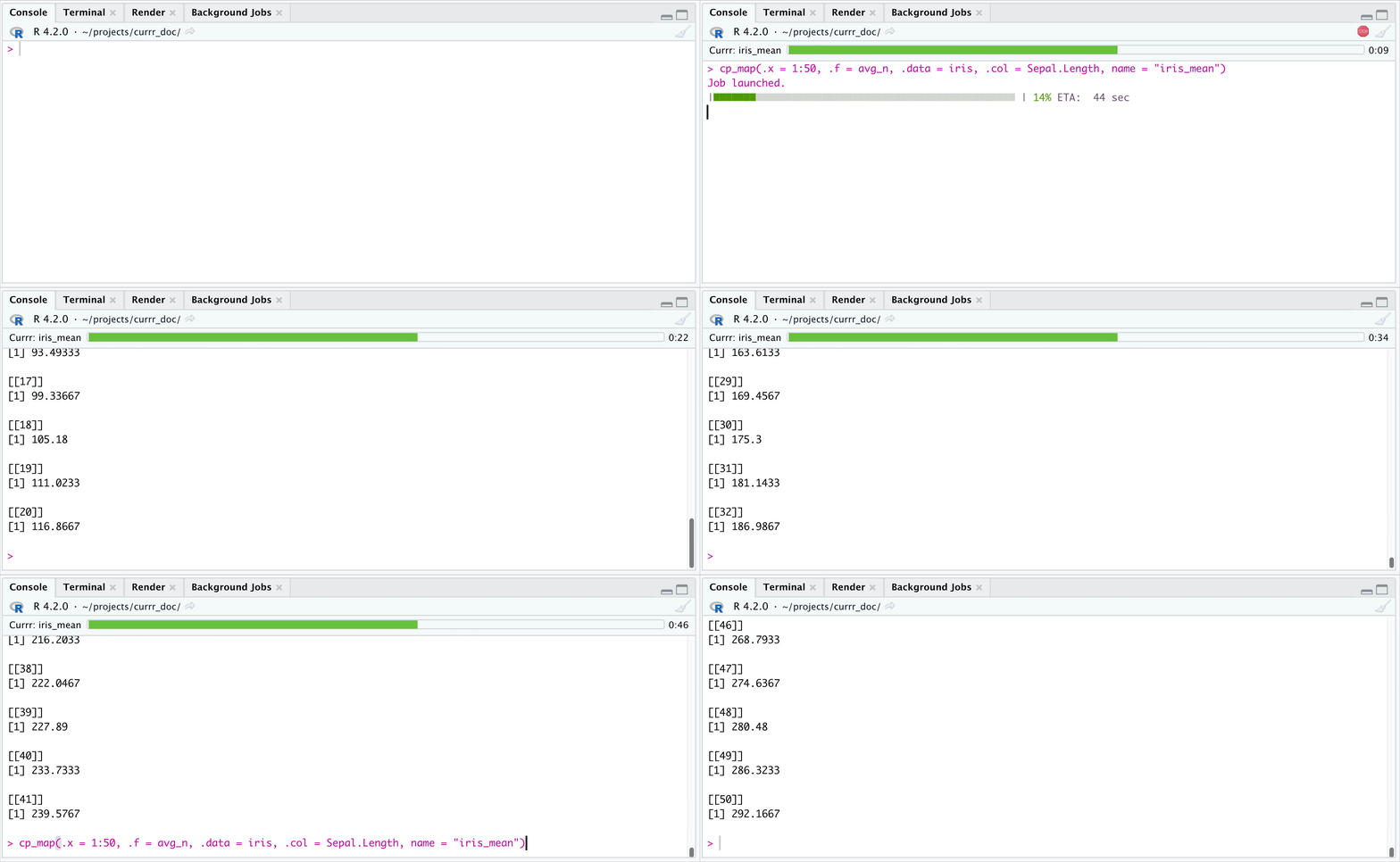
In the example above, you get your results, when 20 iterations are
evaluated, but the job in the background keeps running.