https://github.com/marianapatcosta/github-email-getter
GitHub E-mail Getter is a simple chrome extension to extract the e-mail associated with the commits of a GitHub user. You enter GitHub username or URL if the user's e-mail is public, the extension finds it, so you can contact the user by e-mail.
https://github.com/marianapatcosta/github-email-getter
chrome-extension css github javascript
Last synced: 3 months ago
JSON representation
GitHub E-mail Getter is a simple chrome extension to extract the e-mail associated with the commits of a GitHub user. You enter GitHub username or URL if the user's e-mail is public, the extension finds it, so you can contact the user by e-mail.
- Host: GitHub
- URL: https://github.com/marianapatcosta/github-email-getter
- Owner: marianapatcosta
- Created: 2023-02-06T21:38:24.000Z (over 3 years ago)
- Default Branch: main
- Last Pushed: 2023-02-08T18:50:52.000Z (over 3 years ago)
- Last Synced: 2026-01-03T22:54:45.412Z (6 months ago)
- Topics: chrome-extension, css, github, javascript
- Language: JavaScript
- Homepage: https://chrome.google.com/webstore/detail/github-email-getter/jdjkjpeooffmacndbhajdkndahdbldgn?hl=pt-PT&authuser=0
- Size: 14.6 KB
- Stars: 1
- Watchers: 1
- Forks: 0
- Open Issues: 0
-
Metadata Files:
- Readme: README.md
Awesome Lists containing this project
README
# GitHub E-mail Getter
GitHub E-mail Getter is a simple chrome extension to extract the e-mail associated with the commits of a GitHub user. You enter GitHub username or URL if the user's e-mail is public, the extension finds it, so you can contact the user by e-mail.
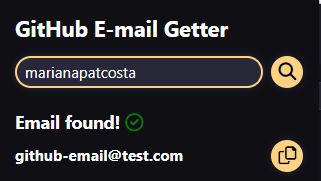
Download it from [Chrome Web Store](https://chrome.google.com/webstore/detail/github-email-getter/jdjkjpeooffmacndbhajdkndahdbldgn?hl=pt-PT&authuser=0).
## How to use
- Download project folder
- Open a Chrome window
- Go to `customise and control Google Chrome -> More Tools -> Extensions`
- Activate `developer mode`at top right corner toggle
- Click `Load unpacked` and select the folder where this project in stored in yourn computer