https://github.com/marinoffdev/focus-fox
Pomodoro technique-based focus timer that helps you stay in a flow state. 🦊💻
https://github.com/marinoffdev/focus-fox
focus javascript nodejs pomodoro pomodoro-technique pomodoro-timer productivity productivity-tools react react-router-dom shadcn-ui tailwindcss time-management timer vite web-application webapp
Last synced: 3 months ago
JSON representation
Pomodoro technique-based focus timer that helps you stay in a flow state. 🦊💻
- Host: GitHub
- URL: https://github.com/marinoffdev/focus-fox
- Owner: marinoffDev
- License: other
- Created: 2024-05-17T23:41:29.000Z (about 2 years ago)
- Default Branch: main
- Last Pushed: 2025-05-28T21:37:56.000Z (about 1 year ago)
- Last Synced: 2025-07-22T20:47:01.906Z (about 1 year ago)
- Topics: focus, javascript, nodejs, pomodoro, pomodoro-technique, pomodoro-timer, productivity, productivity-tools, react, react-router-dom, shadcn-ui, tailwindcss, time-management, timer, vite, web-application, webapp
- Language: JavaScript
- Homepage: https://marinoffdev.github.io/Focus-Fox/
- Size: 3.36 MB
- Stars: 1
- Watchers: 1
- Forks: 0
- Open Issues: 0
-
Metadata Files:
- Readme: README.md
- Funding: .github/FUNDING.yml
- License: LICENSE
Awesome Lists containing this project
README
Focus Fox
Your Go-To Online Timer for Enhanced Productivity
---
## Table of Contents
- [🔍 Overview](#-overview)
- [🌐 Live Demo](#-live-demo)
- [🚀 Features](#-features)
- [🤔 How to Use the Focus Fox Timer](#-how-to-use-the-focus-fox-timer)
- [🛠 Technologies Used](#-technologies-used)
- [💻 Installation](#-installation)
- [🚧 Roadmap](#-roadmap)
- [🤝 Contributing](#-contributing)
- [📄 License](#-license)
---
## 🔍 Overview
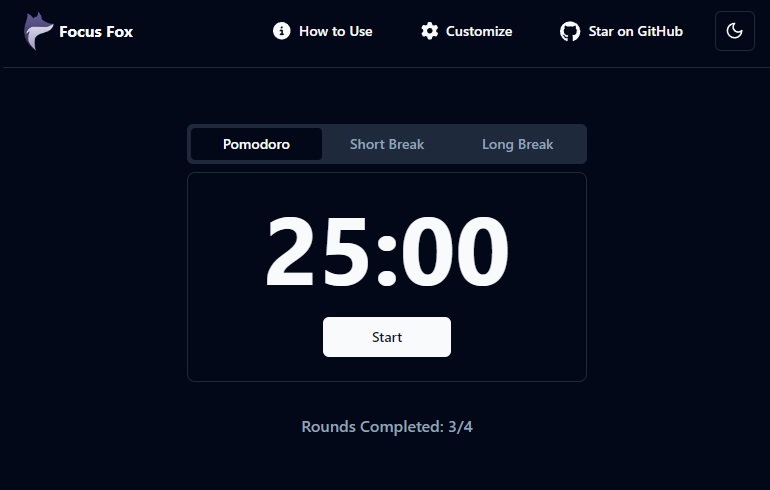
**Focus Fox** is an open-source Pomodoro timer web app designed to help boost productivity through structured work and break sessions. It supports customizable timer lengths for Pomodoro sessions, short breaks, and long breaks.
This project is still in its early stages, so feedback and contributions are welcome and appreciated!
## 🌐 Live Demo
Check out the live version here: **[Focus Fox](https://marinoffdev.github.io/Focus-Fox/)**
## 🚀 Features
- **Pomodoro Timer**: Focus on tasks in timed intervals (work/break cycles a.k.a. rounds).
- **Customizable Timers**: Adjust durations for Pomodoro, Short Breaks, Long Breaks and auto-start behavior to suit your preferences.
- **Notifications**: Get browser notifications when a timer expires with customizable sounds.
- **Mobile Responsive**: Works smoothly across desktop and mobile devices.
- **Dark/Light Mode**: Toggle between dark and light themes.
- **Accessible & Minimalist Design**: Simple UI that helps you stay focused.
## 🤔 How to Use the Focus Fox Timer
1. Customize the timer settings to fit your preferences.
2. Choose a task to focus on.
3. Start the Pomodoro timer and concentrate solely on your task for the set duration (default: 25 minutes).
4. Take a short break after each Pomodoro (default: 5 minutes).
5. After several Pomodoros, opt for a longer break (default: 15 minutes after every 4 rounds).
6. Repeat steps 3-5 until all your tasks are completed.
If you would like to learn more about the Pomodoro technique you can read about it [here](https://en.wikipedia.org/wiki/Pomodoro_Technique).
## 🛠 Technologies Used
- React for building dynamic UI components.
- React Router for page navigation.
- Vite for fast development and build tooling.
- Tailwind CSS (with ShadCN/UI) for utility-first styling and component library.
- FontAwesome for icons.
## 💻 Installation
To run this project locally:
1. Clone the repository:
```bash
git clone https://github.com/marinoffDev/Focus-Fox.git
```
2. Navigate to the project directory:
```bash
cd Focus-Fox
```
3. Install the dependencies:
```bash
npm install
```
4. Start the development server:
```bash
npm run dev
```
## 🚧 Roadmap
Future plans for enhancements and development:
- [x] Add page routes for Privacy Policy, Terms and Conditions, and 404 Page Not Found
- [x] Add a sitemap.xml, robots.txt and meta tags
- [x] Add a customization option for number of pomodoro rounds before a long break (currently default is 4)
- [x] Add an option to reset all user customizations preferences back to default
- [x] Add more notification sound options
- [x] Add open graph meta tags
- [x] Add an option to enable browser notifications
- [x] Add browser cookies support to store the user's customization preferences
- [x] Add an option to start subsequent timers automatically
- [x] Add a component that provides user feedback when their custom preferences have been applied
- [x] Add volume controls for the notification sound
- [x] Add more theme customization options
- [x] Add a toggle for "super dark mode" while a timer is active
## 🤝 Contributing
Contributions are welcome!
Here's how you can contribute:
1. **Submit an Issue**: If you encounter a bug or have a feature request, please submit a [GitHub issue](https://github.com/marinoffDev/Focus-Fox/issues) first. This helps us discuss your suggestions before you begin working on it.
2. **Fork the Repository**: After an issue has been submitted, feel free to fork this repository and work on a fix or enhancement.
3. **Open a Pull Request**: Once your changes are ready, open a pull request (PR). Please reference the issue number and describe the changes you made.
## 📄 License
**Focus Fox** is licensed under the **CC BY-NC 4.0** License - see the [LICENSE](https://github.com/marinoffDev/Focus-Fox/blob/main/LICENSE) file for details.