https://github.com/markiewb/nb-paste-to-new-file
NetBeans plugin which pastes textual clipboard content into a new file.
https://github.com/markiewb/nb-paste-to-new-file
netbeans-plugin paste
Last synced: 9 months ago
JSON representation
NetBeans plugin which pastes textual clipboard content into a new file.
- Host: GitHub
- URL: https://github.com/markiewb/nb-paste-to-new-file
- Owner: markiewb
- Created: 2015-03-17T17:38:48.000Z (over 11 years ago)
- Default Branch: master
- Last Pushed: 2017-04-23T12:13:11.000Z (about 9 years ago)
- Last Synced: 2025-02-08T13:42:24.289Z (over 1 year ago)
- Topics: netbeans-plugin, paste
- Language: Java
- Homepage:
- Size: 872 KB
- Stars: 1
- Watchers: 2
- Forks: 0
- Open Issues: 2
-
Metadata Files:
- Readme: README.md
Awesome Lists containing this project
README
Looking for maintainers, who want to take over the development!
# nb-paste-to-new-file
NetBeans plugin which pastes textual clipboard content into a new file. This is useful if you have to copy code samples (especially whole java classes) from online tutorials.
# How to install
## Install via Plugin Manager

## Download manually
* Core-Plugin: http://plugins.netbeans.org/plugin/57739/?show=true
* Java-Addon for the Core-Plugin: http://plugins.netbeans.org/plugin/57740/?show=true
# Usage
## Paste text from clipboard into a new file
Select a node in the project view and then invoke `Menu|Edit|Paste to new file`. A dialog will ask you for the file name and after confirming it a new file will be created with the given name and the content from the clipboard.
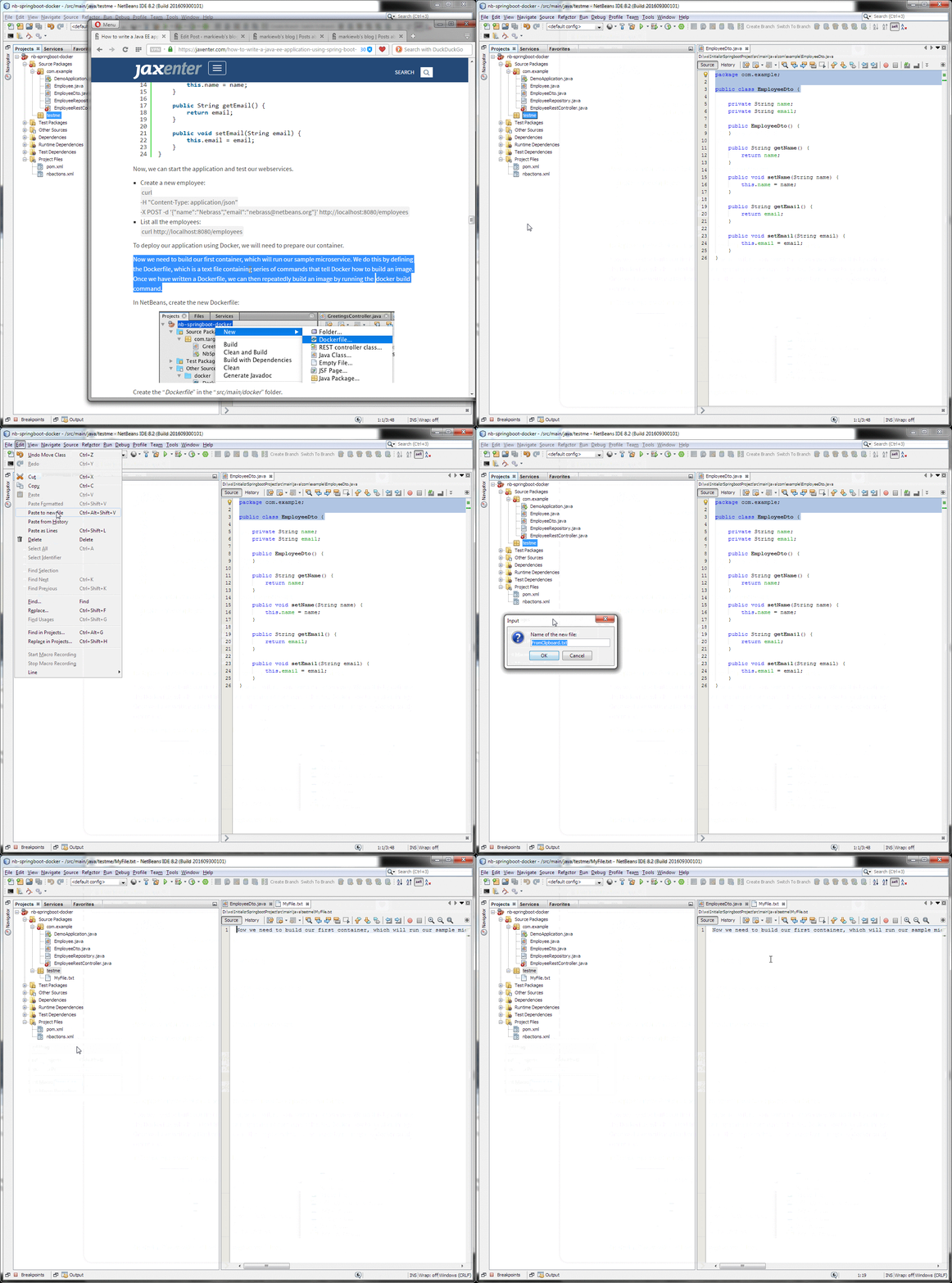
## Paste Java code from clipboard into a new file
* The idea of this feature is taken from Eclipse IDE and IntelliJ Idea, but now it is also available for NetBeans IDE
* **Variant 1:** Select a "Source" or "Test Sources" node and paste Java code (incl. package declaration) via `Menu|Edit|Paste to new file` and a Java file is created in the package defined by the pasted source code.
* **Variant 2:** Select a package node below the "Source" or "Test Sources" node and paste Java code (incl. package declaration) via `Menu|Edit|Paste to new file` and a Java file is created in the selected package. The package declaration in the file is updated automatically.
