https://github.com/markmindckm/obsidian-markmind
A mind map, outline for obsidian,It support mobile and desktop
https://github.com/markmindckm/obsidian-markmind
mindmap-editor pdf-annotator
Last synced: about 2 months ago
JSON representation
A mind map, outline for obsidian,It support mobile and desktop
- Host: GitHub
- URL: https://github.com/markmindckm/obsidian-markmind
- Owner: MarkMindCkm
- Created: 2021-08-18T14:41:39.000Z (almost 5 years ago)
- Default Branch: main
- Last Pushed: 2026-04-01T04:21:13.000Z (3 months ago)
- Last Synced: 2026-04-01T06:59:16.940Z (3 months ago)
- Topics: mindmap-editor, pdf-annotator
- Homepage:
- Size: 472 KB
- Stars: 991
- Watchers: 8
- Forks: 44
- Open Issues: 591
-
Metadata Files:
- Readme: README.md
- Changelog: Changelog.md
Awesome Lists containing this project
README
# Obsidian MarkMind
[中文手册](https://github.com/MarkMindCkm/obsidian-MarkMind/blob/main/docs/%E7%94%A8%E6%88%B7%E6%89%8B%E5%86%8C.md)
### **Notice**
This is not an open source project but [lishid](https://github.com/lishid) (obsidian developer) can check this code
### Feature Comparison
| Free | Catalyst |
| ---------------------------------------- | -------------------------------------------------- |
| `Basic` mode of MindMap | Advanced features in `Rich` mode of MindMap |
| Most features in `Rich` mode of MindMap | PDF annotate |
| List mode | Support development |
| PC and Mobile support | PC and Mobile support |
| Not support | Export mindmap as pdf file |
| $0 | $16 (forever) Buy [here](https://www.MarkMind.net) |
You can try it for 30 days for free. After 30 days, you can purchase a code on the website
## MarkMind docs navigation
## Youtube Vedio
- [How to use basic mode of MindMap](https://www.youtube.com/watch?v=7SkIHeQOI44)
- [How to use markdown mode of MindMap](https://www.youtube.com/watch?v=87dnyg4vEBo)
- [How to use rich mode of MindMap](https://youtu.be/ajg2VWol0L4)
- [How to import and export mindmap as a pdf](https://youtu.be/Rgu1gvWdThE)
- [How to use presentation mode of markmind](https://youtu.be/pd0Phl7U66E)
- [How to annotate pdf with pdf++ plugin](https://www.youtube.com/watch?v=07leD_6CE5E)
### MarkMind
- [Create basic mode of MindMap](https://markmindckm.github.io/markmind-docs/index.html#/basic)
- [Display basic mode to outline](https://markmindckm.github.io/markmind-docs/index.html#/outline)
- [Display basic mode to table](https://markmindckm.github.io/markmind-docs/index.html#/table)
- [Create rich mode of MindMap](https://markmindckm.github.io/markmind-docs/index.html#/rich) ----- [youtube vedio](https://www.youtube.com/watch?v=d65gWBZOJKQ)
- [Get markdown text from rich mode of MindMap](https://markmindckm.github.io/markmind-docs/index.html#/markdown)
- [Copy and paste node of MindMap](https://markmindckm.github.io/markmind-docs/index.html#/copy)
- [Embed MindMap in other markdown file](https://markmindckm.github.io/markmind-docs/index.html#/embed)
- [Common operations of MindMap](https://markmindckm.github.io/markmind-docs/index.html#/common)
- Drag image from desktop to rich mode of MindMap
- Copy text from browser to MindMap
- Drag multiple nodes
### PDF annotation
- [PDF annotate](https://github.com/MarkMindCkm/obsidian-markmind/blob/main/README.md#pdf-annotate)
- youtube: https://www.youtube.com/watch?v=07leD_6CE5E
## Introduction
Obsidian MarkMind is a mind map, outline, and PDF annotate tool based on Obsidian API
### Features:
- Links
- **Inline** ~~text~~ *styles*
-
Multiline
text
- `inline code`
- Katex - $x = {-b \pm \sqrt{b^2-4ac} \over 2a}$
### Links:
- GitHub: https://github.com/MarkMindCkm/obsidian-MarkMind
- Changelog: [Here](/Changelog.md)
- Web site: https://www.MarkMind.net
- Join our Discord: https://discord.gg/8653ZWX649
- Chinese Readme: [中文手册](https://github.com/MarkMindCkm/obsidian-MarkMind/blob/main/docs/%E7%94%A8%E6%88%B7%E6%89%8B%E5%86%8C.md)
### Related:
- [coc-markmap](https://github.com/gera2ld/coc-markmap)
- [gatsby-remark-markmap](https://github.com/gera2ld/gatsby-remark-markmap)
## Creating a MindMap file
- It contains two modes: `Basic` and `Rich`
- You can create a MindMap file by either:
- Right clicking a folder and selecting `New MindMap Board`
- Add the YAML code by hand:
```YAML
---
mindmap-plugin: basic (or rich)
---
```
## Modes
### Basic
You can use the basic mind map function in conjunction with the outline or table mode. It works similar to the obsidian-enhancing-MindMap plugin. All of these modes are available in rich mode as well
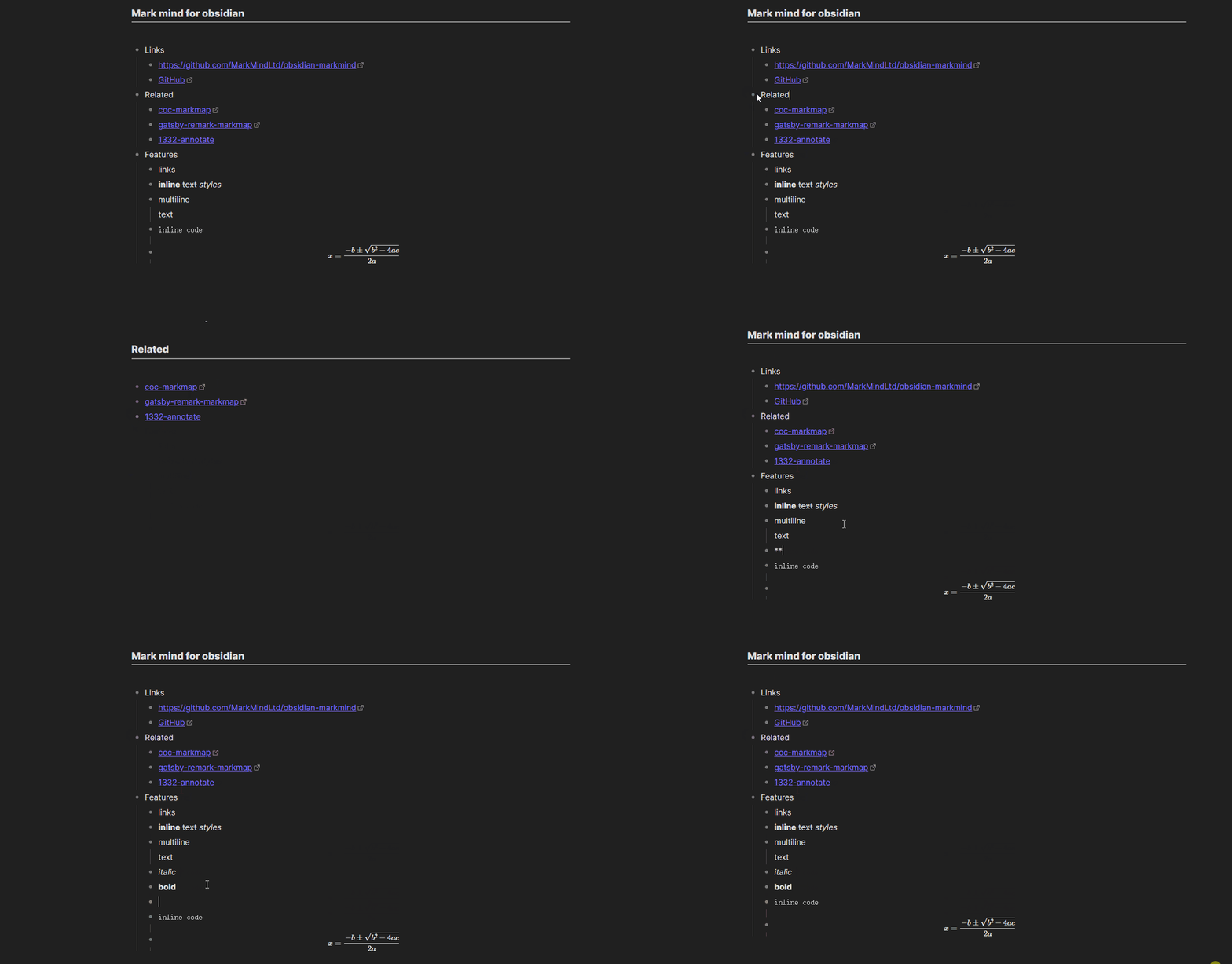
#### Outline
To access the Outline mode you can either:
- Click `More options` on the note and then `Open outline`
- Add the YAML code by hand:
```YAML
---
mindmap-plugin: basic
display-mode: outline
---
```
##### MindMap Outline short cuts
| Feature | Short Cut |
| ------------------------------------- | ----------------------------------------- |
| New Mind Map | CTRL/CMD + P |
| New Child Node | Enter |
| Indent | Tab |
| Unindent | Shift + Tab |
| Zoom in | CTRL/CMD + ] or Double click bullet point |
| Zoom out | CTRL/CMD + [ |
| Zoom in/out | CTRL + Mouse wheel |
| Mind map to center | CTRL/CMD + E |
| Move Up Or Down Node | CTRL/CMD + Up/Down |
| Delete node | Delete/Backspace |
| Edit node | Space/Double click node |
| Undo | CTRL/CMD + Z |
| Redo | CTRL/CMD + Y |
| Expand/Collapse node | CTRL/CMD + / |
| Move node to another node | Drag and drop node |
| Tab node | Up/Down/Left/Right |
| Change MindMap layout | Select node, CTRL/CMD + U/D/L/R/M/J/K/T/Q |
| Delete summary/boundary/related link | Delete/Backspace |
#### Table
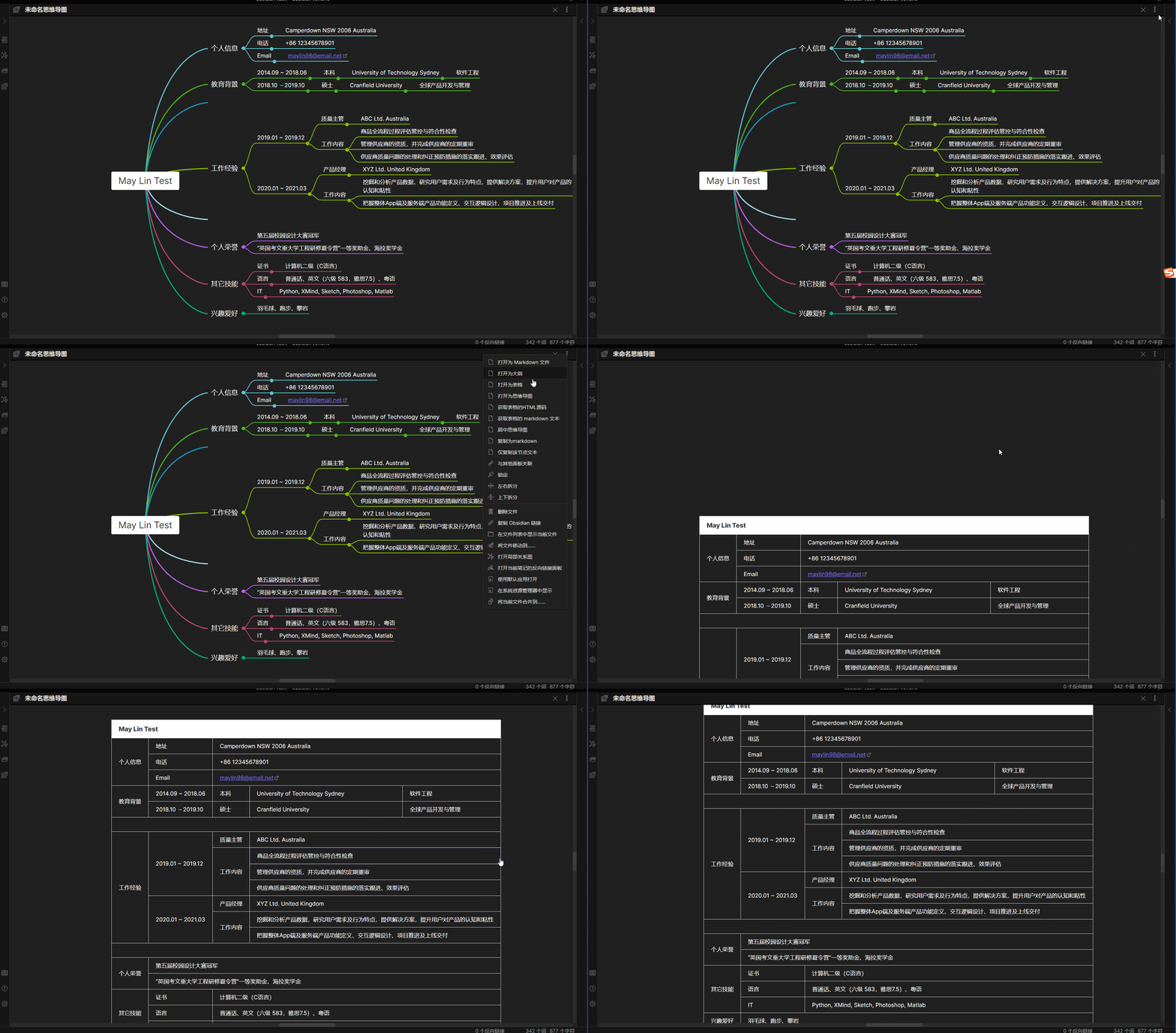
To access the Table mode you can either:
- Click `More options` on the note and then `Open as table`
- Add the YAML code by hand:
```YAML
---
mindmap-plugin: basic
display-mode: table
---
```
### Rich
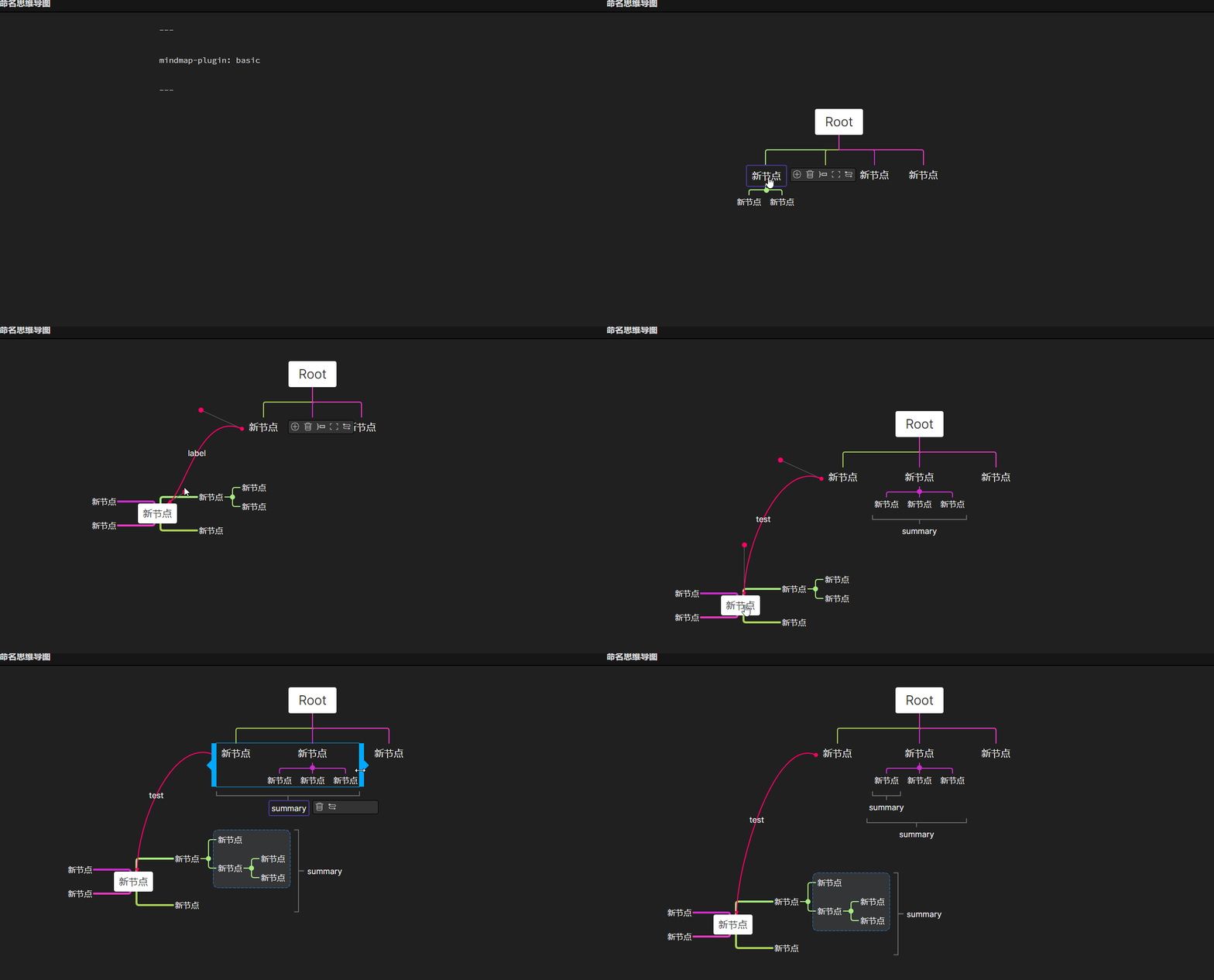
In Rich mode you can use all the functions of basic mode. In addition you can:
- Add a summary
- Add a boundary
- Add a node related link
- Add a free node
#### Rich mode markdown format:
```YAML
---
mindmap-plugin: rich
---
# md
{JSON Data}
```
### Other functions
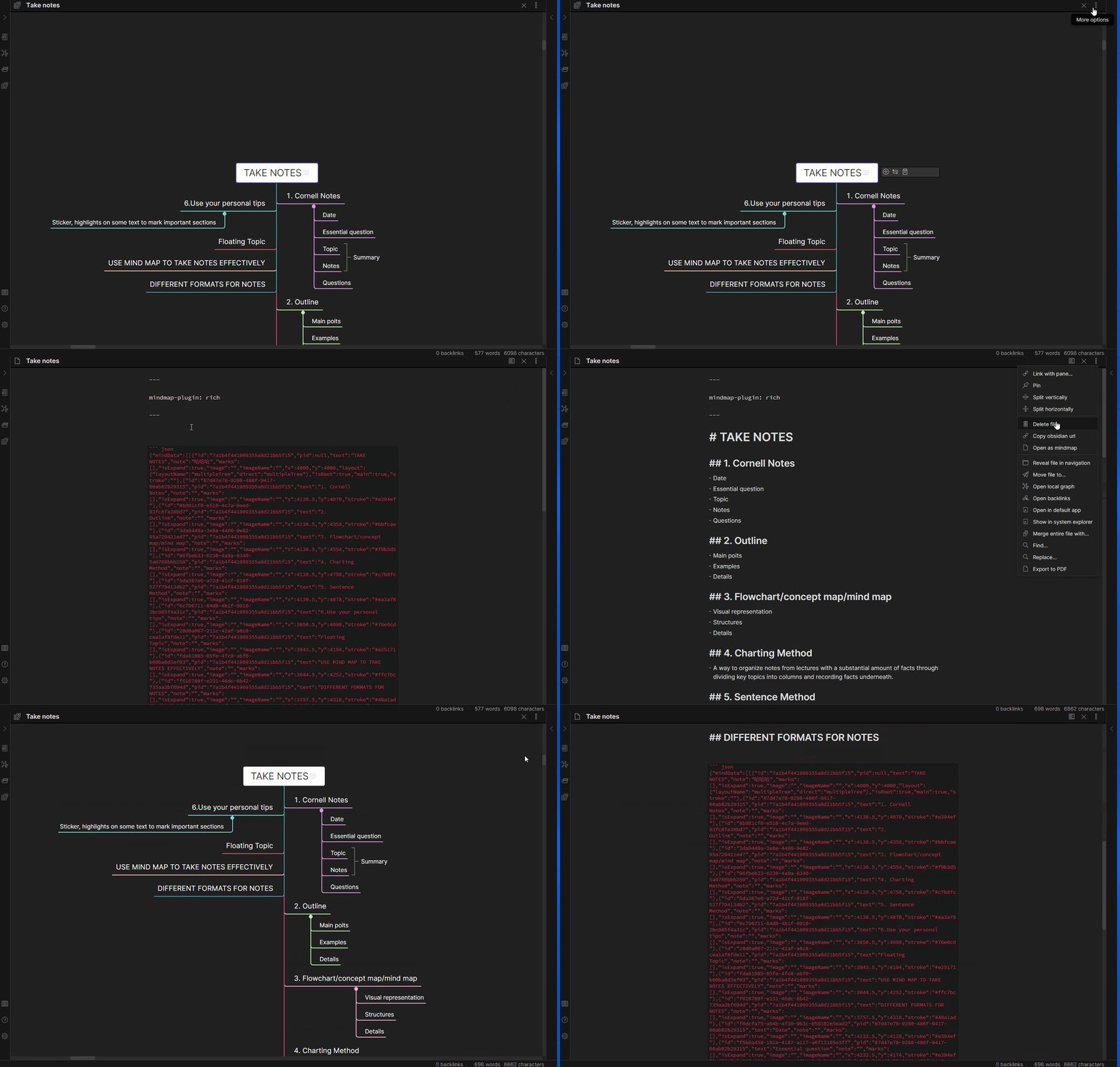
- Exporting MindMap to image
- Use `CTRL + P` and click `Export to HTML` command
- Getting markdown in `rich` mode
- You can find `Copy as markdown` menu in `More options`
- Exporting MindMap to pdf
- download lasted obsidian,open a mind map in a independ window
- Use `CTRL + P` and click `Export mindmap as a pdf file` command
----
## Notice
At present, pdf annotation only supports obsidian 1.4 version ([issue](https://github.com/obsidianmd/obsidian-api/issues/142)). If you use obsidian 1.5 or later, please use markmind software([Download](https://github.com/MarkMindCkm/MarkMind-ltd/releases)) version, which can be used with obsidian and is compatible with this plug-in.
----
## PDF annotate
- use PDF++ plugin
- highlight annotate
- rect annotate
- Relate MindMap node and annotate
### How to use PDF annotate
- download PDF++ plugin
- if open annotate support in markmind setting tab , please close it

- open a pdf
- make a hihlight or rect annotate
- paste (ctrl v) in a node of mindmap
#### annotate vedio
https://github.com/user-attachments/assets/464a8db5-7d47-4dae-9a74-96107687525e
https://github.com/user-attachments/assets/8436d83e-3dae-4745-b478-71ffa6822ca1
## Donating

---
### ChangeLog
#### v1.7.2
> This is a major version update !
[Download PDFjs plugin](https://github.com/MarkMindCkm/obsidian-markmind/releases/download/1.7.2/pdfjs.zip)
1. add a table layout for rich mindmap
2. update `andoird` and `ios` pdfjs plugin , the version will be same as pc version
3. fix `only copy annotate link` in setting tab of markmind , now the link type is `[📌](link)`
4. fix the image name of rect annotate,not paste path in `[[ ]]`
5. Open mind map increases speed
The program is becoming increasingly complex and difficult, please support me!
[Buy a active code](https://www.markmind.net)
The prices will be adjusted soon
---
这是一次大的版本更新,请注意!
[下载 PDFjs 插件](https://github.com/MarkMindCkm/obsidian-markmind/releases/download/1.7.2/pdfjs.zip)
1. 增加表格布局
2. 更新安卓和 ios 的 pdfjs 和电脑版本一致,现在可以在不同系统之间通用
3. 修复 只复制标注链接 的 问题
4. 修复复制矩形标注的链接,去掉其中的图片路径,只使用图片名称
5. 增加打开思维导图的速度
程序越来越复杂,难度越来越大,请支持我!
[购买一个激活码](https://www.markmind.net/cn)
也许后面会调整价格。
----
