https://github.com/markshust/magento2-module-pagebuildersourcecode
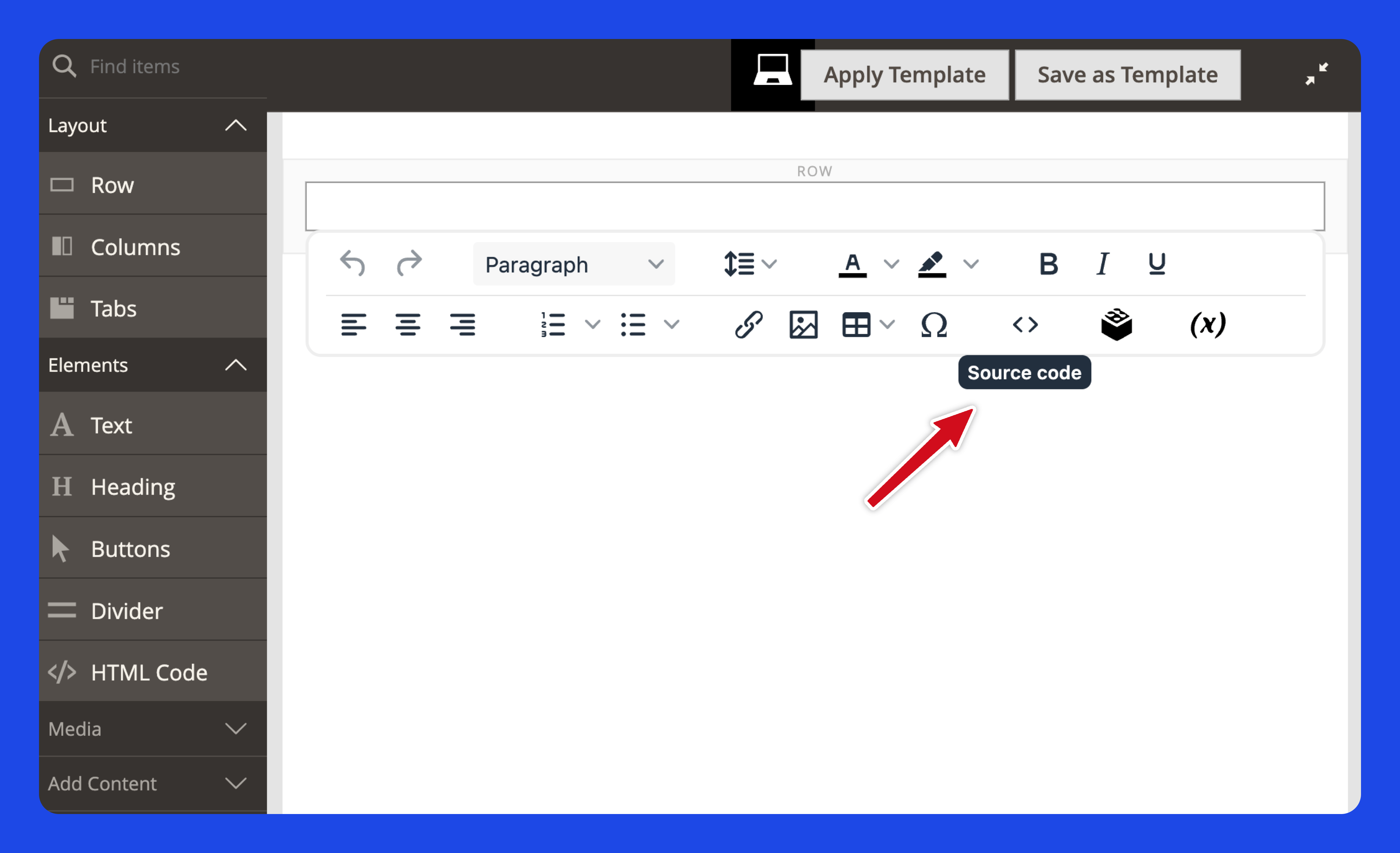
The Page Builder Source Code module adds a Source Code button to the toolbar of the Page Builder WYSIWYG editor.
https://github.com/markshust/magento2-module-pagebuildersourcecode
magento magento2 magento2-module
Last synced: about 1 year ago
JSON representation
The Page Builder Source Code module adds a Source Code button to the toolbar of the Page Builder WYSIWYG editor.
- Host: GitHub
- URL: https://github.com/markshust/magento2-module-pagebuildersourcecode
- Owner: markshust
- License: mit
- Created: 2019-05-27T05:07:38.000Z (about 7 years ago)
- Default Branch: master
- Last Pushed: 2025-03-17T12:32:52.000Z (about 1 year ago)
- Last Synced: 2025-05-12T02:42:03.017Z (about 1 year ago)
- Topics: magento, magento2, magento2-module
- Language: PHP
- Homepage:
- Size: 271 KB
- Stars: 119
- Watchers: 8
- Forks: 20
- Open Issues: 0
-
Metadata Files:
- Readme: README.md
- Changelog: CHANGELOG.md
- Funding: .github/FUNDING.yml
- License: LICENSE.md
Awesome Lists containing this project
README
# MarkShust_PageBuilderSourceCode
Adds a Source Code button to the toolbar of the Page Builder WYSIWYG editor.





## Table of contents
- [Summary](#summary)
- [Requirements](#requirements)
- [Installation](#installation)
- [Usage](#usage)
- [Credits](#credits)
- [License](#license)
## Summary
Page Builder does not come with a way to edit the HTML source code when editing a text block. Sometimes it is desired to override the default styles and edit the HTML manually. This module adds the "code" icon to the toolbar to allow this capability.
If you'd like to learn a bit more about why & how you'd use this module, check out the explainer video of this module, created by Webverse.
## Requirements
This module requires the Page Builder module, which comes installed with Magento Commerce 2.3.1+.
## Installation
```
composer require markshust/magento2-module-pagebuildersourcecode
bin/magento module:enable MarkShust_PageBuilderSourceCode
bin/magento setup:upgrade
```
## Usage
This module has no configuration. Just install, and you'll see the code icon in the Page Builder WYSIWYG editor toolbar.
## Credits
### M.academy
This repository is sponsored by M.academy, the simplest way to learn complex tech skills.

## License
[MIT](https://opensource.org/licenses/MIT)