https://github.com/martinnicolas/interactors_mindmap
Mindmap chart for your Rails interactors
https://github.com/martinnicolas/interactors_mindmap
mindmap rails rails-interactors ruby
Last synced: about 1 year ago
JSON representation
Mindmap chart for your Rails interactors
- Host: GitHub
- URL: https://github.com/martinnicolas/interactors_mindmap
- Owner: martinnicolas
- License: mit
- Created: 2024-05-25T23:31:11.000Z (about 2 years ago)
- Default Branch: master
- Last Pushed: 2025-04-19T02:25:20.000Z (over 1 year ago)
- Last Synced: 2025-06-22T12:49:34.447Z (about 1 year ago)
- Topics: mindmap, rails, rails-interactors, ruby
- Language: Ruby
- Homepage:
- Size: 94.7 KB
- Stars: 1
- Watchers: 1
- Forks: 0
- Open Issues: 0
-
Metadata Files:
- Readme: README.md
- Changelog: CHANGELOG.md
- License: LICENSE.txt
- Code of conduct: CODE_OF_CONDUCT.md
Awesome Lists containing this project
README
# InteractorsMindmap
[](https://github.com/martinnicolas/interactors_mindmap/actions/workflows/main.yml)
[](https://badge.fury.io/rb/interactors_mindmap)
[](https://rubygems.org/gems/interactors_mindmap)
[](https://opensource.org/licenses/MIT)
[](CODE_OF_CONDUCT.md)
This gem generates a mindmap chart to document your [interactors](https://github.com/collectiveidea/interactor) flow on your Ruby on Rails application.
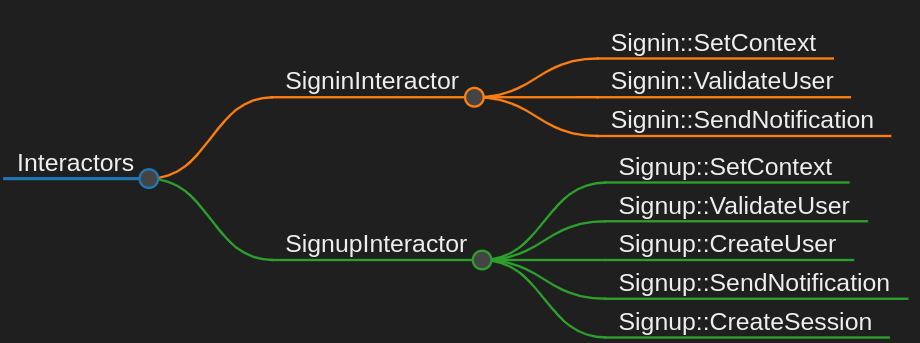
## Installation
Install the gem and add to the application's Gemfile by executing:
$ bundle add interactors_mindmap
If bundler is not being used to manage dependencies, install the gem by executing:
$ gem install interactors_mindmap
## Usage
Run `interactors_mindmap` on the root path of your RoR application to generate an interactors mindmap chart.
### Running with options
By default running `interactors_mindmap`, without arguments, will show you the usage information message. You can use different options to run `interactors_mindmap` and generate only the files what you need:
- `interactors_mindmap --all`: This will generate the `interactors.md` and `interactors.html` files.
- `interactors_mindmap --md`: This will generate only the `interactors.md` file.
- `interactors_mindmap --html`: This will generate only the `interactors.html` file.
- `interactors_mindmap --version`: This will show the gem version.
- `interactors_mindmap --help`: This will show a usage information message.
This gem use [https://markmap.js.org/](https://markmap.js.org/) to generate your interactors mindmap chart.
Open `interactors.html` generated file to see your interactors mindmap chart on your browser. Alternatively, if you use Visual Studio Code IDE you can install [markmap](https://marketplace.visualstudio.com/items?itemName=gera2ld.markmap-vscodemd`) extension to open `interactors.md` generated file on the IDE.
## Development
After checking out the repo, run `bin/setup` to install dependencies. Then, run `rake spec` to run the tests. You can also run `bin/console` for an interactive prompt that will allow you to experiment.
To install this gem onto your local machine, run `bundle exec rake install`. To release a new version, update the version number in `version.rb`, and then run `bundle exec rake release`, which will create a git tag for the version, push git commits and the created tag, and push the `.gem` file to [rubygems.org](https://rubygems.org).
## Contributing
Bug reports and pull requests are welcome on GitHub at https://github.com/martinnicolas/interactors_mindmap. This project is intended to be a safe, welcoming space for collaboration, and contributors are expected to adhere to the [code of conduct](https://github.com/martinnicolas/interactors_mindmap/blob/master/CODE_OF_CONDUCT.md).
## License
The gem is available as open source under the terms of the [MIT License](https://opensource.org/licenses/MIT).
## Code of Conduct
Everyone interacting in the InteractorsMindmap project's codebases, issue trackers, chat rooms and mailing lists is expected to follow the [code of conduct](https://github.com/martinnicolas/interactors_mindmap/blob/master/CODE_OF_CONDUCT.md).