https://github.com/martinpetricko/filament-database-mail-docs
Are you tired of writing email templates in Laravel, managing all translations and constantly editing them whenever something changes? Well, not anymore! Let your clients manage them in filament panel and call it a feature!
https://github.com/martinpetricko/filament-database-mail-docs
database filamentphp laravel mail
Last synced: 3 months ago
JSON representation
Are you tired of writing email templates in Laravel, managing all translations and constantly editing them whenever something changes? Well, not anymore! Let your clients manage them in filament panel and call it a feature!
- Host: GitHub
- URL: https://github.com/martinpetricko/filament-database-mail-docs
- Owner: MartinPetricko
- Created: 2025-03-06T07:45:18.000Z (over 1 year ago)
- Default Branch: main
- Last Pushed: 2025-06-19T09:27:55.000Z (about 1 year ago)
- Last Synced: 2025-06-19T10:36:10.739Z (about 1 year ago)
- Topics: database, filamentphp, laravel, mail
- Homepage: https://filamentphp.com/plugins/martin-petricko-database-mail
- Size: 4.49 MB
- Stars: 0
- Watchers: 1
- Forks: 0
- Open Issues: 0
-
Metadata Files:
- Readme: README.md
- Changelog: CHANGELOG.md
- Funding: .github/FUNDING.yml
- Security: .github/SECURITY.md
Awesome Lists containing this project
README
## Introduction
Are you tired of writing email templates in Laravel, managing all translations and constantly editing them whenever
something changes? Well, not anymore! Let your clients manage them in filament panel and call it a feature!
Filament Database Mail is a FilamentPHP implementation of an
open-source [Laravel Database Mail](https://github.com/MartinPetricko/laravel-database-mail) package that lets you
store email templates in your database, link them to events, and automatically send them when those events are
dispatched. All event properties are shared to email and you can use them just like you would in
standard [Blade views](https://laravel.com/docs/12.x/blade).
This package prepares FilamentPHP resources for managing your email templates with an implementation
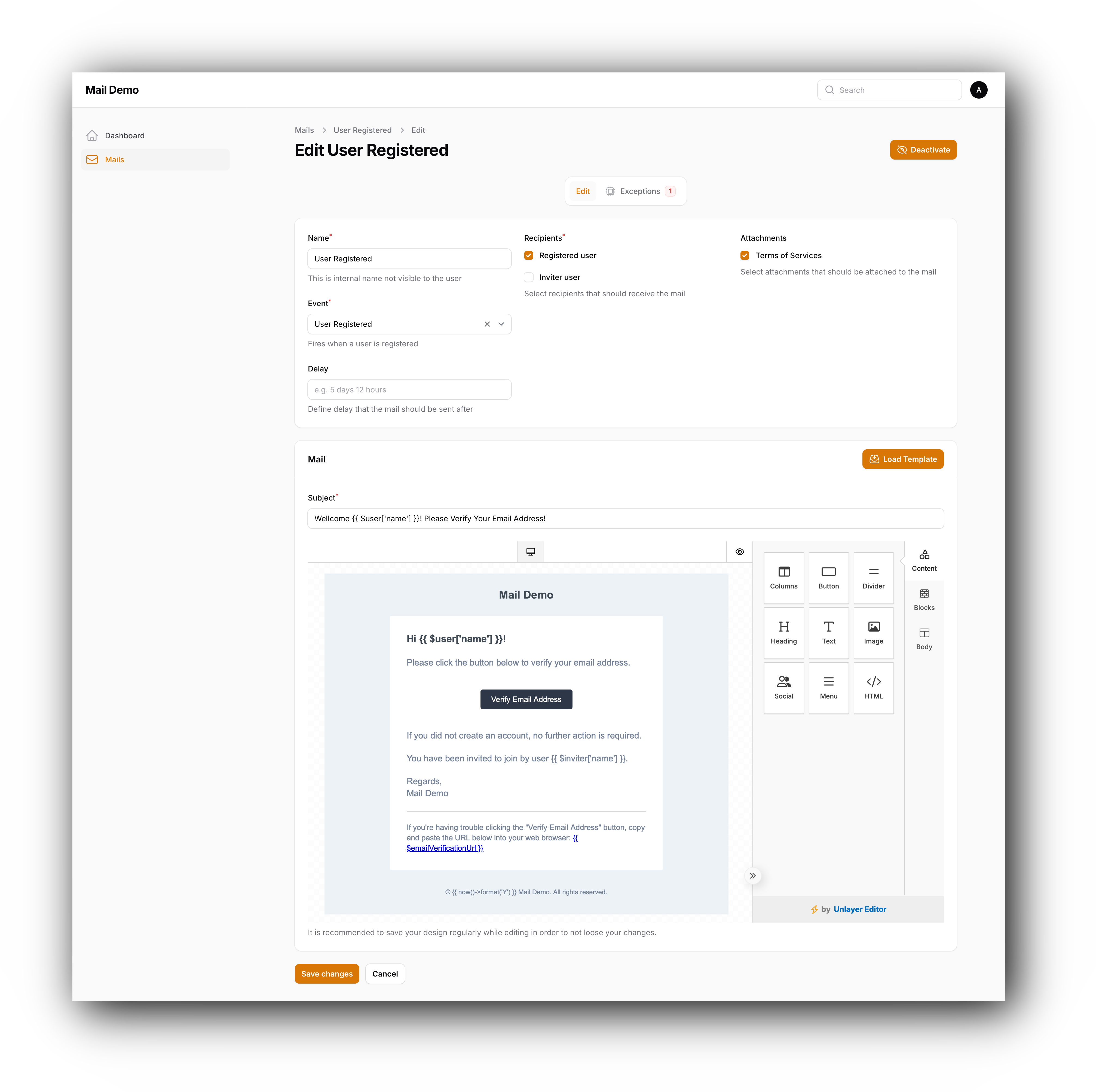
of [Unlayer Editor](https://docs.unlayer.com/builder/latest/email-builder).
> **Security Notice:** This package allows php code executions as email templates are parsed
> with [Blade::render()](https://laravel.com/docs/12.x/blade#rendering-inline-blade-templates). So only administrators
> with highest level of access should be able to use this package.
## Live Demo
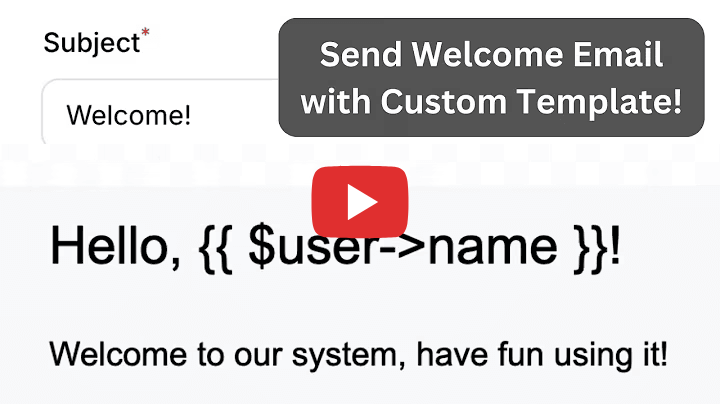
To see the plugin in action, you can visit the [live demo](https://database-mail-demo.web-code.dev/).
[](https://youtu.be/wexzG0_KjKg?si=KghM4dWLFoPVenRf)
## Features
- Store email templates in database
- Assign email templates to standard Laravel events
- Send emails when the events are fired
- Access all of event public properties in email templates
- Define possible email recipients for each event
- Define possible email attachments for each event
- Use Unlayer editor to manage your templates
- Use blade syntax in email templates
- Delay emails sending for time interval after the event is dispatched
- Load templates from locally created designs or from your Unlayer account
- See any exceptions that occurred while sending email due to badly formatted mail templates
- Easy to extend
### Upgrading
#### v3 to v4
New migration was added that needs to be published and migrated
```bash
php artisan vendor:publish --tag=database-mail-migrations
```
```bash
php artisan migrate
```
#### v2 to v3
If you are upgrading from v2 to v3, you will need to import plugin styles in your custom filament theme. You can find
more information in the [Setting up Filament Database Mail](#setting-up-filament-database-mail) section.
## Screenshots
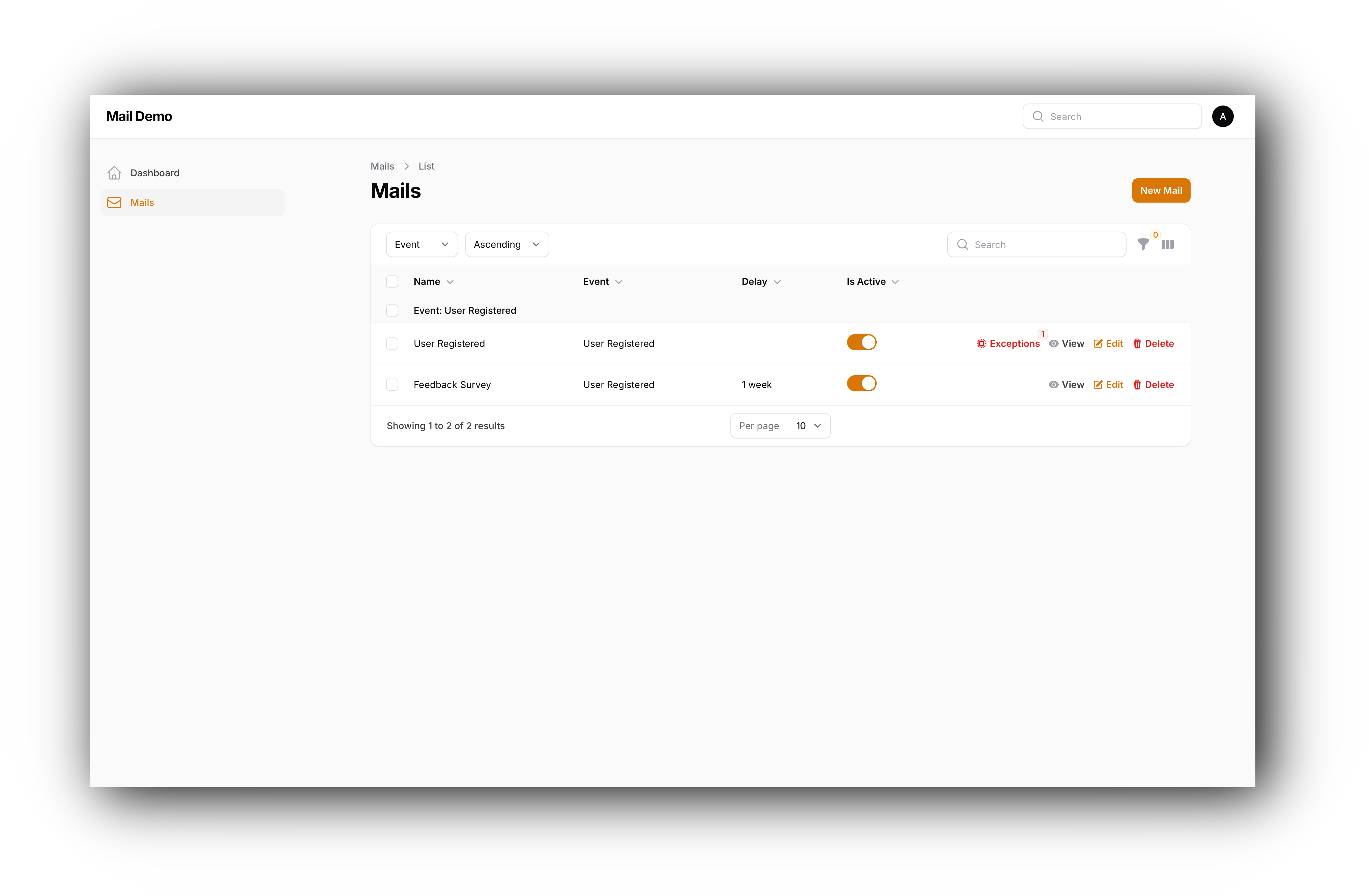
#### List of Email Templates
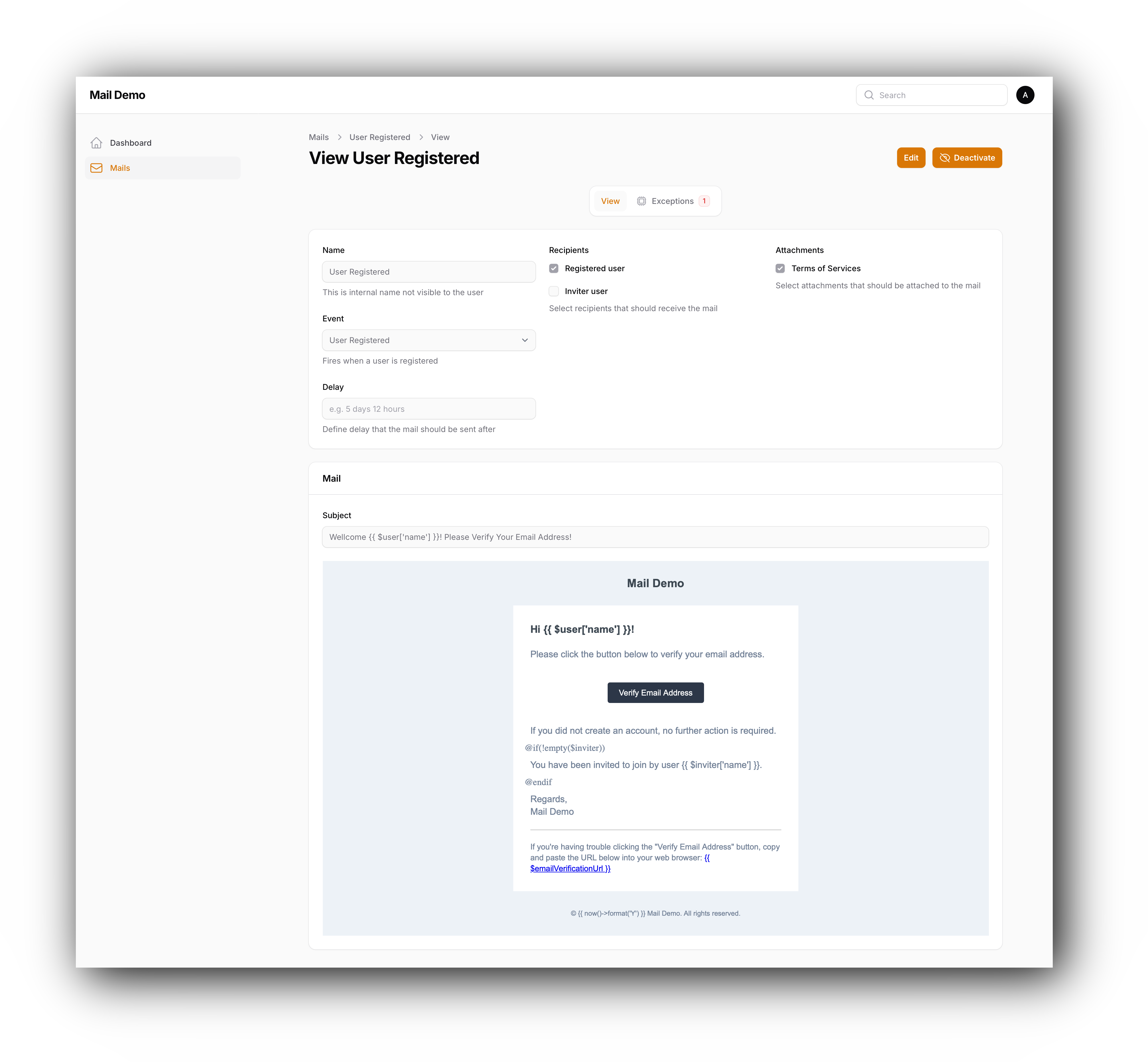
#### Email Detail
#### Email Creation
#### UI for Available Properties

#### Built-in Conditions and Loops
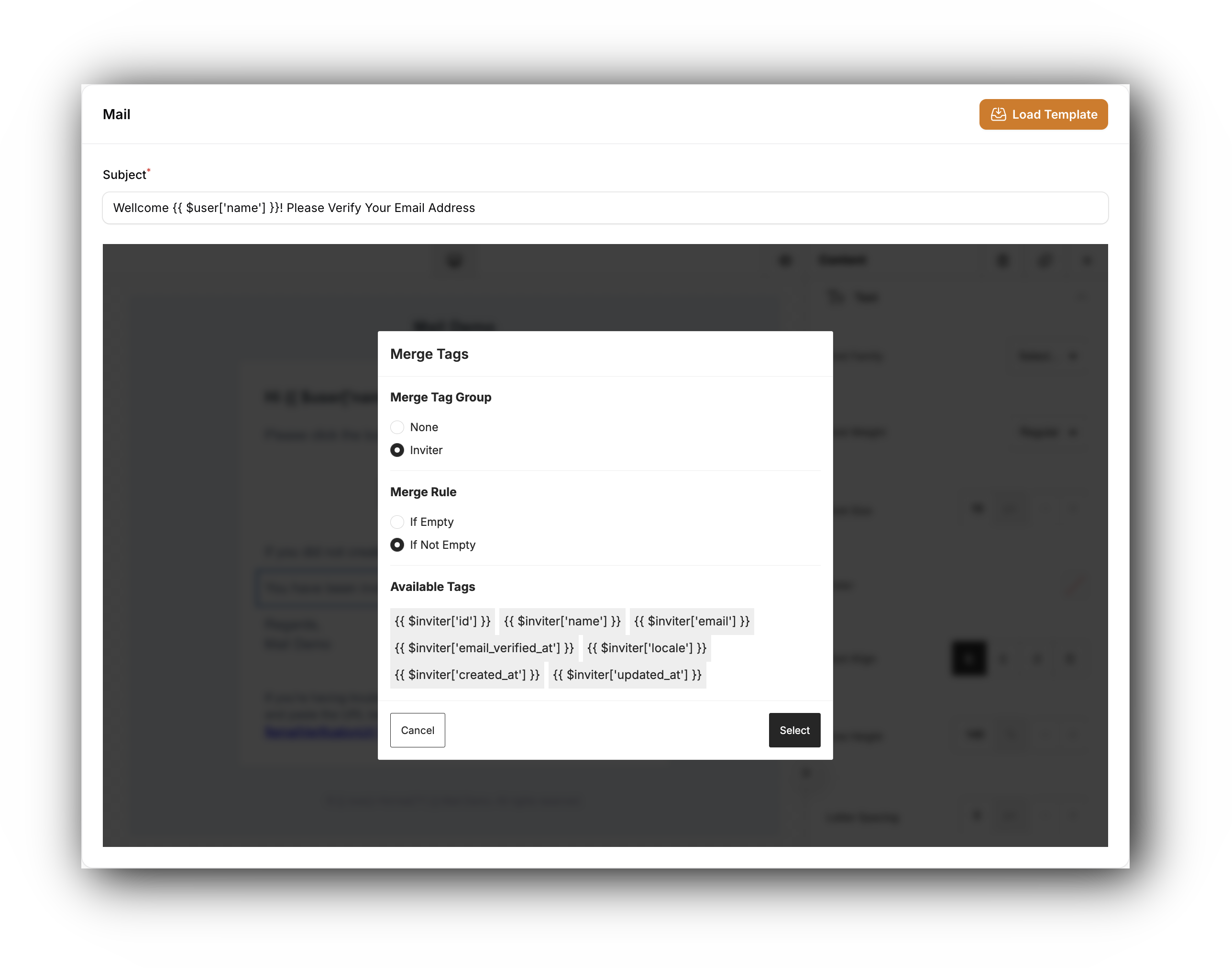
#### Custom Blade Syntax
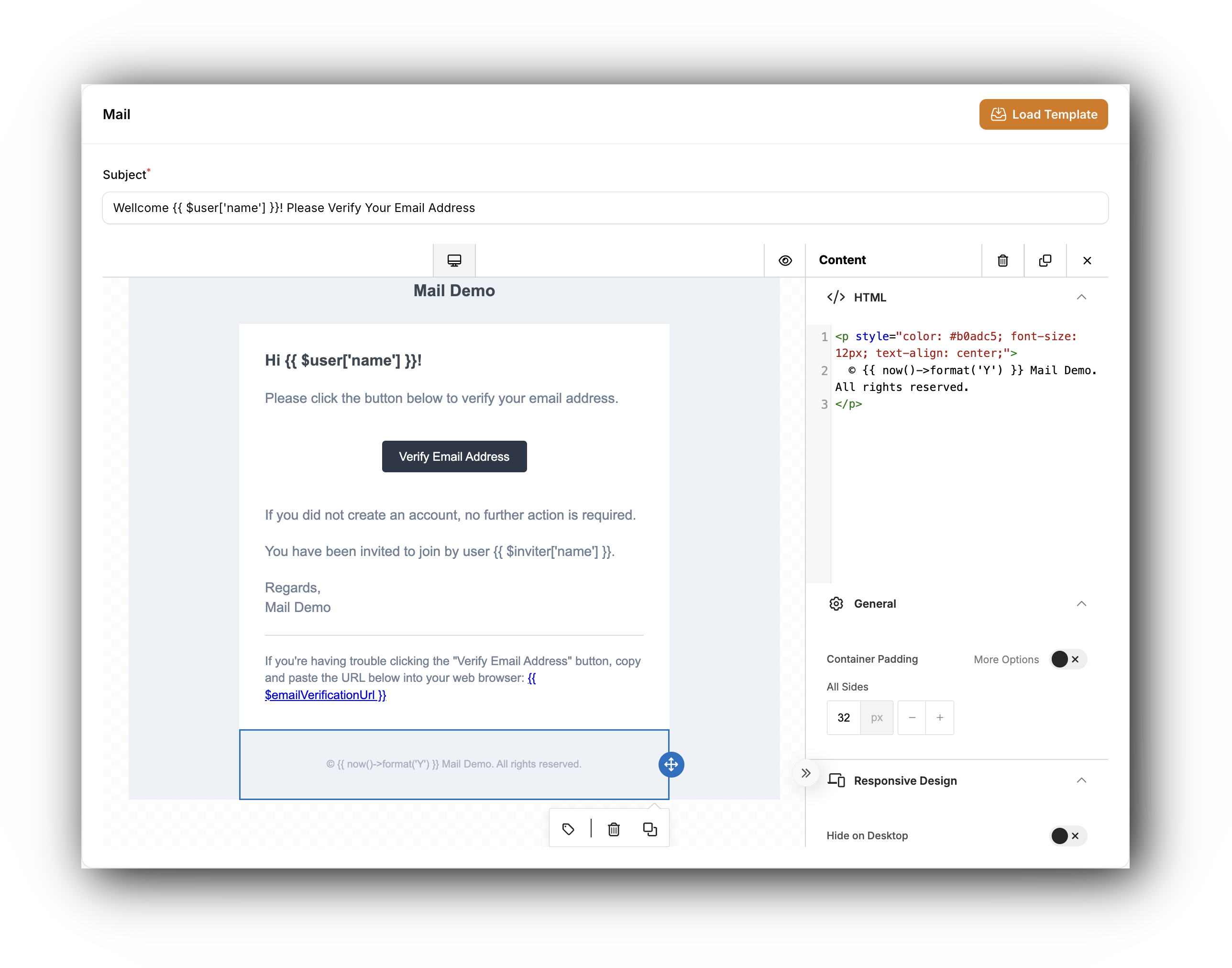
#### Load Templates
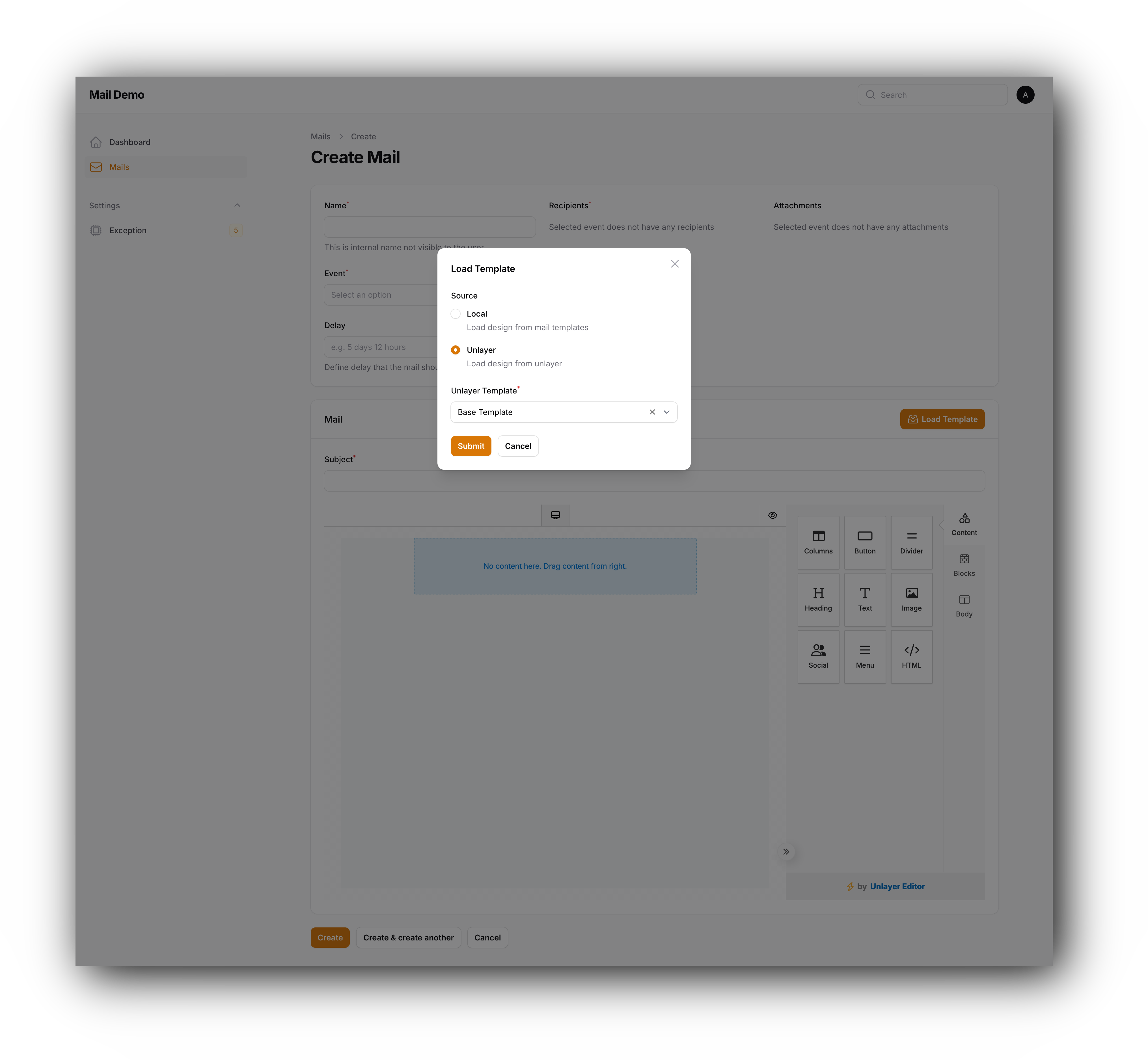
#### Email Formatting Exceptions
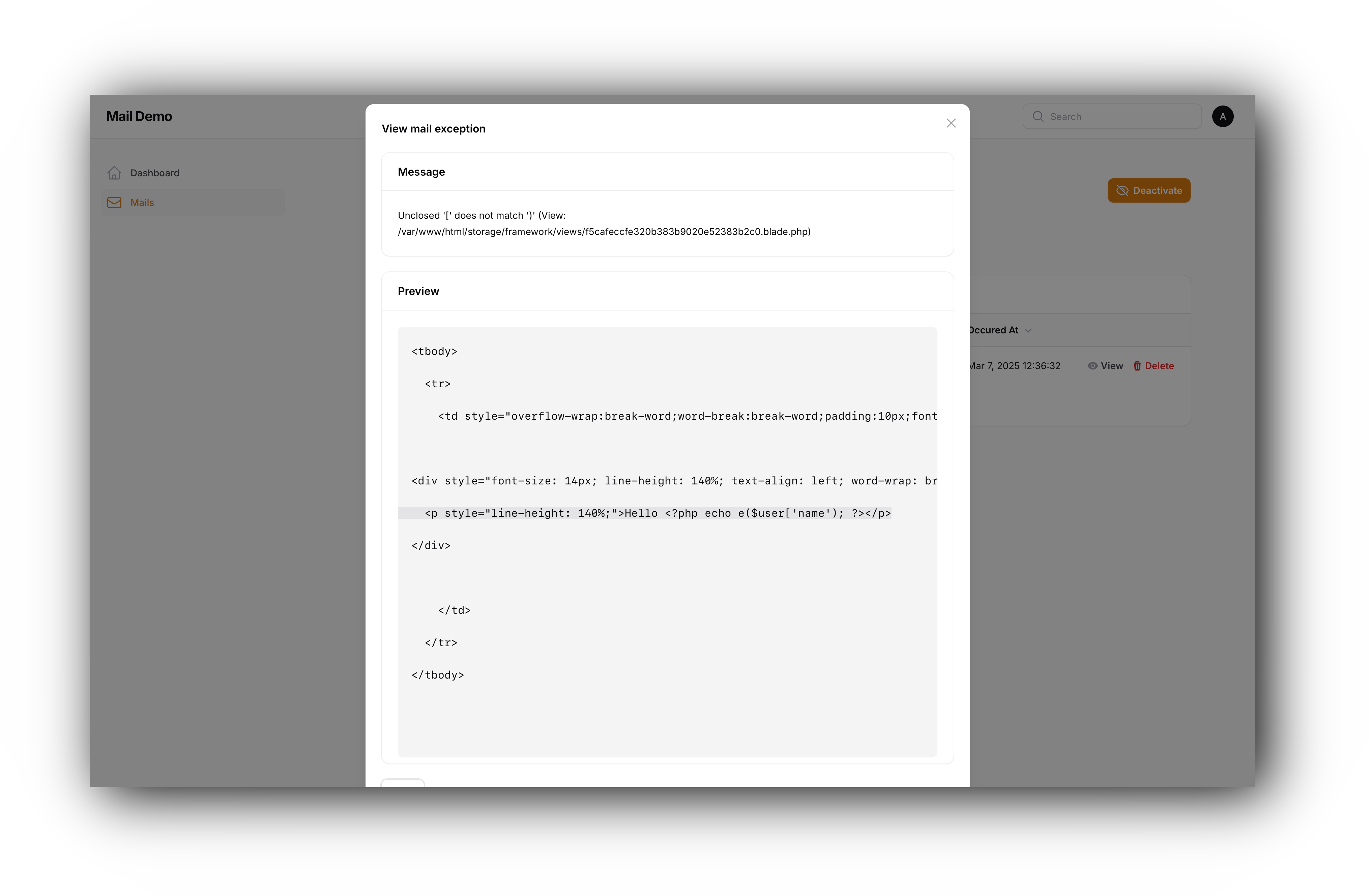
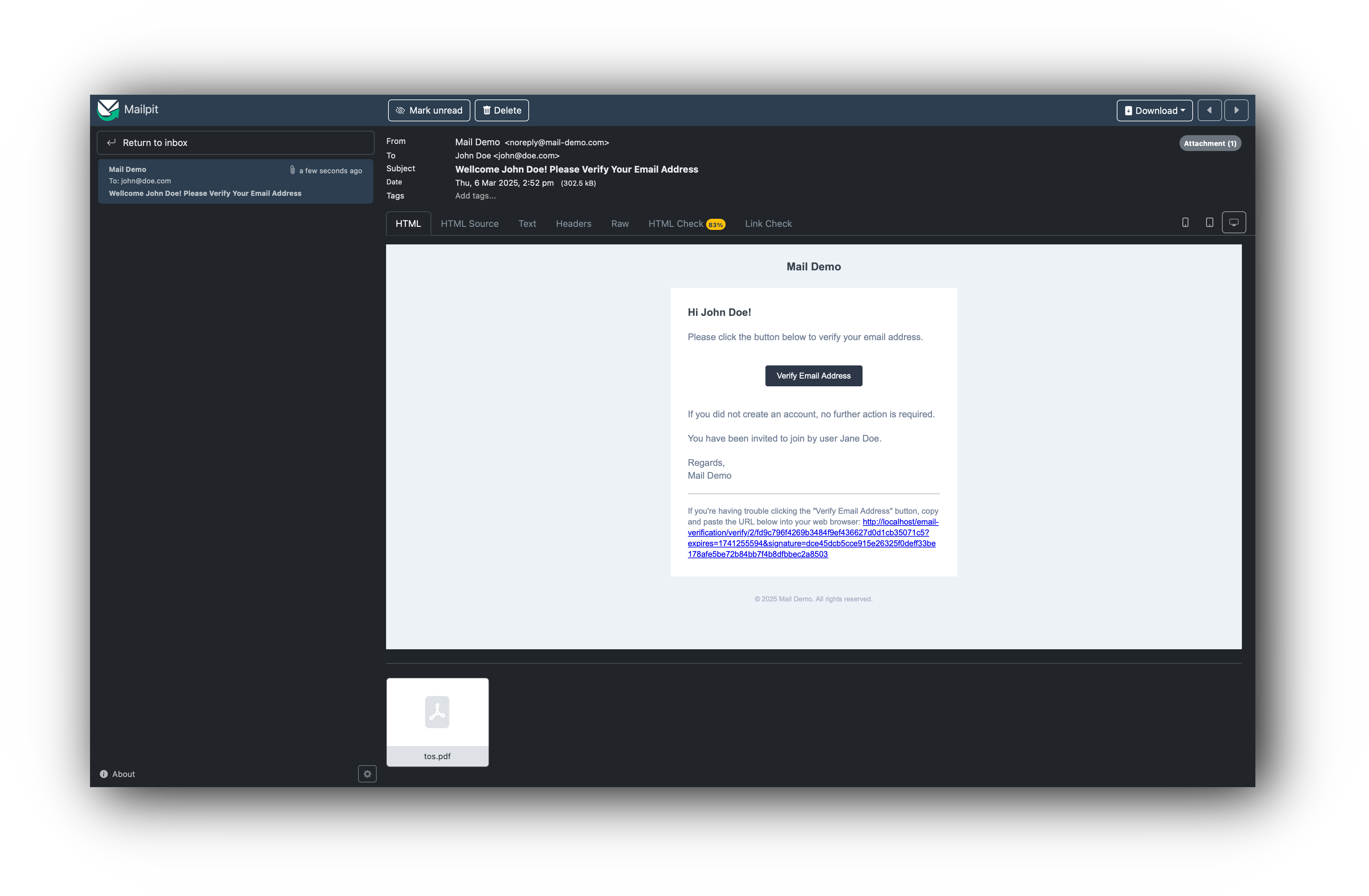
#### Received Email
## Installation
### Requirements
Filament Database Mail requires `PHP ^8.2`, `Filament ^3.3` and `Laravel 11+`.
### Activating Your License on AnyStack
Filament Database Mail uses AnyStack to handle payment, licensing, and distribution.
During the purchasing process, AnyStack will provide you with a license key. Once your license key is activated, you can
proceed installing with composer below.
### Installing with Composer
To Install Filament Database Mail with Composer, you'll need to add the following package repository to your
`composer.json` file:
```json
{
"repositories": [
{
"type": "composer",
"url": "https://filament-database-mail.composer.sh"
}
]
}
```
Once the repository has been added to the composer.json file, you can install Filament Database Mail like any other
composer package using the composer require command:
```bash
composer require martinpetricko/filament-database-mail
```
Next, you will be prompted to provide your username and password.
```bash
Loading composer repositories with package information
Authentication required (filament-database-mail.composer.sh):
Username: [license-email]
Password: [license-key]
```
Your username will be your email address and the password is your license key. For example, let's say we have the
following email and license activation:
- Contact email: john@gmail.com
- License key: 8c21df8f-6273-4932-b4ba-8bcc723ef500
You will need to enter the above information as follows when prompted for your credentials:
```bash
Loading composer repositories with package information
Authentication required (filament-database-mail.composer.sh):
Username: john@gmail.com
Password: 8c21df8f-6273-4932-b4ba-8bcc723ef500
```
### Setting up Filament Database Mail
The plugin follows Filament's theming rules. So, to use the
plugin [create a custom theme](https://filamentphp.com/docs/5.x/styling/overview#creating-a-custom-theme) if you haven't
already, and add the following line to your `theme.css` file:
```css
@import '../../../../vendor/martinpetricko/filament-database-mail/resources/css/index.css';
```
Now build your theme using:
```bash
npm run build
```
Publish and run the migrations with:
```bash
php artisan vendor:publish --tag="database-mail-migrations"
php artisan migrate
```
Publish the config file with:
```bash
php artisan vendor:publish --tag="database-mail-config"
```
These are the contents of the published config file:
```php
return [
/**
* Register event listener for all TriggersDatabaseMail events,
* that sends mails associated with the event.
*/
'register_event_listener' => true,
/**
* Period of time when mail exceptions are pruned.
*/
'prune_exceptions_period' => now()->subMonth(),
/**
* Models that are used by Laravel Database Mail.
*/
'models' => [
'mail_exception' => \MartinPetricko\LaravelDatabaseMail\Models\MailException::class,
'mail_template' => \MartinPetricko\LaravelDatabaseMail\Models\MailTemplate::class,
],
/**
* Mailable that is used to send the mail from database.
*/
'event_mail' => \MartinPetricko\LaravelDatabaseMail\Mail\EventMail::class,
/**
* Resolvers are used to automatically resolve properties of the event.
* These property definitions can be later shown to user as available
* variables that can be used in the mail template.
*/
'resolvers' => [
\MartinPetricko\LaravelDatabaseMail\Properties\Resolvers\EloquentResolver::class,
\MartinPetricko\LaravelDatabaseMail\Properties\Resolvers\BooleanResolver::class,
\MartinPetricko\LaravelDatabaseMail\Properties\Resolvers\StringResolver::class,
\MartinPetricko\LaravelDatabaseMail\Properties\Resolvers\ListResolver::class,
],
/**
* Register events that implement TriggersDatabaseMail interface.
* Events will be used to trigger the mail and this list
* of events can be shown to user as available events.
*/
'events' => [
// \App\Events\YourEvent::class
],
];
```
Optionally, you can publish other config file:
```bash
php artisan vendor:publish --tag="filament-database-mail-config"
```
These are the contents of the published config file:
```php
return [
/**
* Unlayer configuration
*/
'unlayer' => [
/**
* https://docs.unlayer.com/builder/installation#where-to-get-the-project-id
*/
'project_id' => env('UNLAYER_PROJECT_ID'),
/**
* https://docs.unlayer.com/api#section/Authentication/Get-your-API-Key
*/
'api_key' => env('UNLAYER_API_KEY'),
],
];
```
> **Note:** You can use this package without setting up Unlayer project, but option to load templates from Unlayer will
> be disabled.
Register exceptions reporting in `bootstrap/app.php`:
```php
use Illuminate\Foundation\Configuration\Exceptions;
use MartinPetricko\LaravelDatabaseMail\Exceptions\DatabaseMailException;
use MartinPetricko\LaravelDatabaseMail\Facades\LaravelDatabaseMail;
//...
->withExceptions(function (Exceptions $exceptions) {
$exceptions->report(function (DatabaseMailException $e) {
LaravelDatabaseMail::logException($e);
});
})
```
Enable exceptions table pruning:
```php
Schedule::command('model:prune', [
'--model' => [
\MartinPetricko\LaravelDatabaseMail\Models\MailException::class,
],
])->daily();
```
Register and configure plugin for your filament panel:
```php
->plugins([
\MartinPetricko\FilamentDatabaseMail\FilamentDatabaseMailPlugin::make()
->cluster(Cluster::class)
->navigationLabel('Mails')
->navigationGroup('Settings')
->navigationIcon('heroicon-o-envelope')
->navigationSort(5),
])
```
## Usage
### Create Events
Add `TriggersDatabaseMail` interface and `CanTriggerDatabaseMail` trait to your
standard [laravel events](https://laravel.com/docs/master/events).
```php
namespace App\Events;
use App\Models\User;
use Illuminate\Foundation\Events\Dispatchable;
use Illuminate\Queue\SerializesModels;
use MartinPetricko\LaravelDatabaseMail\Attachments\Attachment;
use MartinPetricko\LaravelDatabaseMail\Events\Concerns\CanTriggerDatabaseMail;
use MartinPetricko\LaravelDatabaseMail\Events\Contracts\TriggersDatabaseMail;
use MartinPetricko\LaravelDatabaseMail\Recipients\Recipient;
class Registered implements TriggersDatabaseMail
{
use Dispatchable;
use SerializesModels;
use CanTriggerDatabaseMail;
/**
* All public properties of the event will be passed
* to the mail template body and subject.
*/
public function __construct(public User $user, public string $emailVerificationUrl, public ?User $inviter = null)
{
//
}
/**
* Name of the event that can be used in the UI.
*/
public static function getName(): string
{
return 'User Registered';
}
/**
* Description of the event that can be used in the UI.
*/
public static function getDescription(): ?string
{
return 'Fires when a user is registered';
}
/**
* List of possible recipients that can receive the email.
* MailTemplate stores recipient keys that will
* receive the email when event is triggered.
*
* @return Recipient[]
*/
public static function getRecipients(): array
{
return [
'user' => new Recipient('Registered User', fn (Registered $event) => $event->user),
'inviter-user' => new Recipient('Inviter user', fn (Registered $event) => $event->inviter),
'all' => new Recipient('All', fn (Registered $event) => [
$event->user,
$event->inviter,
]),
];
}
/**
* List of possible attachments that can be attached to the email.
* MailTemplate stores attachment keys that will be attached
* to the email when the event is triggered.
*
* @return Attachment[]
*/
public static function getAttachments(): array
{
return [
'terms-of-service' => new Attachment('Terms of Services', fn (Registered $event) => [
\Illuminate\Mail\Attachment::fromUrl('https://my-project.com/tos')->as('tos.pdf'),
]),
];
}
}
```
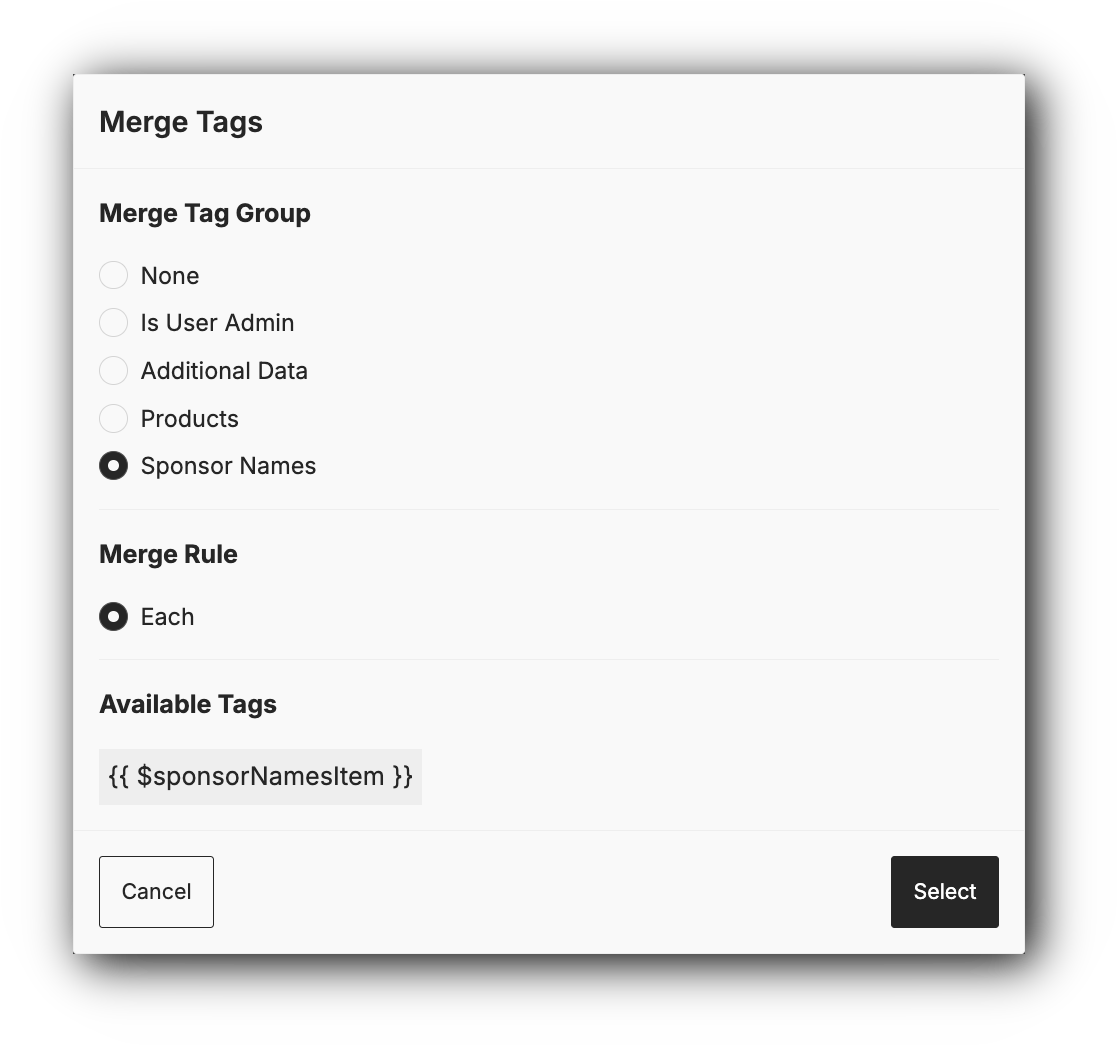
#### Event Properties
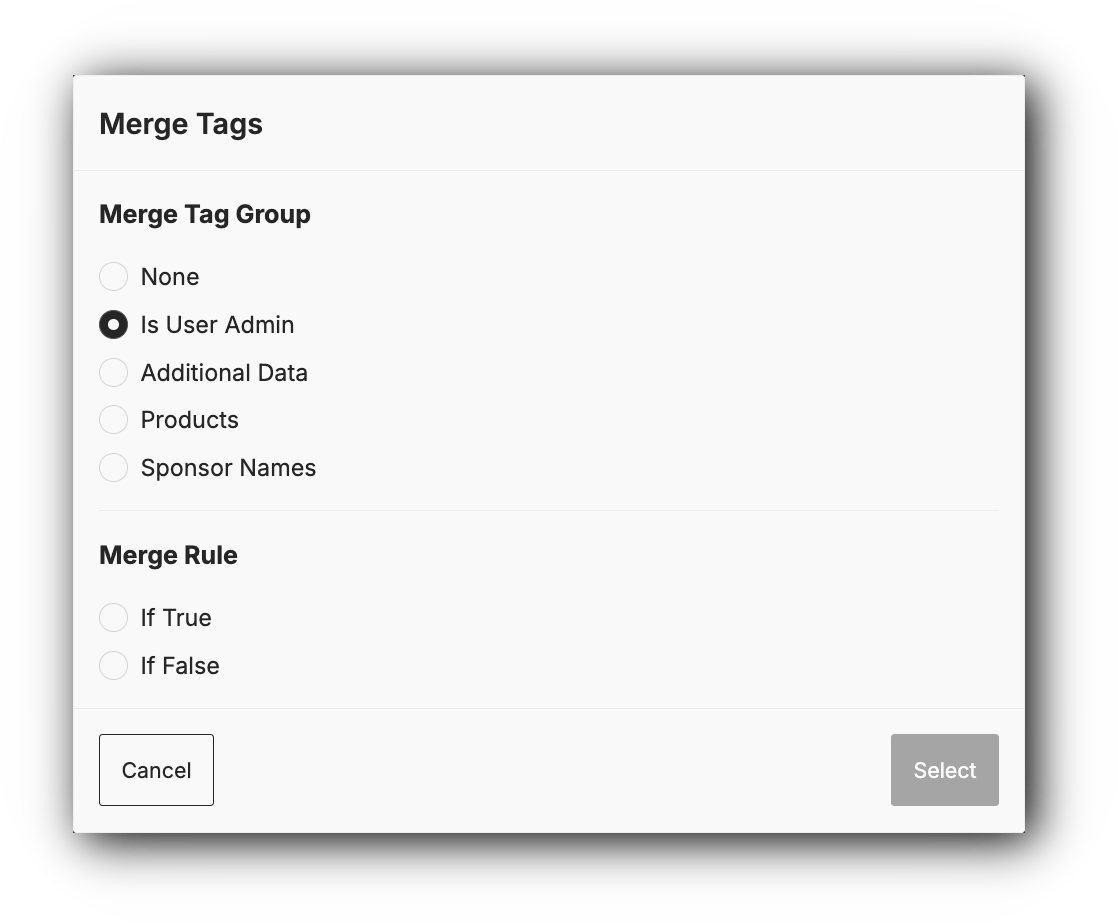
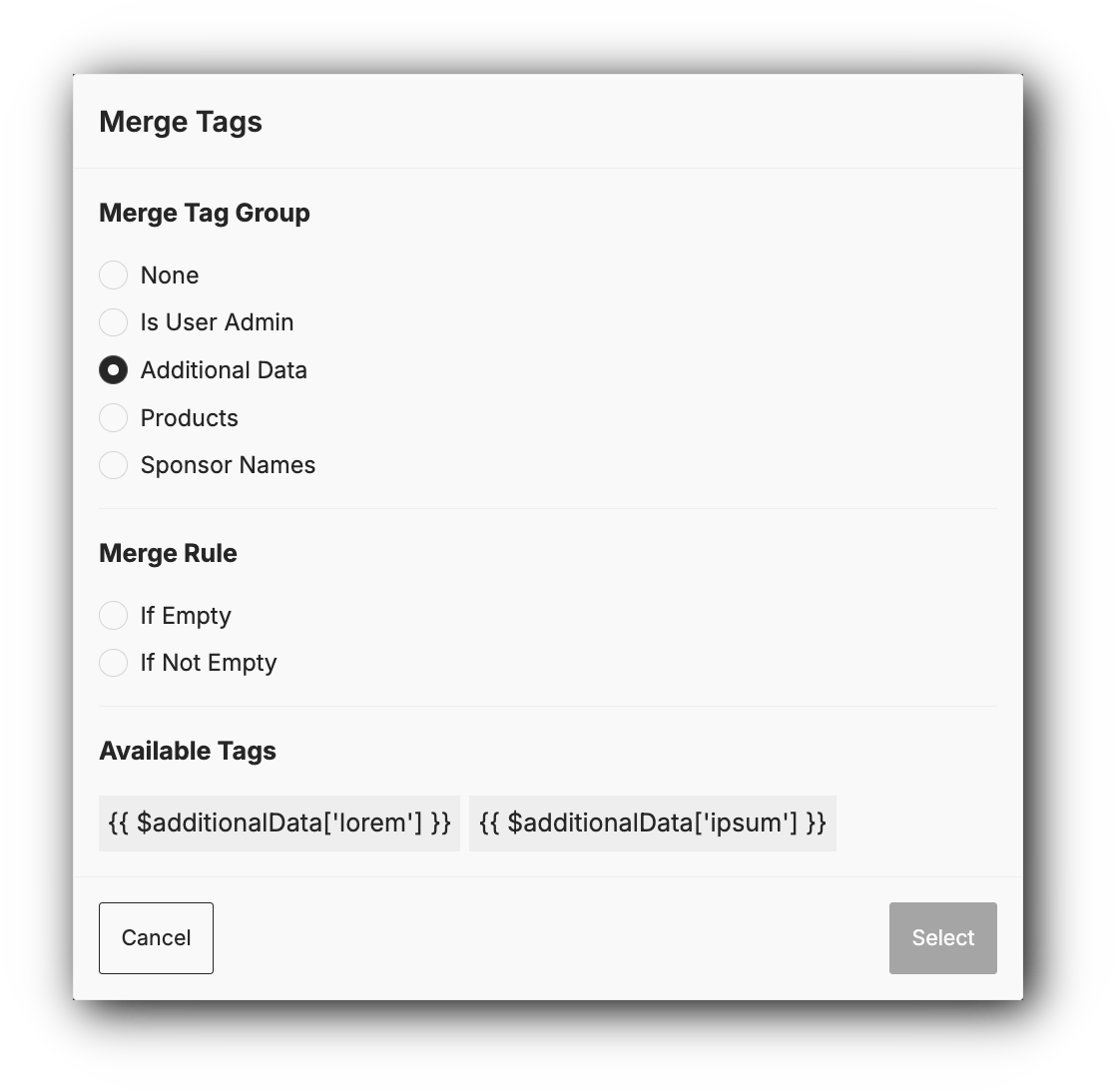
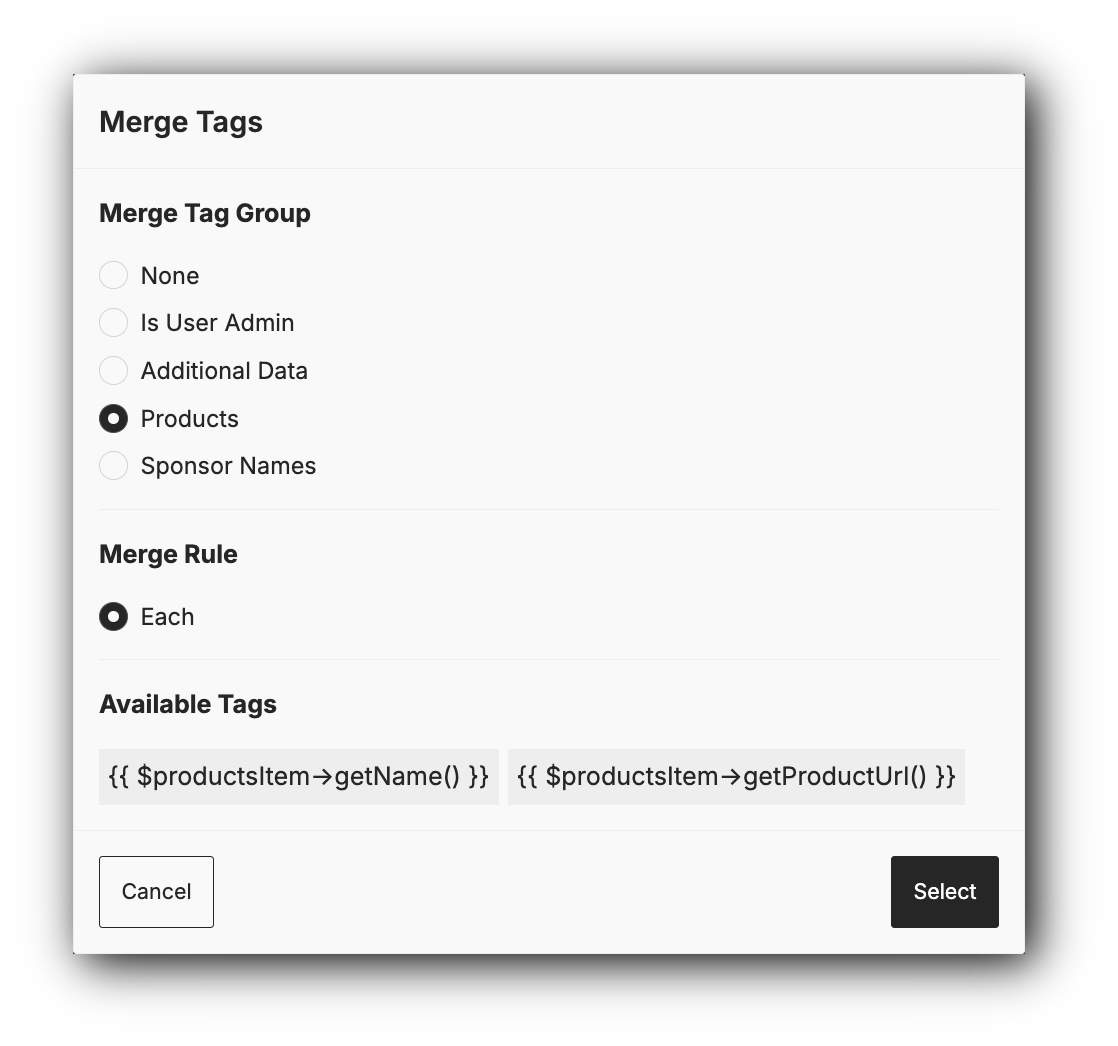
Public properties of the event will try to get parsed
into [Unlayer merge tags](https://docs.unlayer.com/builder/dynamic-content/merge-tags) automatically via registered
resolvers in your `config/database-mail.php` file. However not all properties can be parsed into merge tags, so you can
define your own resolvers or add properties map to the event.
```php
namespace App\Events;
use MartinPetricko\LaravelDatabaseMail\Events\Contracts\TriggersDatabaseMail;
use MartinPetricko\LaravelDatabaseMail\Properties\Property;
class Registered implements TriggersDatabaseMail
{
/**
* @param bool $isUserAdmin
* @param ?array{lorem: string, ipsum: string} $additionalData
* @param Product[] $products
* @param string[] $sponsorNames
*/
public function __construct(
public bool $isUserAdmin,
public ?array $additionalData,
public array $products,
public array $sponsorNames,
) {
//
}
//...
/**
* List of additional properties that can be used in the mail template
* and were not automatically resolved via registered resolvers.
*
* @return array
*/
public static function mergeProperties(): array
{
return [
'isUserAdmin' => new Property('isUserAdmin')
->boolean(),
'additionalData' => (new Property('additionalData'))
->nullable()
->properties([
new Property('lorem'),
new Property('ipsum'),
]),
'products' => new Property('products')
->traversable()
->properties([
(new Property('name'))
->accessor('->getName()'),
new Property('url')
->accessor('->getProductUrl()'),
]),
'sponsorNames' => new Property('sponsorNames')
->traversable(),
];
}
}
```
> **Note:** Properties map is only used for UI. As long as event property is public, you can use it in your mail
> template just like you would in a blade view.
### Register Events
Add a list of events to your published `config/database-mail.php` file:
```php
'events' => [
\App\Events\Registered::class,
],
```
### Create Mail Template

> **Note:** Don't forget to activate the email after creating the template, as by default it is deactivated.
### Dispatch Event
Dispatch the event as you would any other [Laravel event](https://laravel.com/docs/master/events#dispatching-events)
with its parameters.
```php
use App\Events\Registered;
// ... your business logic
Registered::dispatch($registeredUser, $registeredUserEmailVerificationUrl);
```
### Import/Export Mail Templates
You can prepare your mail templates before deploying your application to production and then import them in your
seeders.
#### Export Mail Templates
```bash
php artisan mail:export
```
#### Import Mail Templates
```bash
php artisan mail:import
```
#### Seeder Setup
```php
use Illuminate\Support\Facades\Artisan;
public function run(): void
{
/**
* Import all mail templates from json files and replace localhost url with production url.
*/
Artisan::call('mail:import', [
'--all' => true,
'--search' => 'http:\/\/localhost',
'--replace' => config('app.url'),
]);
}
```
## Authorization
In addition to standard policy actions, you can add methods to allow mail template activation/deactivation:
```php
/**
* Used to activate/deactivate single mail template.
*/
public function activate(User $user, MailTemplate $mailTemplate): bool
{
return true;
}
/**
* Used to activate/deactivate mail templates via bulk actions.
*/
public function activateAny(User $user): bool
{
return true;
}
```
Register your policy:
```php
use App\Policies\MailTemplatePolicy;
use Illuminate\Support\Facades\Gate;
use MartinPetricko\LaravelDatabaseMail\Models\MailTemplate;
public function boot(): void
{
Gate::policy(MailTemplate::class, MailTemplatePolicy::class);
}
```
## Extensibility
You can override MailTemplateResource to your liking. For example let's
implement [filamentphp/spatie-laravel-translatable-plugin](https://github.com/filamentphp/spatie-laravel-translatable-plugin).
#### Setup Plugin
Follow [installation instructions](https://github.com/filamentphp/spatie-laravel-translatable-plugin) for
filamentphp/spatie-laravel-translatable-plugin.
#### Prepare Your Translatable Model
```php
id();
$table->string('event')->index();
$table->string('name');
$table->json('subject'); // Changed type to json
$table->json('body'); // Changed type to json
$table->json('meta')->nullable();
$table->json('recipients');
$table->json('attachments');
$table->string('delay')->nullable();
$table->boolean('is_active');
$table->timestamps();
});
}
public function down(): void
{
Schema::dropIfExists('mail_templates');
}
};
```
Update your `config/database-mail.php` file to use your model:
```php
'models' => [
'mail_exception' => \MartinPetricko\LaravelDatabaseMail\Models\MailException::class,
'mail_template' => \App\Models\MailTemplate::class,
],
```
#### Extend MailTemplateResource
Create `app/Filament/Admin/Resources/MailTemplateResource.php` file:
```php
namespace App\Filament\Admin\Resources;
use App\Filament\Admin\Resources\MailTemplateResource\Pages\CreateMailTemplate;
use App\Filament\Admin\Resources\MailTemplateResource\Pages\EditMailTemplate;
use App\Filament\Admin\Resources\MailTemplateResource\Pages\ViewMailTemplate;
use Filament\Resources\Concerns\Translatable;
class MailTemplateResource extends \MartinPetricko\FilamentDatabaseMail\Resources\MailTemplateResource
{
use Translatable;
public static function getPages(): array
{
return array_merge(parent::getPages(), [
'create' => CreateMailTemplate::route('/create'),
'view' => ViewMailTemplate::route('/{record}'),
'edit' => EditMailTemplate::route('/{record}/edit'),
]);
}
}
```
Create `app/Filament/Admin/Resources/MailTemplateResource/Pages/CreateMailTemplate.php` file:
```php
namespace App\Filament\Admin\Resources\MailTemplateResource\Pages;
use App\Filament\Admin\Resources\MailTemplateResource;
use Filament\Actions\LocaleSwitcher;
use Filament\Resources\Pages\CreateRecord\Concerns\Translatable;
class CreateMailTemplate extends \MartinPetricko\FilamentDatabaseMail\Resources\MailTemplateResource\Pages\CreateMailTemplate
{
use Translatable;
protected function getHeaderActions(): array
{
return array_merge(parent::getHeaderActions(), [
LocaleSwitcher::make(),
]);
}
}
```
Create `app/Filament/Admin/Resources/MailTemplateResource/Pages/EditMailTemplate.php` file:
```php
namespace App\Filament\Admin\Resources\MailTemplateResource\Pages;
use App\Filament\Admin\Resources\MailTemplateResource;
use Filament\Actions\LocaleSwitcher;
use Filament\Resources\Pages\EditRecord\Concerns\Translatable;
class EditMailTemplate extends \MartinPetricko\FilamentDatabaseMail\Resources\MailTemplateResource\Pages\EditMailTemplate
{
use Translatable;
protected function getHeaderActions(): array
{
return array_merge(parent::getHeaderActions(), [
LocaleSwitcher::make(),
]);
}
}
```
Create `app/Filament/Admin/Resources/MailTemplateResource/Pages/ViewMailTemplates.php` file:
```php
namespace App\Filament\Admin\Resources\MailTemplateResource\Pages;
use App\Filament\Admin\Resources\MailTemplateResource;
use Filament\Actions\LocaleSwitcher;
use Filament\Resources\Pages\ViewRecord\Concerns\Translatable;
class ViewMailTemplate extends \MartinPetricko\FilamentDatabaseMail\Resources\MailTemplateResource\Pages\ViewMailTemplate
{
use Translatable;
protected function getHeaderActions(): array
{
return array_merge(parent::getHeaderActions(), [
LocaleSwitcher::make(),
]);
}
}
```
#### Register Your MailTemplateResource to Plugin
```php
->plugins([
FilamentDatabaseMailPlugin::make()
->mailTemplateResource(\App\Filament\Admin\Resources\MailTemplateResource::class),
])
```
> **Note:** Don't forget to set your
> users [preferred locale](https://laravel.com/docs/12.x/mail#user-preferred-locales), so sent mails are in the right
> language.
**Voilà!** Enjoy your translatable email templates that can be managed from filament panel.
## Overriding FilamentPHP Auth Emails
If you want to create email templates for auth actions and override default FilamentPHP emails, you can do it by editing
auth pages like this:
### Register
Create `app/Filament/Admin/Pages/Auth/Register.php` page that extends `Filament\Pages\Auth\Register` and override
`sendEmailVerificationNotification` method to dispatch your custom events.
```php
namespace App\Filament\Admin\Pages\Auth;
use App\Events\EmailVerificationRequested;
use App\Events\Registered;
use Filament\Facades\Filament;
use Illuminate\Database\Eloquent\Model;
class Register extends \Filament\Pages\Auth\Register
{
protected function sendEmailVerificationNotification(Model $user): void
{
// Dispatch our custom Registered event
Registered::dispatch($user);
if (!$user instanceof MustVerifyEmail) {
return;
}
if ($user->hasVerifiedEmail()) {
return;
}
if (! method_exists($user, 'notify')) {
$userClass = $user::class;
throw new Exception("Model [{$userClass}] does not have a [notify()] method.");
}
// Dispatch our custom EmailVerificationRequested event
EmailVerificationRequested::dispatch($user, Filament::getVerifyEmailUrl($user));
}
}
```
### Email Verification Prompt
Create `app/Filament/Admin/Pages/Auth/EmailVerificationPrompt.php` page that extends `Filament\Pages\Auth\EmailVerification\EmailVerificationPrompt` and override
`sendEmailVerificationNotification` method to dispatch your custom events.
```php
namespace App\Filament\Admin\Pages\Auth;
use App\Events\EmailVerificationRequested;
use App\Models\User;
use Filament\Facades\Filament;
use Illuminate\Contracts\Auth\MustVerifyEmail;
class EmailVerificationPrompt extends \Filament\Pages\Auth\EmailVerification\EmailVerificationPrompt
{
protected function sendEmailVerificationNotification(MustVerifyEmail $user): void
{
if ($user->hasVerifiedEmail()) {
return;
}
if (! method_exists($user, 'notify')) {
$userClass = $user::class;
throw new Exception("Model [{$userClass}] does not have a [notify()] method.");
}
// Dispatch our custom EmailVerificationRequested event
EmailVerificationRequested::dispatch($user, Filament::getVerifyEmailUrl($user));
}
}
```
### Request Password Reset
Create `app/Filament/Admin/Pages/Auth/RequestPasswordReset.php` page that extends `Filament\Pages\Auth\PasswordReset\RequestPasswordReset` and override
`request` method to dispatch your custom events.
```php
namespace App\Filament\Admin\Pages\Auth;
use App\Events\PasswordResetRequested;
use DanHarrin\LivewireRateLimiting\Exceptions\TooManyRequestsException;
use Exception;
use Filament\Facades\Filament;
use Filament\Notifications\Notification;
use Illuminate\Contracts\Auth\CanResetPassword;
use Illuminate\Support\Facades\Password;
class RequestPasswordReset extends \Filament\Pages\Auth\PasswordReset\RequestPasswordReset
{
public function request(): void
{
try {
$this->rateLimit(2);
} catch (TooManyRequestsException $exception) {
$this->getRateLimitedNotification($exception)?->send();
return;
}
$data = $this->form->getState();
$status = Password::broker(Filament::getAuthPasswordBroker())->sendResetLink(
$data,
function (CanResetPassword $user, string $token): void {
if (! method_exists($user, 'notify')) {
$userClass = $user::class;
throw new Exception("Model [{$userClass}] does not have a [notify()] method.");
}
// Dispatch our custom PasswordResetRequested event
PasswordResetRequested::dispatch($user, Filament::getResetPasswordUrl($token, $user));
},
);
if ($status !== Password::RESET_LINK_SENT) {
Notification::make()
->title(__($status))
->danger()
->send();
return;
}
Notification::make()
->title(__($status))
->success()
->send();
$this->form->fill();
}
}
```
### Register Custom Auth Pages
As a last step, you need to register your custom auth pages for your panel:
```php
namespace App\Providers\Filament;
use App\Filament\Admin\Pages\Auth\Register;
use App\Filament\Admin\Pages\Auth\RequestPasswordReset;
use App\Filament\Admin\Pages\Auth\EmailVerificationPrompt;
class AdminPanelProvider extends PanelProvider
{
public function panel(Panel $panel): Panel
{
return $panel
->id('admin')
->registration(Register::class)
->passwordReset(RequestPasswordReset::class)
->emailVerification(EmailVerificationPrompt::class)
// ...
}
}
```
## Using without Filament Panel
You can use this plugin without [Filament Panel](https://filamentphp.com/docs/3.x/panels), with only your TALL stack using Filament [Forms](https://filamentphp.com/docs/3.x/forms) and [Tables](https://filamentphp.com/docs/3.x/tables).
### Listing Mail Templates
1. Follow [Installation](https://filamentphp.com/docs/3.x/tables/installation) guide for [adding a table to a Livewire component](https://filamentphp.com/docs/3.x/tables/adding-a-table-to-a-livewire-component).
2. Create a Livewire component for listing mail templates:
```shell
php artisan make:livewire ListMailTemplates
```
3. Setup your table listing mail templates:
```php
namespace App\Livewire;
use Filament\Forms\Concerns\InteractsWithForms;
use Filament\Forms\Contracts\HasForms;
use Filament\Tables\Actions;
use Filament\Tables\Concerns\InteractsWithTable;
use Filament\Tables\Contracts\HasTable;
use Filament\Tables\Table;
use Livewire\Component;
use MartinPetricko\FilamentDatabaseMail\Resources\MailTemplateResource;
use MartinPetricko\LaravelDatabaseMail\Models\MailTemplate;
class ListMailTemplates extends Component implements HasForms, HasTable
{
use InteractsWithForms;
use InteractsWithTable;
public function table(Table $table): Table
{
return $table
->query(MailTemplate::query())
->columns([
MailTemplateResource::getNameTableColumn(),
MailTemplateResource::getEventTableColumn(),
MailTemplateResource::getDelayTableColumn(),
MailTemplateResource::getIsActiveTableColumn()
->disabled(false),
MailTemplateResource::getCreatedAtTableColumn(),
MailTemplateResource::getUpdatedAtTableColumn(),
])
->filters([
MailTemplateResource::getEventTableFilter(),
MailTemplateResource::getIsActiveTableFilter(),
])
->actions([
Actions\EditAction::make()
->url(fn (MailTemplate $record) => route('mail_templates.edit', $record)),
Actions\DeleteAction::make(),
]);
}
public function render()
{
return view('livewire.list-mail-templates');
}
}
```
4. Render the table in your Livewire component:
```bladehtml
{{ $this->table }}
```
5. [Render](https://livewire.laravel.com/docs/components#rendering-components) your Livewire component:
```bladehtml
@livewire('list-mail-templates')
```
### Creating Mail Template
1. Follow [Installation](https://filamentphp.com/docs/3.x/forms/installation) guide for [adding a form to a Livewire component](https://filamentphp.com/docs/3.x/forms/adding-a-form-to-a-livewire-component).
2. Create a Livewire component for creating mail template:
```shell
php artisan make:livewire CreateMailTemplate
```
3. Setup your form for creating mail templates:
```php
namespace App\Livewire;
use Filament\Forms\Components;
use Filament\Forms\Concerns\InteractsWithForms;
use Filament\Forms\Contracts\HasForms;
use Filament\Forms\Form;
use Livewire\Component;
use MartinPetricko\FilamentDatabaseMail\Resources\MailTemplateResource;
use MartinPetricko\FilamentDatabaseMail\Resources\MailTemplateResource\Actions\Forms\LoadTemplateAction;
use MartinPetricko\LaravelDatabaseMail\Models\MailTemplate;
class CreateMailTemplate extends Component implements HasForms
{
use InteractsWithForms;
public ?array $data = [];
public function mount(): void
{
$this->form->fill();
}
public function form(Form $form): Form
{
return $form
->statePath('data')
->schema([
Components\Section::make()
->columns([
'md' => 3,
])
->schema([
Components\Group::make([
MailTemplateResource::getNameFormField(),
MailTemplateResource::getEventFormField(),
MailTemplateResource::getDelayFormField(),
MailTemplateResource::getIsActiveFormField(),
]),
Components\Group::make([
MailTemplateResource::getRecipientsFormField(),
]),
Components\Group::make([
MailTemplateResource::getAttachmentsFormField(),
]),
]),
Components\Section::make('Mail')
->headerActions([
LoadTemplateAction::make()
->visible(),
])
->schema([
MailTemplateResource::getSubjectFormField(),
MailTemplateResource::getBodyFormField(),
]),
]);
}
public function create(): void
{
MailTemplate::create($this->form->getState());
}
public function render()
{
return view('livewire.create-mail-template');
}
}
```
4. Render the form in your Livewire component:
```bladehtml
{{ $this->form }}
Submit
```
5. [Render](https://livewire.laravel.com/docs/components#rendering-components) your Livewire component:
```bladehtml
@livewire('create-mail-template')
```
### Editing Mail Template
1. Follow [Installation](https://filamentphp.com/docs/3.x/forms/installation) guide for [adding a form to a Livewire component](https://filamentphp.com/docs/3.x/forms/adding-a-form-to-a-livewire-component).
2. Create a Livewire component for editing mail template:
```shell
php artisan make:livewire EditMailTemplate
```
3. Setup your form for editing mail templates:
```php
namespace App\Livewire;
use Filament\Forms\Components;
use Filament\Forms\Concerns\InteractsWithForms;
use Filament\Forms\Contracts\HasForms;
use Filament\Forms\Form;
use Illuminate\View\View;
use Livewire\Component;
use MartinPetricko\FilamentDatabaseMail\Resources\MailTemplateResource;
use MartinPetricko\FilamentDatabaseMail\Resources\MailTemplateResource\Actions\Forms\LoadTemplateAction;
use MartinPetricko\LaravelDatabaseMail\Models\MailTemplate;
class EditMailTemplate extends Component implements HasForms
{
use InteractsWithForms;
public MailTemplate $mailTemplate;
public ?array $data = [];
public function mount(MailTemplate $mailTemplate): void
{
$this->mailTemplate = $mailTemplate;
$this->form->fill($mailTemplate->toArray());
}
public function form(Form $form): Form
{
return $form
->statePath('data')
->schema([
Components\Section::make()
->columns([
'md' => 3,
])
->schema([
Components\Group::make([
MailTemplateResource::getNameFormField(),
MailTemplateResource::getEventFormField(),
MailTemplateResource::getDelayFormField(),
MailTemplateResource::getIsActiveFormField(),
]),
Components\Group::make([
MailTemplateResource::getRecipientsFormField(),
]),
Components\Group::make([
MailTemplateResource::getAttachmentsFormField(),
]),
]),
Components\Section::make('Mail')
->headerActions([
LoadTemplateAction::make()
->visible(),
])
->schema([
MailTemplateResource::getSubjectFormField(),
MailTemplateResource::getBodyFormField(),
]),
]);
}
public function update(): void
{
$this->mailTemplate->update($this->form->getState());
}
public function render(): View
{
return view('livewire.edit-mail-template');
}
}
```
4. Render the form in your Livewire component:
```bladehtml
{{ $this->form }}
Submit
```
5. [Render](https://livewire.laravel.com/docs/components#rendering-components) your Livewire component:
```bladehtml
@livewire('edit-mail-template', ['mailTemplate' => $mailTemplate])
```
## Changelog
Please see [CHANGELOG](https://github.com/MartinPetricko/filament-database-mail-docs/blob/main/CHANGELOG.md) for more
information on what has changed recently.
## Security Vulnerabilities
Please review [our security policy](https://github.com/MartinPetricko/filament-database-mail-docs/security/policy) on
how to report security vulnerabilities.