https://github.com/masstransit/sample-forkjoint
https://github.com/masstransit/sample-forkjoint
Last synced: about 1 year ago
JSON representation
- Host: GitHub
- URL: https://github.com/masstransit/sample-forkjoint
- Owner: MassTransit
- Created: 2021-01-01T15:32:46.000Z (over 5 years ago)
- Default Branch: master
- Last Pushed: 2024-04-26T03:15:14.000Z (about 2 years ago)
- Last Synced: 2025-03-23T06:11:44.617Z (over 1 year ago)
- Language: C#
- Size: 188 KB
- Stars: 32
- Watchers: 3
- Forks: 22
- Open Issues: 0
-
Metadata Files:
- Readme: README.md
Awesome Lists containing this project
README
# Fork Joint
Fork Joint is a fictional restaurant built during Season 3 of the MassTransit Live Code Video Series. You can [watch the episodes on YouTube](https://youtube.com/playlist?list=PLx8uyNNs1ri2JeyDGFWfCYyAjOB1GP-t1) and follow along by resetting to the various commits in the Git history.
## Docker Setup
The sample application can be run using Docker, however, there are a couple setup tasks required.
- Install Loki docker plugin `docker plugin install grafana/loki-docker-driver:latest --alias loki --grant-all-permissions`
- Start all the services `docker compose -f .\docker-compose.services.yml up -d`
- Stopping all the services `docker compose -f .\docker-compose.services.yml down -v`
### Certificate Setup
The `docker-compose.api.yml` maps the local ASP.NET certificate folder into the container so that HTTPS can be used. This is different depending upon your operating system.
> I use a Mac with JetBrains Rider, so my configuration is in the GitHub repository.
To create the development certificate:
MAC:
```
dotnet dev-certs https -ep ~/.aspnet/https/aspnetapp.pfx -p Passw0rd
dotnet dev-certs https --trust
```
PC:
```
dotnet dev-certs https -ep %USERPROFILE%\.aspnet\https\aspnetapp.pfx -p Pass0wrd
dotnet dev-certs https --trust
```
You may need to modify the `docker-compose.api.yml` file to match your path for Windows.
[See this page](https://docs.microsoft.com/en-us/aspnet/core/security/docker-https?view=aspnetcore-6.0) for more information, it was used to get this working on my machine.
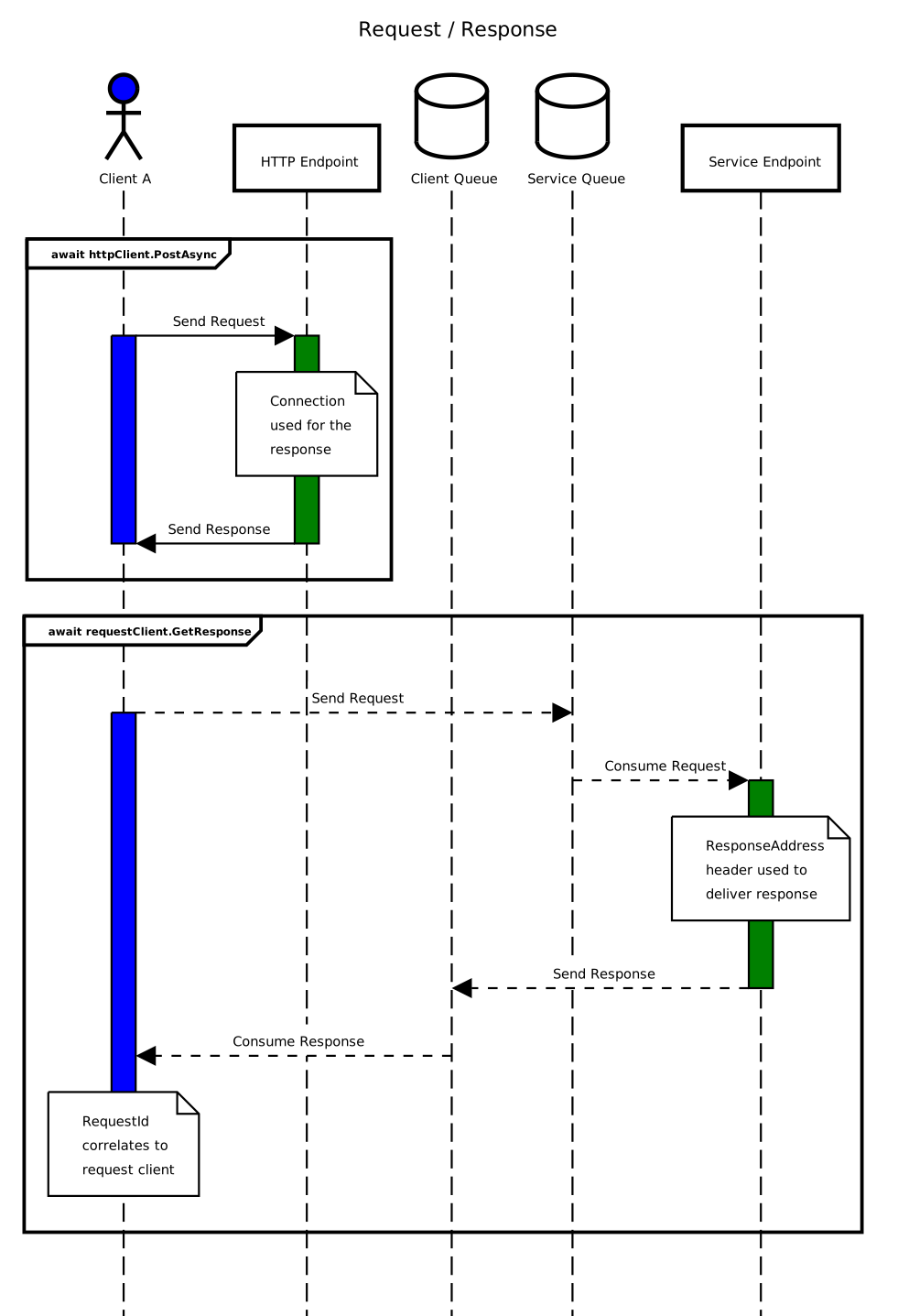
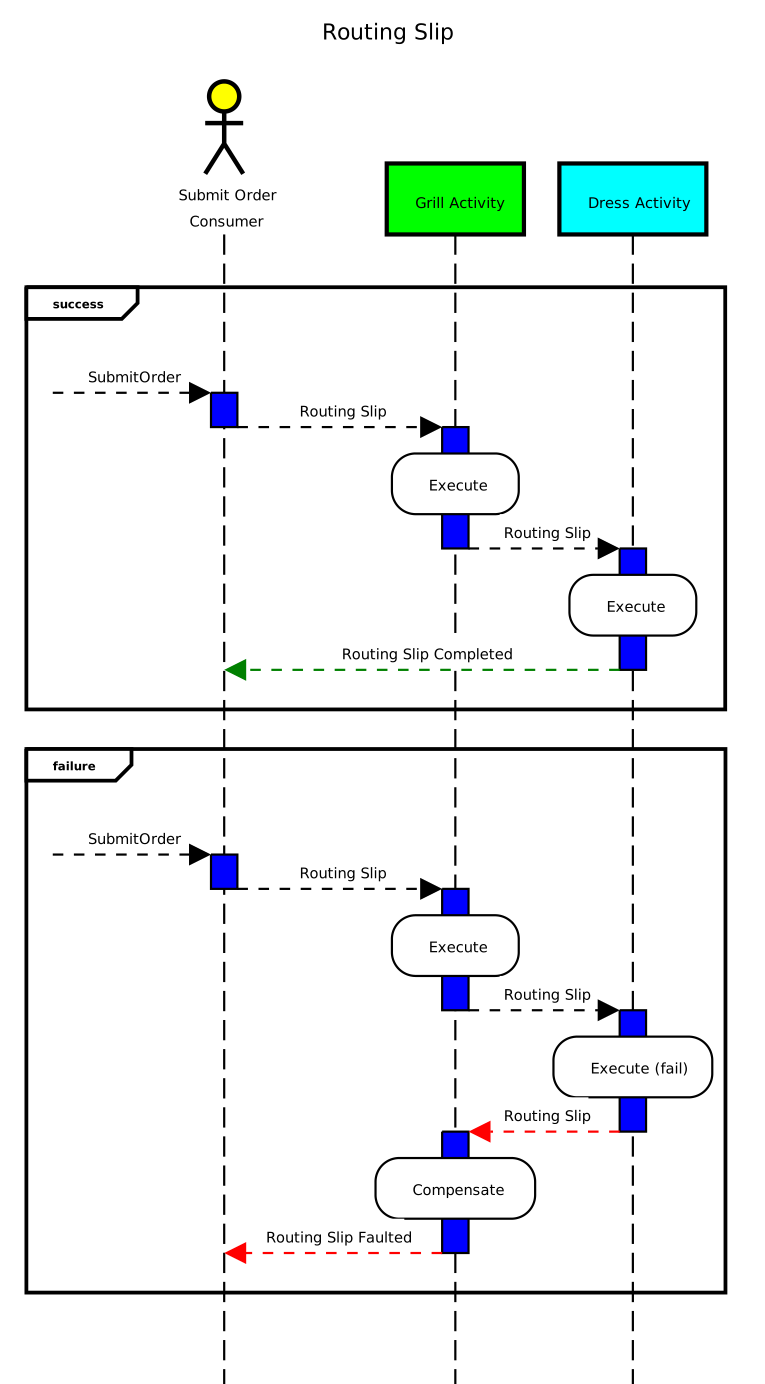
## Design Diagrams
### Request Response
### Routing Slip
### Example SubmitOrder Post
```
POST https://localhost:5001/Order
Content-Type: application/json
{
"orderId": "{{$guid}}",
"burgers": [
{
"burgerId": "{{$guid}}",
"weight": 2,
"lettuce": false,
"cheese": true,
"pickle": true,
"onion": true,
"ketchup": true,
"mustard": true,
"barbecueSauce": true,
"onionRing": true
}
],
"fries": [
{
"fryId": "{{$guid}}",
"size": 1
}
],
"shakes": [
{
"shakeId": "{{$guid}}",
"flavor": "Strawberry",
"size": 1
}
],
"fryShakes": [
{
"fryShakeId": "{{$guid}}",
"flavor": "Banna",
"size": 1
}
]
}
```
### Logging and OpenTelemetry Links
- [Seq](https://datalust.co/) - http://localhost:5341
- [Grafana](https://grafana.com/docs/tempo/latest/) - http://localhost:3001
- [Jaegar](https://www.jaegertracing.io/) - http://localhost:16686