https://github.com/master-co/theme-mode
A lightweight utility for switching CSS theme modes
https://github.com/master-co/theme-mode
Last synced: about 1 year ago
JSON representation
A lightweight utility for switching CSS theme modes
- Host: GitHub
- URL: https://github.com/master-co/theme-mode
- Owner: master-co
- License: mit
- Created: 2024-03-01T07:04:16.000Z (over 2 years ago)
- Default Branch: main
- Last Pushed: 2024-06-09T00:49:05.000Z (about 2 years ago)
- Last Synced: 2025-05-04T09:24:02.599Z (about 1 year ago)
- Language: TypeScript
- Homepage:
- Size: 757 KB
- Stars: 10
- Watchers: 1
- Forks: 0
- Open Issues: 0
-
Metadata Files:
- Readme: README.md
- Contributing: .github/CONTRIBUTING.md
- License: LICENSE
- Code of conduct: .github/CODE_OF_CONDUCT.md
Awesome Lists containing this project
README

A lightweight utility for switching CSS theme modes



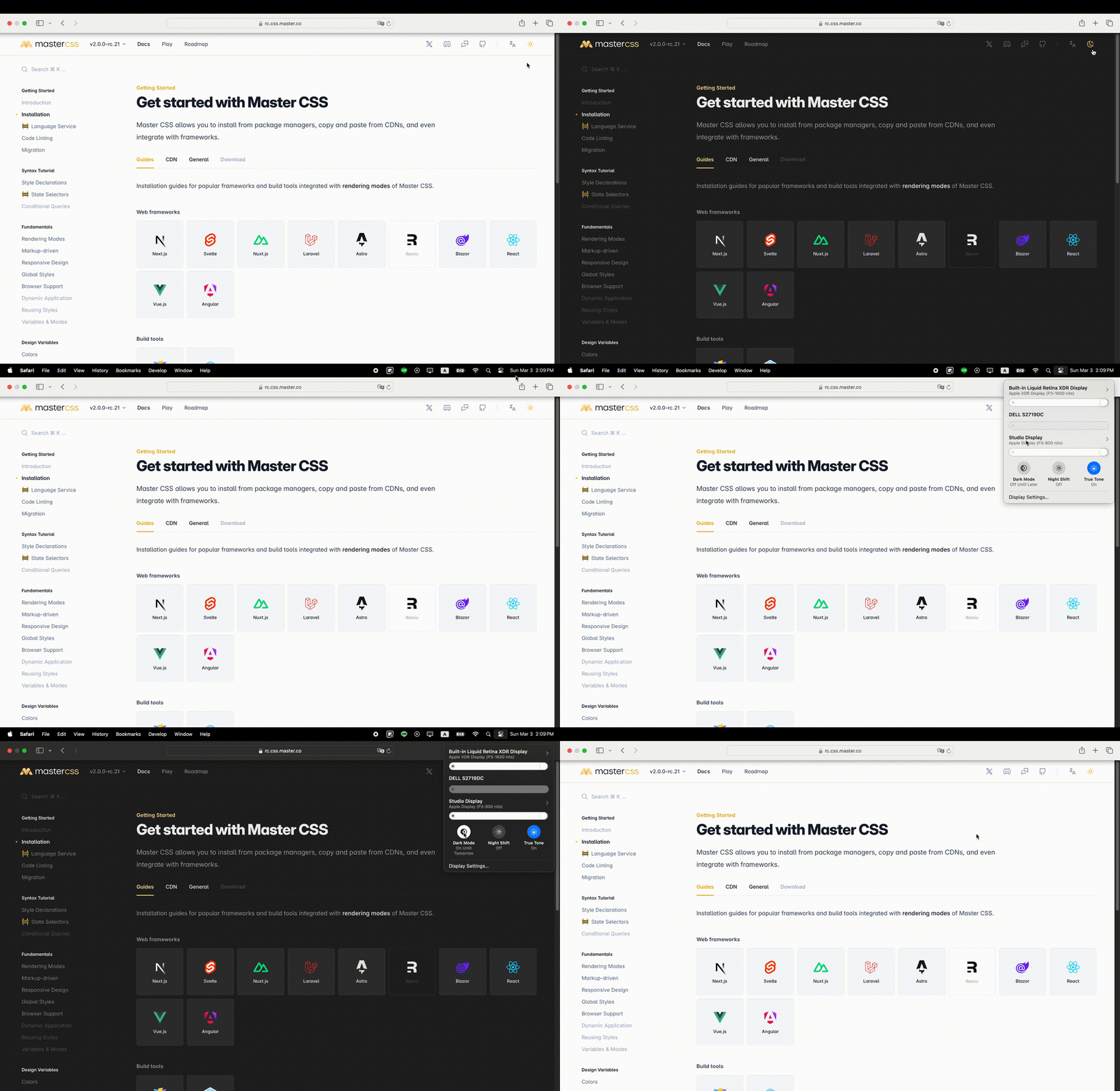
[Try it out on the Master CSS documentation site.](https://rc.css.master.co/docs)
## Features
Vanilla, Next, React, Vue, Svelte, and Master CSS are available:
* ⚡️ Ultra-lightweight **~1.2KB**
* 🌈 Switch between `light`, `dark`, and `system`
* 💖 Sync with system theme preferences
* 💾 Store the user's preference in `localStorage`
* 💫 Access theme preferences and modes through context
* 🧩 Built-in `"use client"` directive
## Why should I use this?
The `prefers-color-scheme` cannot force override to the specified color mode. Once you want to switch themes, you cannot use `@media (prefers-color-scheme: dark)`.
https://stackoverflow.com/questions/56300132/how-to-override-css-prefers-color-scheme-setting
## How does this work?
This package automatically switches themes using `class=""` and `color-scheme:`; that's it.
```html
Hello World
```
To view the source code examples:
- React: https://github.com/master-co/theme-mode/tree/main/examples/react
- Vue: https://github.com/master-co/theme-mode/tree/main/examples/vue
- Svelte: https://github.com/master-co/theme-mode/tree/main/examples/svelte
## Getting Started
Install the package depending on your framework.
### Vanilla
```bash
npm install theme-mode
```
```js
import ThemeMode from 'theme-mode'
const themeMode = new ThemeMode().init()
// Set `preference` anywhere to switch theme modes.
themeMode.preference = 'dark'
```
### React
```bash
npm install @master/theme-mode.react
```
```tsx
import ThemeModeProvider from '@master/theme-mode.react'
export default function App({ children }) {
return (
{children}
)
}
```
### Vue
```bash
npm install @master/theme-mode.vue
```
```vue
import ThemeModeProvider from '@master/theme-mode.vue'
```
### Svelte
```bash
npm install @master/theme-mode.svelte
```
```svelte
import ThemeModeProvider from '@master/theme-mode.svelte';
...
```
## Basic usage
### Default to light or dark mode
You can set the default theme mode when the user has not set a theme preference, such as common `light` or `dark` mode.
```tsx
...
```
Rendered as:
```html
…
```
### Default based on the system preference
Automatically switches modes based on the user's system preference.
```tsx
...
```
Rendered as:
```html
…
…
```
> Note: CSS only supports light and dark modes for system preferences.
### Sync the user's preference to `localStorage`
By default `options.store` is set to `'theme-preference'`, which uses this key to set local storage when the preference is changed.
In this way, the theme preference set last time will be applied when the user visits or refreshes the website again.
To disable local storage, set it to `false`.
```tsx
...
```
## Apply styles based on theme modes
You can now create selector-driven CSS themes using tools like [Master CSS](https://rc.css.master.co/docs/variables-and-modes).
```html
Dark
Light
Christmas
```
## Create a theme-switching select
### React
```tsx
import { useThemeMode } from '@master/theme-mode.react'
export default function ThemeModeSelect() {
const themeMode = useThemeMode()
return (
{themeMode.value === 'dark' ? '🌜' : '☀️'} {themeMode.preference}
themeMode.preference = event.target.value}>
☀️ Light
🌜 Dark
System
)
}
```
### Vue
```vue
import { inject } from 'vue'
const themeMode = inject<any>('theme-mode')
{{ themeMode.value === 'dark' ? '🌜' : '☀️' }} {{ themeMode.preference }}
☀️ Light
🌜 Dark
System
```
### Svelte
```svelte
import { getThemeMode } from "@master/theme-mode.svelte";
const themeMode = getThemeMode();
{$themeMode.value}
{$themeMode.preference}
☀️ Light
🌜 Dark
System
```
## Avoid FOUC
If you've pre-rendered your CSS styles to the page to improve the page loading and first-render experience, it's crucial to initialize the theme mode in advance.
By default, three modules of minified advanced initial scripts for different default themes are exported:
- `theme-mode/pre-init`: https://github.com/master-co/theme-mode/tree/main/packages/core/src/pre-init.iife.min.ts
- `theme-mode/pre-init-light`: https://github.com/master-co/theme-mode/tree/main/packages/core/src/pre-init-light.iife.min.ts
- `theme-mode/pre-init-dark`: https://github.com/master-co/theme-mode/tree/main/packages/core/src/pre-init-dark.iife.min.ts
You have to use the build tool to inject these original scripts into HTML ``, taking Next.js as an example:
```tsx
import PRE_INIT_THEME_MODE_SCRIPT from '!!raw-loader!theme-mode/pre-init';
export default async function RootLayout({ children }: {
children: JSX.Element
}) {
return (
...
...
)
}
```
Or copy them directly:
```js
const preference = localStorage.getItem('theme-preference') || 'system';
const value = preference === 'system'
? matchMedia('(prefers-color-scheme:dark)').matches ? 'dark' : 'light'
: preference;
document.documentElement.classList.add(value);
if (['dark', 'light'].includes(value)) document.documentElement.style.colorScheme = value;
```
Those JS resources cannot be loaded from external because this is a critical script for the first painting of the page.
## Options
### `.preference`
Specify the default theme preference.
- Default: `undefined`
- Value: `'dark'` | `'light'` | `'system'` | `string`
### `.store`
Enable local storage and specify the key for `localStorage`.
- Default: `'theme-preference'`
- Value: `'theme-preference'` | `string` | `false`
## Properties
### `themeMode.preference`
Set or get the current theme preference.
- Default: `undefined`
- Value: `'dark'` | `'light'` | `'system'` | `string`
### `themeMode.value`
Set or get the current theme mode.
- Default: `undefined`
- Value: `'dark'` | `'light'` | `string`
### `themeMode.storage`
Get the currently stored theme preference.
- Default: `undefined`
- Value: `'dark'` | `'light'` | `string`
### `themeMode.systemPreference`
Get the theme mode of the current system
- Default: `undefined`
- Value: `'dark'` | `'light'` | `string`
## Methods
### `themeMode.init()`
Initialize the default theme mode. This is usually performed after the DOM has been initialized.
### `themeMode.destroy()`
Destroy the theme mode, including removing media query listeners.
## Community
The Master community can be found here:
- [Discuss on GitHub](https://github.com/master-co/theme-mode/discussions) - Ask questions, voice ideas, and do any other discussion
- [Join our Discord Server](https://discord.com/invite/sZNKpAAAw6) - Casually chat with other people using the language ✓ 中文
Our [《 Code of Conduct 》](https://github.com/master-co/theme-mode/blob/main/.github/CODE_OF_CONDUCT.md) applies to all Master community channels.
## Contributing
Please see our [CONTRIBUTING](https://github.com/master-co/theme-mode/blob/main/.github/CONTRIBUTING.md) for workflow.