https://github.com/master-wayne7/reviewer-bot
An AI-powered VS Code extension that generates one-liner reviews above function definitions using Gemini 2.0 Flash API.
https://github.com/master-wayne7/reviewer-bot
fortheloveofcode gemini gemini-ai go golang typescript vscode-extension
Last synced: 3 months ago
JSON representation
An AI-powered VS Code extension that generates one-liner reviews above function definitions using Gemini 2.0 Flash API.
- Host: GitHub
- URL: https://github.com/master-wayne7/reviewer-bot
- Owner: master-wayne7
- License: mit
- Created: 2025-07-30T08:33:50.000Z (12 months ago)
- Default Branch: master
- Last Pushed: 2025-07-31T08:18:49.000Z (12 months ago)
- Last Synced: 2025-07-31T11:24:10.350Z (12 months ago)
- Topics: fortheloveofcode, gemini, gemini-ai, go, golang, typescript, vscode-extension
- Language: Go
- Homepage: https://portfolio-87bd3.web.app/
- Size: 3.97 MB
- Stars: 1
- Watchers: 0
- Forks: 0
- Open Issues: 0
-
Metadata Files:
- Readme: README.md
- Changelog: CHANGELOG.md
- License: LICENSE
Awesome Lists containing this project
README
# ReviewerBot 🤖
An AI-powered VS Code extension that generates one-liner reviews above function definitions using **Gemini 2.0 Flash API**. Reviews are generated in different styles: funny, roast, motivational, technical, and hilarious!
## ✨ Features
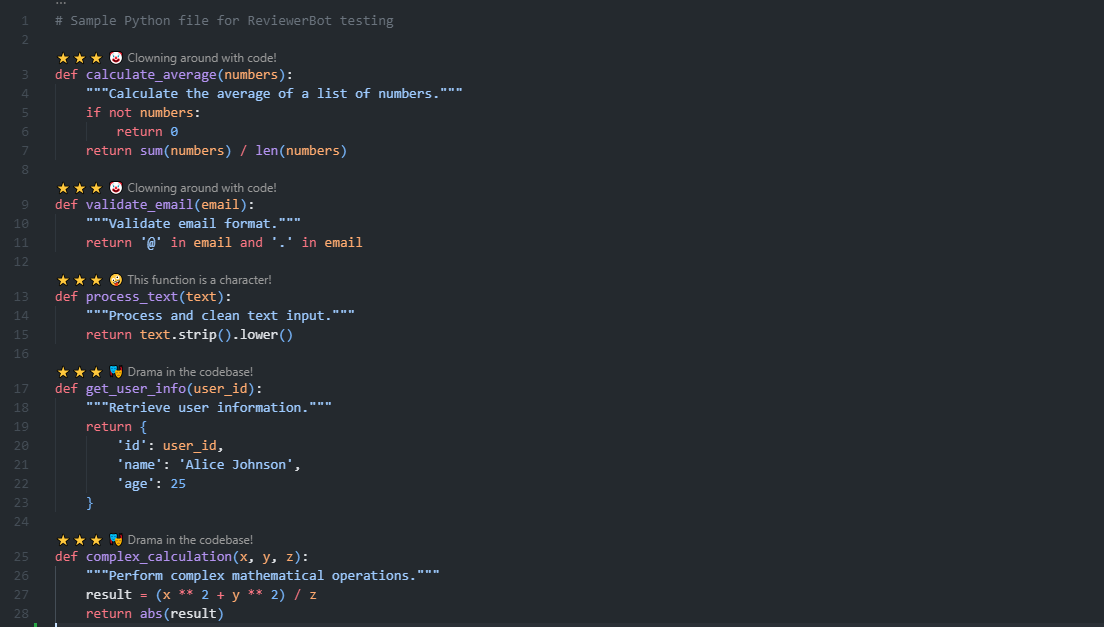
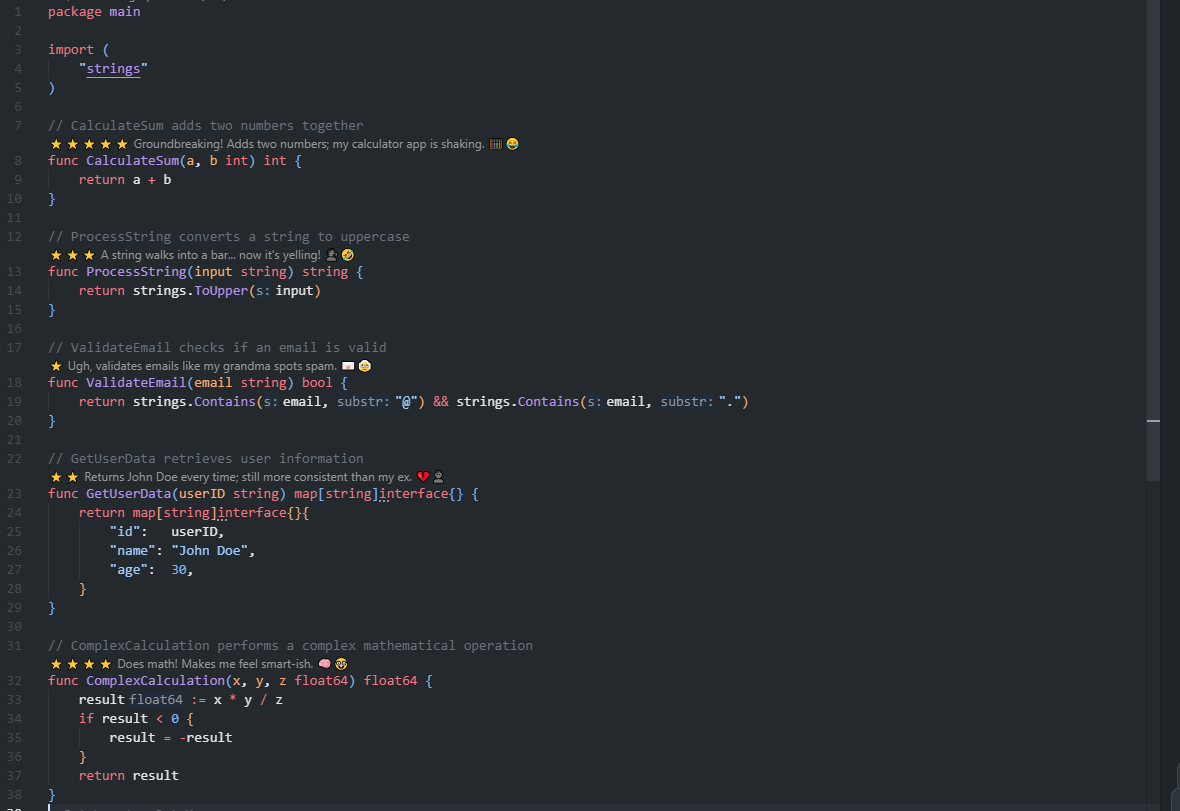
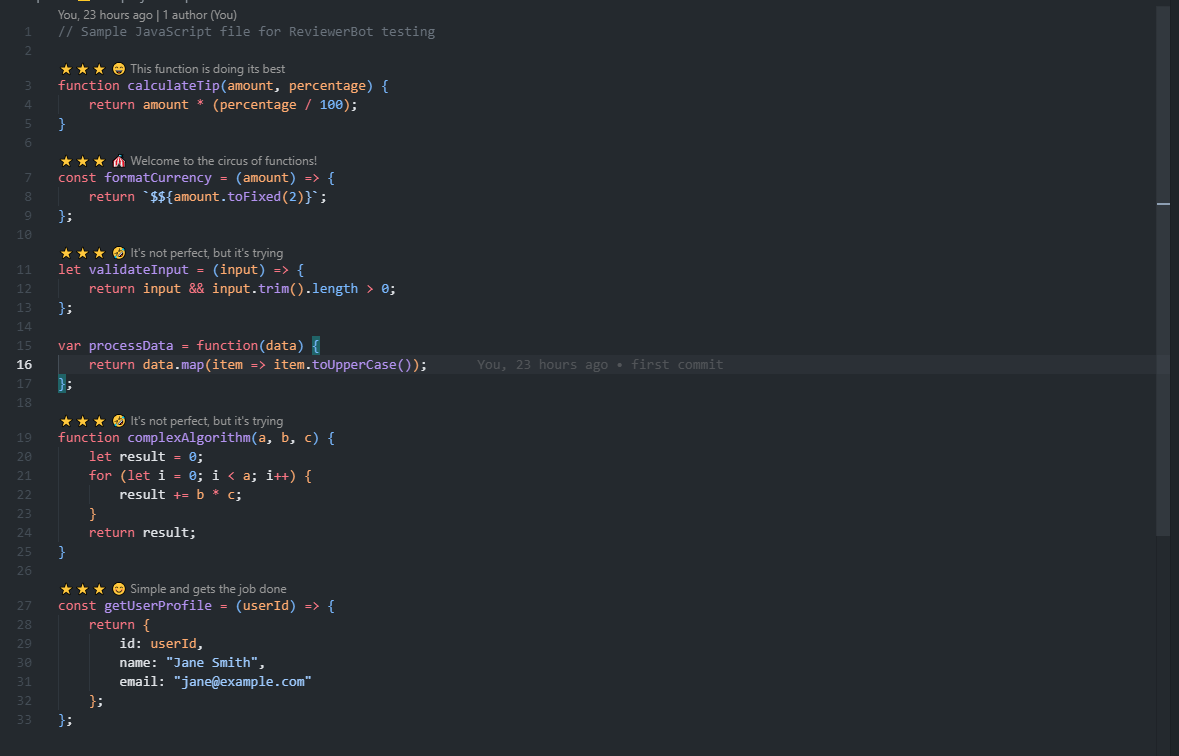
- **Multi-language Support**: Go, Python, JavaScript/TypeScript, C, C++, Dart, Java
- **Multiple Review Styles**:
- 😄 **Funny**: Light-hearted and humorous
- 🔥 **Roast**: Sarcastic and critical
- 💪 **Motivational**: Encouraging and uplifting
- 🔧 **Technical**: Professional and constructive
- 🤪 **Hilarious**: Over-the-top and entertaining
- **Star Ratings**: Automatic star ratings (⭐ to ⭐⭐⭐⭐⭐)
- **Auto-generation**: Generate reviews on file save (optional)
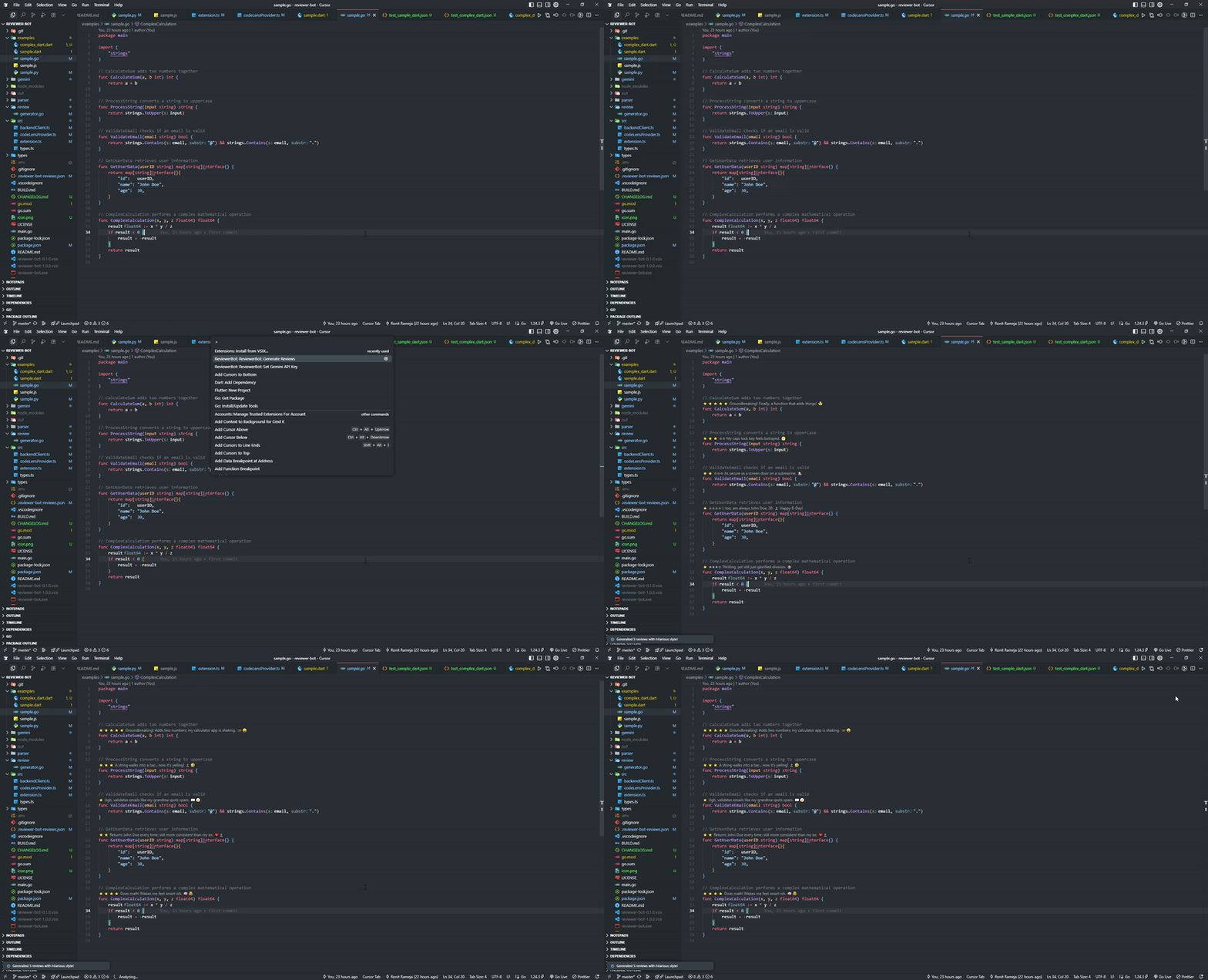
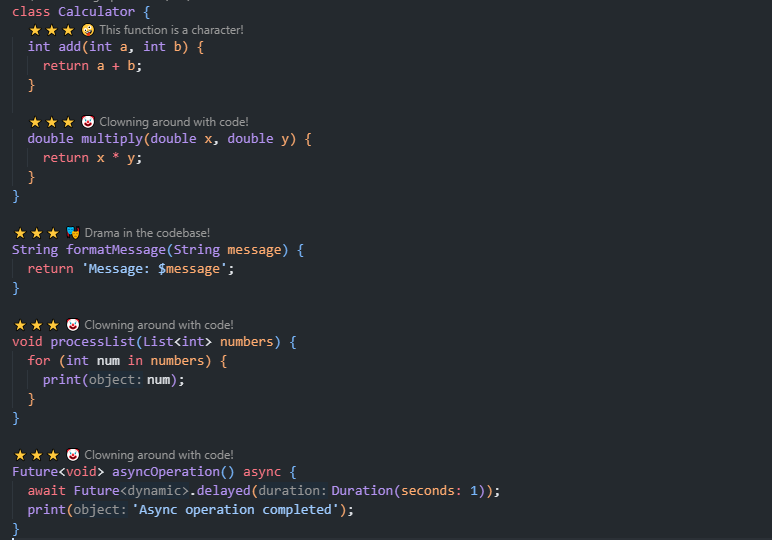
- **CodeLens Integration**: Reviews appear as clickable CodeLens above functions
- **Mock Mode**: Test without API calls
## 📸 Screenshots & Demo
### 🎬 Demo
### 📱 Screenshots by Language
#### 🐍 Python
#### 🟢 Go
#### 🟡 JavaScript
#### 🎯 Dart
## 🏗️ Architecture
ReviewerBot consists of two main components:
### 1. Go Backend (`/backend`)
- **Function Parser**: Detects function definitions using regex patterns
- **Gemini Integration**: Connects to Gemini 2.0 Flash API
- **Review Generator**: Formats reviews with star ratings
- **Direct Communication**: Called directly by VS Code extension via stdin/stdout
- **Mock Mode**: Fallback reviews when API is unavailable
### 2. VS Code Extension (`/extension`)
- **Backend Client**: Calls Go executable directly via stdin/stdout
- **CodeLens Provider**: Displays reviews as clickable CodeLens above functions
- **Configuration UI**: Settings for API key, review style, etc.
- **Command Palette**: Manual review generation, clearing, and review history
## 🚀 Quick Start
### Prerequisites
- Go 1.21+
- Node.js 16+
- VS Code
- Gemini API Key
### 1. Setup Go Backend
```bash
# Install dependencies
go mod tidy
# Build the executable
go build -o reviewer-bot.exe main.go
# Set your Gemini API key (optional - will use mock mode if not set)
export GEMINI_API_KEY="your-api-key-here"
```
The Go executable will be called directly by the extension via stdin/stdout communication.
### 2. Setup VS Code Extension
```bash
# Navigate to extension directory
cd extension
# Install dependencies
npm install
# Compile TypeScript
npm run compile
# Package extension (optional)
npm run package
```
### 3. Install Extension
1. Open VS Code
2. Press `Ctrl+Shift+P` (or `Cmd+Shift+P` on Mac)
3. Type "Extensions: Install from VSIX"
4. Select the packaged `.vsix` file
### 4. Configure Extension
1. Open VS Code Settings (`Ctrl+,`)
2. Search for "ReviewerBot"
3. Configure:
- **API Key**: Your Gemini API key (optional - will use mock mode if not set)
- **Review Style**: Choose your preferred style
- **Auto-generate on Save**: Enable/disable
## 📖 Usage
### Manual Review Generation
1. Open a supported file (`.go`, `.js`, `.ts`, `.py`)
2. Press `Ctrl+Shift+P` (or `Cmd+Shift+P`)
3. Type "ReviewerBot: Generate Reviews"
4. Reviews will appear above function definitions
### API Key Management
1. **Set API Key**: Press `Ctrl+Shift+P` → "ReviewerBot: Set Gemini API Key"
2. **Clear API Key**: Press `Ctrl+Shift+P` → "ReviewerBot: Clear Gemini API Key"
3. **Show Configuration**: Press `Ctrl+Shift+P` → "ReviewerBot: Show Current Configuration"
4. **Mock Mode**: If no API key is set, mock reviews will be generated
### Review Persistence
- Reviews are automatically saved to `.reviewer-bot-reviews.json` in your workspace
- Reviews persist across file sessions and VS Code restarts
- Review history is maintained for each function
### AI-Powered Star Ratings
- Star ratings (⭐ to ⭐⭐⭐⭐⭐) are now generated by the AI based on code quality
- Ratings consider: code structure, readability, naming, error handling, performance, and best practices
- No more random ratings - each review gets a quality-based star rating
### Clear Reviews
1. Press `Ctrl+Shift+P` (or `Cmd+Shift+P`)
2. Type "ReviewerBot: Clear Reviews"
3. All reviews will be removed
### Review History
1. Click on any CodeLens review above a function
2. View the review history for that function
3. Select from previous reviews
### Auto-generation on Save
Enable in settings to automatically generate reviews when saving files.
## 🎨 Review Styles
### Funny 😄
```
⭐⭐⭐⭐ Well-structured and funny—this function actually made me smile 😂
function calculateTip(amount) {
...
}
```
### Roast 🔥
```
⭐⭐ This function has more ifs than your life plan. Still… functional. 🤷
function validateEmail(email) {
...
}
```
### Motivational 💪
```
⭐⭐⭐⭐⭐ You're doing great! This function rocks! 🚀
function processData(data) {
...
}
```
### Technical 🔧
```
⭐⭐⭐⭐ Well-structured and efficient code 📊
function calculateAverage(numbers) {
...
}
```
### Hilarious 🤪
```
⭐⭐⭐ This function is so wild, it needs a leash! 🦮
function complexAlgorithm(a, b, c) {
...
}
```
> **Note**: Reviews appear as clickable CodeLens above function definitions, not as comments in the code.
## 🔧 Configuration
### Backend Configuration
Environment Variables:
- `GEMINI_API_KEY`: Your Gemini API key (optional - will use mock mode if not set)
- `MOCK_MODE`: Set to "true" for testing without API
### Extension Configuration
VS Code Settings:
```json
{
"reviewerBot.apiKey": "your-gemini-api-key",
"reviewerBot.reviewStyle": "funny",
"reviewerBot.autoGenerateOnSave": false,
"reviewerBot.enabledLanguages": ["go", "javascript", "typescript", "python"]
}
```
## 🧪 Testing
### Test Backend
```bash
# Test with mock mode
MOCK_MODE=true go run main.go
# Test with sample data
echo '{"file_path": "test.go", "file_content": "func test() {}", "style": "funny"}' | go run main.go
```
### Test Extension
1. Open a sample file from `/examples`
2. Run "ReviewerBot: Generate Reviews"
3. Verify reviews appear above functions
## 📁 Project Structure
```
reviewer-bot/
├── backend/ # Go backend
│ ├── main.go # Entry point
│ ├── parser/ # Function parsing
│ ├── gemini/ # Gemini API client
│ ├── review/ # Review generation
│ ├── types/ # Data structures
│ └── go.mod # Go dependencies
├── extension/ # VS Code extension
│ ├── src/ # TypeScript source
│ ├── package.json # Extension manifest
│ └── tsconfig.json # TypeScript config
├── examples/ # Sample files
│ ├── sample.go
│ ├── sample.js
│ └── sample.py
└── README.md
```
## 🤝 Contributing
1. Fork the repository
2. Create a feature branch
3. Make your changes
4. Add tests if applicable
5. Submit a pull request
## 📝 License
MIT License - see LICENSE file for details
## 🙏 Acknowledgments
- Google Gemini 2.0 Flash API for AI-powered reviews
- VS Code Extension API for the development platform
- Go community for the excellent standard library
## 🐛 Troubleshooting
### Backend Issues
- **Executable not found**: Ensure `reviewer-bot.exe` is in workspace root
- **API key invalid**: Verify your Gemini API key
- **Permission errors**: Check file permissions for executable
### Extension Issues
- **Backend not found**: Ensure Go executable is in workspace root
- **No reviews generated**: Check file type support
- **Configuration errors**: Verify settings in VS Code
### Common Solutions
1. Restart VS Code after configuration changes
2. Check Developer Tools console for error messages
3. Verify Go executable is in workspace root
4. Test with mock mode first
---
**Happy coding with ReviewerBot! 🎉**