https://github.com/mastermindg/gdrive_sync
Docker Container To Sync a Folder to Google Drive
https://github.com/mastermindg/gdrive_sync
docker google raspberry-pi
Last synced: about 2 months ago
JSON representation
Docker Container To Sync a Folder to Google Drive
- Host: GitHub
- URL: https://github.com/mastermindg/gdrive_sync
- Owner: mastermindg
- Created: 2017-10-14T02:35:37.000Z (over 8 years ago)
- Default Branch: master
- Last Pushed: 2017-10-17T23:59:46.000Z (over 8 years ago)
- Last Synced: 2025-02-25T06:27:28.000Z (over 1 year ago)
- Topics: docker, google, raspberry-pi
- Language: Ruby
- Size: 150 KB
- Stars: 1
- Watchers: 2
- Forks: 0
- Open Issues: 0
-
Metadata Files:
- Readme: README.md
Awesome Lists containing this project
README
# gdrive_sync
Docker container that syncs a folder to Google Drive.
There are two builds on Docker Hub: ARM and x86.
Follow the following steps:
## 1) Create a new project, or select an existing project
Go to the [credentials page](https://console.developers.google.com/apis/credentials) in the Google Developer Console.

## 2) Enable Google Drive API
Go [here](https://console.developers.google.com/apis/library/drive.googleapis.com/?q=drive) and click Enable
## 3) Create a Token
1. Click "Create credentials" -> "OAuth client ID".
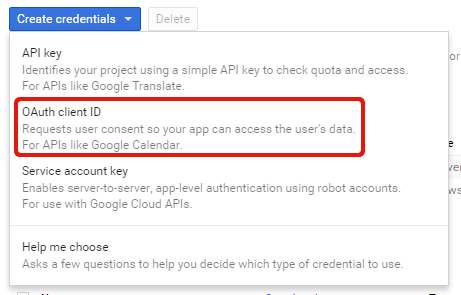
1. Choose "Other UI" for "Application type".

1. Choose User data for "What data will you be accessing?"
1. Click "What credentials do I need?"
1. Click "Create client ID"
1. Enter a Product Name for "Product name shows to users"
1. Click Done
1. Click the client ID in the list - i.e. "Other client 1"
1. Create a file config.json which contains the client ID and client secret from the page that you're on now, which looks like:
```
{
"client_id": "xxxxxxxxxxxx-xxxxxxxxxxxxxxxxxxxxxxxxxxxxxxxx.apps.googleusercontent.com",
"client_secret": "xxxxxxxxxxxxxxxxxxxxxxxx"
}
```
## 3) Get Started!
The start.sh script will make sure you're ready to go. Follow the on-screen instructions to get going. You'll need to authenticate against your account so be prepared to open up a browser window. Once you're ready you'll need to pick a folder to mount to the container. This folder will be where you're downloading files to, i.e. /myshare/files
```
./start.sh
```