https://github.com/math0ne/keyboard-gherkin
The layout for my Gherkin Keyboard
https://github.com/math0ne/keyboard-gherkin
Last synced: 5 months ago
JSON representation
The layout for my Gherkin Keyboard
- Host: GitHub
- URL: https://github.com/math0ne/keyboard-gherkin
- Owner: math0ne
- Created: 2017-07-06T16:16:06.000Z (almost 9 years ago)
- Default Branch: master
- Last Pushed: 2021-04-13T20:32:02.000Z (about 5 years ago)
- Last Synced: 2025-07-27T05:23:10.156Z (11 months ago)
- Language: Makefile
- Size: 1.97 MB
- Stars: 40
- Watchers: 2
- Forks: 9
- Open Issues: 0
-
Metadata Files:
- Readme: readme.md
Awesome Lists containing this project
README
## gherkin keyboard firmware
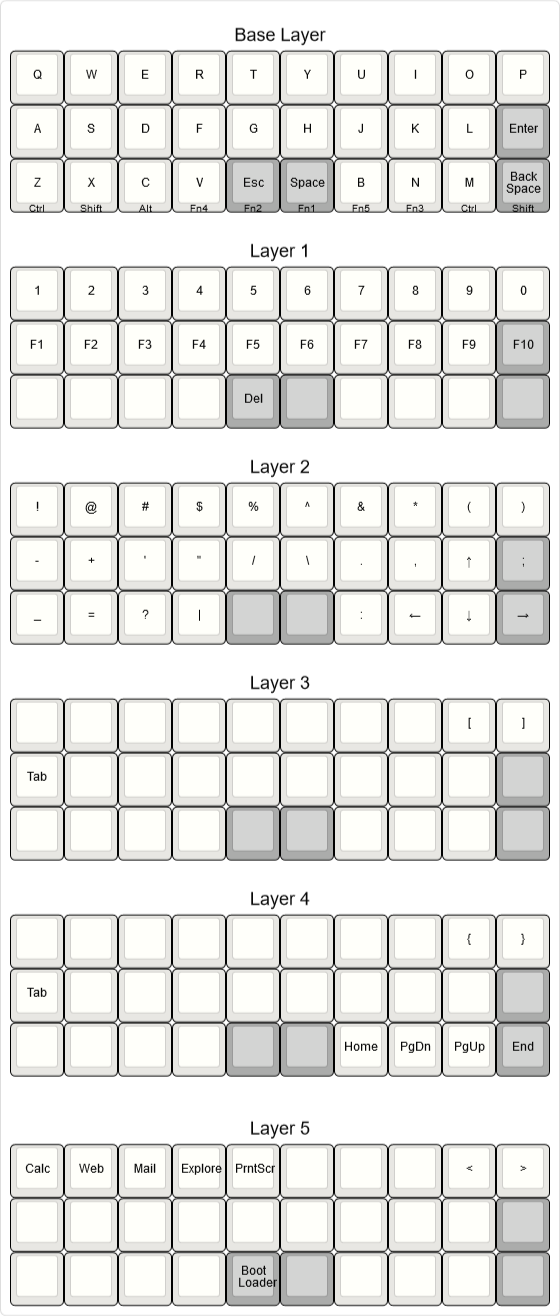
You can see my layout here: http://www.keyboard-layout-editor.com/#/gists/5dec436256c0d150b6f5e854bc4c8429
I ran these commands in ubuntu bash for windows which seems to work great but will also work in cygwin or any linux distro.
* How to flash:
```
apt-get install gcc-avr binutils-avr gdb-avr avr-libc avrdude
git clone https://github.com/openist/keyboard-gherkin.git
cd keyboard-gherkin
make
```
* Copy your .hex file to somewhere you can easily access it on your windows machine.
* Download Xloader: http://russemotto.com/xloader/
* Connect your pro micro via usb, you should hear the device connected sound, if you do not you may not be using a proper data micro usb cable.
* Reset the pro micro twice to enter bootloader mode.
* Within 8 seconds load the hex file into xloader and press upload.
Original Creator: https://www.40percent.club/
Originally forked from: https://github.com/di0ib/
Gerber files released under https://creativecommons.org/licenses/by-sa/4.0/
