https://github.com/matsuoka-601/splash
Fluid simulation with a white splash🌊
https://github.com/matsuoka-601/splash
fluid parallel webgpu
Last synced: 5 months ago
JSON representation
Fluid simulation with a white splash🌊
- Host: GitHub
- URL: https://github.com/matsuoka-601/splash
- Owner: matsuoka-601
- License: mit
- Created: 2025-02-16T17:21:46.000Z (over 1 year ago)
- Default Branch: main
- Last Pushed: 2025-02-22T13:58:59.000Z (over 1 year ago)
- Last Synced: 2025-02-22T14:37:48.372Z (over 1 year ago)
- Topics: fluid, parallel, webgpu
- Language: TypeScript
- Homepage: https://splash-fluid.netlify.app/
- Size: 5.29 MB
- Stars: 0
- Watchers: 1
- Forks: 0
- Open Issues: 0
-
Metadata Files:
- Readme: README.md
- License: LICENSE
Awesome Lists containing this project
README
# Splash
**Splash** is a real-time fluid simulation with the following features. [Try Demo Here!](https://splash-fluid.netlify.app)
- Smoother fluid surface thanks to **Narrow-Range Filter (PACMCGIT 2018)** by Truong and Yuksel.
- **Shadows using ray marching** through the density field (particle mode only)
- Improved simulation performance due to the reduced number of substeps
- More interaction 🌊 (see the demo video)

The simulation and rendering is implemented in WebGPU. The Simulation is based on an algorithm called **MLS-MPM (Moving Least Squared Material Point Method)** and the rendering is based on **Screen-Space Fluid Rendering**. For more detail, see [my article on Codrops](https://tympanus.net/codrops/2025/02/26/webgpu-fluid-simulations-high-performance-real-time-rendering/).
## Demo Video
[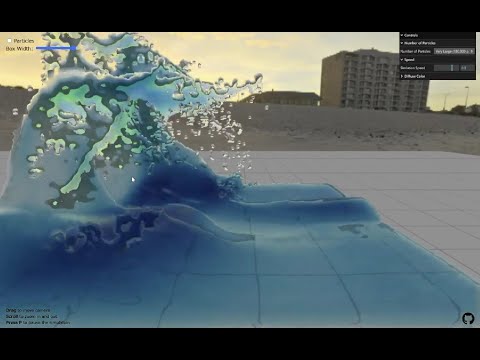](https://www.youtube.com/watch?v=9C7DRSdh88g)
## Narrow-Range Filter for Depth Smoothing
For rendering fluids, I have used a Bilateral Filter for depth smoothing in past two projects ([WebGPU-Ocean](https://github.com/matsuoka-601/webgpu-ocean) and [WaterBall](https://github.com/matsuoka-601/waterball)). The fluid surface obtained with a Bilateral Filter has a decent quality, but it can have some visible artifacts.
To mitigate these artifacts, more sophisticated filters than Bilateral Filter have been proposed. The one I'm using for this project is a [Narrow-Range Filter (PACMCGIT 2018)](https://ttnghia.github.io/pdf/NarrowRangeFilter.pdf) by Troung and Yuksel. This filter aims to render a smoother and cleaner fluid surface compared to other filters, while maintaining real-time performance.
Thanks to a Narrow-Range Filter, I could get a more beautiful reflections & refractions like below compared to past projects where I used a Bilateral Filter. The computational overhead was not that much (I haven't done timing seriously though) compared to Bilateral Filter, which made me decide to use it.

## Shadows Using Raymarching
When switching to Particle mode, you can see shadows are rendered on the surface of the fluid particles.

For rendering these shadows, I'm using **ray marching** using the density grid obtained in the simulation. Additional P2G stage is performed in order to build a density grid. This P2G adds extra performance overhead, but it's not that much since only single floating point number is scattered.
## Single Simulation Substep
The number of simulation steps per frame is very important for real-time performance. In the two previous projects ([WebGPU-Ocean](https://github.com/matsuoka-601/webgpu-ocean/) and [WaterBall](https://github.com/matsuoka-601/waterball)), 2 simulation steps per frame were required for stability. On the other hand, only 1 simulation step is required per frame in this simulation!
In this simulation, I use [Tait equation](https://en.wikipedia.org/wiki/Tait_equation) to calculate pressure like below.
$$
p=k\times \left\\{ \left(\frac{\rho}{\rho_0}\right)^\gamma-1 \right\\}
$$
($k$: stiffness of the fluid, $\rho$: the density of the fluid, $\rho_0$: rest density, $\gamma$: a parameter which determines the incompressibility of the fluid)
$\gamma$ seems have a large influence on the stability of the simulation. In the past projects, I've used $\gamma=5$, but I changed this to $\gamma=1$ in this simulation. This appears to increase the stability of the simulation at the expense of incompressibility. To mitigate the decreased incompressibility, I increased $k$ (the stiffness of the fluid) by a lot.
## How to run
```
npm install
npm run serve
```
If you have trouble running the sim, feel free to open an issue.
`million` branch is for you who want to heat your GPU up! In this branch, `very large` mode amounts to 1.6M particles, which is a very close to the memory limit of the buffer size.