https://github.com/mattecapu/init-npm-project
arrange a minimal setup for an npm project
https://github.com/mattecapu/init-npm-project
Last synced: 4 months ago
JSON representation
arrange a minimal setup for an npm project
- Host: GitHub
- URL: https://github.com/mattecapu/init-npm-project
- Owner: mattecapu
- Created: 2017-01-26T15:16:15.000Z (over 9 years ago)
- Default Branch: master
- Last Pushed: 2017-01-31T18:00:56.000Z (over 9 years ago)
- Last Synced: 2025-10-28T05:27:54.854Z (7 months ago)
- Language: JavaScript
- Size: 56.6 KB
- Stars: 0
- Watchers: 1
- Forks: 0
- Open Issues: 0
-
Metadata Files:
- Readme: README.md
Awesome Lists containing this project
README
# init-npm-project
### arrange a minimal setup for an npm project
## Installation
This package is best consumed as a CLI command, so
```
npm install --global init-npm-project
```
## Usage
```bash
init-npm-project [--name] [--description] [--author] [--no-github] [--no-mkdir]
```
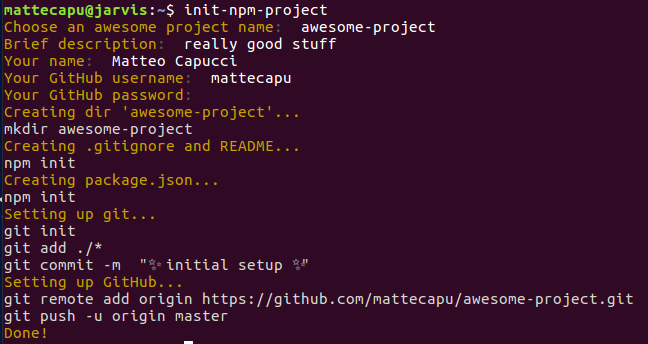
By default, name, description and author name are asked before creation. If you like one-liners, you may provide them using the named args.
GitHub credentials cannot be provided as args, you always have to type them.
#### `--name`
The name of your next project.
#### `--description`
The description of you next project.
#### `--author`
Your name (and optionally email). This gets directly dumped in the `package.json` author field.
#### `--no-mkdir`
Do not create a dir but use an existent one.
Be careful because the tool may overwrite existing files (`package.json`, `README.md`, `.gitignore`).
#### `--no-github`
If this flag is specified, nothing GitHub-related will be done.
Otherwise, the tool will ask for your GitHub credentials (which are not stored in any way, you can check the code).
## License
MIT