https://github.com/mattqdev/stackfingerprint
Scan any public GitHub repo and generate a beautiful, embeddable SVG card of its tech stack. Zero auth, zero config.
https://github.com/mattqdev/stackfingerprint
card readme shield shieldsio stack svg tech
Last synced: about 2 months ago
JSON representation
Scan any public GitHub repo and generate a beautiful, embeddable SVG card of its tech stack. Zero auth, zero config.
- Host: GitHub
- URL: https://github.com/mattqdev/stackfingerprint
- Owner: mattqdev
- Created: 2026-03-05T22:52:53.000Z (4 months ago)
- Default Branch: main
- Last Pushed: 2026-04-06T05:57:06.000Z (3 months ago)
- Last Synced: 2026-04-06T08:14:37.340Z (3 months ago)
- Topics: card, readme, shield, shieldsio, stack, svg, tech
- Language: JavaScript
- Homepage: https://stackfingerprint.vercel.app
- Size: 971 KB
- Stars: 2
- Watchers: 0
- Forks: 0
- Open Issues: 1
-
Metadata Files:
- Readme: README.md
- Contributing: CONTRIBUTING.md
- Code of conduct: CODE_OF_CONDUCT.md
- Security: SECURITY.md
Awesome Lists containing this project
README
# 🔍 Stack Fingerprint
**Scan any public GitHub repo and generate a beautiful, embeddable SVG card of its tech stack.**
Zero auth. Zero config. Paste a repo, get a badge.
[](https://stackfingerprint.vercel.app)
[](https://github.com/mattqdev/stackfingerprint)
[](https://github.com/mattqdev/stackfingerprint/blob/main/LICENSE)
---

---
## ✨ Design Your Card Visually
You don't need to touch a line of code to get the perfect look. The **Interactive Visual Builder** lets you customise your fingerprint in real-time:
- **Real-time preview** — see changes instantly as you toggle themes and layouts
- **10+ designer themes** — from the deep tones of `Obsidian` to the vibrant `Sakura`
- **5 distinct layouts** — choose `Terminal` for dev tools or `Banner` for project headers
- **One-click copy** — grab the Markdown or HTML snippet and drop it straight into your README
[**Try the Visual Builder →**](https://stackfingerprint.vercel.app)


---
## 📄 Quick embed (no Action required)
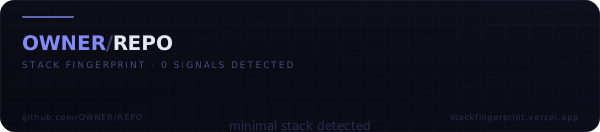
If you just want to try it without setting up the Action, paste this into your README:
```markdown
```
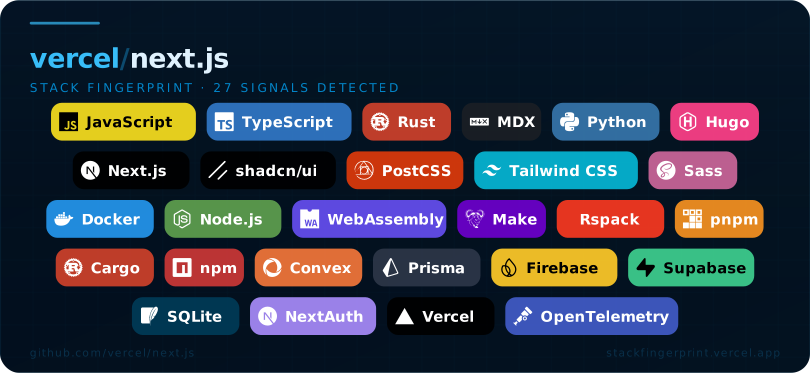
Customise with query parameters (see [API reference](./DOCS.md#api-reference)):
```markdown
```
---
## 🔴 Common Problems
The community reported these most common problems, we have decided to fix all:
| ❌ Problem | ✅ Fix |
| ------------------------------------------------------------------------------------------------------ | -------------------------------------------------------------------------------------------------------------------------------------------------------------------------- |
| The embed is from an uncontrolled third-party domain | Host it yourself easily with Vercel or just paste `.github/workflows/stack-fingerprint.yml` in your repo (recommended) |
| Some of the stacks detected are unused/false positive/insignificant | You can choose to show: Top 5 stacks, Core only, Prod only etc; If this isn't enough you can decide to exclude singular stacks with `"ignore"` in `.stackfingerprint.json` |
| Full-repo scan surfaces signals from unrelated sub-projects | `?path=` query parameter scans a specific sub-directory; |
| Long signal lists discourage contributors and misrepresent the actual stack | `categoryFilter=prodonly` hides all dev signals; `categoryFilter=top` shows only `lang` + `framework`, capped at 5; dev-only signals visually dimmed even in `all` mode. You have the **FULL CONTROL** of **WHAT TO SHOW**. |
---
## ⚙️ Configuration file
Drop a `.stackfingerprint.json` file at your repo root (or at the sub-path you are scanning) to tune detection without touching any API parameter:
```json
{
"ignore": ["babel", "webpack", "terraform"],
"pin": ["nextjs", "typescript"],
"labels": { "nextjs": "Next.js 14" },
"path": "apps/web"
}
```
| Key | Type | Description |
| -------- | ---------- | ---------------------------------------------------------------------------- |
| `ignore` | `string[]` | Signal IDs to suppress from the card, even if detected |
| `pin` | `string[]` | Signal IDs to always show, even if not auto-detected |
| `labels` | `object` | Override the display label for any signal ID |
| `path` | `string` | Default sub-path for monorepo scans (overridden by the `?path=` query param) |
See [DOCS.md → Configuration file](./DOCS.md#configuration-file-stackfingerprintjson) for the full schema.
---
## 🛡 Supply-chain safety & self-hosting
> ⚠️ **Self-hosting recommended for production use.** See [Supply-chain safety](#-supply-chain-safety--self-hosting) below.
Embedding an image from a third-party domain (`stackfingerprint.vercel.app`) in a high-profile README introduces supply-chain risk: the domain owner can change what the URL serves at any time. **The recommended approach is to commit the SVG directly to your repository so it is served from GitHub's own CDN.**
The easiest way to do this is with the included GitHub Action.
### GitHub Action (recommended)
Drop `.github/workflows/stack-fingerprint.yml` into your repo:
Then reference the committed file in your README:
```markdown

```
The SVG is now served from `raw.githubusercontent.com` — GitHub's own CDN — with no runtime dependency on `stackfingerprint.vercel.app`.
### Deploy your own instance
For complete control, deploy a private instance in one click:
[](https://vercel.com/new/clone?repository-url=https://github.com/mattqdev/stackfingerprint)
Point the Action's `URL` at your own domain and you own the entire pipeline.
---
## 🏗 Monorepo support
For monorepos, add `?path=apps/web` to scan a sub-directory instead of the repository root:
```markdown

```
The `path` parameter is also accepted by the GitHub Action as a `workflow_dispatch` input and as a key in `.stackfingerprint.json`.
---
## 🎨 Card options at a glance
| Parameter | Values | Default | Description |
| ---------------- | ------------------------------------------------- | --------- | --------------------------------------- |
| `repo` | `owner/repo` | — | **Required.** GitHub repository to scan |
| `theme` | See [themes](./DOCS.md#themes) | `ocean` | Visual colour theme |
| `layout` | `classic` `compact` `minimal` `terminal` `banner` | `classic` | Card layout |
| `size` | `sm` `md` `lg` | `md` | Card size |
| `iconStyle` | `color` `mono` `outline` | `color` | Icon rendering style |
| `pillShape` | `round` `square` | `round` | Shape of tech pills |
| `categoryFilter` | `all` `prodonly` `top` | `all` | Signal filter (see below) |
| `path` | `apps/web` etc. | _(root)_ | Monorepo sub-path |
### `categoryFilter` options
| Value | What it shows |
| ---------- | ---------------------------------------------------------------------------------------- |
| `all` | Every detected signal; dev-only signals are dimmed at 55 % opacity |
| `prodonly` | Production signals only — all `devDependencies`-sourced signals are hidden |
| `top` | Only `lang` + `framework` categories, capped at 5 signals — the minimal meaningful badge |
---
## 🛠 Contributing & support
This project thrives on community input. Before opening a pull request, **please open an issue first** so we can discuss the goal and make sure it is a good fit.
### Help grow the signal database
Is your favourite framework missing? Adding a new detection signal is as easy as adding a JSON object to `src/data/signals.js`:
```js
{
id: "astro",
label: "Astro",
category: "framework",
iconSlug: "astro",
color: "#FF5D01",
match: {
files: ["astro.config.mjs", "astro.config.js"],
},
}
```
See [DOCS.md → Adding a signal](./DOCS.md#adding-a-signal) for the full signal schema.
---
## License
MIT — see [LICENSE](./LICENSE).
---
Built by [mattqdev](https://github.com/mattqdev) · If this saved you time, a ⭐ goes a long way.