https://github.com/maxhu08/dotfiles
💎 my dotfiles
https://github.com/maxhu08/dotfiles
config dotfiles stow
Last synced: 7 months ago
JSON representation
💎 my dotfiles
- Host: GitHub
- URL: https://github.com/maxhu08/dotfiles
- Owner: maxhu08
- Created: 2024-06-29T13:13:09.000Z (about 2 years ago)
- Default Branch: master
- Last Pushed: 2026-01-10T23:07:04.000Z (7 months ago)
- Last Synced: 2026-01-11T07:06:45.714Z (7 months ago)
- Topics: config, dotfiles, stow
- Language: CSS
- Homepage:
- Size: 514 KB
- Stars: 656
- Watchers: 5
- Forks: 20
- Open Issues: 0
-
Metadata Files:
- Readme: README.md
Awesome Lists containing this project
README
# dotfiles
> [!IMPORTANT] If you are looking for my old dotfiles (which do not use stow), you can find them [here](https://github.com/maxhu08/dotfiles-old)
This repo contains all my configs I use.
## getting-started
My dotfiles are managed with `stow`, which manages symlinks so that the files in this dotfiles repo are synced with the actual configs.
To get started with using my dotfiles run these commmands:
```shell
# arch
sudo pacman -S stow
# gentoo
doas emerge -av app-admin/stow
git clone https://github.com/maxhu08/dotfiles
cd dotfiles
```
After that, you just need to run the stow command to symlink the dotfiles you want.
> [!CAUTION] I would not recommend stowing stuff like `git` because that contains my .gitconfig or `xorg` because thats specific to my monitor setup
```shell
# you can stow multiple things in one command!
stow alacritty fish kitty nvim picom tmux vscode xorg
```
## install-packages
Make sure to install the programs, stow just symlinks the configs. You still need to install the programs!
To get all the packages, check out my [rebos-config](https://github.com/maxhu08/rebos-config-arch) for arch.
## wallpapers
My wallapers are not in this repo. To access all my of wallpapers, check out my [wallpapers](https://github.com/maxhu08/wallpapers) repo.
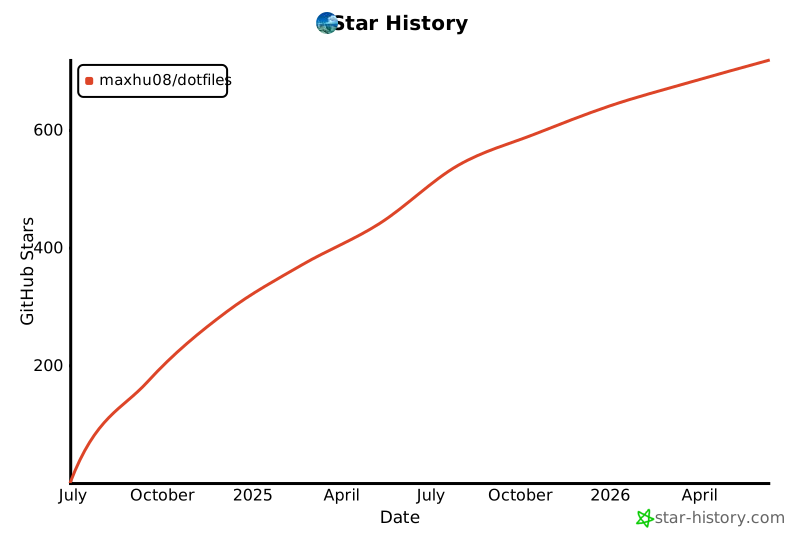
## star-history
[](https://star-history.com/#maxhu08/dotfiles&Date)