https://github.com/maximkotliar/bartinter
Dynamically changes status bar style depending on content behind it
https://github.com/maximkotliar/bartinter
automatically bar content-dependent status tint uikit uistatusbar
Last synced: about 1 year ago
JSON representation
Dynamically changes status bar style depending on content behind it
- Host: GitHub
- URL: https://github.com/maximkotliar/bartinter
- Owner: MaximKotliar
- License: mit
- Created: 2018-06-19T17:10:19.000Z (about 8 years ago)
- Default Branch: master
- Last Pushed: 2019-10-23T12:38:27.000Z (almost 7 years ago)
- Last Synced: 2025-05-16T01:06:51.298Z (about 1 year ago)
- Topics: automatically, bar, content-dependent, status, tint, uikit, uistatusbar
- Language: Swift
- Homepage:
- Size: 4.15 MB
- Stars: 1,716
- Watchers: 22
- Forks: 86
- Open Issues: 7
-
Metadata Files:
- Readme: README.md
- License: LICENSE
Awesome Lists containing this project
README
[](https://github.com/vsouza/awesome-ios)
[](http://cocoapods.org/pods/Bartinter)
[](http://cocoapods.org/pods/Bartinter)
[](http://cocoapods.org/pods/Bartinter)
# Bartinter
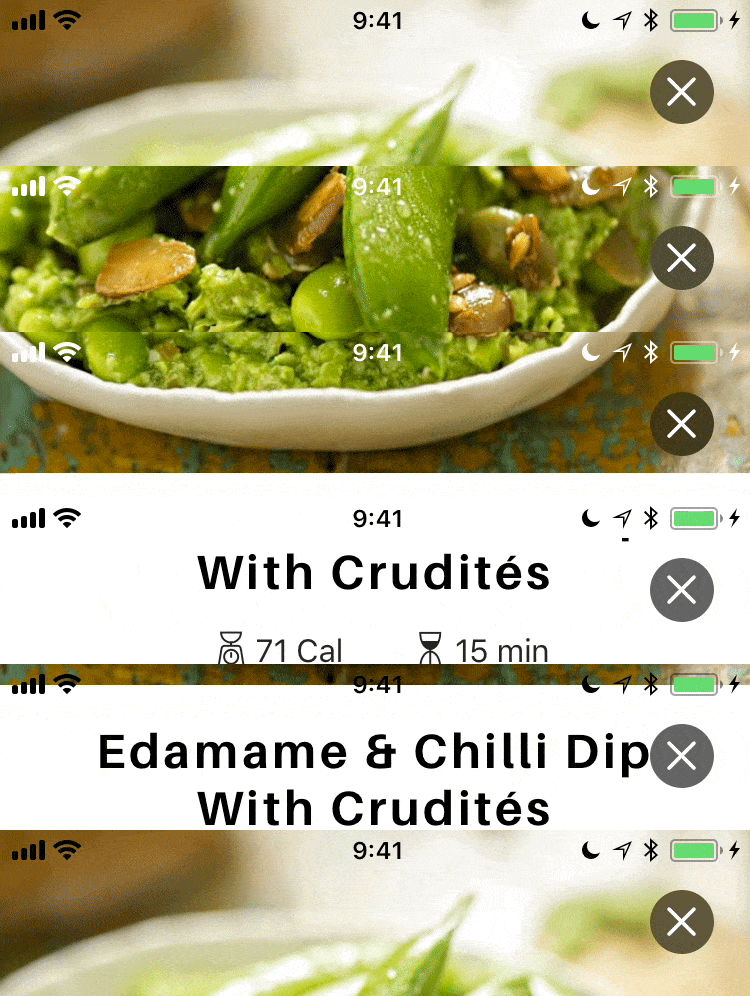
Status bar apperance manager that make your status bar readable by dynamically changing it's color depending on content behind.
## Installation
Add
```ruby
pod 'Bartinter'
```
to your podfile, and run
```
pod install
```
## Usage
Set "View controller-based status bar appearance" (UIViewControllerBasedStatusBarAppearance) to YES in your Info.plist.
Set ViewController's `updatesStatusBarAppearanceAutomatically = true`
That's it.
### Swizzling
By default, bartinter swizzles a couple methods for your convenience. (see: `UIKitSwizzling.swift`)
If you are not ok with method swizzling, you can disable it by following line:
```swift
Bartinter.isSwizzlingEnabled = false
```
Without swizzling you need to do some things manually:
Firstly, you need to provide `childViewControllerForStatusBarStyle`, in your ViewController subclass just add following:
```swift
override var childViewControllerForStatusBarStyle: UIViewController? {
return statusBarUpdater
}
```
Secondly, you need to decide, when you need to refresh status bar style, for example on tableView scroll, so add:
```swift
func scrollViewDidScroll(_ scrollView: UIScrollView) {
statusBarUpdater?.refreshStatusBarStyle()
}
```