https://github.com/maxkostinevich/shopify-serverless-starter-app
Shopify Serverless Starter Application built on Serverless Framework and Polaris UI (React.js)
https://github.com/maxkostinevich/shopify-serverless-starter-app
aws aws-lambda react reactjs serverless serverless-framework shopify shopify-app shopify-polaris
Last synced: 4 months ago
JSON representation
Shopify Serverless Starter Application built on Serverless Framework and Polaris UI (React.js)
- Host: GitHub
- URL: https://github.com/maxkostinevich/shopify-serverless-starter-app
- Owner: maxkostinevich
- License: mit
- Created: 2019-12-12T18:19:30.000Z (over 6 years ago)
- Default Branch: master
- Last Pushed: 2020-09-18T12:01:30.000Z (almost 6 years ago)
- Last Synced: 2025-04-22T03:30:42.395Z (about 1 year ago)
- Topics: aws, aws-lambda, react, reactjs, serverless, serverless-framework, shopify, shopify-app, shopify-polaris
- Language: JavaScript
- Size: 700 KB
- Stars: 61
- Watchers: 6
- Forks: 14
- Open Issues: 0
-
Metadata Files:
- Readme: README.md
- License: LICENSE.txt
Awesome Lists containing this project
README
# Shopify Serverless Starter App
Shopify Serverless App built on [Serverless Framework](https://serverless.com) and [Polaris UI](https://polaris.shopify.com/).
## Shopify App Setup
Login to your [Shopify Partners Account](https://www.shopify.com/partners) and create a new App.
Do not forget to add `/install/store` to Whitelisted redirection URLs as shown on the screenshot below:
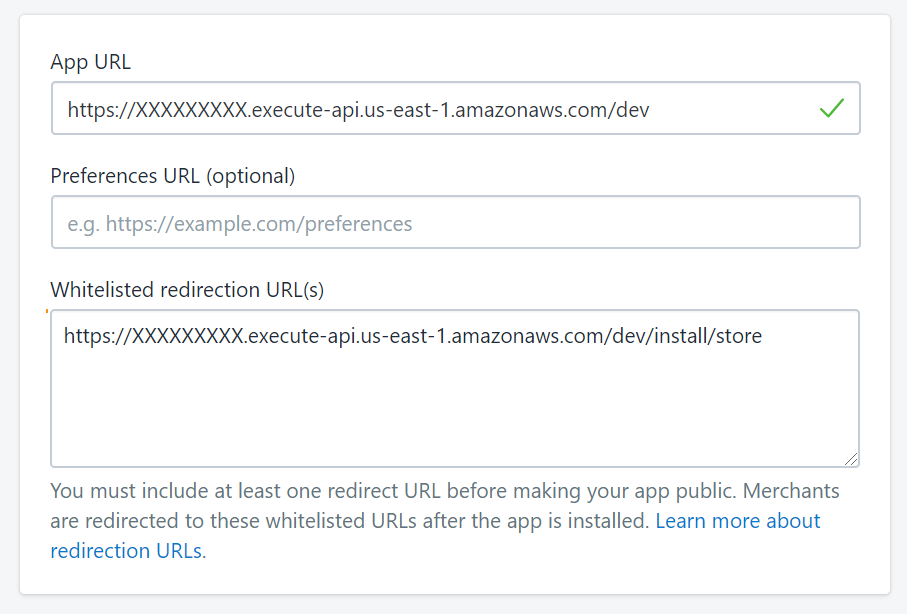
Optionally you may set `GDPR webhook` to `https://XXXXXXXXX.execute-api.us-east-1.amazonaws.com/dev/webhooks/gdpr`
## Deployment to AWS
Clone the Github repository, make sure Serverless Framework and Node.js are installed on your machine.
Rename `sample.env.yml` to `env.yml` and update all necessary variables.
### Create a new AWS user
AWS Console -> IAM -> Users -> Add User -> Set username and choose Access type: "Programmatic Access" -> on next screen choose "Attach existing policies directly" -> Search for AdministratorAccess -> Click "Create User" and download .CSV file with access credentials.
Then you can login using the following command:
`serverless config credentials --provider aws --key KEY --secret SECRET`
### Install NPM Dependencies
To install NPM dependencies use the following command:
`npm install`
To build frontend assets (React Components) use the following command:
`npm run assets-dev` or `npm run assets-prod`
### Deploy the backend
To deploy application to `dev` environment use the following command:
`sls deploy`
To deploy application to `prod` environment use the following command:
`sls deploy -s prod`
**Do not forget to create a DB Index**
To create an index, go to AWS Console -> DynamoDB -> App Table -> Indexes and create `domain-index` with `domain (String)` partition key as shown on the screenshot below:

It needs to be done only once per environment.
### Deploy the frontend assets
To deploy frontend assets to S3 use the following command:
`npm run sls-client-deploy` or `sls client deploy --no-delete-contents`
**!! Important: always use --no-delete-contents** flag, otherwise all uploaded files will be deleted from S3 Bucket.
---
(c) 2019 [Max Kostinevich](https://maxkostinevich.com) - All rights reserved.