https://github.com/maxmindlin/locust
MITM super proxy and proxy manager
https://github.com/maxmindlin/locust
Last synced: 12 months ago
JSON representation
MITM super proxy and proxy manager
- Host: GitHub
- URL: https://github.com/maxmindlin/locust
- Owner: maxmindlin
- License: mit
- Created: 2024-02-16T22:58:41.000Z (over 2 years ago)
- Default Branch: main
- Last Pushed: 2024-03-21T01:36:26.000Z (over 2 years ago)
- Last Synced: 2024-10-16T16:48:02.867Z (almost 2 years ago)
- Language: Rust
- Homepage:
- Size: 934 KB
- Stars: 5
- Watchers: 2
- Forks: 0
- Open Issues: 0
-
Metadata Files:
- Readme: README.md
- License: LICENSE
Awesome Lists containing this project
README

MITM proxy and proxy management tool




# Locust
Locust is a MITM proxy that routes traffic to various upstream proxies. Locust comes with a CLI that facilitates proxy configuration, importing, querying, and creating custom Squid proxies that are automatically used by the proxy server.
## Installation
See [releases](https://github.com/maxmindlin/locust/releases/latest) for binaries and installation instructions.
## Features
- Proxy server that smartly routes traffic to an appropriate upstream proxy.
- Easily configurable via a tagging system.
- CLI that makes managing proxies easy.
- File importing that works out of the box with known proxy providers.
- Squid proxy farm commands that allow for the creation, deletion, and cycling of squid VMs that are automatically picked up and used by the server (currently only works with GCP).
- Configuration commands that make sure your proxies work out of the box.
- Querying via tags that gives visibility into proxies without having to execute SQL.
Locust is a super proxy that maintains a pool of upstream proxies that it uses to route traffic to the requested web resources. As a user, you use it like any other proxy. When Locust receives a web request it analyzes the target URL and determines which proxy is best for the given request.
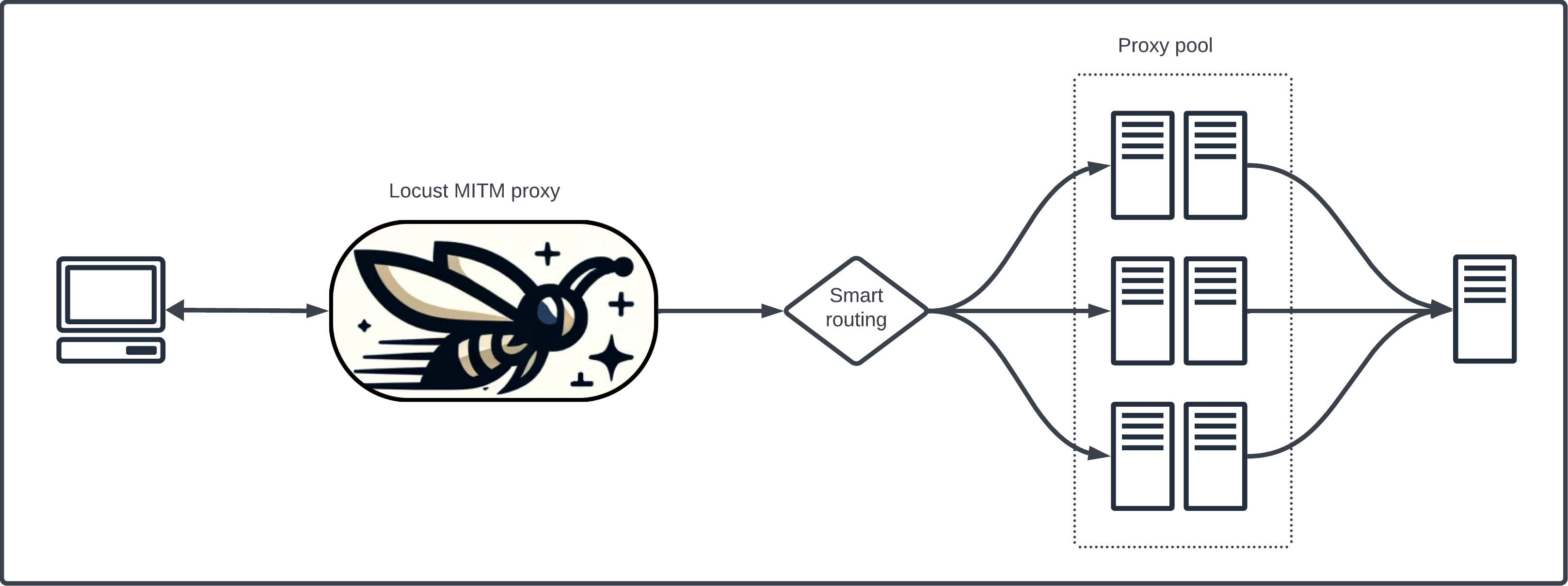
Locust keeps track of metadata and metrics about every web request it completes in order to continually fine tune which proxies to use and remove bad ones. You can also tag web domains in order to instruct Locust to limit the pool of proxies it will choose from for requests to these domains.
Via the CLI, you can also create and cycle Squid proxies in your GCP account which Locust will automatically start using as they are created.
## Requirements
### CLI
1. `gloud` CLI installed and authenticated.
2. using the `farm` command will require sufficient GCP privileges for VM creation and destruction.
3. ENV vars set with the proper PostgreSQL connection parameters. See `.env` file for default settings.
### Proxy server
The proxy server currently runs as a dockerfile. A compose file is provided as well for easy spinup. Without the compose you will need ENV vars set with the proper PostgreSQL connection parameters. See `.env` file for the default settings.
## Usage
### CLI
- `locust-cli -h`
### Proxy server
Docker compose:
- `docker-compose up --build`
Docker image can be ran without compose, but you must ensure that it is provided with ENV vars for PSQL connection parameters.
### TLS
Locust uses its own self-signed certs for HTTPS requests. In order to use Locust as a trusted CA, you must add its cert as a trusted source in your OS keychain.
1. Open `locust/src/ca/locust.cer` with Keychain Access app.
2. Double-click the Locust cert.
3. Set the Trust option to `Always Trust`.